Introduction
Modern software teams are expected to deliver useful features regularly while maintaining application reliability, security, and performance. For a beginner, this can seem difficult because software delivery involves much more than writing code. Teams also need servers, databases, networks, testing environments, deployment systems, monitoring tools, security controls, and processes that allow developers and operations professionals to work together. This is where understanding how cloud infrastructure supports DevOps and Agile delivery becomes important. Cloud infrastructure can provide resources when teams need them, while DevOps practices help automate delivery and improve cooperation. Agile provides an iterative way of planning and building software. When these three areas work together, teams can create a more organized path from an idea to tested and deployed software.
What is Cloud Infrastructure ?
Cloud infrastructure is the collection of computing resources and services used to run applications and digital workloads through cloud platforms.
Instead of purchasing and maintaining every physical server inside an organization’s own facility, a company can use cloud-based computing, storage, networking, databases, security services, and other infrastructure capabilities.
For a beginner, imagine a software team building an online application.
The developers need somewhere to run the application. They may also need a database for customer information, storage for files, networking between services, monitoring for application health, and separate environments for development and testing.
Cloud infrastructure can provide these resources without requiring the team to build every physical component themselves.
How Cloud Infrastructure Works
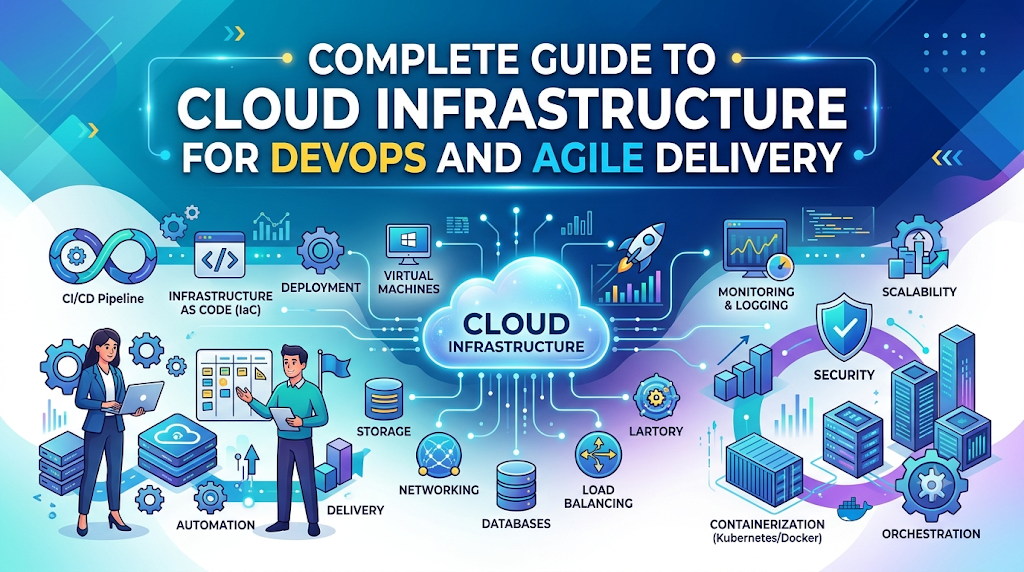
A typical cloud environment can contain:
- Compute resources for running applications
- Storage for files and application data
- Databases for structured or unstructured information
- Networking components for connecting services
- Identity and access management
- Security controls
- Monitoring and logging services
- Backup and recovery capabilities
- Automation services
- Container or orchestration platforms
DevOps teams can connect these resources to automated software delivery processes.
For example, a developer may commit code to a source repository. A CI/CD pipeline can automatically build the application, execute tests, create an artifact or container image, and deploy it to a cloud environment.
This reduces the amount of manual work between development and deployment.
A Beginner-Friendly Example
Suppose a company is building an online appointment application.
The development team creates a new scheduling feature. Instead of manually preparing a server every time the feature needs testing, the team can use automated cloud environments.
A development environment can be created, tested, updated, and removed according to the team’s workflow.
This gives developers faster access to the infrastructure they need.
A Common Misunderstanding
A common mistake is thinking that moving applications to the cloud automatically creates DevOps.
It does not.
Cloud infrastructure provides capabilities and flexibility, but DevOps still requires processes, automation, collaboration, testing, monitoring, security, and continuous improvement.
Practical Takeaway
Cloud infrastructure is best understood as an enabling foundation. It gives DevOps and Agile teams resources they can configure and automate to support faster, safer, and more repeatable software delivery.
Why Cloud Infrastructure Is Important for DevOps and Agile Teams
DevOps focuses on improving cooperation between development and operations while making software delivery more reliable and repeatable.
Agile focuses on delivering software incrementally, responding to feedback, and continuously improving the product.
Cloud infrastructure can support both approaches by making infrastructure more accessible, programmable, and adaptable.
Supporting Faster Development
Developers often need environments for development and testing.
When these environments require long manual setup processes, development can slow down.
Cloud resources can be provisioned through automation, allowing teams to prepare environments more consistently.
The benefit is not simply speed. Consistency is equally important.
When two developers receive environments configured differently, testing results can become difficult to interpret.
Supporting Continuous Integration
Continuous integration requires teams to frequently integrate code and validate changes.
Cloud infrastructure can provide the computing resources required for build servers, test environments, artifact storage, and related services.
This allows teams to connect code changes with automated validation.
Supporting Continuous Delivery
Continuous delivery depends on repeatable deployment processes.
Cloud environments can be integrated with CI/CD pipelines so that tested software moves through controlled environments.
Instead of treating deployment as a special event, teams can make it part of their normal development process.
Supporting Agile Iterations
Agile teams often work in short development cycles.
They need to build, test, demonstrate, receive feedback, and improve.
Cloud infrastructure supports this cycle by providing flexible environments where new application versions can be tested without requiring extensive physical infrastructure changes.
Supporting Scalability
Some applications have changing workloads.
A cloud environment can provide mechanisms for adjusting resources based on workload requirements.
However, scalability must be designed carefully.
Adding resources does not automatically solve every performance problem. Application architecture, database design, networking, caching, and code quality still matter.
Practical Scenario
Consider an online learning platform.
The team may release a new course-search feature during one development cycle.
Developers create the feature, automated tests validate it, and the CI/CD pipeline prepares a deployment. The cloud environment provides the required infrastructure for testing and production.
If users report a problem, the team can investigate logs and monitoring information and then work on an improvement during the next iteration.
This creates a connection between Agile planning, DevOps automation, and cloud infrastructure.
The Real Problems Teams Face Without Effective Cloud Infrastructure
Cloud adoption alone does not solve software delivery problems.
Organizations can still experience delays, failures, unexpected costs, and security weaknesses if their cloud environment is poorly designed.
Manual Infrastructure Work
When infrastructure is created manually, configurations can differ between environments.
One server might have a setting that another server does not.
This can create the familiar problem of software working in one environment but failing somewhere else.
Slow Environment Creation
Agile development depends on regular iteration.
If developers must wait several days for an environment to be prepared, the infrastructure process becomes a bottleneck.
Deployment Inconsistency
Manual deployments can result in missed steps.
A deployment checklist may say that five actions are required, but someone may forget the third step.
Automation can reduce this type of operational error.
Limited Collaboration
If developers cannot easily understand how applications are deployed or operated, and operations teams have limited visibility into development changes, communication becomes difficult.
DevOps attempts to reduce this separation.
Poor Cost Visibility
Cloud infrastructure makes resources easier to provision, but that convenience can create unnecessary spending when teams create resources without ownership, monitoring, or lifecycle controls.
Security Gaps
A cloud environment can contain databases, credentials, application interfaces, storage systems, and sensitive information.
Poor identity management, excessive permissions, weak secrets handling, and incorrect configurations can increase security risk.
Lack of Observability
A successful deployment is not the end of delivery.
Teams need to know whether the application is functioning correctly after deployment.
Without logs, metrics, traces, alerts, and useful dashboards, teams may discover problems only after users report them.
Better Approach
The better approach is to treat cloud infrastructure as part of the software delivery system rather than as a separate technical layer.
Infrastructure, application code, security, testing, deployment, monitoring, and governance should work together.
How Cloud Infrastructure Supports DevOps and Agile Delivery Step by Step
The relationship between cloud infrastructure, DevOps, and Agile delivery becomes easier to understand when viewed as a practical workflow.
Step 1: Define the Product Requirement
Agile delivery normally begins with a business or user requirement.
The team identifies what needs to be improved and breaks the requirement into manageable work.
The infrastructure team or DevOps engineers should understand whether the change requires new services, databases, networking, security controls, or additional capacity.
The common mistake is starting infrastructure work without understanding the application requirement.
A better approach is to connect infrastructure planning with product and engineering requirements from the beginning.
For example, if a team plans to add image uploads to an application, the infrastructure design may need to consider storage, access controls, processing requirements, backup, and monitoring.
Step 2: Create a Repeatable Development Environment
Developers need an environment that closely represents the conditions under which the application will operate.
Cloud infrastructure can provide computing, databases, storage, and networking resources for development.
The environment should be documented and preferably automated.
A common mistake is creating development infrastructure manually and assuming that production will behave the same way.
A better approach is to use repeatable configuration so environments can be created consistently.
This reduces unnecessary differences between development, testing, and production.
Step 3: Manage Infrastructure Through Code
Infrastructure as Code allows teams to define infrastructure configuration using machine-readable files.
Instead of manually clicking through cloud consoles, teams can describe resources and configuration in code.
This provides several benefits.
Infrastructure definitions can be stored in version control, reviewed by team members, changed through controlled processes, and reused.
For example, a team may define a network, compute resources, access rules, and supporting services in Infrastructure as Code.
A common mistake is treating infrastructure code as disposable configuration.
A better approach is to review infrastructure changes with the same care applied to application code.
Step 4: Connect Code Changes to CI/CD
Once infrastructure and application development become repeatable, the team can connect them with CI/CD pipelines.
A typical pipeline may perform actions such as:
- Retrieve source code.
- Install required dependencies.
- Build the application.
- Run automated tests.
- Perform quality or security checks.
- Package the application.
- Publish an artifact or container image.
- Deploy to a suitable environment.
- Validate the deployment.
- Provide deployment or monitoring feedback.
The exact workflow varies between organizations.
The common mistake is automating deployment before establishing reliable tests.
A better approach is to automate validation first and then gradually automate delivery.
Step 5: Use Automated Testing
DevOps and Agile delivery depend heavily on feedback.
Cloud environments can support automated testing by providing temporary or persistent environments where software can be validated.
Testing may include:
- Unit testing
- Integration testing
- API testing
- Security testing
- Performance testing
- Configuration validation
- End-to-end testing
The mistake is assuming that successful compilation means the application is ready.
A better approach is to define meaningful automated checks before deployment.
Step 6: Deploy Through Controlled Environments
Software should normally move through appropriate environments according to the organization’s risk and delivery requirements.
A simplified workflow may involve development, testing, staging, and production.
Cloud infrastructure can provide separate environments while automation helps maintain consistency.
The mistake is giving every deployment unrestricted access to production.
A better approach is to introduce approval controls, access restrictions, automated checks, and rollback procedures appropriate to the application.
Step 7: Monitor and Learn From Production
Agile and DevOps are continuous processes.
After deployment, teams need information about how the application behaves.
Cloud environments can support:
- Application logs
- Infrastructure metrics
- Performance monitoring
- Distributed tracing
- Error tracking
- Availability monitoring
- Security alerts
- Operational dashboards
The mistake is treating monitoring as something added only after a production incident.
A better approach is to design observability into the delivery process.
Production feedback can then become input for the next Agile cycle.
Key Factors That Influence Cloud-Based DevOps and Agile Delivery
Several factors determine whether cloud infrastructure actually improves delivery.
Automation
Automation reduces repetitive manual work.
Teams can automate environment creation, testing, deployment, scaling, backups, compliance checks, and operational tasks.
The important point is to automate stable processes rather than automate confusion.
If a process is poorly designed, automation may simply make the poor process run faster.
Infrastructure as Code
Infrastructure as Code provides a structured way to manage infrastructure configurations.
It improves repeatability and makes infrastructure changes easier to review.
However, teams still need standards for naming, security, versioning, testing, and ownership.
CI/CD Pipeline Quality
A CI/CD pipeline should provide useful feedback rather than simply execute many steps.
A well-designed pipeline should make failures understandable.
If a deployment fails, engineers should be able to identify where and why it failed.
Scalability
Cloud infrastructure can support changes in workload requirements.
However, teams should distinguish between scaling infrastructure and solving application performance problems.
A slow database query cannot always be fixed simply by adding more computing resources.
Security
Security must be included throughout the delivery lifecycle.
Important areas include:
- Identity management
- Least-privilege access
- Secrets management
- Network security
- Encryption
- Vulnerability scanning
- Audit logging
- Secure CI/CD pipelines
Security should not be treated as a final inspection.
Cost Management
Cloud spending should be monitored continuously.
Teams need to understand which services they use, who owns them, why they exist, and when they should be removed.
Unused development environments, unnecessary storage, oversized resources, and uncontrolled workloads can increase costs.
Collaboration
DevOps is not only about tools.
Developers, operations engineers, security professionals, testers, and business stakeholders need clear communication.
Cloud infrastructure becomes more valuable when teams share responsibility for delivery and reliability.
Observability
Teams need visibility into system behavior.
Metrics can indicate performance conditions.
Logs can provide detailed event information.
Traces can help engineers understand requests moving through distributed systems.
Together, these capabilities can help teams diagnose problems more effectively.
Detailed Breakdown of Cloud Infrastructure, DevOps, and Agile Delivery
Cloud Infrastructure as a Delivery Foundation
Cloud infrastructure can be considered the foundation on which many software delivery processes operate.
Applications require resources to execute.
CI/CD pipelines require infrastructure.
Automated tests require computing resources.
Monitoring requires data storage and processing.
Development teams require environments.
Cloud platforms can provide these capabilities in flexible ways.
However, flexibility also increases responsibility.
Teams must establish governance so that infrastructure remains secure, understandable, and manageable.
DevOps Connects Development and Operations
Traditional software delivery sometimes created a strong separation between developers and operations teams.
Developers focused on application functionality.
Operations teams focused on running applications.
DevOps attempts to create shared responsibility.
A developer should have some understanding of how the application behaves in production.
An operations engineer should understand application requirements and release processes.
Cloud infrastructure can support this collaboration because infrastructure configurations, deployment pipelines, monitoring systems, and operational data can become part of a shared engineering workflow.
Agile Provides the Iterative Process
Agile encourages teams to deliver smaller increments and learn from feedback.
Cloud infrastructure supports this by making it easier to create environments and release changes through repeatable processes.
For example, an Agile team may decide to improve the checkout process.
Instead of waiting for a large release containing many unrelated changes, the team may implement and validate smaller improvements.
DevOps automation supports the technical delivery of those increments.
CI/CD Creates the Connection
CI/CD often acts as the bridge between development activity and deployment.
A developer makes a change.
The pipeline validates it.
The application is packaged.
The deployment process moves it through the required environments.
Monitoring provides feedback.
That feedback informs the next development cycle.
This creates a continuous loop:
Plan → Develop → Test → Deploy → Monitor → Learn → Improve
Containers and Cloud Infrastructure
Containers provide a standardized way to package applications and their required components.
They can help reduce differences between environments.
Cloud platforms can provide services for running and managing containers.
Containerization can be useful for DevOps teams, but it also introduces additional concepts such as image management, orchestration, networking, resource limits, security, and observability.
The common mistake is adopting containers simply because they are popular.
The better approach is to use them when they solve a real engineering requirement.
Kubernetes and Cloud-Native Delivery
Kubernetes is commonly used to manage containerized workloads.
It can automate aspects of deployment, service management, scaling, and workload scheduling.
However, Kubernetes introduces operational complexity.
Teams should understand containers, networking, security, storage, observability, and deployment practices before treating Kubernetes as a complete solution.
Cloud-native development is broader than Kubernetes.
It involves designing applications and operating practices that take advantage of cloud capabilities while maintaining reliability, security, and operational control.
Infrastructure Automation
Automation can be applied across the infrastructure lifecycle.
Examples include:
- Creating environments
- Configuring networks
- Deploying applications
- Managing access
- Updating resources
- Running backups
- Testing configurations
- Monitoring systems
- Scaling workloads
The objective should be repeatability.
If an environment can be created consistently without a long manual procedure, the team has reduced one source of operational uncertainty.
Environment Consistency
One important benefit of cloud-based automation is the ability to make environments more consistent.
Development, testing, and production environments may still have legitimate differences, but those differences should be understood.
Infrastructure definitions and automated provisioning can make those differences visible.
This reduces the risk of undocumented manual changes.
Reliability and Recovery
DevOps teams should think about failure before failure occurs.
Cloud infrastructure can support backup, redundancy, monitoring, recovery, and controlled deployment strategies.
But reliability depends on architecture and operational planning.
A system with backups is not automatically resilient if the organization has never tested restoration.
A better approach is to test recovery procedures and document responsibilities.
Common Mistakes Beginners Make With Cloud Infrastructure
Mistake 1: Thinking Cloud Automatically Means DevOps
Cloud and DevOps are related but different concepts.
Cloud provides infrastructure and services.
DevOps is a combination of practices, culture, automation, collaboration, and engineering processes.
Better approach: Learn how cloud capabilities support specific DevOps practices instead of treating cloud adoption as a complete DevOps strategy.
Mistake 2: Moving Everything to the Cloud Without Planning
Cloud migration can involve architecture, security, data, networking, costs, and operational changes.
Moving an application without understanding these areas can create new problems.
Better approach: Assess workloads and dependencies before migration.
Mistake 3: Managing Everything Manually
Manual cloud management can become difficult as infrastructure grows.
Better approach: Use Infrastructure as Code and automation where practical.
Mistake 4: Ignoring Security Until Deployment
Security weaknesses can become expensive to fix when discovered late.
Better approach: Include security checks throughout development and deployment.
Mistake 5: Creating Too Many Tools Without a Process
A team can have many DevOps tools but still experience poor delivery.
Better approach: Start with the process and select tools that solve specific problems.
Mistake 6: Ignoring Cloud Costs
Flexible infrastructure can make resource creation easy.
That does not mean every resource should remain active indefinitely.
Better approach: Establish ownership, budgets, monitoring, tagging, and lifecycle policies.
Mistake 7: Automating Without Testing
An automated deployment that has not been properly tested can spread mistakes quickly.
Better approach: Build reliable validation into the pipeline.
Mistake 8: Overlooking Monitoring
Deployment is only one part of the application lifecycle.
Better approach: Monitor applications and infrastructure from the beginning.
Mistake 9: Giving Excessive Permissions
Broad permissions can increase security exposure.
Better approach: Follow least-privilege access and review permissions regularly.
Mistake 10: Following Social Media Advice Blindly
Cloud and DevOps architecture depends heavily on application requirements.
A solution that works well for one organization may be inappropriate for another.
Better approach: Evaluate recommendations against workload, security, cost, team skills, and operational requirements.
Don’t Do This Checklist
- Do not assume cloud automatically creates DevOps.
- Do not deploy without meaningful testing.
- Do not ignore infrastructure security.
- Do not give unnecessary administrative access.
- Do not leave unused resources running without review.
- Do not copy architectures without understanding them.
- Do not treat monitoring as optional.
- Do not automate an unclear process.
- Do not ignore backup and recovery planning.
- Do not choose tools only because they are popular.
Practical Real-Life Examples of Cloud Infrastructure Supporting DevOps and Agile Delivery
Example 1: Online Retail Application
Situation: An online retailer is developing a new product-search feature.
Challenge: Developers need frequent testing, but manually creating test environments takes too much effort.
Better action: The team uses automated cloud provisioning and connects the environment to its CI/CD workflow.
Learning: Repeatable environments can help Agile teams validate smaller changes more efficiently.
Example 2: Banking Application Team
Situation: A financial software team needs strict controls around application deployments.
Challenge: Manual deployment creates uncertainty about who changed what and when.
Better action: The team uses version-controlled infrastructure, controlled CI/CD pipelines, access restrictions, and audit records.
Learning: Automation and governance can work together instead of being treated as opposites.
Example 3: SaaS Startup
Situation: A software company is developing a subscription-based application.
Challenge: The development team grows quickly, and each engineer needs reliable development resources.
Better action: The organization creates standardized development environments through Infrastructure as Code.
Learning: Standardization becomes increasingly valuable as teams and infrastructure grow.
Example 4: Healthcare Software Platform
Situation: A healthcare software provider is improving an application that handles sensitive information.
Challenge: The team wants faster delivery without weakening security.
Better action: Security checks, access controls, logging, and testing are integrated into the delivery process.
Learning: Faster delivery should not mean weaker security. DevOps and Agile practices should include appropriate controls.
Example 5: Media Streaming Platform
Situation: A media platform experiences different levels of application demand.
Challenge: The application must handle changing workloads while maintaining acceptable performance.
Better action: The team uses cloud capabilities for workload management while monitoring application performance and infrastructure usage.
Learning: Scalability is most useful when combined with application monitoring and sound architecture.
Cloud Infrastructure Capabilities and DevOps Benefits
| Cloud Infrastructure Capability | DevOps and Agile Benefit | Practical Use |
|---|---|---|
| Compute resources | Flexible application execution | Development, testing, and production workloads |
| Storage | Centralized and scalable data storage | Application files, artifacts, backups |
| Cloud networking | Service connectivity | Application and infrastructure communication |
| Infrastructure as Code | Repeatable infrastructure | Automated environment creation |
| CI/CD services | Automated software delivery | Build, test, and deployment pipelines |
| Containers | Consistent application packaging | Portable application deployments |
| Monitoring and logging | Better operational visibility | Troubleshooting and performance analysis |
| Identity and access management | Controlled resource access | Security and authorization |
| Autoscaling capabilities | Flexible workload management | Handling changing resource requirements |
| Backup and recovery services | Improved recovery planning | Data protection and restoration |
Common Delivery Challenges and Better Approaches
| Common Challenge | Risk or Impact | Better Approach |
|---|---|---|
| Manual environment creation | Inconsistent configurations | Infrastructure as Code |
| Manual deployment | Human error and missed steps | Automated CI/CD |
| Limited testing | Defects reaching later environments | Automated testing |
| Poor monitoring | Slow incident detection | Observability and alerts |
| Excessive permissions | Increased security exposure | Least-privilege access |
| Unused cloud resources | Unnecessary spending | Resource ownership and lifecycle review |
| Large infrequent releases | Higher change risk | Smaller incremental releases |
| Unclear infrastructure ownership | Operational confusion | Defined responsibilities |
| Untested recovery process | Difficult incident recovery | Regular recovery testing |
| Tool-first decision making | Unnecessary complexity | Start with business and engineering needs |
Tools, Methods, and Frameworks Readers Can Use
Infrastructure as Code
Infrastructure as Code allows teams to define cloud resources through configuration files.
It helps teams create repeatable environments and track infrastructure changes.
Beginners should start with simple resources and understand how changes are reviewed and applied.
It helps avoid undocumented manual configuration.
CI/CD Pipeline
A CI/CD pipeline automates stages of software validation and delivery.
A beginner can start with a simple pipeline that builds an application and runs tests.
As confidence increases, deployment, security checks, infrastructure validation, and monitoring can be added.
The main mistake is creating an overly complex pipeline before understanding the basic workflow.
Git-Based Version Control
Version control provides a history of application and infrastructure changes.
Teams can review changes, collaborate, investigate problems, and return to previous versions when appropriate.
For DevOps, version control should generally include both application code and relevant infrastructure configuration.
Containerization
Containers can package an application and its runtime dependencies in a consistent format.
They can help reduce environment differences.
Teams should first understand why containerization is useful for their workload before introducing orchestration complexity.
Configuration Management
Configuration management helps teams maintain consistent system settings.
It can be useful when infrastructure contains operating-system-level configurations or application settings that must remain consistent.
Monitoring and Observability
Monitoring tools collect information about application and infrastructure behavior.
Teams can use dashboards and alerts to identify problems.
Observability should be connected to actual operational questions rather than collecting every possible metric without a purpose.
Deployment Strategies
Teams can use controlled deployment approaches depending on application requirements.
Examples include:
- Rolling deployments
- Blue-green deployments
- Canary releases
- Feature-based release controls
The appropriate method depends on application architecture, risk, testing quality, and operational maturity.
Agile Retrospectives
A retrospective allows the team to review what worked, what did not work, and what should change.
This is useful for cloud and DevOps processes because infrastructure problems often become visible only after teams use the workflow repeatedly.
Expert Tips to Make Better Cloud, DevOps, and Agile Decisions
1. Start With the Delivery Problem
Do not begin by asking which cloud service or DevOps tool should be purchased.
First identify the problem.
Is deployment too slow? Are environments inconsistent? Are failures difficult to diagnose? Is testing insufficient?
The answer should guide the technical solution.
2. Automate Repetitive Work
If engineers repeatedly perform the same infrastructure task, determine whether it can be safely automated.
Automation frees time for higher-value engineering work.
3. Keep Infrastructure Under Version Control
Infrastructure changes should be traceable.
Version control makes it easier to review changes and investigate unexpected behavior.
4. Make Testing Part of Delivery
Do not treat testing as an activity that happens only at the end.
Automated tests should provide feedback as early as practical.
5. Build Security Into the Pipeline
Security checks can be integrated into development and deployment workflows.
This can help identify problems before software reaches production.
6. Monitor Before Problems Become Incidents
Useful monitoring gives teams information before users have to report every problem.
Define meaningful signals for application health and infrastructure performance.
7. Control Cloud Costs From the Beginning
Cost management should not be introduced only after spending becomes a problem.
Assign resource ownership and review unnecessary infrastructure regularly.
8. Use Least-Privilege Access
Users and services should receive the permissions required for their responsibilities rather than broad access by default.
9. Keep Agile Releases Manageable
Smaller changes are often easier to test, understand, and troubleshoot than large collections of unrelated changes.
10. Design for Failure
Assume that services can fail.
Think about backups, recovery, deployment rollback, monitoring, and incident response.
11. Do Not Confuse Complexity With Maturity
A system containing many tools is not automatically more mature.
A simpler architecture that is understood, monitored, secured, and maintained can be more effective.
12. Document Important Decisions
Record why major infrastructure and architecture decisions were made.
This helps future team members understand the reasoning behind the environment.
13. Review Infrastructure Regularly
Cloud environments change.
Applications grow, requirements change, and unused resources accumulate.
Regular reviews help identify outdated configurations and unnecessary resources.
14. Give Teams Clear Ownership
Every major infrastructure component should have a responsible team or owner.
Unclear ownership can make incident response and maintenance difficult.
15. Improve Through Feedback
DevOps and Agile are based on continuous improvement.
Use deployment results, incident information, testing outcomes, and developer feedback to improve the next iteration.
Case Studies: How Better Cloud Infrastructure Changes Decisions
Case Study 1: Reducing Environment Inconsistency
Profile: A growing software development team with several application developers.
Situation: Developers frequently report that software works in their local environments but behaves differently during testing.
Problem: Development environments were created manually and had different configurations.
Wrong Approach: The team continued troubleshooting each environment individually.
Better Approach: The organization introduced standardized cloud development environments and Infrastructure as Code.
Result or Learning: Environment differences became easier to identify and reproduce. The team spent less effort dealing with undocumented configuration differences.
Key Takeaway: Infrastructure consistency can be as important as application code consistency.
Case Study 2: Improving Deployment Reliability
Profile: A software company releasing updates regularly.
Situation: Deployments were performed manually by operations staff.
Problem: Releases occasionally failed because deployment steps were missed or performed in the wrong order.
Wrong Approach: The organization added more manual checklists without addressing the underlying process.
Better Approach: Stable deployment steps were converted into a controlled CI/CD pipeline with automated validation.
Result or Learning: The delivery process became more repeatable, and failures became easier to investigate.
Key Takeaway: Automation is most valuable when it turns a well-understood process into a repeatable workflow.
Case Study 3: Balancing Speed With Security
Profile: A company developing a business application containing sensitive organizational information.
Situation: Developers wanted faster releases, while security teams were concerned about access and configuration risks.
Problem: Security reviews were performed mainly near the end of the release process.
Wrong Approach: The company treated security and delivery speed as competing goals.
Better Approach: Security checks, access controls, logging, and infrastructure reviews were introduced earlier in the development and deployment process.
Result or Learning: Security became part of the normal workflow instead of being treated only as a final gate.
Key Takeaway: Good DevOps practices should improve delivery without removing appropriate security and governance controls.
Risk Awareness: What Readers Must Check First
Security Risk
Cloud environments contain valuable infrastructure and application resources.
Weak permissions, exposed credentials, insecure configurations, or vulnerable components can create security problems.
Risk reduction: Use strong identity controls, least privilege, secrets management, monitoring, and regular security reviews.
Configuration Risk
Incorrect infrastructure configuration can affect application availability or security.
Risk reduction: Use Infrastructure as Code, peer review, testing, and controlled changes.
Cost Risk
Cloud resources can generate ongoing charges.
Risk reduction: Monitor usage, assign ownership, remove unused resources, and establish appropriate cost controls.
Availability Risk
Cloud services can experience failures, and application components can also fail.
Risk reduction: Design appropriate redundancy, monitoring, backup, and recovery processes.
Deployment Risk
A software release can introduce defects.
Risk reduction: Use automated tests, controlled deployments, monitoring, and rollback strategies.
Data Risk
Applications may store important or sensitive information in cloud databases and storage systems.
Risk reduction: Apply suitable access controls, encryption, backup practices, retention policies, and data governance.
Dependency Risk
Applications may depend on external services, cloud components, libraries, or APIs.
Risk reduction: Understand dependencies and create suitable fallback or recovery plans where required.
Operational Risk
Poor documentation or unclear ownership can make incidents harder to manage.
Risk reduction: Define responsibilities, document critical systems, and practice incident response.
Misinformation Risk
Cloud and DevOps advice found online can be incomplete or unsuitable for a particular organization.
Risk reduction: Verify technical recommendations against official documentation, architecture requirements, security needs, and operational constraints.
Checklist Before Implementing Cloud Infrastructure for DevOps
Before taking action, teams should review the following:
- Business and technical requirements are clearly defined.
- Application dependencies are understood.
- Development and production requirements are documented.
- Infrastructure ownership is assigned.
- Security requirements are identified.
- Access permissions follow least-privilege principles.
- Infrastructure can be managed consistently.
- Infrastructure as Code is considered where appropriate.
- CI/CD requirements are clearly defined.
- Automated testing is available for important application behavior.
- Monitoring and logging requirements are understood.
- Backup and recovery procedures are documented.
- Cloud costs can be monitored.
- Unused resources have a lifecycle management process.
- Deployment failure and rollback procedures are considered.
- Compliance requirements are reviewed where applicable.
- Team members understand their responsibilities.
- Major infrastructure decisions are documented.
- The architecture is reviewed before large-scale implementation.
This checklist should not be treated as a one-time form. Cloud environments change as applications and organizations grow. Teams should revisit these points periodically and after significant architecture or business changes.
Strategic Insights for Better DevOps and Agile Delivery
Treat Infrastructure as Part of the Product
Infrastructure should not always be considered an invisible background component.
Application availability, performance, security, and delivery speed depend on infrastructure decisions.
Including infrastructure considerations during product planning can prevent surprises later.
Use Small, Controlled Changes
Large infrastructure changes can be difficult to test and troubleshoot.
Smaller changes allow teams to identify problems more easily.
This fits naturally with Agile delivery.
Build a Feedback Loop
A strong delivery process should continuously collect information.
The team should learn from:
- Deployment failures
- Production incidents
- Application performance
- Security findings
- Developer experience
- Customer feedback
- Infrastructure costs
- Testing results
That information should influence future planning.
Think About Reliability During Development
Reliability should not be added only after an application is released.
Developers and operations teams should consider failure scenarios during architecture and implementation.
This may include dependency failures, database issues, network problems, resource shortages, and unexpected workload changes.
Connect Infrastructure Decisions With Business Goals
Technical decisions should have a reason.
A company may prioritize release speed, reliability, cost control, security, or scalability differently depending on its business model.
The best cloud architecture is therefore not necessarily the most complex one.
It is the architecture that meets the required business and technical objectives responsibly.
Avoid Overengineering
Teams sometimes introduce Kubernetes, multiple cloud services, complex deployment systems, and advanced automation before understanding whether these components are actually necessary.
Complexity creates maintenance requirements.
Start with a manageable design and improve it as requirements grow.
Make Observability Part of Delivery
If a team cannot understand what happened after deployment, its feedback loop remains incomplete.
Observability should help answer practical questions:
- Is the application healthy?
- Are errors increasing?
- Are response times changing?
- Which service is affected?
- Did the latest deployment introduce a problem?
- Is infrastructure capacity sufficient?
Key Terms Explained for Beginners
- Cloud Infrastructure: The computing, storage, networking, security, and related resources used to operate workloads through cloud platforms.
- DevOps: A set of practices and a collaborative approach that brings development and operations closer together to improve software delivery and reliability.
- Agile: An iterative approach to software development that emphasizes incremental delivery, feedback, collaboration, and continuous improvement.
- CI/CD: A collection of practices and automated processes used to build, test, validate, and deliver software changes.
- Infrastructure as Code: A method of defining and managing infrastructure through machine-readable configuration instead of relying mainly on manual setup.
- Cloud-Native Development: An approach to designing and operating applications to make effective use of cloud capabilities and practices.
- Container: A packaged application environment containing software and its required dependencies in a consistent format.
- Kubernetes: A platform for managing containerized workloads and related services across computing environments.
- Scalability: The ability of a system to handle changing workloads by adjusting available resources or application capacity.
- Observability: The ability to understand the internal behavior of a system using information such as metrics, logs, and traces.
- Deployment: The process of making a software version available in an environment where it can run.
- Rollback: Returning an application or configuration to a previous known state after a problem.
- Least Privilege: A security principle in which users and services receive only the permissions necessary for their responsibilities.
- Cloud Governance: Policies and controls used to manage cloud security, costs, compliance, ownership, and operational standards.
- Automation: The use of software and defined processes to perform repeatable tasks with limited manual intervention.
Who Should Read This Blog
Beginners
Beginners can use this guide to understand the relationship between cloud infrastructure, DevOps, and Agile without starting with highly complex technical concepts.
Students
Students preparing for cloud, DevOps, software engineering, or infrastructure roles can use the concepts as a foundation for further learning.
Software Developers
Developers benefit from understanding how their code moves from a development environment into testing and production.
DevOps Engineers
DevOps engineers can use these principles when designing automated delivery, infrastructure management, and operational workflows.
Cloud Engineers
Cloud engineers can better understand how infrastructure decisions affect application delivery and Agile development processes.
Operations Professionals
Operations teams can use DevOps and cloud practices to improve consistency, monitoring, automation, and reliability.
Project Managers
Project managers can benefit from understanding why infrastructure, testing, automation, and deployment processes influence delivery timelines.
Small Businesses
Small organizations can use the principles to avoid unnecessary infrastructure complexity while establishing reliable development and deployment practices.
Technology Leaders
Technology leaders can use these concepts when evaluating cloud adoption, engineering processes, governance, and delivery maturity.
DevOps Learners
Anyone preparing for a DevOps career can use the topic to understand why cloud infrastructure is an important part of modern software delivery.
Frequently Asked Questions
1. What does how cloud infrastructure supports DevOps and Agile delivery mean?
It refers to the ways cloud-based computing, storage, networking, automation, and related services help development teams build, test, deploy, monitor, and improve software. Cloud infrastructure provides flexible resources, while DevOps and Agile provide practices for managing delivery and continuous improvement.
2. Why is cloud infrastructure important for DevOps?
Cloud infrastructure can provide flexible resources for development, testing, deployment, monitoring, and production workloads. It also works well with automation and Infrastructure as Code, helping teams create more repeatable delivery processes.
3. How does cloud infrastructure support Agile software development?
Agile teams work through repeated development cycles. Cloud infrastructure can provide environments and services that support frequent development, testing, and deployment activities, helping teams respond to feedback and deliver incremental improvements.
4. Is cloud infrastructure the same as DevOps?
No. Cloud infrastructure is a technical foundation consisting of resources and services. DevOps is a broader approach involving collaboration, automation, testing, deployment, monitoring, and continuous improvement. Cloud infrastructure can support DevOps, but it does not automatically create a DevOps culture or process.
5. How does Infrastructure as Code help DevOps teams?
Infrastructure as Code allows infrastructure configurations to be defined and managed through code or configuration files. This can improve consistency, version control, reviewability, and repeatability while reducing dependence on manual infrastructure setup.
6. Does cloud infrastructure make software delivery automatically faster?
Not necessarily. Cloud infrastructure can remove certain infrastructure bottlenecks, but delivery speed also depends on application architecture, testing, team collaboration, deployment processes, security requirements, and organizational practices.
7. What are the main risks of using cloud infrastructure for DevOps?
Important risks include security misconfiguration, excessive permissions, unexpected costs, availability issues, deployment failures, data protection problems, and operational complexity. These risks can be reduced through governance, monitoring, testing, access controls, and proper architecture.
8. How do CI/CD pipelines work with cloud infrastructure?
CI/CD pipelines can use cloud resources to build applications, run automated tests, store artifacts, and deploy software. A pipeline can connect code changes with repeatable validation and delivery processes.
9. Should every organization use containers and Kubernetes?
No. Containers and Kubernetes can be useful, but they also introduce operational complexity. Organizations should evaluate their application requirements, team capabilities, scale, security needs, and operational requirements before adopting them.
10. How does cloud infrastructure support continuous improvement?
Cloud environments can provide monitoring, logs, deployment information, performance data, and operational feedback. DevOps and Agile teams can use this information to identify problems, improve processes, and plan future development work.
11. How can organizations control cloud costs while using DevOps?
Organizations can assign resource ownership, monitor usage, remove unnecessary resources, review infrastructure regularly, use appropriate resource sizing, and establish governance policies. Cost management should be part of normal cloud operations rather than a one-time exercise.
12. What is the best next step for learning how cloud infrastructure supports DevOps and Agile delivery?
Start with the fundamentals of cloud computing, Linux, networking, version control, CI/CD, Infrastructure as Code, containers, monitoring, and security. Then practice by building a small application delivery workflow and gradually adding automation and operational controls.
Conclusion
Understanding how cloud infrastructure supports DevOps and Agile delivery is important because successful software delivery depends on more than application code. Cloud infrastructure can provide the computing, storage, networking, security, monitoring, and automation capabilities that modern engineering teams need, while DevOps practices help connect development with operations through collaboration and repeatable processes. Agile adds an iterative approach that allows teams to work in smaller increments, gather feedback, and improve continuously. However, cloud adoption by itself does not guarantee faster or better delivery. Teams still need sound architecture, Infrastructure as Code, automated testing, reliable CI/CD pipelines, security controls, cost management, observability, and clear ownership. Beginners should focus on understanding the relationship between these areas instead of simply collecting tools. A practical starting point is to build a small application, place its infrastructure under controlled management, create a basic CI/CD pipeline, introduce automated tests, and monitor the deployed application. From there, teams can gradually improve automation, security, scalability, and recovery practices. The goal should always be dependable delivery rather than complexity for its own sake. When cloud infrastructure, DevOps, and Agile practices are planned together, organizations can create a more consistent path from business requirements to working software while remaining aware of operational, security, and cost-related risks.