Introduction
Picture two teams in a company. One team writes the software. Another team keeps it running once it launches. For years, these teams worked apart. This caused delays. Bugs slipped through. Nobody felt fully responsible when something broke.
DevOps was built to fix this gap. It merges these two teams into one connected process. But something else often got left out of that process: security. Security teams were added at the very end, right before launch. This caused new problems. Bugs and risks were found too late to fix easily.
DevSecOps was created to solve this second gap. This guide breaks down both terms. It shows you what changes in daily work. It also helps you know which approach your business actually needs right now.
What Is DevOps?
DevOps combines two words: Development and Operations. It is a way of working, not a single tool or product.
In simple terms, DevOps means developers and operations staff work as one team. They share the same goals. They use shared tools. They release software more often, in smaller pieces, instead of huge updates once or twice a year.
Why does this matter? Old software releases were slow and risky. A team might spend months building a big update. Then they would release it all at once. If something broke, it was hard to find the exact cause. DevOps breaks this into small, frequent releases. Each one is easier to test and easier to fix if something goes wrong.
A simple example: A retail company using DevOps might release small website updates every week. If one update causes an issue, the team can quickly roll it back. They do not need to undo months of work.
What Is DevSecOps?
DevSecOps combines three words: Development, Security, and Operations. It takes the DevOps idea and adds security as an equal partner.
In older setups, security checks happened right before launch. A security team would review the finished product. If they found a serious problem, the whole release could get delayed. This created tension between teams and wasted time.
DevSecOps changes this. Security checks happen at every stage, starting from the very first line of code. This is often called “shifting left,” because security moves earlier in the process, not later.
A simple example: A banking app team using DevSecOps runs automatic security scans every time a developer writes new code. This catches many risks early, while they are still small and easy to fix.
The Core Difference Between the Two
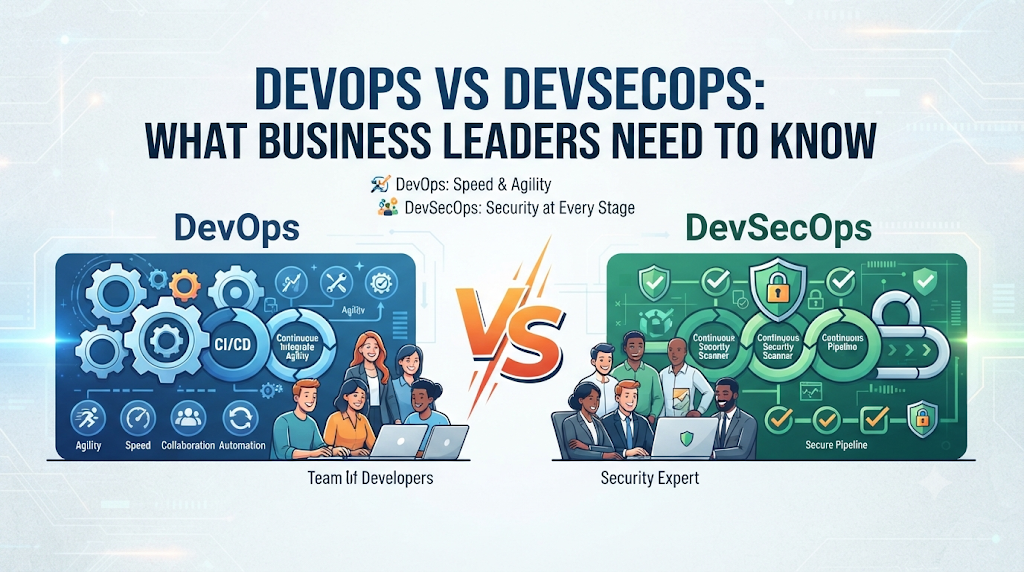
The clearest way to see the difference is this: DevOps focuses on speed and teamwork between developers and operations. DevSecOps focuses on speed, teamwork, and security, all built into the same process from day one.
DevOps does not ignore security completely. But in most DevOps setups, security still comes in as a separate, later step. DevSecOps removes that separation. Security becomes part of daily work for every team member, not just a final checkpoint.
How Each Approach Actually Works Day to Day
A Typical DevOps Workflow
A developer writes code. This code moves through automatic testing. If it passes, it moves toward release. Operations staff handle the final deployment and keep the system running. Teams meet often to fix problems and plan next steps together.
A Typical DevSecOps Workflow
The process looks similar, but with security steps added throughout. Code gets scanned for known security flaws as soon as it is written. Automated tools check for weak points before code even reaches testing. Security experts join planning meetings from the start, not just at the end.
This means a DevSecOps team catches many risks weeks or months before they would appear in a DevOps-only process.
Why This Choice Matters for a Business Leader
This is not just a technical decision. It affects cost, speed, and risk for the whole company.
A DevOps-only approach can mean faster releases at first. But security issues found late are often more expensive to fix. They can also cause serious damage if a flaw reaches real customers before anyone catches it.
A DevSecOps approach can feel slightly slower at the very start. Teams need time to build security checks into their process. But this often saves money and stress later, since fewer serious problems reach production.
When DevOps Alone Might Be Enough
DevOps alone can work well for smaller projects with lower security risk. An internal tool used only by a small team, with no sensitive customer data, may not need the same level of security focus as a public-facing app.
It can also work as a starting point for a company still learning to work in this faster, more connected way. Adding full security integration on top of a brand-new DevOps process can feel like too much change at once.
When DevSecOps Becomes Necessary
DevSecOps becomes important once a business handles sensitive data. This includes customer payment details, health records, or private personal information. It also matters for businesses in regulated industries, where security failures can lead to legal penalties, not just technical problems.
Any business building software that faces the public internet should seriously consider DevSecOps. Public-facing systems are the most common target for attacks, and catching flaws early reduces this risk significantly.
Common Mistakes Business Leaders Make
Assuming DevOps automatically includes strong security. Many leaders believe their DevOps team already handles security well. In many real setups, security is still a late, separate step. Ask your team directly how and when security checks happen in your current process.
Treating DevSecOps as just “adding a security tool.” Buying a security scanning tool does not create DevSecOps on its own. It requires changing how teams work together, including bringing security experts into early planning, not just running a scan at the end.
Expecting instant speed gains from either approach. Both DevOps and DevSecOps take time to set up properly. Teams need training. Processes need adjusting. Expecting overnight results often leads to disappointment and abandoned efforts.
Ignoring team culture during the shift. Moving to DevOps or DevSecOps changes how teams communicate and share responsibility. Skipping this cultural shift, and only changing tools, often causes the new process to fail quietly over time.
Choosing DevSecOps without the staff to support it. DevSecOps needs people who understand both development and security basics. Adopting this approach without any training or hiring plan can leave teams confused and unable to follow through.
Risks Worth Understanding
Risk: Security debt in DevOps-only teams. Without built-in security checks, small risks can pile up over time. This is sometimes called security debt. Left unchecked, it can lead to a major, costly failure later.
Risk: Slower early adoption of DevSecOps. Teams new to DevSecOps often move slower at first, as they learn new tools and habits. This is a normal, temporary cost, not a sign that the approach has failed.
Risk: Tool overload. Some teams add too many security tools at once, without a clear plan. This creates noise and confusion, rather than real protection. Fewer, well-understood tools often work better than many poorly managed ones.
Risk: False sense of safety. A business might believe they are secure simply because they use DevSecOps tools. Tools alone do not guarantee safety. Regular review and updates to the process remain necessary.
A Simple Decision Framework
Step 1: Identify what kind of data your software handles. Sensitive data raises the need for DevSecOps.
Step 2: Check if your industry has legal or regulatory security requirements.
Step 3: Assess your current team’s security knowledge and available time.
Step 4: Compare the cost of adding security training now against the cost of a potential security failure later.
Step 5: Start with a small pilot project if you are new to either approach, rather than changing everything at once.
Step 6: Review results after a set period, and adjust your process based on what you learn.
A Quick Comparison Table
| Factor | DevOps | DevSecOps |
|---|---|---|
| Main focus | Speed and teamwork | Speed, teamwork, and security |
| When security is checked | Mostly near the end | Throughout the entire process |
| Best for | Lower-risk, internal projects | Public-facing or sensitive-data projects |
| Setup time | Generally faster to start | Takes longer to fully set up |
| Long-term risk | Higher, if security stays separate | Lower, due to early detection |
A Checklist Before Choosing Your Approach
- Does your software handle sensitive customer data?
- Is your industry subject to security regulations?
- Does your current team understand basic security practices?
- Have you budgeted time for training if you choose DevSecOps?
- Have you planned a small pilot project before a full rollout?
- Do your teams already communicate well, or will that need work too?
Key Terms
- DevOps: A way of working that combines development and operations teams to release software faster and more reliably.
- DevSecOps: A way of working that adds security as an equal partner in the DevOps process, from the very start.
- Shift Left: Moving security checks earlier in the development process, instead of leaving them until the end.
- Security Debt: Small, unresolved security risks that build up over time when they are not addressed early.
- Automated Testing: Using software tools to check code for errors or issues without manual review each time.
- Deployment: The process of releasing new software or updates to users.
- Pipeline: The set of automated steps code goes through, from writing to testing to release.
Frequently Asked Questions
1. Is DevSecOps just DevOps with extra steps?
Not exactly. It changes how security fits into the whole process, making it a shared responsibility from the start, not just an added step at the end.
2. Can a small business use DevSecOps, or is it only for large companies?
Small businesses can use DevSecOps too, especially if they handle sensitive data. The scale of the tools and training can be adjusted to fit a smaller team.
3. Does choosing DevSecOps slow down software releases?
It can feel slower at first, while teams adjust. Over time, many teams find they avoid costly delays caused by late-stage security problems.
4. Do I need to fully replace DevOps to adopt DevSecOps?
No. DevSecOps builds on DevOps. You do not start from zero. You add security practices into the process you already have.
5. What is the biggest sign that a business needs DevSecOps?
Handling sensitive customer data, or operating in a regulated industry, are both strong signs that DevSecOps is worth adopting.
6. Can tools alone make a team DevSecOps-ready?
No. Tools help, but real DevSecOps also requires changes in team habits and communication, not just new software.
7. How long does it take to shift from DevOps to DevSecOps?
This varies by team size and current skill level. Many businesses start with a small pilot project and expand over several months.
8. Is DevSecOps more expensive than DevOps?
It can cost more upfront, mainly through training and tools. Many businesses find this cost is lower than the cost of fixing a serious security issue found too late.
9. What happens if a business skips security entirely in DevOps?
Security risks can build up unnoticed, creating security debt. This can lead to a serious, costly failure if it goes unaddressed for too long.
10. Should every business eventually move to DevSecOps?
Not necessarily every business, but any company handling sensitive data or facing the public internet should seriously consider it.
Conclusion
DevOps brings development and operations together to release software faster. DevSecOps takes this a step further by making security part of every stage, not just a final check. The right choice depends on what kind of data your business handles, and how much risk a late-stage security failure would create. Start by looking honestly at your current process. If security still feels like an afterthought, that is often the clearest sign it is time to consider DevSecOps.