Introduction
Imagine building a large brick house. You spend months putting up the walls, painting the rooms, and moving in your furniture. On the very last day, an inspector walks in and says, “The main support beams are weak. The whole house is unsafe.”
To fix the problem, you now have to tear down walls, ruin the paint, and spend a fortune. Fixing the mistake at the very end is ten times harder than checking the blueprints before building started.
Traditional software development often works like that broken house. For a long time, companies wrote all their code first and handed it to a separate security team right before releasing it to the public. If that security team found a major flaw, the entire release had to stop. Developers had to rewrite huge blocks of code under massive pressure.
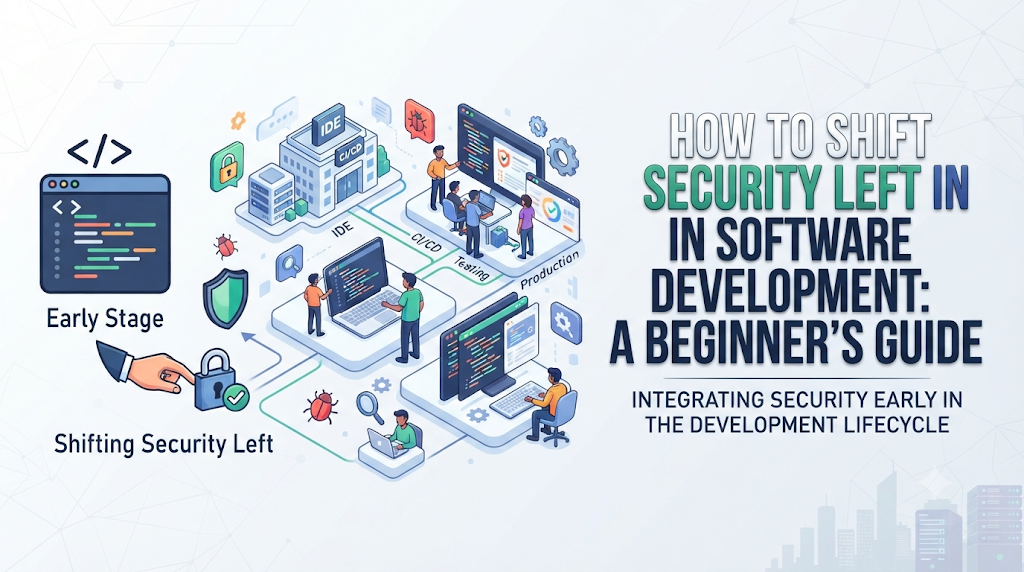
Shifting security left solves this problem. By moving security tasks toward the “left” side of the development timeline—the planning and writing phase—teams can catch mistakes when they are small, cheap, and easy to fix.
What Is “Shifting Left” in Software?
In software engineering, timelines are often drawn horizontally from left to right.
- The Left Side: Planning, designing, and writing the first lines of code.
- The Right Side: Testing, releasing, and running the software for real users.
“Shifting left” means taking tasks that used to happen on the right side (like testing for security bugs) and moving them to the left side (while the software is still being built).
Professional Term -> Simple Meaning -> Why It Matters -> Example
- Vulnerability: A weakness or security hole in computer code. -> It matters because hackers look for these holes to steal data. -> Example: Leaving a door unlocked in a physical building.
- Static Analysis: Scanning source code for bugs without running it. -> It matters because it catches mistakes instantly as you type. -> Example: A spellchecker underlining a typo while you write an email.
- Remediation: Fixing a security flaw. -> It matters because fixing code early costs much less time and money. -> Example: Patching a leaky pipe before it floods your living room.
How Shift-Left Security Works
In a traditional workflow, security is treated like a tollbooth at the end of the highway. Developers drive fast, build everything, and then slam on the brakes when they hit the security gate.
A shift-left workflow turns security into guardrails along the entire highway. Here is how the process works in practice:
- Secure Design: Developers and security experts talk about potential risks before writing any code. They plan how user data will be stored safely and encrypted.
- Automated Scanning Tools: As developers write code on their computers, background tools automatically scan it. If a developer accidentally types a risky command or a known bad password, the tool warns them immediately.
- Continuous Integration (CI) Checks: When code is saved to a shared project folder, automated scripts run deeper tests to check for hidden bugs or outdated components with known security flaws.
- Peer Code Reviews: Another developer looks over the code to make sure it follows safety rules before it gets approved.
Why Shifting Security Left Matters
Waiting until the end of a project to check for security flaws creates major problems. Shifting left fixes these issues by changing when problems are found.
- Lower Cost: Fixing a bug while writing code takes minutes. Fixing that same bug after the software is released can take weeks, involve emergency meetings, and require pushing urgent patches to thousands of users.
- Better Speed: When security checks happen automatically in the background, development teams do not get stuck waiting weeks for a final security review. Software updates can launch faster and safer.
- Shared Responsibility: Security is no longer just the job of a single stressed-out security officer at the end of the line. Every developer learns how to write clean, safe code from day one.
Practical Example: The Story of Two Developers
To see why shifting left matters, let us look at two developers working at a small online bookstore.
- Developer A (Traditional Right-Side Approach): Alex spends three months building a new user login page. Alex writes the code quickly without checking for security flaws. On launch day, the security team scans the page and discovers that user passwords are saved in plain text. Alex has to cancel the launch, rewrite the database structure, and delay the project by two weeks.
- Developer B (Shift-Left Approach): Sam spends three weeks building a similar login page. As Sam types the code, a local automated tool pops up a warning: “Password storage looks unsafe. Use password hashing instead.” Sam fixes the line of code in thirty seconds. The project launches on time, and user data stays secure from day one.
Common Mistakes When Shifting Left
Many organizations try to adopt shift-left security but run into trouble because of common pitfalls.
- Mistake: Dumping complex security tools on developers without training.
- Why it happens: Management thinks buying expensive software is enough.
- Why it causes problems: Developers get overwhelmed by confusing error messages and ignore the tools.
- What to do instead: Start with simple automated checks and train developers to understand what the alerts mean.
- Mistake: Turning security into a bottleneck.
- Why it happens: Adding too many manual approvals at the start of the project.
- Why it causes problems: It defeats the goal of moving fast.
- What to do instead: Rely on automation for routine checks and reserve human experts for complex design reviews.
- Mistake: Ignoring open-source software risks.
- Why it happens: Assuming third-party code libraries are always safe.
- Why it causes problems: Modern software uses many external packages that can contain hidden security flaws.
- What to do instead: Use automated tools to scan all third-party code dependencies constantly.
Risks and Limitations
While shifting left is a powerful strategy, it is not a magic fix for everything.
- Tool Fatigue: Automated scanners can sometimes produce false alarms, pointing out security warnings that are not actually dangerous. If too many false alarms happen, developers stop paying attention.
- Cultural Resistance: Experienced developers who are used to working independently might resist new security rules, viewing them as extra paperwork.
- Upfront Effort: Setting up automated testing pipelines takes time and technical knowledge before any real coding begins.
To reduce these risks, teams must fine-tune their tools to reduce false alarms and explain why security rules help make their daily jobs easier.
Decision-Making Framework: How to Start
If you want to bring shift-left security into a team or project, follow these simple steps:
- Audit Your Current Process: Find out when security checks currently happen. Are they happening at the very end?
- Introduce Automated Scanning: Add a basic code scanning tool that runs automatically when developers save their work.
- Train the Team: Teach developers how to read security warnings and fix simple vulnerabilities on their own.
- Update Dependencies: Set up tools to check third-party libraries for known security bugs automatically.
- Review and Improve: Gradually add deeper security checks as the team gets comfortable with the new workflow.
Checklist for Shift-Left Security
Use this quick checklist to see if your development process is properly shifting security left:
- Are security requirements discussed during the initial project planning phase?
- Do developers use automated tools to scan code as they write it?
- Are third-party code packages checked for known security flaws?
- Do automated tests run every time new code is saved to the project?
- Does the team review security mistakes together to prevent them from happening again?
Key Terms
- CI/CD (Continuous Integration / Continuous Delivery): The automated process of building, testing, and delivering software updates quickly and safely.
- Dependency: A piece of third-party code or library borrowed from outside sources to help build an application faster.
- False Positive: An incorrect warning from a security tool claiming a safe piece of code is dangerous.
- Secure Coding: Writing software in a way that protects it from malicious attacks and data leaks.
- Threat Modeling: A strategy for identifying potential security risks and design flaws before building a system.
FAQs
What does “shifting left” mean in simple words?
It means moving tasks—like security testing—earlier in the timeline so you catch mistakes when they are small and easy to fix instead of waiting until the end of a project.
Does shift-left security slow down development?
Initially, setting up new tools takes a little time. However, in the long run, it speeds up development by preventing massive last-minute emergencies and delayed product launches.
Do developers need to become cybersecurity experts?
No. Developers do not need to become full-time security experts, but they should learn basic secure coding habits and know how to use automated security tools.
What is the biggest challenge of shifting left?
The biggest challenge is usually cultural. Getting developers and security teams to collaborate smoothly and trust automated tools requires clear communication and patience.
Can small startups benefit from shift-left security?
Yes. Fixing security flaws early is especially important for small startups because a major security breach or delayed launch can bankrupt a new company.
Conclusion
Shifting security left is not just about buying new software or following a corporate trend. It is a smarter, more sustainable way to build technology in a world where digital threats evolve every single day. By catching security flaws during the planning and writing stages rather than waiting for a frantic final review, development teams protect their users, lower their operational costs, and release software with complete confidence.
Ultimately, building safety into the foundation of a project ensures that security is never treated as an afterthought or a roadblock. When developers, operations, and security teams work together from day one, writing safe code becomes a natural part of daily creation. Taking these early steps today paves the way for stronger, more resilient applications tomorrow.