Introduction
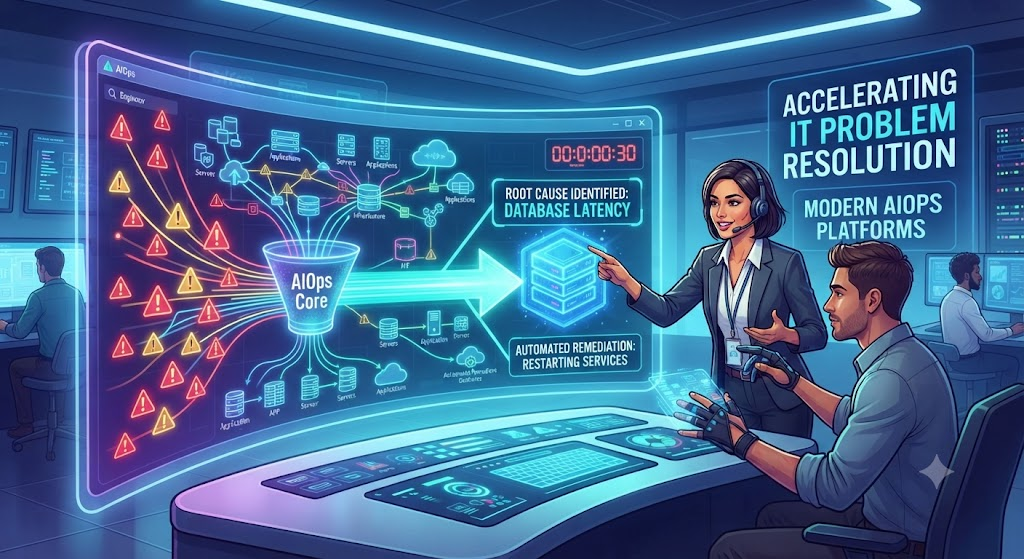
Imagine running a busy online store. Suddenly, thousands of customers cannot check out because a payment gateway slows down. In the background, monitoring tools scream with alarms. Hundreds of alerts flood the computer screens of the IT support team.
Which alert matters? Which problem caused the others? Figuring this out takes time, and every minute of delay costs money and frustrates customers.
In modern technology environments, the sheer volume of data makes manual troubleshooting nearly impossible. Traditional monitoring tools tell IT teams that something is broken, but they rarely explain why or how to fix it quickly. This is where AIOps enters the picture. By applying advanced data science to everyday IT operations, teams can move from reactive firefighting to smart, proactive problem solving.
What Is AIOps?
AIOps (Artificial Intelligence for IT Operations) refers to software platforms that combine big data and machine learning functionality to enhance operational workflows.
- Simple meaning: AIOps is a smart computer assistant that looks at massive amounts of computer system data, learns what normal behavior looks like, and flags real problems while ignoring useless noise.
- Why it matters: Modern apps run across complex cloud environments, generating millions of log lines and performance metrics every second. Humans cannot read this fast. AIOps processes this data instantly to keep services running smoothly.
- Example: Instead of an IT engineer manually checking twenty different servers to see why a website crashed, an AIOps tool instantly correlates data from all servers and tells the engineer, “Database Server 4 ran out of memory due to a bad software update at 2:00 PM.”
How AIOps Works
AIOps platforms do not just magically solve problems. They follow a clear pipeline built on data collection, analysis, and automated action.
1. Data Ingestion
Modern IT systems produce different types of operational data, often called telemetry. This includes logs (recorded events), metrics (performance numbers like CPU usage), and traces (the path of a user request). An AIOps platform gathers all of this information into a single central database.
2. Pattern Matching and Machine Learning
Once the data is in one place, machine learning algorithms analyze it to establish a baseline. The system learns what a normal Tuesday afternoon looks like compared to a busy holiday shopping event.
3. Noise Reduction and Alert Correlation
When a problem happens, thousands of alerts usually trigger at once. AIOps groups these related alerts together into a single incident. Instead of seeing 500 alerts, the IT team sees one clear notification explaining the core problem.
4. Automated Remediation
Advanced AIOps systems can take action without human help. If the system knows that a specific error always goes away when a microservice restarts, it can safely restart that service automatically within seconds.
Why AIOps Matters for Problem Management
Problem management is the IT process of finding the underlying cause of recurring issues and stopping them from happening again. AIOps transforms this process in several important ways:
- Faster Mean Time to Resolution (MTTR): By cutting down the time spent searching for clues, AIOps helps teams fix problems much faster.
- Proactive Detection: AIOps spots unusual patterns before they turn into full outages. For example, it might notice memory usage creeping up slowly over a week and warn engineers to fix it before the server crashes.
- Breaking Down Silos: In many companies, the network team, database team, and security team use different tools. AIOps brings all their data together, giving everyone a shared view of reality.
Important Factors to Understand
Before adopting AIOps, organizations must recognize what the technology can and cannot do.
- Data Quality is King: An AIOps tool is only as good as the data fed into it. If your basic monitoring is messy or incomplete, the AI will struggle to give accurate insights.
- Context Matters: AI recognizes patterns, but it does not understand human business priorities. A server running slowly during a routine data backup might look like a crisis to an algorithm, even though it is completely normal.
- Human Oversight: AIOps automates routine tasks and speeds up investigations, but human judgment remains essential for complex strategic decisions and major architectural changes.
Practical Examples
Example 1: E-Commerce Checkout Failure
- Without AIOps: A checkout page fails. The monitoring tool sends alerts to the network team, the database team, and the application team. Each team spends 30 minutes proving the problem is not on their side. Total downtime: 90 minutes.
- With AIOps: The platform analyzes the incoming signals, isolates a slow API call from a third-party shipping calculator, and routes the alert directly to the integration team with a suggested fix. Total downtime: 10 minutes.
Example 2: Slow Internal Applications
- Without AIOps: Employees complain that the human resources portal is slow. IT support has no immediate visibility into the cause and has to wait for user tickets to pile up.
- With AIOps: The system detects an unusual spike in database query latency and flags a misconfigured index on a newly deployed software patch, allowing developers to roll it back before staff productivity suffers.
Common Mistakes
Organizations adopting AIOps often fall into predictable traps. Avoid these missteps to get the best results:
- Mistake: Expecting instant magic.
- Why it happens: Vendors sometimes market AIOps as a plug-and-play solution.
- Why it causes problems: AI models need time to ingest historical data and learn the specific quirks of a company’s infrastructure.
- What to do instead: Start with a small, well-defined pilot project, such as alert noise reduction, before expanding to full automation.
- Mistake: Feeding the tool too much garbage data.
- Why it happens: Teams dump every possible log file into the platform without filtering.
- Why it causes problems: High volumes of irrelevant logs confuse the machine learning models and generate false alarms.
- What to do instead: Clean up existing monitoring data sources and focus on high-value telemetry first.
- Mistake: Ignoring team training.
- Why it happens: Management assumes engineers will automatically know how to interpret AI-driven recommendations.
- Why it causes problems: Staff may distrust the tool or ignore its warnings if they do not understand how the insights were generated.
- What to do instead: Provide hands-on training so operations teams understand how to collaborate effectively with AI platforms.
Risks and Limitations
While AIOps offers major advantages, it also introduces specific operational risks:
- Blind Trust in AI: If an automated remediation script runs without proper guardrails, it could make a bad situation worse by restarting the wrong service during a critical window.
- Alert Fatigue Shift: If thresholds are configured incorrectly, the AIOps tool itself can start generating too many low-priority insights, leading back to the exact fatigue it was meant to cure.
- Privacy and Compliance Concerns: AIOps platforms often process large volumes of operational data that may accidentally include sensitive customer information or regulated data payloads.
Comparison: Traditional IT Operations vs. AIOps
| Feature | Traditional IT Operations | AIOps-Driven Operations |
| Alert Handling | High volume of isolated alerts | Correlated incidents with reduced noise |
| Problem Detection | Reactive (after users report an issue) | Proactive (spotting anomalies early) |
| Root Cause Analysis | Manual log searching across silos | Automated correlation across all data types |
| Resolution Speed | Slower, depends on individual tribal knowledge | Faster, guided by historical patterns and automation |
Checklist for Implementing AIOps
Use this checklist to evaluate your readiness before rolling out an AIOps strategy:
- Audit current monitoring tools: Identify which systems currently generate logs, metrics, and traces.
- Define clear goals: Choose one specific problem to solve first (e.g., reducing alert noise or speeding up root cause analysis).
- Clean your data streams: Remove redundant or low-value monitoring metrics to keep AI inputs clean.
- Establish safety guardrails: Set strict limits on what automated remediation scripts are allowed to change without human approval.
- Measure success: Track metrics like Mean Time to Detection (MTTD) and Mean Time to Resolution (MTTR) before and after implementation.
Key Terms
- Anomaly Detection: The automated process of identifying unusual patterns or behaviors in system data that deviate from the normal baseline.
- Event Correlation: The process of grouping related operational alerts together to understand a single underlying incident.
- Logs: Timestamped records of computer events, errors, and system activities generated by software applications.
- Metrics: Measurable numerical data points that describe system performance, such as CPU utilization, memory usage, or response time.
- Mean Time to Resolution (MTTR): The average time required to troubleshoot and fix a problem after it occurs.
- Telemetry: The automated collection and transmission of data from remote systems to a central monitoring location.
- Noise Reduction: Filtering out irrelevant or duplicate alerts so IT teams can focus on critical issues.
- Remediation: The action taken to fix, correct, or resolve an IT problem or security vulnerability.
FAQs
What is the main difference between traditional monitoring and AIOps?
Traditional monitoring tells you when something is broken by triggering alerts based on simple rules. AIOps uses machine learning to analyze massive amounts of data, correlate alerts, find root causes, and predict failures before they impact users.
Does AIOps eliminate the need for human IT engineers?
No. AIOps handles repetitive tasks, filters out noise, and speeds up investigations, freeing engineers to focus on architecture, innovation, and complex problem-solving.
How long does it take for an AIOps tool to start working effectively?
Most AIOps platforms require a training period of two to four weeks to analyze historical data and establish accurate baselines for normal system behavior.
Is AIOps only for large enterprise companies?
While large enterprises with complex cloud environments benefit the most, mid-sized companies experiencing high alert volumes or rapid digital growth can also see significant improvements in operational efficiency.
Can AIOps fix problems automatically without human approval?
Yes, many AIOps platforms support automated remediation for known, routine issues. However, most companies start with semi-automated workflows where the system suggests a fix and a human operator approves it.
What kind of data do AIOps platforms need to function?
AIOps platforms primarily consume logs, metrics, and traces from servers, applications, networks, and databases, along with historical incident tickets and change logs.
Conclusion
Managing modern digital infrastructure is too complex for manual troubleshooting alone. When system alerts overwhelm human teams, problems take longer to solve, leading to frustrated customers and costly downtime.
AIOps changes this dynamic by cutting through the noise, finding root causes quickly, and automating routine fixes. By combining expert operational knowledge with intelligent data analysis, organizations can move from reactive firefighting to resilient, proactive problem management.