Introduction
Modern enterprise technology environments generate an overwhelming amount of data every single second. Servers log errors, networks report traffic spikes, applications throw warnings, and cloud resources scale up and down. For human IT teams, keeping up with this endless flood of alerts is like trying to drink from a firehose.
When a critical system goes down, engineers often waste precious hours just trying to figure out which alert matters and where the root problem actually hides. This struggle is why many organizations turn to AIOps. By combining big data with machine learning, AIOps helps teams filter out the noise and focus on what truly matters.
However, jumping into artificial intelligence without a clear plan is a recipe for failure. Many organizations buy expensive tools, plug them into messy data, and wonder why nothing improves. This guide explores a practical, phased roadmap for bringing AIOps into an enterprise technology team successfully, avoiding common traps, and building a resilient IT environment.
What Is AIOps?
AIOps stands for Artificial Intelligence for IT Operations.
Put simply, it is the use of machine learning, data analytics, and automation to make managing computers, networks, and software applications easier and smarter.
Why It Matters
Traditional IT monitoring tools tell you when something is already broken. AIOps tools look at historical data and current patterns to tell you when something is about to break, or they fix the issue before anyone notices.
Example
Imagine a hotel reservation system. A traditional monitoring tool sends an alarm only after the server crashes and customers cannot book rooms. An AIOps platform notices that server memory usage is climbing at an unusual rate every Tuesday at 2 PM, predicts that the system will fail in two hours, and automatically restarts the background service or scales up resources to prevent the crash entirely.
How AIOps Works Under the Hood
To understand how an AIOps platform helps your team, it helps to look at its core engine. AIOps platforms generally perform three main functions: data collection, analysis, and action.
1. Data Ingestion (Gathering the Noise)
Enterprise IT systems use many different tools for monitoring logs, performance metrics, and user activity. An AIOps platform collects all these different data streams into a single central engine.
2. Pattern Recognition and Correlation (Finding the Signal)
Once the platform has the data, machine learning algorithms sort through it. They connect a network drop on floor three with a slow database query in the cloud, recognizing that both issues stem from a single underlying network switch failure.
3. Automated Action (Solving the Problem)
Once the platform identifies the root cause, it can either notify the correct engineer with exact details or trigger an automated script to fix the issue instantly.
Why AIOps Matters for Enterprise Technology Teams
Enterprise technology teams face mounting pressure to deliver faster software updates while keeping systems running reliably around the clock.
- Reducing Alert Fatigue: IT staff often receive hundreds of false alarms every day. AIOps groups related alerts together so engineers deal with one incident instead of fifty separate warnings.
- Faster Root Cause Analysis: When an outage happens, finding the source takes time. AIOps points directly to the failing component, cutting troubleshooting time from hours to minutes.
- Shifting from Reactive to Proactive: Instead of waiting for users to report bugs, teams can fix performance bottlenecks before they cause downtime.
Important Factors to Understand Before You Begin
Before putting together an implementation roadmap, your team must understand a few operational realities.
Data Quality is Everything
AI models rely entirely on the quality of the data fed into them. If your server logs are messy, inconsistent, or missing, the AIOps platform will produce inaccurate insights. Cleaning up your data sources is a mandatory first step.
Cultural Readiness
AIOps changes how engineers work. Moving from manual troubleshooting to trusting automated recommendations requires patience, training, and a shift in mindset. Teams must feel confident that the AI recommendations are safe to follow.
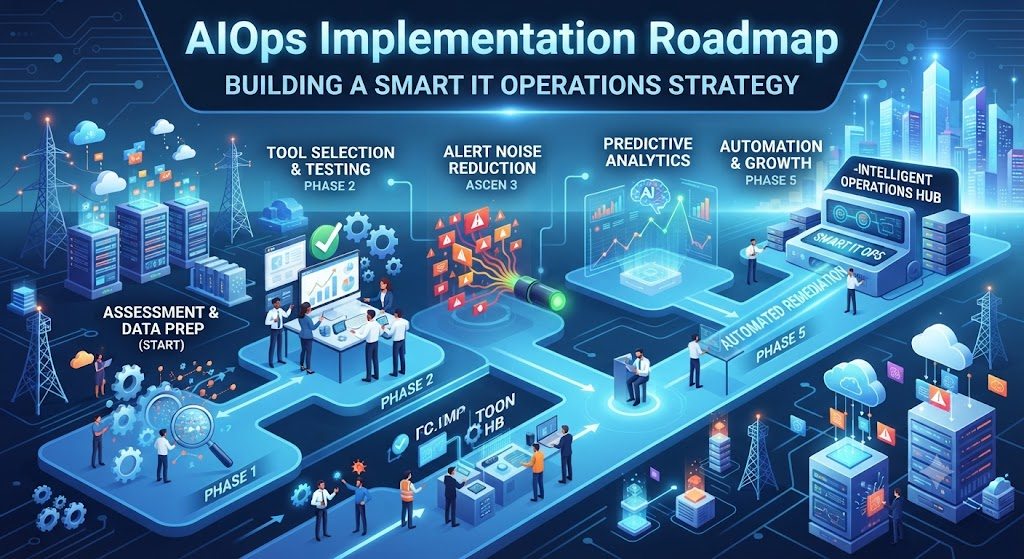
The AIOps Implementation Roadmap
Implementing AIOps across a large enterprise requires a structured, multi-phase approach. Trying to automate everything at once usually leads to confusion and wasted investment.
Phase 1: Assessment and Data Preparation
The first phase focuses on understanding your current environment and getting your data ready.
- Audit Existing Tools: List every monitoring, logging, and ticketing tool your team currently uses.
- Identify Data Silos: Determine which teams own which data streams and break down communication barriers.
- Define Business Goals: Decide what you want AIOps to fix first. Do you want to reduce downtime, lower ticket resolution times, or speed up server provisioning?
Phase 2: Selecting and Testing the Right Tool
Once you know your goals and data maturity, you can evaluate AIOps platforms.
- Proof of Concept (PoC): Run a small-scale test with a single application or a non-critical environment.
- Evaluate Integration: Ensure the AIOps tool connects smoothly with your existing ticketing systems, cloud providers, and monitoring agents.
- Measure Baseline Metrics: Record your current incident response times so you can measure whether the tool actually improves performance.
Phase 3: Initial Deployment and Alert Reduction
Start your official rollout by tackling your biggest pain point: noisy alerts.
- Noise Reduction: Configure the platform to group duplicate alerts and filter out low-priority warnings.
- Dashboard Setup: Create clear, easy-to-read dashboards for system administrators and engineering managers.
- Initial Tuning: Fine-tune machine learning thresholds to reduce false positives.
Phase 4: Expanding to Predictive Analytics
Once your team trusts the basic alert filtering, expand the platform’s capabilities toward prediction.
- Anomaly Detection: Enable machine learning models to watch for unusual behavior in network traffic or application memory.
- Capacity Planning: Use historical trends to predict when your servers or cloud storage will run out of space.
- Cross-Domain Correlation: Connect infrastructure logs with application performance data to see the bigger picture.
Phase 5: Full Automation and Continuous Improvement
The final stage involves letting the system take safe, automated actions without human intervention.
- Automated Remediation: Set up automated playbooks that fix common issues, such as restarting hung services or clearing full disks.
- Feedback Loops: Regularly review automated actions with your engineering team to refine rules and prevent mistakes.
- Scaling Across Departments: Roll out successful workflows to other business units and technology teams.
Practical Examples
Example 1: E-Commerce Checkout Monitoring
An online retailer uses AIOps to monitor their payment checkout gateway. During a busy holiday sale, an unexpected database slowdown begins to delay credit card processing. The AIOps platform instantly correlates the slow response time with a specific database query, alerts the on-call database engineer with the exact line of code causing the delay, and automatically spins up a read-replica database to handle the traffic spike. The checkout process stays smooth, and customers complete their purchases without noticing a glitch.
Example 2: Financial Services Log Analysis
A banking technology team manages thousands of microservices. When a login failure occurs, tracing the error through dozens of servers used to take hours. An AIOps platform ingests all server logs, groups related error messages into a single incident ticket, and highlights the exact microservice update that caused the failure. The engineering team rolls back the faulty update immediately, minimizing customer disruption.
Common Mistakes to Avoid
Technology teams often stumble during AIOps adoption. Recognizing these common errors helps protect your investment.
- Mistake: Trying to automate everything on day one.
- Why it happens: Excitement over new artificial intelligence features.
- The problem: Over-automation in a complex environment creates unpredictable system behavior.
- What to do instead: Start small by using the platform for read-only alert filtering before granting it permission to take automated actions.
- Mistake: Treating AIOps as a purely software-driven project.
- Why it happens: Assuming technology fixes operational culture automatically.
- The problem: Siloed teams refuse to share data or trust automated recommendations.
- What to do instead: Involve system administrators, developers, and operations staff early in the planning process to build internal trust.
- Mistake: Ignoring data cleanliness.
- Why it happens: Assuming advanced algorithms can magically interpret unorganized logs.
- The problem: Garbage data leads to garbage insights and false alarms.
- What to do instead: Standardize log formats and clean up monitoring tools before feeding data into the AIOps engine.
Risks and Limitations
While AIOps offers powerful benefits, it is not a magic wand. Understanding its limitations keeps expectations realistic.
- Black-Box Confusion: Some machine learning models make predictions without clearly explaining why they reached a certain conclusion. This lack of transparency can make troubleshooting difficult for engineers who need to understand the root cause.
- High Initial Setup Cost: Setting up data pipelines, integrating disparate monitoring tools, and tuning algorithms requires significant time and specialized skill sets.
- Dependency on Historical Data: Machine learning models need historical data to recognize patterns. If your enterprise is launching a brand-new cloud architecture with no past data, the AI will initially struggle to predict anomalies accurately.
AIOps Implementation Checklist
Use this checklist to verify that your team has covered the essential steps before rolling out an AIOps solution.
- Audited all existing monitoring and logging tools across departments.
- Defined clear, measurable business goals (e.g., reducing mean time to resolution).
- Cleaned up and standardized log formats and metric collection rules.
- Selected an AIOps vendor or open-source framework that fits your tech stack.
- Conducted a controlled proof-of-concept in a non-critical environment.
- Established a baseline for current incident response times.
- Configured alert noise reduction and grouping rules.
- Trained operations staff on how to interpret AI-driven recommendations.
- Created a governance plan for automated remediation scripts.
Key Terms
- Alert Fatigue: Exhaustion experienced by IT staff when they receive an overwhelming number of alarms, causing them to miss critical warnings.
- Anomaly Detection: The use of algorithms to spot unusual patterns or behaviors in system data that deviate from the norm.
- Event Correlation: The process of connecting multiple separate alerts or log entries to identify a single underlying root cause.
- IT Operations (ITOps): The day-to-day management, maintenance, and support of an organization’s technology infrastructure.
- Mean Time to Resolution (MTTR): The average time required to troubleshoot and fix a system failure completely.
- Microservices: An architectural style where an application is built as a collection of small, independent services.
- Observability: The degree to which you can understand the internal state of a system simply by examining its outputs, such as logs, metrics, and traces.
- Remediation: The process of fixing a security vulnerability, system bug, or operational failure.
- Root Cause Analysis: A problem-solving method aimed at identifying the fundamental reason for a system failure rather than just treating its symptoms.
- Telemetry: The automated collection and transmission of data from remote or embedded systems to monitoring equipment.
Frequently Asked Questions
What is the main difference between traditional monitoring and AIOps?
Traditional monitoring uses static rules to tell you when a metric crosses a threshold (like CPU usage going above 90%). AIOps uses machine learning to analyze complex data streams, spot hidden patterns, predict failures before they happen, and automate responses.
Do we need to replace our existing monitoring tools to use AIOps?
No. AIOps platforms are designed to sit on top of your existing tools. They ingest data from your current monitoring software, log collectors, and ticketing systems, bringing all the information together into a single intelligent layer.
Is AIOps only suitable for large enterprises?
While AIOps is most commonly used in large enterprises with complex, distributed cloud environments, medium-sized businesses with heavy digital operations can also benefit by reducing manual IT overhead.
Can AIOps completely replace human IT engineers?
No. AIOps automates repetitive tasks, filters out noise, and speeds up troubleshooting, but human engineers remain essential for strategic planning, complex problem-solving, and managing automated governance.
How long does an AIOps implementation take?
A basic proof-of-concept can take a few weeks, but a full enterprise implementation—including data cleanup, tool integration, and staff training—typically takes anywhere from six months to a year.
What skill sets does a team need for AIOps success?
Your team needs a mix of traditional system administrators, data analysts who understand log data, and site reliability engineers (SREs) who know how to build and maintain automation workflows.
How do we measure the success of an AIOps project?
Success is measured by tracking key performance indicators such as a decrease in false alarms, faster incident response times, lower mean time to resolution, and an increase in successfully automated fixes.
Conclusion
Bringing AIOps into an enterprise technology team is a journey that requires careful planning, clean data, and cultural alignment. By moving step-by-step through assessment, alert reduction, and predictive analytics, technology teams can transform their operations from a reactive scramble into a proactive, efficient engine. Start small, focus on solving your team’s most frustrating operational bottlenecks, and let smart automation pave the way for a more reliable technology future.