Introduction
Many technology leaders enter the world of modern infrastructure with immense excitement, but they often feel confused when complex migration projects stall and cloud bills rise unpredictably. Traditional IT companies—built on physical data centers, localized hardware provisioning, and tightly coupled legacy architectures—frequently struggle to match the agility of cloud-native systems. When team leads rush into the cloud without a definitive strategy, they risk fracturing their security perimeters, overspending budgets, and suffering critical application downtime.
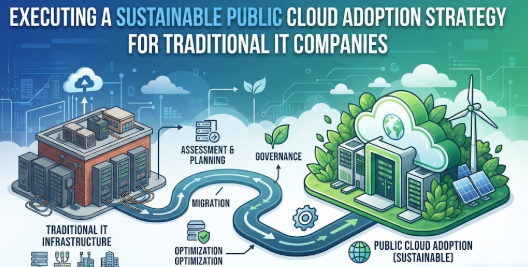
This deep architectural guide breaks down the precise methodology required to execute a flawless public cloud adoption strategy for traditional IT companies. By prioritizing deliberate architectural assessments, automated compliance controls, and deep optimization principles over reactive, hurried decisions, organizations can reliably bridge the gap between legacy infrastructure stability and public cloud flexibility.
What is Public Cloud Adoption ?
Public cloud adoption refers to the process where an organization moves its digital assets, data, workloads, and IT operations from on-premises servers or private data centers into shared infrastructure managed by a third-party hyperscaler (such as AWS, Microsoft Azure, or Google Cloud Platform). Instead of purchasing, racking, and cooling physical servers, a traditional IT company rents virtual computing power, storage systems, and managed networking databases on an as-needed basis.
Think of it like moving from a privately owned water well to a municipal utility grid. Instead of paying upfront capital to build, maintain, and secure a private well, you plug into an engineered system where you pay exclusively for the exact volume of water you consume.
A common misunderstanding among infrastructure beginners is believing that moving to the cloud simply means copying virtual machines from a local server to a remote one. While that basic shift (known as a “lift-and-shift”) works initially, it ignores the real power of the cloud: native auto-scaling, managed microservices, and automated resilience. The practical takeaway is that true cloud adoption requires transforming your deployment operations, architecture, and team habits rather than just shifting the location of your code.
Why a Public Cloud Adoption Strategy Is Important
Operating an IT business without an organized public cloud adoption strategy for traditional IT companies directly harms long-term operational performance, budgeting stability, and technological longevity. Without a blueprint, companies treat the cloud like an unbounded data center, buying idle compute power that drains financial resources and complicates visibility.
- Savings and Capital Efficiency: Shifting from capital expenses (buying physical servers upfront) to operational expenses (paying for active resources) ensures capital remains free for engineering innovation rather than depreciation hardware.
- Risk Awareness and Resilience: A defined strategy ensures that workloads are distributed across multiple availability zones, dramatically reducing the risk of localized infrastructure crashes.
- Long-Term Engineering Discipline: Enforcing structured infrastructure-as-code models prevents configuration drift, making environments easily auditable, predictable, and simple to replicate.
Consider a practical scenario: A legacy software provider undergoes an unpredictable seasonal surge in traffic. Under an on-premises model, they would have to order, configure, and deploy additional hardware weeks in advance—only for those servers to sit empty for the remaining nine months of the year. With a managed cloud adoption model, auto-scaling groups automatically scale out infrastructure within minutes to meet the peak demand and scale back down immediately afterward, preventing thousands of dollars in wasted compute expenses.
The Real Problem Traditional IT Companies Face with Cloud Adoption
The core obstacle to building a reliable public cloud adoption strategy for traditional IT companies stems from structural legacy friction, mixed operational incentives, and fragmented documentation. Many established enterprises struggle with deep dependencies hidden within old monolithic software, where undocumented system connections make simple migrations surprisingly risky.
Furthermore, engineering teams are often hit with a paradox of conflicting advice from online platforms, vendor marketing, and standard industry frameworks. Developers push for advanced serverless tools, while operations teams favor static virtual machines to maintain visibility. This conflict creates structural analysis paralysis. Without an objective framework, organizations make emotional engineering choices based on trending tech stacks rather than their actual performance needs, leading to complex multi-cloud configurations that teams are not trained to secure or operate safely.
How to Implement a Public Cloud Strategy Step by Step
Step 1: Establish an Enterprise Cloud Center of Excellence (CCoE)
- What it means: Assembling a cross-functional governance group composed of enterprise architects, security officers, financial analysts, and engineering leaders to guide cloud principles.
- Why it matters: Without unified representation, cloud projects fragment into isolated, insecure shadows with conflicting priorities and separate tooling.
- How to apply it: Appoint distinct leads from security, finance, and engineering to meet weekly, establishing universal tagging policies, landing zone architectures, and baseline deployment guards.
- Common mistake: Letting a single developer team set up your initial cloud environment without security or financial oversight.
- Better approach: Form an official governance board that designs corporate landing zones before a single production application is moved.
Step 2: Discover and Categorize the Application Portfolio
- What it means: Cataloging all active software, virtual servers, data repositories, and integrations running inside the private data center.
- Why it matters: Undocumented dependencies can cause applications to break post-migration if their underlying databases or authentication servers are left behind.
- How to apply it: Deploy automated network discovery tools to map active communication paths between local workloads, grouping applications by dependency metrics.
- Common mistake: Relying entirely on out-of-date static spreadsheets to track active enterprise systems.
- Better approach: Use continuous automated network discovery tools to build an accurate live dependency map.
Step 3: Map Workloads to the 6 Rs of Cloud Migration
- What it means: Aligning every asset to a migration pathway: Rehost (lift-and-shift), Replatform (lift-tinker-shift), Refactor (re-architect), Rebase, Retain, or Retire.
- Why it matters: Trying to rewrite every application into a modern microservice overnight leads to long delays, while lifting every broken system wholesale locks in high costs.
- How to apply it: Analyze each system’s lifecycle stage, prioritizing non-critical systems for initial lift-and-shift paths to build team experience before tackling complex system rewrites.
- Common mistake: Assuming every single piece of legacy software needs to be completely rewritten before migrating.
- Better approach: Selectively lift stable applications to reduce hardware footprints, while reserving refactoring efforts for high-value systems.
Step 4: Construct a Highly Secure Automated Landing Zone
- What it means: Building a standardized configuration framework across all cloud accounts that includes identity protection, isolated networking, and central logging.
- Why it matters: Migrating workloads into unconfigured cloud accounts exposes sensitive data pools to the public internet within minutes.
- How to apply it: Utilize Infrastructure as Code (IaC) templates to configure isolated virtual private networks, separate development from production accounts, and route logs to an unalterable security vault.
- Common mistake: Using a single shared master root account to host development, testing, and production workloads simultaneously.
- Better approach: Programmatically provision segregated accounts with strict isolated networks for every distinct enterprise environment.
Step 5: Implement FinOps Governance and Cost Management
- What it means: Aligning development teams with accountability structures to track, analyze, and optimize cloud infrastructure spending.
- Why it matters: Unmonitored testing systems, unattached cloud drives, and oversized compute engines will rapidly exceed static legacy hardware budgets.
- How to apply it: Enforce a strict tagging policy across all resources, configure automated real-time spending alerts, and shut down development systems outside of working hours.
- Common mistake: Leaving oversized, high-performance testing databases running constantly over weekends and holidays.
- Better approach: Set up automated automation schedules that pause development resources when teams are off the clock.
Step 6: Execute the Migration in Controlled Waves
- What it means: Moving grouped systems systematically in planned stages rather than attempting a high-risk data center shutdown all at once.
- Why it matters: A wholesale cutover puts the entire business at risk if hidden system integration problems appear under load.
- How to apply it: Begin by migrating simple internal applications, moving to customer-facing front-ends next, and finally transitioning core databases once network tunnels are thoroughly tested.
- Common mistake: Scheduling the migration of core customer transaction engines during your highest traffic business season.
- Better approach: Migrate minor, peripheral applications first to test your workflows before moving core systems during low-traffic windows.
Step 7: Transition to Automated Operations and Continuous Optimization
- What it means: Shifting system operations from manual server configurations to automated scaling policies and policy-as-code updates.
- Why it matters: Treating cloud instances like permanent hardware limits the system’s resilience and locks you into fixed high costs.
- How to apply it: Replace manual infrastructure configurations with auto-scaling alerts, upgrade legacy virtual machines to modern containers, and review architecture recommendations monthly.
- Common mistake: Manually updating security patches inside individual cloud servers rather than updating base images.
- Better approach: Deploy immutable architecture patterns where updated server designs are redeployed using automated pipelines.
Key Factors That Influence Public Cloud Migration Success
Successfully executing a public cloud adoption strategy for traditional IT companies requires balancing specific technical, financial, and organizational components:
- Risk and Governance Frameworks: Establishing precise identity boundaries and encryption policies to protect critical information assets during transit.
- Infrastructure Financial Visibility: Implementing proactive alerting mechanisms to catch runaway queries, over-allocated testing systems, and abandoned development storage.
- Workload Refactoring Horizons: Accurately calculating when to pick a simple lift-and-shift over a complex application rewrite based on timelines and internal skill sets.
- Organizational Skill Upskilling: Providing technical teams with hands-on training to handle cloud networking, infrastructure automation, and modern monitoring tools.
- Data Architecture Mapping: Documenting database read-write frequencies, latency needs, and storage tiers to prevent high network egress charges.
Detailed Breakdown of Public Cloud Adoption Foundations
Data Center vs. Public Cloud Operating Realities
Traditional IT platforms are built for durability over long lifecycles. Infrastructure teams order physical equipment based on peak load estimates for the next three to five years, accepting high capital expense waste in exchange for complete control over hardware.
Public cloud environments operate on a utility model. Computing power is ephemeral, elastic, and instantly scale-ready. Systems should be designed around the assumption that underlying hardware components can change or fail, relying on software configurations to provide resilience across isolated availability zones.
Choosing Your Migration Path
Understanding the tradeoff between migration velocity and long-term cloud efficiency is critical for modernizing legacy applications.
[Legacy Monolith]
       │
       ├───► Path A: Rehost (Lift-and-Shift) ───► Fast Migration / Higher Run Cost
       │
       └───► Path B: Refactor (Cloud-Native) ──► Slow Migration / Optimal Elasticity
Rehosting provides rapid data center evacuation benefits but imports the inefficiencies of legacy configurations directly into the cloud. Refactoring, on the other hand, breaks apart monolithic apps into independent microservices or containers. This yields maximum elasticity and lower compute overhead but requires dedicated development timelines and deeper modern engineering capabilities.
Common Cloud Migration Mistakes Beginners Make
- Treating the Cloud as a Static Data Center: Provisioning large instances to match the peak capacities of old on-premises hardware, resulting in low utilization and massive bills.
- Migrating Active Data Pools Without Optimization: Dropping historical data into premium, high-availability block storage tiers rather than leveraging cost-efficient archive or cold storage options.
- Bypassing Security Integration: Deploying critical production workloads into cloud environments without configuring proper network boundaries, central log routing, or multi-factor authentication.
- Ignoring Network Egress Expenses: Failing to monitor the volume of data transferred out of the cloud network, leading to surprise charges on monthly utility statements.
The “Don’t Do This” Cloud Action Checklist
- Never use root administrator credentials for daily operations or automated pipeline integrations.
- Do not leave virtual machine access open to the public internet without secure bastions or virtual private network tunnels.
- Never skip setting up real-time billing alerts and budget thresholds across your cloud accounts.
- Do not start broad data center migrations without running end-to-end data restore drills first.
Practical Real-Life Examples of Cloud Transitions
- Scenario 1: Migrating an Enterprise Web Application
- Situation: An enterprise software company runs an internal human resource system on old, local servers that struggle during end-of-month processing loops.
- Mistake: Lifting the entire app into a massive, permanently active cloud virtual instance, matching the worst-case performance spikes and doubling monthly costs.
- Better Action: Moving the system onto mid-sized container groups backed by auto-scaling rules that handle peak loads smoothly.
- Learning: Elastic auto-scaling structures outperform oversized fixed instances in both cost and reliability.
- Scenario 2: Modernizing Database Backups
- Situation: A logistics company maintains terabytes of historical tracking files on expensive on-premises storage arrays.
- Mistake: Uploading all unorganized records into premium, hot cloud object storage tiers, creating high monthly costs.
- Better Action: Setting up lifecycle automation that moves files older than thirty days into deep archive tiers.
- Learning: Smart data tiering saves significant budget while keeping compliance records accessible.
- Scenario 3: Implementing API Infrastructure
- Situation: An insurance vendor exposes quote calculation APIs to distribution partners using a traditional server cluster.
- Mistake: Rehosting the unmonitored server cluster without rate-limiting systems, leaving it vulnerable to traffic spikes.
- Better Action: Replatforming the API layer behind an enterprise API Gateway with built-in query limits and managed microservices.
- Learning: Managed edge gateways shield application layers from instability while cutting operational maintenance.
- Scenario 4: Reorganizing Access Control Management
- Situation: A development shop expands its cloud engineering presence across three new distributed product groups.
- Mistake: Sharing a single administrative login file among developers to speed up code deployments.
- Better Action: Setting up a single sign-on provider linked to role-based access controls across separate accounts.
- Learning: Strict identity management stops accidental reconfigurations and keeps environments secure.
- Scenario 5: Transforming System Configurations
- Situation: An accounting platform moves its core tax engine to public cloud infrastructure ahead of busy filing seasons.
- Mistake: Making manual setting adjustments directly inside production cloud instances during live errors.
- Better Action: Defining all infrastructure configurations in code templates managed through automated deployment systems.
- Learning: Infrastructure-as-code models prevent configuration drift and make systems easy to reproduce during disasters.
Framework and Strategy Comparisons for Decision-Making
Table 1: Structural Migration Strategies Matrix
| Migration Type | Implementation Speed | Required Re-Engineering Effort | Post-Migration Cost Profile | Primary Risk Profile |
| Rehost (Lift-and-Shift) | Ultra-Fast | Minimal | High (Inherits Legacy Inefficiencies) | Underutilized Compute Spend |
| Replatform (Tinker-and-Shift) | Moderate | Low to Medium | Optimized (Leverages Managed Services) | Minor Integration Gaps |
| Refactor (Re-architect) | Slow | High (Complete Code Overhaul) | Low (True Cloud Elasticity) | Scope Creep & Project Delays |
Table 2: Infrastructure Governance Model Matrix
| Governance Domain | Traditional Datacenter Method | Modern Public Cloud Approach | Key Benefit Realized | Primary Failure Mode |
| Asset Allocation | Manual Procurement Cycles | Automated IaC Provisioning | Immediate Resource Access | Runaway Resource Provisioning |
| Security Boundaries | Rigid Physical Perimeters | Identity-Defined Microsegmentation | Granular Zero-Trust Access | Permissive Network Rules |
| Cost Management | Fixed Capital Depreciation | Variable Operational Optimization | Pay-As-You-Go Savings | Lack of Budget Visibility |
Tools, Methods, and Frameworks for Enterprise Teams
- Infrastructure as Code (IaC) Frameworks: Utilizing open tools like Terraform or native enterprise automation options (AWS CloudFormation, Azure Resource Manager) allows teams to define complex topologies in clean, reviewable code files. This method prevents manual configuration drift and guarantees that testing, staging, and production environments match perfectly.
- Comprehensive Application Discovery Suites: Tools such as AWS Application Discovery Service, Azure Migrate, or open network mapping options allow enterprises to safely monitor data center traffic patterns. This helps teams discover hidden app dependencies and plan cloud migration waves based on actual data rather than out-of-date documentation.
- Cloud Financial Operations (FinOps) Platforms: Integrating cloud-native cost monitoring platforms alongside dedicated alerting systems allows financial leads to monitor spending trends daily. Engineers receive automated warnings when any instance breaks budget thresholds, helping them catch underutilized resources before billing cycles close.
Expert Tips for Successful Cloud Architecture Transition
- Enforce Tagging Policies on Day One: Make sure every single cloud resource is tagged with its environment, owner, and cost center. Use automated policies to block any deployment that lacks these tags.
- Start with Minimal compute allocations: Deploy smaller instance profiles during initial migration waves, using automated scaling metrics to expand resources only when live workloads demand it.
- Isolate Environments at the Network Layer: Keep development, testing, and production environments in completely separate virtual networks or accounts to prevent testing errors from touching live customer systems.
- Use Native Managed Databases: When migrating standard SQL or NoSQL databases, lean toward managed engine versions to eliminate patch management, backup configuration, and OS licensing overhead.
- Implement Centralized Logging Vaults: Route all cloud access trails and system logs into an unalterable, separate log storage account to maintain a clear audit trail for compliance reviews.
- Design for Eventual Regional Outages: Build multi-availability zone configurations for core business tools so that local hardware disruptions don’t take down your entire system.
- Set Up Real-Time Budget Alerts: Configure automated billing alerts at 50%, 75%, and 90% of your projected monthly budget to catch configuration mistakes early.
- Optimize Egress Traffic Routing: Place high-traffic content behind global content delivery networks (CDNs) to reduce network transit costs and accelerate download speeds for end users.
- Regularly Audit Idle Infrastructure: Run automated weekly cleanup routines to tear down abandoned storage drives, unattached IP addresses, and forgotten testing sandboxes.
- Limit Admin Access with Role-Based Controls: Enforce the principle of least privilege by assigning short-lived, role-based access permissions instead of distributing permanent access keys.
Case Studies: How Strategic Governance Restructures Outcomes
Case Study 1: Modernizing a Legacy Core Logistics Platform
- Profile: A regional shipping enterprise managing older tracking systems across on-premises servers.
- Situation: The company’s hardware was approaching end-of-life just as seasonal holiday shipping volumes grew by 40%.
- Problem: Their physical databases couldn’t handle the data request spikes, resulting in tracking delays during high-volume periods.
- Wrong Approach: Trying to buy and set up temporary rental servers in local racks, which took weeks to ship and configure.
- Better Approach: Replatforming their tracking database into a managed cloud system backed by clear read-replica structures.
- Result/Learning: The system handled record holiday traffic with zero downtime, and read latency dropped by 65%.
- Key Takeaway: Using managed cloud database services removes hardware bottlenecks while scaling performance instantly.
Case Study 2: Reorganizing Financial Operations for a Software Vendor
- Profile: A veteran corporate software team moving 40 distinct client tools into public infrastructure.
- Situation: Within three months of migration, monthly cloud costs spiked to three times their original data center projections.
- Problem: Developers were provisioning high-performance compute engines for minor internal tests and leaving them running indefinitely.
- Wrong Approach: Issuing broad warnings to engineering teams without setting up hard tracking systems or clear technical guardrails.
- Better Approach: Enforcing automated policy controls that automatically turned off non-production resources outside of standard business hours.
- Result/Learning: The automated cleanup reduced monthly cloud overspending by 42% within 30 days.
- Key Takeaway: Automated cost controls are far more reliable than manual engineering guidelines for managing cloud budgets.
Case Study 3: Securing a Legacy Financial Services Application
- Profile: A traditional financial software provider moving their core underwriting engine out of a private facility.
- Situation: The engineering team needed to connect cloud assets back to legacy on-premises compliance databases safely.
- Problem: Initial migration configurations exposed internal application management ports to the public internet, raising security flags.
- Wrong Approach: Relying on simple perimeter software firewalls running directly inside the virtual servers.
- Better Approach: Building an isolated private landing zone connected via an encrypted VPN tunnel, using explicit identity credentials for every connection.
- Result/Learning: The app passed enterprise security audits on its first review, ensuring safe data transit without exposing ports.
- Key Takeaway: Secure, automated landing zones are essential for maintaining compliance boundaries across hybrid clouds.
Risk Awareness: What Enterprise IT Teams Must Check First
When executing a public cloud adoption strategy for traditional IT companies, engineering leads must evaluate structural risks to ensure safe operations.
- Shared Responsibility Models: Hyperscalers guarantee the security of the underlying cloud hardware, but the enterprise remains entirely responsible for the security of configuration choices, data access settings, and software code in the cloud.
- Data Egress Cost Volatility: While moving data into a public cloud environment is generally free, moving large data volumes out across the open internet carries per-gigabyte costs that can strain traditional budgets if unmonitored.
- Vendor Lock-In Dynamics: Relying heavily on proprietary cloud database features can make moving workloads to another provider difficult down the line, requiring a balance between managed platform features and standard open containers.
Organizations should thoroughly test their system configurations, regularly run cross-region backup recovery drills, and use multi-cloud monitoring frameworks to ensure long-term independence.
Checklist Before Taking Action on Migration Projects
- Establish a multi-functional Enterprise Cloud Center of Excellence including security and finance representatives.
- Complete an automated dependency mapping scan across all active data center assets.
- Categorize every application according to the 6 Rs migration framework.
- Launch an automated, multi-account landing zone configured with zero-trust networking access.
- Enforce code-based tagging rules across all development and production infrastructure profiles.
- Set up real-time billing threshold alerts at multiple stages of the projected monthly budget.
- Test data recovery procedures by restoring production databases inside an isolated staging network.
- Connect corporate access directories to the cloud using single sign-on tools and multi-factor authentication.
- Transition operational deployment models from manual server setups to infrastructure-as-code files.
Using this checklist before kick-off keeps teams aligned with modern cloud architecture rules and prevents common migration delays.
Strategic Insights for Better Decision-Making
Moving to the cloud successfully requires shifting how you evaluate engineering value. Traditional IT models focus heavily on hardware uptime, whereas modern cloud operations lean on service availability metrics and system design adaptivity.
Teams should treat infrastructure configurations as temporary, evolving resources. Rather than troubleshooting long-lived servers manually, engineers should update base infrastructure templates and deploy fresh, clean instances through automated pipelines. This approach keeps systems highly resilient and eliminates configuration drift across the entire environment.
Key Terms Explained for Technical Beginners
- Public Cloud: A computing infrastructure model where resources are owned and managed by a third-party provider and shared across multiple clients over the internet.
- Infrastructure as Code (IaC): The methodology of provisioning and managing computing networks using machine-readable definition files rather than manual dashboard configurations.
- Landing Zone: A pre-configured cloud environment that serves as a secure blueprint for hosting workloads, matching corporate security, identity, and networking standards.
- FinOps (Cloud Financial Operations): An operational discipline that combines financial accountability with cloud engineering to optimize spending performance.
- Lift-and-Shift (Rehosting): The process of moving an application from an on-premises server to a cloud instance without modifying the core code or architecture.
- Auto-Scaling: Technology that automatically adjusts computing allocations based on real-time traffic volume or resource load.
- Shared Responsibility Model: A framework defining which security tasks belong to the cloud provider and which belong to the enterprise client.
- Network Egress: The volume of data moving out of a cloud provider’s network infrastructure toward external destinations or local data centers.
- Microservices: An architectural style that structures an application as a collection of small, independent, loosely coupled services.
- Configuration Drift: The phenomenon where live infrastructure settings grow inconsistent with original design files due to manual ad-hoc modifications.
Who Should Read This Blog
This technical blueprint is crafted for enterprise chief technology officers, infrastructure engineering managers, solution architects, and financial analysts within traditional IT spaces. It provides a practical roadmap for migrating legacy systems to the cloud safely, helping organizations lower compute spend and maintain strong security controls across their environments.
Frequently Asked Questions
What is the primary benefit of a public cloud adoption strategy for traditional IT companies?
A deliberate strategy ensures that legacy systems transition smoothly without disrupting operations. It prevents unexpected cost overruns, secures cloud boundaries, and moves teams away from manual hardware maintenance toward automated, elastic resource management.
How does cloud migration alter corporate budget allocation?
It converts upfront capital expenditures (purchasing physical servers) into variable operational expenses (paying for active resources). This shift keeps capital free for software innovation but requires active FinOps tracking to control costs.
Can a lift-and-shift approach cause financial problems?
Yes. Copying inefficient legacy server layouts directly into the cloud without optimization means renting oversized, always-on resources. This often results in higher monthly bills than running the original on-premises hardware.
What is the role of a Cloud Center of Excellence (CCoE)?
A CCoE acts as a cross-functional governance group that includes security, finance, and engineering leaders. It sets corporate landing zone standards, manages security guardrails, and aligns migration goals with actual business needs.
How should teams approach legacy database migrations?
Teams should use continuous automated discovery tools to map out database dependencies first. Moving data in well-planned stages, optimizing storage tiers, and transitioning to managed database services helps avoid performance drops and minimizes maintenance overhead.
Why is infrastructure-as-code critical for modern migrations?
IaC defines your entire network layout in clear, reviewable configuration files. This eliminates manual setup errors, stops configuration drift between teams, and makes it easy to reproduce identical environments during a disaster recovery event.
What are network egress fees in public cloud environments?
Egress fees are the data transfer charges applied when moving data out of the cloud provider’s network to external systems. Unoptimized data transfers can lead to surprise utility costs if network paths are poorly designed.
How do you secure legacy applications during a cloud transition?
By building secure landing zones that use role-based access controls, isolating testing environments from production systems, and keeping database traffic inside private virtual network tunnels rather than open to the internet.
What does it mean to refactor an application?
Refactoring means redesigning and rewriting an application’s code to use cloud-native features like microservices and containers. This maximizes system scalability and efficiency but requires longer development timelines.
How often should enterprise cloud architectures be audited?
Engineering teams should run automated cost and configuration audits weekly, while architecture and governance leads should conduct deep strategy reviews monthly to optimize resource use and align with new platform updates.
Is the public cloud inherently more secure than private data centers?
Public cloud infrastructure offers incredibly strong physical security and automated compliance tools. However, total environment security depends on the client properly configuring access rights, keeping firewalls updated, and managing code vulnerabilities safely.
What is the most reliable first step for a traditional IT company?
Begin by establishing a governance framework and migrating minor, non-critical internal tools. This allows your teams to build hands-on experience with cloud operations before moving core business platforms.
Conclusion
Transitioning to modern public cloud infrastructure requires a cultural and structural shift away from static hardware habits toward scalable, code-driven environments. A successful public cloud adoption strategy for traditional IT companies balances migration speed with long-term financial and technical governance. By setting up a dedicated Cloud Center of Excellence, building automated landing zones, and using infrastructure-as-code tools, enterprises can modernize legacy applications safely.
Moving forward, focus on cloud-native training for your teams and pick a simple internal tool to run through your first migration wave. Moving methodically and managing costs early keeps your infrastructure reliable, secure, and ready to scale.