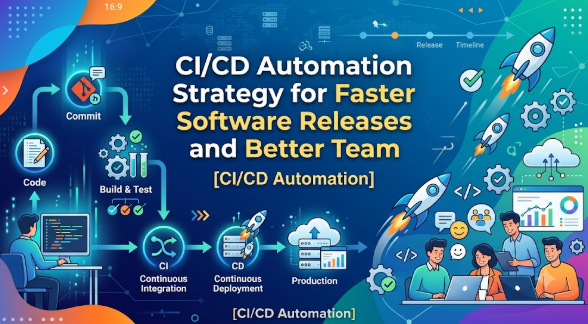
Introduction
Many software teams start with excitement, but release pressure quickly becomes stressful when code changes, testing, bug fixes, approvals, and deployment steps are handled manually. A small mistake in one file, one missed test, or one delayed approval can slow the entire release cycle. This is where CI/CD Automation Matters for Faster Software Releases becomes an important topic for beginners, developers, DevOps learners, product managers, and business owners. CI/CD automation helps teams move from slow, risky, manual releases to a structured delivery process where code is built, tested, checked, and deployed more consistently. It does not remove the need for planning, quality review, or skilled engineers, but it gives teams a reliable system for faster software delivery. This blog explains CI/CD automation in simple words, shows how it works, highlights common mistakes, and gives practical steps for building safer, faster, and more dependable release workflows.
Understanding CI/CD Automation in Simple Words
CI/CD stands for Continuous Integration and Continuous Delivery or Continuous Deployment. In simple words, it is a software delivery method where code changes are automatically checked, tested, and prepared for release instead of waiting for large manual release cycles.
Continuous Integration means developers regularly merge their code into a shared codebase. Every time code is added, automated checks run to make sure the new code does not break the application. Continuous Delivery means the tested code is always kept ready for release. Continuous Deployment goes one step further and automatically releases approved changes to users when all checks pass.
People search for CI/CD automation because they want to understand how modern software teams release faster without depending on repeated manual work. It is used in web applications, mobile apps, cloud platforms, SaaS products, banking systems, e-commerce websites, healthcare software, logistics platforms, and enterprise tools.
For a business, CI/CD automation connects directly with cost control, customer satisfaction, product speed, security discipline, and operational planning. When releases are slow, customers wait longer for bug fixes and new features. When releases are uncontrolled, businesses face outages, support pressure, and trust issues.
For example, imagine an online booking platform where developers update payment code manually. Without automation, one missed test can create payment errors. With CI/CD automation, the code is tested before release, security checks can be added, and the deployment process becomes more controlled.
A common misunderstanding is that CI/CD means releasing code without human responsibility. That is not correct. CI/CD automation supports better decisions; it does not replace engineering judgment.
The practical takeaway is simple: CI/CD automation helps teams release software faster, but its real value comes from quality checks, process discipline, and responsible deployment planning.
Why CI/CD Automation Is Important
CI/CD automation is important because software delivery is no longer only a technical task. It affects customer experience, business speed, operational cost, team productivity, and long-term product trust. When releases are delayed, companies lose time. When releases are rushed without checks, companies face defects, downtime, and frustrated users.
For savings, CI/CD automation reduces repeated manual tasks. Engineers spend less time doing the same build, test, and deployment steps again and again. For planning, it helps product teams estimate releases better because the process becomes more predictable. For risk awareness, automated testing and deployment checks reduce the chance of avoidable errors.
CI/CD automation also supports better investment in software infrastructure. Instead of spending effort on emergency fixes after every release, teams can invest in test automation, monitoring, security checks, and release quality. This improves long-term software discipline.
It also helps reduce emotional decision-making. Without CI/CD, teams may panic before release deadlines and skip important checks. With a defined pipeline, every change must pass agreed quality gates before moving forward.
A practical scenario is a small SaaS company preparing a feature update. Without automation, the team waits until the weekend, manually tests everything, and hopes nothing breaks. With CI/CD automation, every code change is tested during the week, deployment is repeatable, rollback planning is clearer, and the team can release with more confidence.
The better approach is not to chase speed blindly. Faster software releases should come from better automation, better testing, better monitoring, and better teamwork.
The Real Problem Readers Face With CI/CD Automation
The real problem is not only that teams lack CI/CD tools. The bigger problem is that many beginners and businesses do not understand the process behind automation. They hear that CI/CD improves speed, but they do not know how to design a reliable pipeline.
Some teams face too much confusing advice online. One source recommends one tool, another recommends a different platform, and another says full automation is the only modern way. Beginners may feel lost because they do not know where to start.
Another problem is unrealistic expectations. CI/CD automation does not automatically fix bad code, weak testing, unclear requirements, or poor team communication. If the development process is messy, automation may only make mistakes move faster.
Many teams also depend only on social media advice or tool comparisons without understanding their own release problems. They may adopt complex pipelines before learning basic version control, testing discipline, deployment environments, or rollback planning.
Poor comparison is another issue. Some teams choose tools based on popularity instead of checking integration support, security needs, team skills, cost, maintenance effort, and long-term scalability.
Ignoring risk is also common. A pipeline without proper access control, secrets management, approval stages, or monitoring can create serious security and operational problems.
The right next step is to understand the release journey first: code change, integration, build, test, security check, artifact storage, approval, deployment, monitoring, and rollback. Once this flow is clear, CI/CD automation becomes easier to plan and safer to apply.
How CI/CD Automation Works Step by Step
Step 1: Code Is Written and Committed
This step starts when a developer writes code and commits it to a shared version control system. It matters because CI/CD automation needs a clear starting point. Beginners can apply this by using structured branches, meaningful commit messages, and regular code updates. For example, a developer fixing a login bug commits the change to a feature branch. A common mistake is saving code locally for many days and merging everything at once. The better approach is to commit smaller changes regularly so problems are easier to find.
Step 2: Code Is Merged Through a Controlled Process
After code is committed, it usually goes through a review or merge request process. This means another developer or team member checks the code before it enters the main branch. It matters because automation works best when code quality is reviewed early. Beginners can apply this by using pull requests, code review comments, and basic approval rules. For example, a payment feature should be reviewed before it is merged. A common mistake is merging code without review because the release is urgent. The better approach is to keep reviews short, focused, and consistent.
Step 3: Automated Build Is Triggered
When code enters the pipeline, an automated build process starts. This means the application is compiled, packaged, or prepared so it can run correctly. It matters because build failures should be found early, not during final deployment. Beginners can apply this by creating a repeatable build script. For example, a web application may install dependencies and create a production-ready build. A common mistake is building software manually on one developer’s laptop. The better approach is to let the CI/CD pipeline build the application in a clean environment.
Step 4: Automated Tests Are Run
After the build, automated tests check whether the application behaves as expected. These tests may include unit tests, integration tests, API tests, and basic UI checks. It matters because faster releases are risky without testing discipline. Beginners can apply this by starting with small but meaningful tests for important features. For example, a shopping cart application should test checkout calculations. A common mistake is depending only on manual testing at the end. The better approach is to run automated tests on every important code change.
Step 5: Security and Quality Checks Are Added
A good CI/CD pipeline does not only test functionality. It also checks code quality, dependency risk, secret exposure, and basic security issues. This matters because fast releases should not create unsafe software. Beginners can apply this by adding code scanning, dependency checks, and secret detection tools. For example, the pipeline can warn if an API key is accidentally committed. A common mistake is treating security as a final step before launch. The better approach is to shift security checks earlier in the pipeline.
Step 6: Deployment Package Is Created
Once code passes checks, the pipeline creates a deployable artifact such as a container image, package, or build file. This matters because teams need a consistent version of the software to deploy. Beginners can apply this by storing artifacts with version numbers. For example, a container image can be tagged with a release version. A common mistake is deploying untracked files directly from a local machine. The better approach is to deploy only verified artifacts created by the pipeline.
Step 7: Code Is Deployed to the Right Environment
The tested artifact is deployed to an environment such as development, staging, or production. This matters because each environment has a different purpose. Beginners can apply this by testing in staging before production. For example, a new dashboard feature can be deployed to staging for review before users see it. A common mistake is pushing changes directly to production without environment testing. The better approach is to use controlled promotion from lower environments to production.
Step 8: Monitoring, Feedback, and Rollback Are Prepared
After deployment, teams monitor the application to check performance, errors, logs, and user impact. This matters because deployment is not finished when code goes live. Beginners can apply this by setting alerts and preparing rollback steps. For example, if a new release causes login failures, the team should quickly identify and reverse the change. A common mistake is having no rollback plan. The better approach is to treat monitoring and recovery as part of the CI/CD process.
Key Factors That Influence CI/CD Automation
Code Quality
Code quality strongly affects CI/CD automation because pipelines can only validate what the team has prepared. Clean, modular, and readable code is easier to test and deploy. Poor code may pass basic checks but still create long-term problems. The better approach is to combine automation with code review, documentation, and consistent engineering standards.
Test Coverage
Testing is one of the most important parts of CI/CD automation. If there are no meaningful tests, the pipeline may release broken features faster. Beginners should not chase complete test coverage from day one. Instead, they should start with critical user flows such as login, payment, signup, search, and data updates.
Deployment Environment
Development, staging, and production environments should be properly separated. If every environment is different, the release process becomes unpredictable. Teams should keep configurations controlled and documented. A common mistake is testing in one environment and deploying to another environment with different settings.
Security Controls
CI/CD pipelines often need access to code repositories, servers, cloud accounts, databases, and secret keys. Weak access control can create serious risk. Teams should use role-based permissions, secret management, approval stages, and audit logs.
Team Collaboration
CI/CD automation works best when developers, testers, DevOps engineers, security teams, and product owners work together. If teams operate separately, automation becomes fragmented. The better approach is shared ownership of release quality.
Tool Integration
A CI/CD pipeline usually connects with version control, testing tools, container platforms, cloud infrastructure, monitoring systems, and communication tools. Poor integration causes delays. Beginners should choose tools that fit their current workflow instead of selecting tools only because they are popular.
Rollback Planning
Fast deployment is not enough. Teams also need a safe way to recover from failed releases. Rollback planning helps reduce downtime and user impact. Every release should have a recovery plan before it reaches production.
Continuous Improvement
CI/CD automation is not a one-time setup. Pipelines need regular review. Tests become outdated, dependencies change, security risks evolve, and release needs grow. Teams should improve pipelines gradually based on real problems.
Detailed Breakdown of CI/CD Automation
Continuous Integration
Continuous Integration means developers merge code frequently into a shared repository. The goal is to detect problems early. When a developer adds new code, the pipeline automatically builds and tests the application. If something breaks, the team knows quickly.
The mistake beginners make is waiting too long before merging code. Large code changes are harder to review and test. The better approach is to merge small, focused changes more often.
Continuous Delivery
Continuous Delivery means the software is always kept in a release-ready state. It does not always mean the code is automatically released to users. It means every approved change can be released when the team decides.
This helps businesses because release timing becomes a planned decision rather than a stressful event. The common mistake is thinking delivery means deployment without review. The better approach is to keep approval gates where needed.
Continuous Deployment
Continuous Deployment means every change that passes all automated checks can be deployed to production automatically. This approach requires strong testing, monitoring, rollback, and team maturity.
Beginners should be careful with this stage. Automatic production deployment can be powerful, but it is risky if tests are weak. The better approach is to first build confidence with Continuous Integration and Continuous Delivery before moving toward full Continuous Deployment.
Pipeline Design
A CI/CD pipeline is the workflow that moves code from commit to release. A basic pipeline may include build, test, scan, package, deploy, and monitor stages. A strong pipeline is simple enough to maintain and detailed enough to catch important problems.
A common mistake is creating a pipeline that is too complex too early. The better approach is to start small, measure issues, and improve gradually.
Build Automation
Build automation removes dependency on manual build steps. It makes sure every release is created in the same way. This improves consistency and reduces confusion.
For example, instead of asking one engineer to prepare release files manually, the pipeline creates the package automatically. This makes the release process easier to repeat.
Test Automation
Test automation checks whether software features still work after code changes. It helps teams release faster because they do not need to manually retest everything each time.
However, test automation must be meaningful. Tests that do not match real user flows may create false confidence. The better approach is to test the most important business functions first.
Deployment Automation
Deployment automation moves software into the target environment through a repeatable process. It reduces errors caused by manual copying, missed commands, or incorrect configuration.
The common mistake is automating deployment before understanding environment requirements. The better approach is to document deployment steps first, then automate them carefully.
Monitoring and Feedback
Monitoring helps teams know whether a release is working properly. Logs, metrics, alerts, and user feedback help detect problems quickly.
A release without monitoring is incomplete. The better approach is to connect deployment with post-release observation so teams can respond quickly if something goes wrong.
Business Impact
CI/CD automation supports faster software releases, but the business value is broader. It helps teams reduce release delays, improve customer response, manage defects better, and plan product updates with more confidence.
For small businesses, this can mean fewer missed opportunities. For enterprise teams, it can mean better governance, stronger release control, and more reliable operations.
Common Mistakes Beginners Make With CI/CD Automation
Following Random Advice
This happens when beginners copy pipeline structures from blogs, videos, or social media without understanding their own project needs. It is risky because every application has different build, test, security, and deployment requirements. What works for a large enterprise may be too complex for a small team. The better approach is to map your release process first and automate the most painful steps.
Ignoring Risk
Some teams focus only on speed and ignore security, rollback, approvals, and monitoring. This can lead to outages, data exposure, and broken features. The better approach is to make risk checks part of the pipeline.
Not Comparing Options
Beginners may choose CI/CD tools based on popularity instead of fit. This can create integration problems and maintenance pressure. The better approach is to compare tools based on repository support, cloud compatibility, security features, team skills, and cost structure.
Trusting Fake Productivity Claims
Some content presents CI/CD as a magic solution that instantly improves every release. This is misleading. CI/CD automation helps only when the team also improves testing, collaboration, and deployment discipline. The better approach is to treat CI/CD as a long-term engineering practice.
Making Emotional Decisions
Release pressure can make teams skip tests, bypass approvals, or deploy unreviewed changes. This is risky because urgent releases can create bigger problems. The better approach is to follow a documented release checklist even during pressure.
Not Reading Tool Documentation
Many teams connect tools without understanding permission settings, billing rules, environment variables, or security limitations. This can create avoidable failures. The better approach is to review tool settings carefully before using them in production workflows.
Sharing Sensitive Information
Beginners may accidentally store passwords, tokens, or API keys in pipeline files or repositories. This is a serious security risk. The better approach is to use secret management systems and restricted access.
Ignoring Compliance Responsibilities
Some industries require audit trails, approval records, change management, and security reviews. Ignoring these needs can create legal or operational risk. The better approach is to align CI/CD pipelines with compliance expectations.
Depending Only on Social Media Advice
Short posts may explain tools quickly but often skip real-world complexity. The better approach is to learn fundamentals, test small workflows, and document decisions.
Acting in Panic
When a release fails, teams may make random fixes without understanding the root cause. This can make the problem worse. The better approach is to monitor, diagnose, rollback if needed, and then fix carefully.
Don’t Do This Checklist
- Do not deploy directly from a developer’s local machine.
- Do not skip automated tests to save time.
- Do not store secrets inside code repositories.
- Do not give full pipeline access to everyone.
- Do not release to production without rollback planning.
- Do not copy complex pipelines without understanding them.
- Do not ignore failed tests.
- Do not treat CI/CD tools as a replacement for skilled review.
- Do not depend only on manual testing.
- Do not make release decisions under panic or pressure.
Practical Real-Life Examples of CI/CD Automation
Example 1: Small SaaS Team Releasing Feature Updates
A small SaaS team wants to release new dashboard features every week, but manual testing delays every update. The challenge is repeated release pressure. The better action is to automate build and test steps for core features. The learning is that CI/CD automation helps small teams reduce repeated manual effort.
Example 2: E-Commerce Website Fixing Checkout Bugs
An e-commerce website faces checkout errors after small code changes. The mistake is relying only on manual review. The better action is to add automated tests for cart, payment flow, and order confirmation. The learning is that faster software releases need quality checks before deployment.
Example 3: Mobile App Team Managing Frequent Updates
A mobile app team struggles because different developers build the app differently. The challenge is inconsistency. The better action is to create a pipeline that builds the app in a standard environment. The learning is that repeatable builds reduce confusion and release failure.
Example 4: Enterprise Team Handling Compliance Needs
An enterprise team must maintain approval records before production deployment. The mistake is using informal messages for release approval. The better action is to include approval gates and audit logs in the CI/CD workflow. The learning is that automation can support both speed and governance.
Example 5: Startup Avoiding Production Downtime
A startup deploys a major change without monitoring and discovers errors from customer complaints. The challenge is poor post-release visibility. The better action is to connect deployment with alerts, logs, and rollback steps. The learning is that CI/CD does not end at deployment; monitoring is essential.
Two Useful Tables for Better Understanding
Table 1: Manual Release vs CI/CD Automated Release
| Area | Manual Release Approach | CI/CD Automated Approach |
|---|---|---|
| Build Process | Often done by developers manually | Done automatically in a repeatable environment |
| Testing | Mostly manual and delayed | Automated tests run early and regularly |
| Deployment | Higher chance of missed steps | Standardized deployment process |
| Speed | Slower due to repeated manual work | Faster because routine steps are automated |
| Risk Control | Depends heavily on individual attention | Uses checks, approvals, and logs |
| Rollback | Often unclear or delayed | Can be planned as part of release workflow |
| Team Confidence | Lower when releases are unpredictable | Higher when pipelines are stable |
Table 2: Beginner Mistakes and Better CI/CD Approach
| Beginner Mistake | Why It Creates Risk | Better Approach |
|---|---|---|
| Skipping tests | Broken code may reach users | Run automated tests before deployment |
| Storing secrets in code | Sensitive data can be exposed | Use secret management tools |
| Deploying directly to production | No safe review stage | Use staging before production |
| Copying complex pipelines | Hard to maintain and debug | Start simple and improve gradually |
| Ignoring monitoring | Problems are discovered late | Add alerts, logs, and health checks |
| Giving broad access | Security and control risk increases | Use role-based access control |
| No rollback plan | Recovery becomes slow | Prepare rollback steps before release |
Tools, Methods, and Frameworks Readers Can Use
Version Control System
A version control system stores code changes and helps teams collaborate. It helps because CI/CD pipelines usually start when code is committed. Beginners can use it to track changes, review history, and manage branches. It helps avoid the mistake of losing code or merging unclear changes.
CI/CD Pipeline Tool
A CI/CD pipeline tool automates build, test, scan, and deployment steps. It helps teams reduce manual work and standardize release flow. Beginners can start with a simple pipeline that builds code and runs tests. It helps avoid the mistake of depending on one person to prepare every release manually.
Automated Testing Framework
An automated testing framework checks whether application features work as expected. It helps because manual testing alone becomes slow as the product grows. Beginners can start by testing important user flows. It helps avoid the mistake of releasing code without checking business-critical features.
Code Review Method
Code review means another person checks the code before it is merged. It helps improve quality, knowledge sharing, and team accountability. Beginners can use short review checklists for readability, logic, security, and test coverage. It helps avoid the mistake of approving code without proper understanding.
Deployment Checklist
A deployment checklist includes the important items that must be reviewed before release. It helps teams stay calm and structured during release pressure. Beginners can include tests passed, approvals completed, rollback ready, and monitoring active. It helps avoid emotional and rushed release decisions.
Environment Management Method
Environment management means keeping development, staging, and production settings controlled. It helps because different environments can cause unexpected issues. Beginners can document environment variables and configuration rules. It helps avoid the mistake of testing in one setup and deploying to a very different one.
Secret Management Practice
Secret management protects passwords, tokens, keys, and sensitive configuration values. It helps reduce cybersecurity risk. Beginners can avoid putting secrets in code and use controlled storage instead. It helps avoid accidental exposure of sensitive business information.
Monitoring and Alerting System
Monitoring tracks application health after deployment. It helps teams detect problems before users report them widely. Beginners can monitor error rates, response times, logs, and service availability. It helps avoid the mistake of assuming a release is successful just because deployment completed.
Rollback Framework
A rollback framework defines how to return to a previous stable version if something fails. It helps reduce downtime and panic. Beginners can document rollback steps before every major release. It helps avoid confusion during production incidents.
Release Review Meeting
A release review meeting helps teams learn from successful and failed releases. It helps improve future pipelines, test coverage, and team coordination. Beginners can review what went well, what failed, and what should improve. It helps avoid repeating the same release mistakes.
Expert Tips to Make Better Decisions
1. Start With the Release Problem, Not the Tool
This matters because tools cannot fix unclear processes. Beginners should first write down where releases slow down: testing, approvals, deployment, rollback, or monitoring. Then they should choose automation based on the real problem.
2. Keep the First Pipeline Simple
A simple pipeline is easier to understand, debug, and improve. Beginners should start with build and test automation before adding advanced stages. This avoids creating a pipeline that nobody wants to maintain.
3. Automate Repeated Manual Work First
Repeated manual tasks create delays and mistakes. Teams should identify tasks done the same way every release and automate them first. This gives practical value without overwhelming the team.
4. Treat Tests as Release Protection
Tests are not only technical checks; they protect users and business trust. Beginners should write tests for important features before less critical areas. This helps avoid releasing broken core functionality.
5. Use Code Review Before Automation Approval
Automation checks many things, but humans still understand business logic and context better. Code review helps catch unclear logic, missing cases, and risky assumptions. Teams should not skip review just because the pipeline passes.
6. Protect Secrets Carefully
CI/CD pipelines often connect with cloud services and production systems. Leaked secrets can create serious damage. Beginners should use secure secret storage and avoid placing sensitive values in code files.
7. Add Monitoring Early
A deployment without monitoring is incomplete. Teams should track errors, performance, and service health after each release. This helps identify issues before they become larger incidents.
8. Do Not Automate Bad Processes
If a manual process is confusing, automation may make it fail faster. Teams should simplify the process before automating it. This helps avoid turning weak practices into permanent pipeline problems.
9. Use Staging Before Production
A staging environment helps teams test releases in a controlled setup. Beginners should use staging to validate major changes before users see them. This reduces production risk.
10. Document Pipeline Decisions
Documentation helps new team members understand why the pipeline is designed a certain way. Teams should document stages, approvals, secrets, rollback steps, and ownership. This avoids confusion when issues happen.
11. Review Failed Pipelines Carefully
A failed pipeline is useful feedback. Teams should not ignore failures or bypass them casually. Beginners should check the cause, fix properly, and improve tests or scripts when needed.
12. Avoid Over-Automation Too Early
Not every step needs automation immediately. Some approval or review steps may still need human judgment. Teams should automate gradually based on maturity and risk level.
13. Measure Quality, Not Only Speed
Faster releases are valuable only when quality remains strong. Teams should track failed deployments, rollback frequency, test failures, and user issues. This helps balance speed with reliability.
14. Keep Emergency Fixes Controlled
Urgent fixes are sometimes necessary, but they should still follow a safe process. Teams can create a fast-track path with required checks instead of skipping everything. This protects users during pressure.
15. Improve the Pipeline Regularly
CI/CD automation needs ongoing improvement. Teams should review pipeline speed, test quality, security checks, and deployment outcomes. This keeps the system useful as the product grows.
Case Studies: How Better Understanding Changes Decisions
Case Study 1: Small Product Team Moving From Manual Releases
Profile: A five-member software team building a customer support platform.
Situation: The team released updates manually every two weeks. One developer prepared files, another tested manually, and deployment happened late at night.
Problem: Releases were stressful, and small bugs reached users because manual checks were inconsistent.
Wrong Approach: The team first tried to copy a complex enterprise CI/CD pipeline. It had too many stages and confused everyone.
Better Approach: The team simplified its process. First, it automated builds. Then it added unit tests for login, ticket creation, and notification features. Later, it added staging deployment.
Result or Learning: Releases became more predictable because the team automated the most painful steps first.
Key Takeaway: CI/CD automation works best when teams start with real problems and improve gradually.
Case Study 2: E-Commerce Business Reducing Checkout Release Risk
Profile: A growing e-commerce business with frequent product and checkout updates.
Situation: The business needed faster software releases during sales campaigns, but checkout changes were risky.
Problem: Manual testing missed edge cases such as coupon use, delivery charges, and failed payment responses.
Wrong Approach: The team planned to release faster by reducing testing time.
Better Approach: The team added automated tests for cart calculation, coupon validation, payment response, and order confirmation. It also created rollback steps for payment-related releases.
Result or Learning: The team learned that speed should come from better automation, not fewer checks.
Key Takeaway: Faster software releases are safer when automation protects business-critical flows.
Case Study 3: Enterprise Team Balancing Speed and Compliance
Profile: An enterprise software team managing internal finance applications.
Situation: The team wanted faster releases but needed approval records and controlled access.
Problem: Manual approvals through messages were difficult to track, and deployment access was too broad.
Wrong Approach: The team considered giving more people production access to speed up releases.
Better Approach: The team added approval gates, role-based access, audit logs, and controlled deployment stages in the CI/CD pipeline.
Result or Learning: The team improved release speed while keeping governance and accountability.
Key Takeaway: CI/CD automation can support both faster delivery and responsible control when designed carefully.
Risk Awareness: What Readers Must Check First
Security Risk
Security risk means the chance that code, systems, credentials, or infrastructure can be misused or exposed. It matters because CI/CD pipelines often connect to sensitive systems. Readers can reduce this risk by using access control, secret management, code scanning, and limited permissions.
Deployment Risk
Deployment risk means the chance that a release may break features or affect users. It matters because faster releases can create faster failures if checks are weak. Teams can reduce this risk through automated testing, staging validation, monitoring, and rollback planning.
Data Privacy Risk
Data privacy risk means sensitive user or business information may be exposed. It matters especially when applications handle customer data, payments, health details, or internal records. Teams can reduce this risk by avoiding sensitive data in logs, protecting secrets, and following privacy-aware development practices.
Tool Misconfiguration Risk
Tool misconfiguration happens when CI/CD tools, cloud accounts, or permissions are set incorrectly. It matters because one wrong permission can create security or operational exposure. Teams can reduce this risk by reviewing settings, using least-privilege access, and documenting configurations.
Compliance Risk
Compliance risk appears when software delivery does not meet required industry, legal, or internal standards. It matters for businesses in finance, healthcare, government, and enterprise environments. Teams can reduce this risk with approval gates, audit trails, documentation, and professional review where required.
Cost Risk
Cost risk means automation tools, cloud builds, storage, and deployment resources may increase expenses if not monitored. It matters because uncontrolled pipeline usage can create budget pressure. Teams can reduce this risk by reviewing usage, removing unnecessary jobs, and choosing tools based on actual needs.
Misinformation Risk
Misinformation risk happens when beginners follow incomplete or misleading advice about CI/CD. It matters because poor implementation can create more problems than benefits. Readers can reduce this risk by learning fundamentals, testing small workflows, and verifying recommendations.
Emotional Decision Risk
Emotional risk happens when teams skip checks due to deadlines, pressure, panic, or overconfidence. It matters because rushed releases often create avoidable failures. Teams can reduce this risk by following written checklists and keeping emergency release rules clear.
Readers should always verify technical details, review tool documentation, and consult qualified software, security, DevOps, legal, or compliance professionals when decisions affect production systems, customer data, or regulated environments.
Checklist Before Taking Action
- Understand what CI/CD automation means before choosing tools.
- Identify the biggest release problem in your current workflow.
- Review whether your code is stored in a version control system.
- Check whether your team uses code review before merging changes.
- Start with build and test automation before advanced deployment.
- Add security checks before connecting production systems.
- Keep secrets, tokens, and passwords out of code repositories.
- Use separate development, staging, and production environments.
- Compare tools based on team skills, integrations, security, and cost.
- Avoid fake promises that CI/CD will solve every delivery problem instantly.
- Keep emergency deployment rules documented.
- Prepare rollback steps before production release.
- Add monitoring and alerts for important application areas.
- Review compliance requirements if your industry needs them.
- Protect personal, customer, and business data.
- Avoid emotional release decisions under deadline pressure.
- Keep written documentation for pipeline stages and ownership.
- Consider professional guidance for complex cloud, security, or compliance setups.
This checklist should be used before building or improving a CI/CD pipeline. Beginners can use it as a practical safety review so they do not focus only on speed while ignoring testing, security, monitoring, and long-term maintainability.
Strategic Insights for Better Decision-Making
Release Frequency
Release frequency means how often a team delivers code changes. Frequent releases can reduce large deployment pressure, but only when quality controls are strong. Beginners should not increase release frequency until testing and monitoring are reliable.
Pipeline Ownership
Every CI/CD pipeline needs clear ownership. If nobody owns the pipeline, failures remain unresolved. Teams should decide who maintains scripts, fixes failed jobs, manages credentials, and reviews pipeline performance.
Shift-Left Testing
Shift-left testing means testing earlier in the development process. It helps teams find problems before they reach production. For example, a login error should be caught during code integration, not after customers complain.
Deployment Strategy
Deployment strategy decides how code reaches users. Common approaches include staged deployment, blue-green deployment, and canary release. Beginners can start with simple staging-to-production flow before adopting advanced methods.
Rollback Discipline
Rollback discipline means preparing a safe way to return to a stable version. It matters because not every release will work perfectly. A rollback plan reduces panic and helps teams recover faster.
Environment Consistency
If staging and production are very different, testing becomes less reliable. Teams should keep environments as similar as practical. This reduces surprises during production deployment.
Security-by-Design
Security should be part of pipeline planning, not an afterthought. Teams can include secret scanning, dependency checks, and access reviews. This helps prevent risky code from moving forward.
Business-Critical Flow Protection
Not every feature has the same risk. Login, payment, order processing, user data, and admin access usually need stronger testing. Teams should prioritize automation around the flows that matter most to users and business operations.
Feedback Loops
A strong CI/CD process gives quick feedback to developers. If a test fails, the team should know quickly. Fast feedback reduces wasted time and helps developers fix issues while the code is still fresh.
Continuous Improvement Mindset
CI/CD automation should improve over time. Teams should review failed releases, slow stages, flaky tests, security gaps, and manual bottlenecks. This turns CI/CD into a long-term delivery discipline rather than a one-time setup.
Key Terms Explained for Beginners
- CI/CD: CI/CD means Continuous Integration and Continuous Delivery or Deployment. It is a method for building, testing, and releasing software more consistently.
- Continuous Integration: Continuous Integration means developers frequently merge code into a shared repository where automated checks can run.
- Continuous Delivery: Continuous Delivery means tested code is kept ready for release, but the final production release may still need approval.
- Continuous Deployment: Continuous Deployment means approved code that passes all checks can be released automatically to production.
- Pipeline: A pipeline is the automated workflow that moves code from commit to build, testing, deployment, and monitoring.
- Build: A build is the process of preparing software so it can run. It may include compiling code, installing dependencies, or creating packages.
- Automated Testing: Automated testing uses scripts or tools to check whether software works correctly after changes.
- Artifact: An artifact is the final package, container image, or build output created by the pipeline for deployment.
- Staging Environment: A staging environment is a testing setup that helps teams review changes before production release.
- Production Environment: Production is the live environment where real users access the software.
- Rollback: Rollback means returning to a previous stable version when a new release causes problems.
- Version Control: Version control stores code history and helps teams manage changes safely.
- Secret Management: Secret management protects passwords, tokens, keys, and sensitive configuration values.
- Deployment: Deployment is the process of moving software into an environment where it can run.
- Monitoring: Monitoring tracks application health, errors, performance, and availability after deployment.
Who Should Read This Blog
Beginners
Beginners should read this blog to understand CI/CD automation without technical confusion. It explains the topic step by step and avoids unnecessary jargon.
Students
Students learning software development, DevOps, or cloud computing can use this blog to understand how modern release workflows work in real projects.
Salaried Employees
Salaried professionals working in IT, QA, support, project management, or operations can understand how CI/CD affects productivity, release quality, and team coordination.
Small Business Owners
Small business owners with software products can learn why manual releases may slow growth and increase operational risk.
New Developers
New developers can understand why code review, automated tests, and regular commits matter in professional engineering teams.
DevOps Learners
DevOps learners can use this blog as a practical foundation for understanding pipelines, automation, deployment, monitoring, and rollback.
Product Managers
Product managers can learn how CI/CD automation supports faster feature delivery, better planning, and more predictable releases.
Startup Founders
Startup founders can understand why release speed should be balanced with security, testing, and customer trust.
Finance and Business Bloggers
Finance and business bloggers covering technology transformation can understand how CI/CD automation connects with productivity, cost control, and operational discipline.
People Improving Digital Awareness
Anyone trying to understand modern software delivery can use this blog to learn how automation supports faster, safer, and more reliable applications.
Frequently Asked Questions
1. What is CI/CD automation?
CI/CD automation is the process of automatically building, testing, checking, and deploying software changes. It helps teams reduce manual work and release software more consistently. It is commonly used in modern DevOps and cloud-based software delivery.
2. Why CI/CD Automation Matters for Faster Software Releases?
Why CI/CD Automation Matters for Faster Software Releases is important because manual release processes are often slow and error-prone. Automation helps teams detect problems earlier, reduce repeated tasks, and deploy changes with better control. It supports faster delivery without ignoring quality.
3. Is CI/CD automation only for large companies?
No, CI/CD automation is useful for small teams, startups, and growing businesses too. A small team can start with simple build and test automation. The key is to begin with practical steps instead of copying complex enterprise pipelines.
4. Does CI/CD automation remove the need for manual testing?
No, CI/CD automation does not remove all manual testing. It reduces repeated testing work and catches common issues early. Manual testing may still be needed for user experience, complex workflows, and final business review.
5. What is the biggest mistake beginners make with CI/CD?
The biggest mistake is focusing only on tools instead of understanding the release process. A tool cannot fix unclear testing, weak code review, or poor deployment planning. Beginners should first understand their workflow and then automate carefully.
6. How does CI/CD automation improve software quality?
CI/CD automation improves software quality by running checks whenever code changes. It can detect build errors, failed tests, security issues, and deployment problems earlier. This helps teams fix issues before they reach users.
7. Is Continuous Delivery the same as Continuous Deployment?
No, they are different. Continuous Delivery keeps code ready for release, but a human approval may still be required. Continuous Deployment automatically releases code to production when all checks pass.
8. Why CI/CD Automation Matters for Faster Software Releases in startups?
Why CI/CD Automation Matters for Faster Software Releases in startups is simple: startups need speed, but they also need reliability. Automation helps small teams release updates without depending fully on manual work. It also reduces pressure during urgent changes.
9. What risks should teams check before using CI/CD automation?
Teams should check security risk, access control, secret management, deployment risk, monitoring, rollback planning, and compliance needs. Fast automation without safeguards can create serious problems. Risk review should be part of the pipeline plan.
10. Can CI/CD automation reduce software release costs?
It can reduce repeated manual effort and release delays, but it may also require tool setup, maintenance, cloud resources, and team training. The value depends on how well the pipeline is planned and used. Teams should review both benefits and operational costs.
11. How can beginners start with CI/CD automation safely?
Beginners can start by using version control, creating a simple build pipeline, and adding basic automated tests. After that, they can add staging deployment, security checks, and monitoring. Starting small is safer than building a complex pipeline too early.
12. What is the best next step after learning Why CI/CD Automation Matters for Faster Software Releases?
The best next step is to review your current release process and identify the most painful manual steps. Then create a simple pipeline that builds and tests your application. Improve gradually by adding security, deployment, monitoring, and rollback steps.
Conclusion and Next Steps
CI/CD automation is one of the most important practices for modern software teams because it helps turn slow, stressful, manual release work into a more structured and reliable delivery process. The main lesson from Why CI/CD Automation Matters for Faster Software Releases is that speed should never come from skipping quality checks. Real speed comes from repeatable builds, automated tests, secure pipelines, controlled deployments, useful monitoring, and clear rollback planning. Beginners should remember that CI/CD is not only about tools; it is about better teamwork, better engineering habits, and better release discipline. A business that understands CI/CD automation can plan product updates more confidently, respond to user needs faster, and reduce avoidable release mistakes. The practical next step is to review your current release workflow, identify repeated manual tasks, add version control discipline, start with basic build and test automation, and improve the pipeline slowly. Teams should also check risks before production deployment, especially around security, access control, secrets, compliance, data privacy, and monitoring. Long-term success comes from continuous improvement, not one-time setup. CI/CD automation does not guarantee perfect releases, but it gives teams a stronger foundation for safer and faster software delivery. When planned responsibly, it helps developers, DevOps teams, product managers, and business owners work with more confidence and less release chaos.
A key factor in successful CI/CD adoption is balancing automation with visibility. Automated pipelines are powerful, but teams also need clear feedback and monitoring so issues can be identified and resolved before they affect production.