Introduction
Many business owners and project managers enter the software development space with great excitement, but they often feel confused when development timelines stretch from weeks into months. Launching a new application feature or fixing a critical bug can feel like steering a massive ship through a narrow canal. Code gets written quickly, yet it sits stalled for weeks in testing queues, manual configuration steps, and security reviews. This delay creates a severe business pain point: while your software remains stuck in development limbo, competitors win the market, customers grow frustrated, and engineering costs skyrocket.
For tech beginners and business leaders, the operational disconnect between developers (the people who build software) and IT operations (the people who maintain systems) is incredibly confusing. Developers want to push changes rapidly to satisfy users, while operations teams want to keep systems stable by limiting changes. This traditional divide causes friction, miscommunication, and catastrophic deployment failures. Failing to understand how to bridge this gap leads to severe commercial mistakes, including missed product launches, waste of technical budgets, and unstable systems that crash during high-traffic events.
This comprehensive guide will explain exactly how DevOps helps businesses improve software delivery speed without sacrificing system stability. We will strip away the confusing corporate buzzwords to reveal the core methods that top technology teams use to ship software daily. Whether you manage a small business website, oversee a corporate IT budget, or operate an e-commerce platform, this blog will provide you with practical, foundational knowledge. You will learn how automation, cultural shifts, and continuous testing remove operational bottlenecks.
In the digital economy, making tech decisions based on vague assumptions or rushed timelines can permanently damage your brand. Developing a grounded, practical understanding of modern software deployment is always superior to hunting for quick fixes or forcing engineers to work unrealistic overtime. This guide serves as a reliable, expert blueprint to help you navigate software operations safely, ensuring your business stays agile, profitable, and highly trusted by your users.
Understanding DevOps and Delivery Speed in Simple Words
What It Is
DevOps is a combination of cultural philosophies, engineering practices, and automation tools that merges software development (Dev) and IT operations (Ops). Instead of treating these teams as isolated silos, DevOps unites them into a single, collaborative unit that shares responsibility for the software throughout its entire lifecycle.
How It Works
Think of software development like an automobile assembly line. In a traditional setup, workers build a car body by hand and pass it over a wall to a separate team that installs the engine, with minimal communication between them. If the engine does not fit, the car is thrown back over the wall, causing massive delays.
DevOps replaces this manual process with a fully automated, coordinated assembly line. The moment a developer writes code, automated systems instantly test it, check its fit within the overall application, and prepare it for deployment. People search for this methodology because they need to move away from slow, unpredictable manual workflows toward predictable, high-speed digital operations.
Real-World Connection
In real life, this directly impacts business profitability and software performance. For instance, when a retail website experiences a security bug during a major shopping holiday, a traditional setup might take days to approve, test, and apply a manual patch. A DevOps-driven business can identify the bug, run automated safety checks, and deploy the fix to production within minutes, protecting company revenue.
- Common Misunderstanding: Many people assume that DevOps is simply a collection of expensive software tools that you can buy and install overnight. In reality, tools are useless without a cultural shift toward shared ownership and transparency.
- Practical Takeaway: High software delivery speed is not achieved by typing code faster; it is achieved by removing the dead waiting time between development, testing, and system deployment.
Why Accelerating Software Delivery Is Important for Business
Accelerating software delivery changes how a business responds to market realities and manages its digital infrastructure. When a company can release updates safely and frequently, every department experiences operational improvements.
Risk Awareness & Better Planning
Fast, iterative delivery allows teams to break massive software releases into tiny, manageable components. Instead of deploying a year’s worth of code in one highly risky launch event, teams deploy small changes daily. This makes planning highly precise and reduces the emotional stress of software releases. If an error occurs, it is far easier to troubleshoot a minor change made an hour ago than a massive system overhaul built over six months.
Long-Term Operational Discipline
The discipline required to build a high-speed software pipeline naturally cleans up a company’s technical environment. It forces teams to document their workflows, write automated testing suites, and eliminate messy, uncoordinated manual workarounds. This structured environment prevents emotional decision-making when technical emergencies arise, replacing panic with automated, repeatable recovery steps.
A Practical Scenario
Consider an insurance company trying to launch a new digital claim filing feature for its policyholders.
Traditional Approach:
[6 Months Development] -> [2 Months Manual Testing] -> [Bug Found] -> [2 Weeks Delay]
Result: Competitors launch first; customers switch providers due to poor digital experience.

DevOps Approach:
[Weekly Incremental Builds] -> [Automated Security Checks] -> [Live Feedback]
Result: Safe, functional feature goes live in 4 weeks; market share is preserved.
By prioritizing delivery speed through structural discipline, businesses protect their development investments, keep customer satisfaction high, and maintain a highly reliable software platform.
The Real Problem Businesses Face with Slow Delivery Cycles
The primary driver behind the adoption of DevOps is the hidden, systemic cost of slow software development. Organizations often fail to recognize that a sluggish pipeline is a symptom of deep operational fractures.
Lack of Awareness and Too Much Confusing Advice
Many executives know their software delivery is slow, but they are overwhelmed by confusing, overly technical advice found online. They are told to buy complex cloud architectures or hire expensive specialists without understanding their baseline bottlenecks. This lack of clear guidance leads to expensive tool investments that fail to improve actual delivery times.
Emotional Decision-Making and Poor Planning
When development projects stall, management often makes panic-driven adjustments. They pressure developers to skip safety steps, write code faster, or work exhausting hours. This emotional pressure leads to messy code, high employee burnout, and critical system outages. It treats the symptom (slowness) by exacerbating the cause (poor process discipline).
Weak Comparisons and Unrealistic Expectations
Organizations frequently copy the deployment workflows of giant tech monopolies without evaluating their own team’s maturity level or actual business constraints. They expect instant velocity jumps, completely ignoring the fact that their engineering teams are still trapped by manual server configurations, a lack of automated test environments, and rigid corporate silos.
Ignoring Risks and Terms
When speed is pushed mechanically without the foundational automated guardrails of DevOps, teams overlook security vulnerabilities, regulatory compliance issues, and system architecture weaknesses. They depend heavily on unverified tribal knowledge or random online scripts to fix bugs, leading to unstable production environments where nobody knows exactly what code is currently running live.
How DevOps Accelerates Software Delivery Step by Step
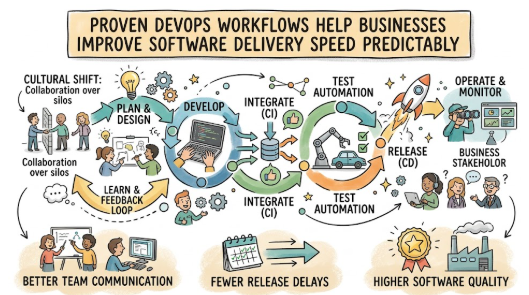
To safely improve your software delivery speed, your engineering and operations teams must implement an integrated workflow. Here is the step-by-step blueprint for building a high-speed DevOps delivery pipeline.
1.Establish Continuous Integration (CI):Automate the Code Consolidation.
Developers frequently merge their code changes into a central, shared repository. Every code contribution triggers an automated build process to verify that the new additions do not break the existing application structure.
Example: A developer submits a feature update, and the CI server builds the application automatically within 3 minutes.
Common Mistake: Developers keep code isolated on private machines for weeks, causing massive integration conflicts later.
Better Approach: Merge code changes back to the main branch at least once per day to keep conflicts small and manageable.
2.Automate Continuous Testing:Validate Quality Instantly.
Embed automated testing directly into the delivery pipeline. The moment code passes the initial build stage, automated unit tests, integration checks, and security scans run immediately to evaluate software health.
Example: The pipeline runs 5,000 automated validation tests in 10 minutes, checking user authentication and data encryption.
Common Mistake: Relying entirely on manual QA teams who must click through every screen by hand over several days.
Better Approach: Build a robust automated test suite that covers core application logic, leaving manual testing only for complex user experiences.
3.Implement Infrastructure as Code (IaC):Standardize the Computing Environments.
Define servers, networks, and cloud infrastructure using code files rather than configuring them manually by hand. This ensures that development, testing, and live production environments are perfectly identical.
Example: A configuration script provisions a brand-new, secure cloud server environment automatically in less than 5 minutes.
Common Mistake: System administrators manually configure production servers, creating untraceable setting differences.
Better Approach: Treat environment configurations exactly like software code, storing them in version control for complete traceability.
4.Deploy via Continuous Delivery (CD):Automate the Release Workflow.
Configure the pipeline to automatically package and deploy code that has passed all testing stages into a staging or production environment. This makes publishing an update a routine, low-risk administrative event.
Example: The operations team clicks a single button to push a fully verified software update live to millions of users.
Common Mistake: Holding manual release meetings that drag on for hours while engineers copy files over via unencrypted networks.
Better Approach: Use automated deployment scripts that execute predictable, repeatable release steps instantly.
5.Configure Continuous Monitoring:Track Live System Performance.
Install real-time monitoring and logging tools across your live production environments. These systems track application performance, CPU usage, and user error rates continuously to flag anomalies instantly.
Example: An automated dashboard detects an unexpected 5% spike in payment errors and immediately pages the on-call engineer.
Common Mistake: Waiting for angry customers to call your support desk before realizing that a live feature is broken.
Better Approach: Set up automated alerting thresholds that warn your engineering team before performance drops affect users.
6.Embed Automated Feedback Loops:Inform Engineering Instantly.
Connect system monitoring data directly back to the development team. Bugs, performance regressions, and security alerts are logged automatically into the team’s project tracking system for immediate prioritization.
Example: Production monitoring identifies a slow database query and automatically files a high-priority ticket for the backend team.
Common Mistake: Ignoring operations logs, allowing the same software bugs to reappear in subsequent releases.
Better Approach: Review operational metrics during weekly planning meetings to optimize application performance continuously.
Key Factors That Influence Software Delivery Speed
Understanding the structural variables within your technical organization helps you target bottlenecks accurately. The following variables dictate how quickly your team can ship stable code.
1. Automation Coverage Ratio
The percentage of your deployment pipeline that runs without human intervention directly limits your maximum delivery speed. If your code compilation, environment setup, and security compliance checks require manual signatures or manual typing, your pipeline will always stall. High-speed organizations automate everything except strategic design decisions.
2. Deployment Architecture
Monolithic systems—where an entire corporate application is built as a single, giant block of code—slowing down delivery speed dramatically. A tiny change in the payment module requires rebuilding and retesting the entire system. Breaking applications into modular microservices allows small teams to develop, test, and deploy independent components quickly without impacting the broader ecosystem.
3. Team Autonomy and Silo Reduction
If your developers must wait for an external database team to approve a minor schema update, and then wait for an operations team to allocate a test server, your delivery schedule will remain broken. DevOps succeeds by forming cross-functional teams that contain developers, QA engineers, and security specialists working toward a shared delivery metric.
4. Code Base Health and Technical Debt
Rushing software out the door without cleaning up sloppy code creates “technical debt.” Over time, this debt compounds, making the codebase fragile, confusing, and highly unpredictable. Engineers spend 80% of their time fixing regressions caused by new changes rather than delivering fresh business value. Maintaining strict linting (automated code formatting) and regular refactoring preserves long-term velocity.
Detailed Breakdown of DevOps Implementation Mechanics
The Core Conflict: Autonomy vs. Control
The underlying magic of DevOps lies in resolving the fundamental tension between software velocity and operational stability. Traditionally, speed and safety were treated as a zero-sum game: if you wanted more speed, you had to accept more system crashes. DevOps breaks this false binary by transforming safety policies into automated code validations.
Architectural Modernization
To achieve rapid software delivery, organizations must decouple their software components. When applications are tightly coupled, a bug in an unessential feature can crash the core transactional database. By adopting API-driven architectures, teams create clean contracts between software modules. This structural insulation allows teams to upgrade individual modules independently, dropping deployment risk to near zero.
The Role of Configuration Management
A massive source of delivery delays is the “it worked on my machine” phenomenon. A developer builds a feature that functions perfectly on their local laptop, but it crashes instantly when deployed to production because the live server runs a different version of an operating system component. DevOps eliminates this issue entirely by using containerization technologies.
[Developer Code] + [Exact System Dependencies]
                   ↓ Wrapped inside
            [Secure Container]
                   ↓ Behaves identically on
   [Local Laptop] → [Staging Server] → [Live Cloud Environment]
Containers package the software code along with the exact system files, configurations, and dependencies it needs to execute. This package runs identically across all cloud infrastructure, removing environmental guesswork and deployment-day troubleshooting.
Cultural Transformation and Blameless Post-Mortems
You cannot fix a technical pipeline without fixing the team culture. When a live software deployment fails in a traditional organization, management searches for a scapegoat to punish. This creates a culture of fear, where engineers delay deployments because they want to avoid blame.
DevOps implements “blameless post-mortems.” When a failure occurs, the team assumes that engineers acted with good intentions based on the information they had. The investigation focuses entirely on identifying the gap in the automated pipeline that allowed the flawed code to slip through. Fixing the process ensures that specific error type can never happen again.
Common Mistakes Beginners Make with DevOps Speed
When organizations attempt to speed up their software delivery, they often fall into common process traps that undermine their goals.
- Prioritizing Speed Over Automated Testing: Pushing code faster to production without a robust automated testing framework simply breaks your live environment faster. Velocity without validation is a direct path to system downtime.
- Buying Advanced Tools Without Changing Culture: Teams often purchase expensive enterprise DevOps dashboards but continue to operate in rigid, uncommunicative silos. Tools simply automate your existing processes; if your process is broken, tools only accelerate the mess.
- Creating a Separate “DevOps Silo Team”: Appointing a separate team to handle DevOps often creates a third silo. DevOps is a shared operational philosophy, not an isolated department responsible for cleaning up after developers.
- Ignoring Telemetry and Logs: Building an automated deployment pipeline without real-time monitoring leaves your team blind. You must track performance metrics continuously to know if your high-speed releases are helping or hurting users.
The “Don’t Do This” Checklist
- Never deploy unverified code directly to production servers by hand.
- Do not allow developers to skip local compliance and security scans to hit deadlines.
- Never hardcode sensitive passwords, API keys, or database credentials inside your application code repositories.
- Do not plan software releases larger than a two-week development scope.
- Never blame individual engineers for systemic process failures or automated pipeline gaps.
Practical Real-Life Examples of DevOps in Action
- Situation: A growing e-commerce retailer experiences heavy manual work, where deploying software updates requires engineers to work late on weekends, manually copying code files onto live servers.Mistake: The team rushes a checkout page update without manual environment checks, which mismatches the live database version and crashes the shopping cart for 6 hours.Better Action: The company implements Infrastructure as Code (IaC) and an automated deployment pipeline to standardize configurations across all testing and production servers.Learning: Eliminating manual server configuration steps prevents human errors and allows teams to deploy software safely during regular business hours.
- Situation: A financial technology provider needs to update its user mobile dashboard but faces a 3-month testing cycle handled by an external compliance team.Mistake: Management forces the engineering team to skip the manual security compliance queue to launch a new feature ahead of a major competitor.Better Action: The team builds automated security scanning and compliance policy checks directly into their Continuous Integration (CI) pipeline.Learning: Moving security validation directly into the automated build pipeline ensures compliance at high speeds, removing external bureaucratic delays.
- Situation: A SaaS startup finds that its application becomes slow and unresponsive every time developers release a new product feature.Mistake: The team continually adds new features to fix performance issues without setting up real-time production monitoring tools.Better Action: They deploy continuous monitoring tools that automatically track application response times and immediately alert the team when code slows down.Learning: Real-time operational data allows developers to catch and fix performance regressions before they impact the user experience.
- Situation: A logistics firm manages a massive, interconnected software platform where a single bug can stop supply chain operations.Mistake: They organize long monthly release meetings where dozens of developers attempt to merge thousands of lines of uncoordinated code simultaneously.Better Action: They break the application down into independent modules and require developers to merge small code segments daily.Learning: Merging small, frequent code updates lowers deployment risk and simplifies debugging when errors occur.
- Situation: A digital media company relies entirely on a single systems administrator to manually configure cloud environments for new projects.Mistake: The administrator falls ill during a critical project launch, leaving the development team unable to test or deploy their completed code.Better Action: The company documents all infrastructure setups in code repositories, allowing any developer to spin up identical testing environments automatically.Learning: Codifying infrastructure removes single points of dependency and ensures continuous software delivery regardless of individual availability.
Two Useful Tables for Better Understanding
Table 1: Traditional Software Delivery vs. DevOps Delivery
| Operational Metric | Traditional Software Workflow | DevOps Automated Workflow |
| Deployment Frequency | Monthly, quarterly, or bi-annually | Daily, or multiple times per day |
| Lead Time for Changes | Weeks or months from code to production | Minutes or hours from code to production |
| Testing Methodology | Manual QA verification phases at the end | Continuous, automated testing inside the pipeline |
| Infrastructure Management | Manual server provisioning and configuration | Automated Infrastructure as Code (IaC) |
| Change Failure Rate | High (releases frequently break live systems) | Low (small changes are thoroughly pre-tested) |
| Mean Time to Recovery (MTTR) | Hours or days of troubleshooting and patching | Minutes via automated rollbacks or fast patches |
Table 2: Common DevOps Engineering Bottlenecks and Solutions
| Technical Bottleneck | Business & Operational Impact | DevOps Remediation Strategy |
| Manual Server Configuration | Environment drift; “worked on my machine” errors | Implement Infrastructure as Code (IaC) templates |
| Infrequent Code Merging | Complex, painful code integration conflicts | Mandate daily main-branch Continuous Integration |
| Manual QA Testing Regression | Testing queues delay releases for weeks | Build an automated, multi-tiered testing suite |
| Large, Monolithic Codebases | Team dependencies; high blasting radius for bugs | Decouple systems into modular microservices |
| Lack of Live System Visibility | Slow detection of bugs; customer complaints | Deploy continuous monitoring and real-time alerting |
Tools, Methods, and Frameworks Readers Can Use
1. Version Control Systems (VCS)
The absolute foundation of all DevOps practices is a reliable version control system like Git. It tracks every line of code change, records who made it, and allows teams to roll back to previous stable states instantly if an update fails. It acts as the single source of truth for both software code and infrastructure configuration files.
2. DORA Metrics Framework
The DevOps Research and Assessment (DORA) framework provides teams with four clear metrics to measure delivery speed and operational stability accurately.
- Deployment Frequency: How often your organization successfully releases code to production.
- Lead Time for Changes: The time it takes for a committed line of code to reach live production.
- Change Failure Rate: The percentage of deployments that cause a failure or require a rollback.
- Mean Time to Recovery (MTTR): How long it takes to restore service when a production outage occurs.
3. Automated CI/CD Runners
Tools such as Jenkins, GitHub Actions, or GitLab CI act as the digital engine of your delivery pipeline. They listen for code updates, automatically spin up clean testing containers, run your validation checks, and securely push approved code into production servers, eliminating manual effort.
Expert Tips to Make Better Decisions
- Learn Before Taking Action: Do not buy complex cloud enterprise tools until your team thoroughly understands the basic principles of automated building and testing.
- Start Small with a Pilot Project: Choose a small, non-critical application module to practice your initial DevOps pipeline automation before migrating your core business engines.
- Compare Infrastructure Costs Carefully: Automated cloud scaling can save money, but unmonitored testing environments will quickly inflate your monthly cloud provider invoices.
- Check Risk Before Pushing Speed: Ensure your automated testing suite covers security vulnerabilities and data privacy compliance before aiming for multiple daily deployments.
- Keep Complete Written Infrastructure Records: Never allow engineers to adjust production server configurations without committing those changes to your central code repository.
- Review Your Deployment Metrics Monthly: Track your DORA metrics regularly to identify whether your engineering team is hitting process bottlenecks or running into high error rates.
- Protect Your Automated Pipeline Access: Restrict access to your deployment systems using strict multi-factor authentication to prevent malicious code injections.
- Avoid Fake “Instant DevOps” Promises: Be skeptical of consultants who promise immediate performance gains without addressing team communication styles and cultural silos.
- Read Cloud Provider Service Level Agreements Carefully: Understand your hosting platform’s built-in redundancy and uptime parameters before designing your deployment strategy.
- Keep Your Production Rollback Plan Simple: Ensure your automated pipeline can restore the previous stable version of your software with a single command if an update fails.
- Maintain Separate Emergency Infrastructure Budgets: Keep financial buffers available for advanced security monitoring and data recovery tooling as your platform grows.
- Take Professional Architectural Advice When Decoupling: Consult a senior cloud architect when breaking a legacy monolithic codebase down into microservices to avoid networking errors.
- Do Not Blindly Copy Giant Tech Companies: Tailor your automation suite to match your actual team size, budget, and compliance realities rather than copying massive enterprise setups.
- Focus on Long-Term System Discipline: Consistency in writing clean code and running automated tests matters far more than rushing a feature out to hit an arbitrary deadline.
- Track Automated Pipeline Failures Rigorously: Analyze why a build or test failed within your pipeline to continually optimize your verification checks over time.
Case Studies: How Better DevOps Understanding Changes Decisions
Case Study 1: The E-Commerce Platform Upgrade
- Profile: Retail e-commerce application serving 50,000 active monthly shoppers.
- Situation: The business needed to launch a personalized product recommendation algorithm to maximize holiday sales.
- Problem: Their traditional development workflow relied on manual server deployments, leading to frequent setting mismatches and long testing delays.
- Wrong Approach: Forcing developers to manually copy code onto production servers late at night to meet a strict promotional deadline.
- Better Approach: Building an automated deployment pipeline using containerized testing environments to ensure configuration consistency across all servers.
- Result/Learning: The recommendation engine went live without a single minute of system downtime, driving a 15% increase in seasonal sales.
- Key Takeaway: Standardizing deployment environments via automation removes human error and protects business revenue during major product launches.
Case Study 2: The Healthcare SaaS Compliance Transition
- Profile: Digital health technology startup handling patient medical charts and scheduling.
- Situation: The development team needed to deploy weekly application updates to satisfy shifting healthcare provider requirements.
- Problem: Manual security reviews and data privacy compliance verifications delayed every product release by up to 6 weeks.
- Wrong Approach: Trying to bypass standard compliance reviews to push features out faster, creating severe data leak risks.
- Better Approach: Integrating automated vulnerability scanning and policy-as-code validation directly into the continuous integration pipeline.
- Result/Learning: Compliance validation times dropped from weeks to minutes, allowing safe, weekly software updates while maintaining strict data privacy standards.
- Key Takeaway: Embedding automated compliance guardrails into development workflows allows teams to move fast without compromising regulatory standards.
Case Study 3: The Logistics Provider Infrastructure Rebuild
- Profile: Regional shipping and fleet tracking enterprise running a complex custom legacy application.
- Situation: The logistics platform suffered regular system slowdowns during peak morning dispatch hours, requiring constant manual server adjustments.
- Problem: The single monolithic codebase made it impossible to scale up the tracking system without duplicating the entire application architecture.
- Wrong Approach: Adding expensive hardware to the existing monolithic server setup without modifying how the underlying code interacted with the system.
- Better Approach: Breaking the tracking system into independent microservices and deploying automated infrastructure tracking tools.
- Result/Learning: The core fleet management components scaled automatically during high-demand windows, lowering monthly cloud infrastructure costs by 30%.
- Key Takeaway: Modular system architectures combined with automated performance tracking prevent resource waste and improve application availability.
Risk Awareness: What Readers Must Check First
1. Security Vulnerabilities (DevSecOps)
When you accelerate your software delivery pipeline, you risk accelerating the introduction of security flaws into production. If developers do not scan their open-source code libraries for known vulnerabilities, a high-speed pipeline can inadvertently deploy a security backdoor. Organizations must integrate automated security tools directly into their CI/CD systems—a practice known as DevSecOps.
2. Platform Access and Cyber Risk
Automated deployment systems require administrative access to your cloud servers to function. If your pipeline configuration files are poorly secured or exposed to the public internet, malicious actors can hijack your automated delivery engine to compromise your infrastructure.
3. Over-Automation and False Comfort
Relying blindly on automated test suites without verifying the quality of the tests themselves creates a dangerous false sense of security. If your automated tests only check whether a webpage loads but fail to verify if database transactions complete successfully, your pipeline may confidently deploy completely broken software.
4. Verification and Professional Advice
Technology leaders must regularly review their automation frameworks, data handling policies, and cloud configurations. Always consult with certified cloud security professionals, enterprise systems architects, and regulatory experts to verify that your automated delivery mechanisms comply with local data protection and operational safety laws.
Checklist Before Taking Action
- Verify that your entire software codebase is stored in a secure, centralized version control system.
- Review your current software delivery bottleneck by mapping out every step from code design to live production.
- Confirm that your engineering team has written basic automated testing suites covering core application workflows.
- Ensure all database access keys and infrastructure credentials are removed from plaintext application code files.
- Establish real-time system monitoring and performance logging across your live staging and production servers.
- Define a clear, automated rollback plan to safely reverse a failed deployment in under 5 minutes.
- Audit all third-party software dependencies and open-source libraries for known security vulnerabilities.
- Schedule cross-functional alignment meetings between development and operations teams to establish shared performance metrics.
- Validate that your cloud architecture budget includes alerting thresholds to prevent unexpected scaling bills.
- Consult a qualified systems security professional to review the access permissions of your deployment systems.
Strategic Insights for Better Decision-Making
Position Sizing and Blast Radius Management
A critical strategic consideration when improving software delivery speed is managing the “blast radius” of any potential failure. High-performing DevOps organizations design their systems so that if a newly deployed feature fails, the damage is completely contained. This is achieved by using feature flags—software toggles that allow teams to turn specific code components on or off instantly for live users without deploying new software.
[New Feature Code deployed to Production]
                   ↓
         [Controlled Rollout]
  - 95% of Users: See Old Feature (Stable)
  -  5% of Users: See New Feature (Testing)
                   ↓
   If bug occurs: Flip Feature Flag Off instantly
   Result: 0% downtime; 95% of users never affected.
By keeping the blast radius small, your business can safely test innovative new capabilities on a tiny fraction of live user traffic, gather valuable feedback, and mitigate overall system risk.
Avoiding Herd Mentality in Cloud Migrations
Many small business owners fall victim to the herd mentality of adopting overly complex multi-cloud container management systems simply because major tech conglomerates use them. This technical over-engineering adds massive maintenance costs and slows down delivery speed.
Strategic technical planning requires matching your deployment infrastructure directly to your business size and internal engineering capabilities. A simple, cleanly automated delivery pipeline running on a single cloud provider is infinitely superior to an unmanageable, fragmented architecture that your team does not fully understand or control.
Key Terms Explained for Beginners
- DevOps: A collaborative operational framework that combines software development and IT operations to shorten the development lifecycle and provide continuous high-quality software delivery.
- Continuous Integration (CI): An engineering practice where developers regularly merge their code updates into a central repository, triggering automated builds and tests to catch errors early.
- Continuous Delivery (CD): A software engineering approach in which teams produce software in short cycles, ensuring that the software can be reliably released at any time without manual intervention.
- Infrastructure as Code (IaC): The practice of managing and provisioning computer data centers through machine-readable definition files, rather than physical hardware configuration or interactive configuration tools.
- Microservices: An architectural design style that structures an application as a collection of small, loosely coupled, autonomous services that communicate through lightweight application programming interfaces (APIs).
- Monolith: A traditional software application architecture where all functional components—such as data access, business logic, and user interface—are combined into a single program platform.
- Telemetry: The automated collection and transmission of operational data from remote software systems, application logs, and server hardware for real-time monitoring and analysis.
- Mean Time to Recovery (MTTR): A core operational metric that measures the average time required to troubleshoot, fix, and restore a software system or infrastructure component after a service outage.
- Change Failure Rate: The percentage of code deployments or infrastructure modifications that result in unexpected system degradation, service downtime, or require immediate manual rollback.
- Technical Debt: The implied cost of future software rework caused by choosing an easy, messy technical solution today instead of using a better, well-designed architectural approach.
- Feature Flag: A software engineering technique that allows developers to turn specific system capabilities on or off remotely for selected users without deploying new underlying code.
- Containerization: A lightweight form of virtualization that packages an application’s code along with all its required configuration files, runtimes, and system dependencies so it executes identically anywhere.
Who Should Read This Blog
- Beginners and Technology Newcomers: Learn the foundational workflows of modern software deployment without getting lost in overly dense engineering jargon.
- Small Business Owners: Understand how automating your software systems reduces overhead costs, protects your website from downtime, and helps you compete against larger brands.
- Salaried Project Managers: Gain the technical insights needed to communicate effectively with engineering teams, set realistic deployment timelines, and eliminate delivery delays.
- Enterprise IT Leaders: Discover how to break down corporate communication silos, implement DORA metrics frameworks, and safely accelerate legacy application software pipelines.
- Software Quality Assurance Professionals: Transition from manual application clicking workflows toward high-value, automated test development inside modern continuous delivery pipelines.
Frequently Asked Questions
What is the primary way that DevOps helps businesses improve software delivery speed?
DevOps accelerates delivery speed by replacing manual, error-prone software build, test, and release processes with automated workflows. This eliminates the waiting time between development and operations teams, allowing code to move safely to production in minutes.
Does increasing software delivery speed lower application security?
No, when implemented correctly through a DevSecOps framework, speed and security improve together. Automated security scanners inspect every line of code inside the pipeline, identifying vulnerabilities before the software ever reaches live users.
What is the biggest mistake beginners make when adopting DevOps?
The most common mistake is purchasing expensive enterprise management software while keeping development and operations teams isolated in uncommunicative silos. Automation tools are ineffective without an internal culture of shared ownership.
Is DevOps only useful for large technology companies?
Small businesses benefit significantly from DevOps because automation allows lean teams to manage complex cloud systems efficiently, reducing manual engineering costs and protecting platforms from human-caused outages.
How does Infrastructure as Code help improve delivery speed?
Infrastructure as Code allows teams to define cloud servers and configurations through code files. This means identical, secure testing environments can be spun up automatically in seconds, eliminating manual configuration delays.
What are DORA metrics?
DORA metrics are four core industry benchmarks used to measure software delivery speed and stability: Deployment Frequency, Lead Time for Changes, Change Failure Rate, and Mean Time to Recovery.
How often should a DevOps-driven business release software updates?
High-performing DevOps teams aim to deploy small, incremental updates daily or multiple times per day. Shipping smaller code changes lowers deployment risk and simplifies system troubleshooting if errors occur.
What is the difference between Continuous Integration and Continuous Delivery?
Continuous Integration focuses on automatically building and testing code changes whenever a developer submits updates. Continuous Delivery automates the packaging and deployment of that tested code directly into live server environments.
Can we implement DevOps without moving to cloud hosting?
Yes, DevOps principles apply to on-premise data centers and hybrid hosting environments. The core focus remains on automating human workflows and improving team collaboration, regardless of where your servers sit.
What should a business owner check before automating deployments?
Ensure your software code is managed under version control, establish comprehensive automated testing metrics, remove hardcoded credentials, and set up real-time platform performance tracking alerts.
How does a modular microservices architecture support DevOps speed?
Microservices break a large application into independent components, allowing small engineering teams to update and deploy individual features quickly without needing to rebuild or retest the entire ecosystem.
What is the best next step after reading this guide?
Audit your existing software release pipeline to locate your largest manual bottleneck, then implement a single automated continuous integration check to begin building long-term engineering velocity.
Conclusion and Next Steps
Building a high-speed software delivery pipeline requires moving away from fragmented manual processes toward a unified, automated DevOps workflow. As we have explored in this guide, improving delivery speed is not about forcing developers to type code faster or skipping essential security checks. True operational velocity is achieved by automating repetitive system building, running continuous testing validation suites, and breaking down the communication silos between development and operations teams. When you transform your software delivery engine into a predictable, automated assembly line, your business gains a massive competitive advantage.
Developing a grounded, realistic understanding of modern cloud infrastructure and deployment mechanics is essential for any modern business leader or project manager. It ensures you can make smart technical investments, set realistic project goals, and avoid the expensive mistakes that come with unverified assumptions or panic-driven adjustments. By measuring your pipeline health using clear DORA metrics, managing your feature deployments with feature flags, and standardizing your environments with Infrastructure as Code, you protect your digital platform from unexpected downtime.
Your immediate next step should be to sit down with your technical leadership team and map out your current software release process from start to finish. Identify where code spends the most time sitting idle—whether it is waiting for manual test verifications, server configurations, or deployment approvals. Choose one single bottleneck to automate first, such as establishing daily code integration or setting up real-time performance tracking alerts. Proceed deliberately, prioritize pipeline discipline over raw speed, and build a reliable technical foundation that supports sustainable long-term business growth.
One challenge with DevOps workflows is maintaining consistency as teams and services grow. Regularly reviewing and refining workflows based on real delivery metrics can help prevent processes from becoming overly complex while still supporting predictable release cycles.