Introduction
Secure Managed File Transfer (MFT) is a class of enterprise-grade software designed to facilitate the reliable and automated exchange of data between people, systems, and partners. Unlike standard FTP or email, MFT solutions provide a centralized platform that integrates advanced security protocols, end-to-end encryption, and rigorous audit trails. At its core, MFT is about moving data safely, ensuring it reaches its destination intact, and proving to regulators that the entire process complied with corporate and government policies.
The importance of MFT tools has surged as data breaches become more sophisticated and regulatory requirements like GDPR, HIPAA, and PCI DSS become more stringent. Key real-world use cases include financial institutions processing millions of daily transactions, healthcare providers sharing protected health information (ePHI) with labs, and manufacturing firms sending massive CAD files to global supply chain partners. When evaluating these tools, users should prioritize automation capabilities, protocol support (SFTP, AS2, HTTPS), scalability, and the depth of compliance reporting.
Best for: Large enterprises, financial services, healthcare organizations, and government agencies that handle high volumes of sensitive data and require strict regulatory compliance.
Not ideal for: Solo freelancers or very small businesses with low-volume, non-sensitive file sharing needs, where simpler cloud storage solutions like Google Drive or Dropbox may be more cost-effective.
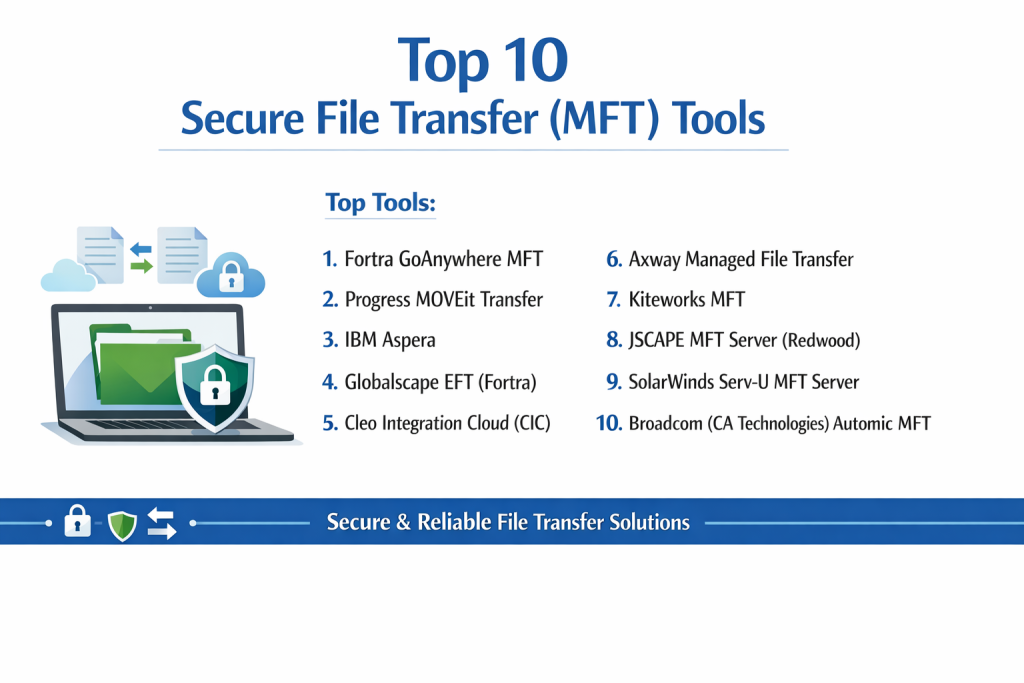
Top 10 Secure File Transfer (MFT) Tools
1 — Fortra GoAnywhere MFT
GoAnywhere MFT is a market-leading solution known for its exceptional balance of power and user-friendliness. It is designed to automate and secure file transfers across various environments, including on-premises and the cloud.
- Key Features:
- Workflow Designer: A drag-and-drop interface for building multi-step automation without scripting.
- Extensive Protocol Support: Native support for SFTP, FTPS, AS2, HTTPS, and PeSIT.
- Cloud Connectors: Out-of-the-box integrations for Box, Google Drive, SharePoint, and Salesforce.
- Advanced Reporting: Over 60 different compliance and audit report templates.
- Secure Folders: Web-based file sharing for ad-hoc user collaboration.
- FIPS 140-2 Certification: Uses government-grade encryption algorithms.
- Pros:
- Extremely intuitive; non-developers can build complex automation in minutes.
- Exceptional flexibility for hybrid cloud deployments.
- Cons:
- Pricing can escalate quickly as you add specific modules or connectors.
- Can be resource-heavy for smaller server environments.
- Security & compliance: SOC 2, HIPAA, GDPR, PCI DSS, FIPS 140-2, and SSO integration.
- Support & community: High-quality 24/7 support, an active user forum, and a comprehensive “GoAnywhere University” for training.
2 — Progress MOVEit Transfer
MOVEit is highly regarded for its robust compliance features and tamper-evident logging, making it a staple in the finance and healthcare sectors.
- Key Features:
- Tamper-Evident Logging: Ensures that audit trails cannot be altered, crucial for legal integrity.
- Centralized Dashboard: Real-time visibility into all file transfer activities across the enterprise.
- MOVEit Automation: A separate, powerful engine for scaling complex data workflows.
- Multi-Layered Security: Includes IP lockouts and multi-factor authentication (MFA).
- Flexible Deployment: Available as a cloud service (SaaS), on-premises, or as a managed service.
- Pros:
- Strongest focus on compliance; often the first choice for highly regulated industries.
- Reliable failover and high-availability options.
- Cons:
- The interface for the Automation module can feel dated compared to newer competitors.
- Performance can degrade when handling massive numbers of very small files simultaneously.
- Security & compliance: FIPS 140-2, HIPAA, PCI DSS, GDPR, and ISO 27001.
- Support & community: Solid enterprise support with a large base of third-party certified consultants.
3 — IBM Aspera
IBM Aspera stands out for its proprietary FASP protocol, which overcomes the limitations of TCP to move large data sets at maximum speed over any distance.
- Key Features:
- FASP Technology: Patented protocol that is up to 100x faster than standard FTP/HTTP.
- Direct-to-Cloud: Streams data directly into cloud object storage like AWS S3 or Azure Blob.
- Global Management: Centralized control for transfers across a global network of nodes.
- Bandwidth Control: Granular scheduling and prioritization of transfer speeds.
- Mobile App: Full-featured mobile clients for secure field-to-office transfers.
- Pros:
- Unrivaled speed for “Big Data” and 4K/8K video files.
- Highly reliable over high-latency or low-quality network connections.
- Cons:
- One of the most expensive solutions on the market.
- Setup and optimization require specialized technical knowledge.
- Security & compliance: AES-256 encryption, SSO, SOC 2, and HIPAA.
- Support & community: Top-tier IBM enterprise support and a robust developer SDK for custom integrations.
4 — Globalscape EFT (Fortra)
Globalscape Enhanced File Transfer (EFT) is built for massive scalability and high-concurrency environments, often used by the world’s largest logistics and retail firms.
- Key Features:
- Advanced Workflow Engine: Powerful logic-based automation without the need for manual coding.
- High Availability: Active-Active clustering for zero-downtime environments.
- Secure ICAP Gateway: Integrated virus scanning and data loss prevention (DLP).
- Workspaces: Secure, branded portal for external parties to collaborate on files.
- Remote Administration: A comprehensive web console for managing servers from anywhere.
- Pros:
- Extremely stable platform that handles thousands of concurrent sessions with ease.
- Excellent visibility into the end-to-end “flow” of data.
- Cons:
- High entry price point makes it less accessible for mid-market companies.
- The depth of features can be overwhelming for smaller IT teams.
- Security & compliance: FIPS 140-2, HIPAA, PCI DSS, GDPR, and SOC 2.
- Support & community: Premier enterprise support including dedicated account engineers for large deployments.
5 — Cleo Integration Cloud (CIC)
Cleo focuses on B2B ecosystem integration, connecting MFT workflows directly to ERP and CRM systems to streamline supply chain operations.
- Key Features:
- Ecosystem Integration: Connects MFT directly to SAP, Oracle, and Salesforce.
- AI-Powered Insights: Intelligent error resolution and predictive monitoring.
- 18+ Protocol Support: One of the widest ranges of connectivity in the industry.
- Self-Service Portals: Empowers trading partners to manage their own onboarding.
- End-to-End Visibility: Tracks data from the initial file transfer to the final database entry.
- Pros:
- Reduces partner onboarding time from weeks to hours.
- Bridges the gap between file transfer and business process automation.
- Cons:
- Steep learning curve for the advanced integration mapping features.
- Primarily focused on B2B, so less ideal for simple internal file sharing.
- Security & compliance: SOC 2 Type II, GDPR, PCI DSS, and HIPAA.
- Support & community: Strong customer success focus and 24/7 proactive monitoring.
6 — Axway Managed File Transfer
Axway offers a highly resilient MFT gateway designed to sit at the edge of the network, managing thousands of external connections securely.
- Key Features:
- SecureTransport: A multi-protocol gateway designed for high-volume edge transfers.
- Transfer CFT: A multi-platform controller for complex application-to-application flows.
- Intelligent MFT: No-code automation builder for rapid deployment.
- Sentinel Analytics: Predictive monitoring that alerts you before SLAs are missed.
- Containerized Deployment: Supports Docker and Kubernetes for modern DevOps.
- Pros:
- Exceptional at managing “edge” security for thousands of trading partners.
- Very strong API for developers building custom automation.
- Cons:
- Managing the full Axway suite requires specialized training and certification.
- Documentation can be dense and difficult to navigate for beginners.
- Security & compliance: FIPS 140-2, Common Criteria, HIPAA, GDPR, and PCI DSS.
- Support & community: Global 24/7 follow-the-sun support and a robust developer portal.
7 — Kiteworks MFT
Kiteworks prioritizes “content risk management,” providing a unified platform to govern and protect sensitive content throughout its entire lifecycle.
- Key Features:
- Unified Audit Logs: Consolidated view of every “send” and “share” across the organization.
- CMMC Compliance: Specifically designed to help defense contractors meet strict standards.
- Email Encryption Integration: Seamlessly wraps secure MFT around standard email workflows.
- Hardened Virtual Appliance: Ships as a pre-configured, secure OS to reduce the attack surface.
- DRM Controls: Digital Rights Management to control what happens to files after they are downloaded.
- Pros:
- Simplifies compliance for organizations working with the Department of Defense (DoD).
- Excellent balance between high security and end-user simplicity.
- Cons:
- Focuses more on secure “content sharing” than heavy industrial automation.
- Integration with legacy on-premises systems can be complex.
- Security & compliance: FedRAMP Authorized, FIPS 140-2, HIPAA, GDPR, and SOC 2.
- Support & community: Strong professional services for compliance-heavy onboarding.
8 — JSCAPE MFT Server (Redwood)
Recently acquired by Redwood, JSCAPE is a platform-independent solution designed to simplify the automation of secure file transfers for diverse IT environments.
- Key Features:
- Platform Independent: Runs natively on Windows, Linux, Mac OS X, and Solaris.
- Accelerated FTP (AFTP): Proprietary protocol to speed up transfers over high-latency networks.
- Ad-Hoc File Transfer: Easy web interface for users to send large files without an account.
- DLP Features: Built-in tools to inspect files for sensitive data before they are sent.
- Triggers & Events: Simple “if-this-then-that” logic for basic automation.
- Pros:
- One of the best values in the MFT market; packs enterprise features at a lower price.
- Extremely easy to migrate across different server types.
- Cons:
- The reporting engine is not as deep as those found in GoAnywhere or MOVEit.
- The user community is smaller than the top-tier “Big 3” providers.
- Security & compliance: FIPS 140-2, HIPAA, PCI DSS, and GDPR.
- Support & community: Responsive technical support and a growing knowledge base under Redwood’s ownership.
9 — SolarWinds Serv-U MFT Server
Serv-U is a reliable, straightforward MFT server that is particularly popular among SMBs and IT departments that need a secure server without high complexity.
- Key Features:
- Universal Protocol Support: FTP, FTPS, SFTP, HTTP, and HTTPS.
- Event-Driven Automation: Trigger email alerts or run programs based on file activity.
- Web-Based Client: Users can transfer files via a browser without installing software.
- Mobile Accessibility: Optimized web views for smartphones and tablets.
- Simple Administration: A clean, easy-to-navigate management console.
- Pros:
- Very fast to set up; you can be running in under an hour.
- Cost-effective for smaller organizations needing professional security.
- Cons:
- Lacks the complex “workflow orchestration” of enterprise-level tools.
- Not designed for massive, global-scale data replication.
- Security & compliance: FIPS 140-2, HIPAA, PCI DSS, and FISMA.
- Support & community: Large, active “Thwack” community and solid basic technical support.
10 — Broadcom (CA Technologies) Automic MFT
Automic MFT integrates file transfer into a broader workload automation suite, making it the choice for companies that view MFT as just one part of a larger business process.
- Key Features:
- Workload Integration: Syncs file transfers with database updates and ERP jobs.
- Zero-Downtime Upgrades: Ability to patch the system without interrupting active transfers.
- Mainframe to Microservices: Supports everything from legacy systems to Kubernetes.
- Object-Oriented Design: Build reusable automation components to save time.
- Predictive Analytics: AI-driven forecasting for job completion times.
- Pros:
- Unmatched for organizations that need MFT as part of a complex “job scheduling” ecosystem.
- Highly scalable for millions of transfers daily.
- Cons:
- Massive learning curve; requires dedicated staff to manage the platform.
- Overkill for companies that only need to move files between two points.
- Security & compliance: ISO 27001, HIPAA, GDPR, and FIPS 140-2.
- Support & community: Extensive enterprise support and professional services network.
Comparison Table
| Tool Name | Best For | Platform(s) Supported | Standout Feature | Rating (Gartner/G2) |
| GoAnywhere MFT | Ease of Use / SMB | Win, Linux, Mac, Cloud | Drag-and-Drop Designer | 4.8 / 5 |
| MOVEit Transfer | Compliance / Audit | Win, Cloud | Tamper-Evident Logs | 4.6 / 5 |
| IBM Aspera | Large Data / Speed | All, Cloud | FASP Protocol | 4.5 / 5 |
| Globalscape EFT | Performance / Scale | Win, Cloud | Advanced Workflow Logic | 4.7 / 5 |
| Cleo CIC | B2B Integration | Cloud, Hybrid | ERP/CRM Connectors | 4.5 / 5 |
| Axway MFT | Edge Security | Linux, Win, Docker | SecureTransport Gateway | 4.4 / 5 |
| Kiteworks MFT | Gov / Defense | Virtual Appliance | CMMC/Hardened OS | 4.6 / 5 |
| JSCAPE MFT | Platform Agnostic | All, Java-based | Accelerated FTP (AFTP) | 4.4 / 5 |
| Serv-U MFT | SMB / Simplicity | Win, Linux | Rapid Deployment | 4.3 / 5 |
| Automic MFT | Workload Auto | All, Mainframe | ERP Orchestration | 4.2 / 5 |
Evaluation & Scoring of Secure File Transfer (MFT) Tools
This scoring reflects the requirements of a typical mid-to-large organization.
| Category | Weight | Description |
| Core Features | 25% | Multi-protocol support, automation depth, and workflow logic. |
| Ease of Use | 15% | Intuitiveness of the admin console and drag-and-drop builders. |
| Integrations | 15% | Cloud connectors, API availability, and ERP/CRM support. |
| Security & Compliance | 10% | Encryption standards (FIPS), audit logs, and certifications. |
| Performance | 10% | Concurrency limits, transfer speeds, and high availability. |
| Support & Community | 10% | 24/7 availability, training resources, and user forums. |
| Price / Value | 15% | Licensing flexibility and ROI for the feature set. |
Which Secure File Transfer (MFT) Tool Is Right for You?
Solo Users vs SMB vs Mid-Market vs Enterprise
- Solo/Small Teams: MFT is likely too complex. Stick to secure cloud sharing. If you must use MFT, Serv-U is the most manageable.
- SMB (50–250 employees): GoAnywhere or JSCAPE offer the best blend of enterprise features without requiring a 5-person IT team to run them.
- Mid-Market (250–1,000 employees): MOVEit or Kiteworks are ideal for teams that need to pass audits without the high overhead of IBM or Broadcom.
- Enterprise (>1,000 employees): Globalscape or Axway provide the scalability and clustering required for global operations.
Budget-Conscious vs Premium Solutions
If budget is the primary driver, JSCAPE and Serv-U provide professional security at a lower price point. If performance is the driver, IBM Aspera is a premium solution that pays for itself by reducing the “time-to-data” for massive files.
Feature Depth vs Ease of Use
GoAnywhere is the undisputed king of ease of use. However, if your “feature depth” requirements include deep workload automation across mainframe and cloud, Automic MFT is the necessary choice despite its complexity.
Integration and Scalability Needs
For supply chain and B2B needs, Cleo is superior due to its native ERP connectors. For pure scalability in terms of raw concurrent connections, Globalscape and Axway are the standard.
Security and Compliance Requirements
For Defense contractors, Kiteworks is the specialized choice. For medical and financial firms where auditing is the top priority, the tamper-evident logging of MOVEit provides the highest level of legal defensibility.
Frequently Asked Questions (FAQs)
1. How does MFT differ from standard SFTP?
SFTP is just a protocol for moving data. MFT is a management platform that uses SFTP (and others) while adding automation, centralized control, visibility, and compliance reporting.
2. Is MFT only for large corporations?
While large corporations were the early adopters, any business handling sensitive PII or PHI (like accounting or medical clinics) can benefit from the security and automation MFT provides.
3. Can MFT tools work in the cloud?
Yes, most top-tier tools like GoAnywhere and MOVEit offer SaaS versions or can be deployed in private clouds like AWS and Azure.
4. What is FIPS 140-2, and why should I care?
It is a US government security standard for cryptographic modules. Choosing a FIPS-validated tool ensures your encryption is robust and meets federal requirements.
5. How long does it take to implement an MFT solution?
A basic setup like Serv-U can take an hour. A full enterprise deployment with complex ERP integrations and partner onboarding can take several weeks or months.
6. Do MFT tools include antivirus scanning?
Many (like Globalscape and Axway) offer integrated ICAP gateways that allow you to scan files for malware before they are allowed into your network.
7. What happens if a file transfer fails?
Professional MFT tools have “auto-resume” and “checkpoint restart” features. If a network drops, the tool will pick up exactly where it left off once the connection is restored.
8. Can I share files with people who don’t have an MFT account?
Yes. Most MFT tools include an “Ad-Hoc” or “Workspaces” feature that allows you to send a secure, password-protected link to an external user’s email.
9. Why is MFT better than using email for large files?
Email is insecure, has strict size limits, and provides no audit trail. MFT handles files of any size, encrypts them at rest and in transit, and logs every access attempt.
10. What is the most common mistake when buying MFT software?
Buying for today’s volume instead of tomorrow’s. Always choose a solution that allows you to add modules (like AS2 support or extra automation) as your business grows.
Conclusion
Choosing a Secure Managed File Transfer (MFT) tool is a critical decision that balances security, efficiency, and compliance. The landscape in 2026 shows a clear trend toward automation and cloud integration, with tools like Fortra GoAnywhere leading for general usability, and IBM Aspera dominating for high-speed transfers.
Ultimately, the “best” tool is the one that fits into your existing IT ecosystem without creating a management nightmare. If you prioritize ease of use, look at GoAnywhere; if you need industrial-scale B2B integration, Cleo is your best bet; and if compliance is your only goal, MOVEit remains a trusted standard. By focusing on your specific industry needs and data volumes, you can select a platform that not only secures your files but also streamlines your entire business operation.