Introduction
Most companies sit on mountains of digital data. They collect customer clicks, sales figures, and inventory numbers every single second. But raw data is messy. It arrives in different formats, often with missing pieces or sudden errors.
To make sense of this information, data engineers build data pipelines. A data pipeline is a series of steps that takes raw data from various sources, cleans it up, and stores it in a central place for analysis.
Unfortunately, pipelines break often. A partner website changes its layout, a database schema shifts, or a server runs out of memory. When this happens, business dashboards show wrong numbers. Executives might make bad decisions based on faulty revenue reports, and finding the root cause can take days.
This is where DataOps comes in. By treating data workflows with the same care that software developers use for apps, DataOps changes how organizations handle data quality.
What Is DataOps?
DataOps (short for Data Operations) is an automated, process-oriented methodology used to improve the quality and speed of data analytics.
- Simple meaning: DataOps is a teamwork system that helps data teams deliver clean, trustworthy information faster and with fewer mistakes.
- Why it matters: Without DataOps, data teams spend most of their time firefighting broken pipelines instead of building useful analytics.
- Example: Imagine a restaurant kitchen. Without a system, chefs bump into each other, drop plates, and send out cold food. DataOps is like a well-organized kitchen workflow where every step—from chopping vegetables to plating—is tested, timed, and streamlined.
DataOps borrows ideas from two popular concepts: Agile software development (working in fast, collaborative cycles) and DevOps (automating software testing and deployment).
How Data Pipelines Work and Where They Break
To understand how DataOps helps, you first need to look at a standard data pipeline. A pipeline typically has three main stages:
- Ingestion (Extraction): Pulling raw data from apps, databases, or third-party APIs.
- Transformation (Processing): Cleaning the data, removing duplicates, and calculating metrics.
- Serving (Loading): Storing the clean data in a data warehouse so business analysts can build charts and reports.
Common Failure Points
- Schema Drift: A source system changes a column name from
user_idtocustomer_id. The pipeline suddenly fails or drops all incoming records. - Silent Data Corruption: The pipeline does not crash, but it loads negative values for product prices due to a calculation bug.
- Latency Bottlenecks: A batch job takes too long to run, meaning morning reports are empty when executives arrive at work.
Why Traditional Data Management Fails
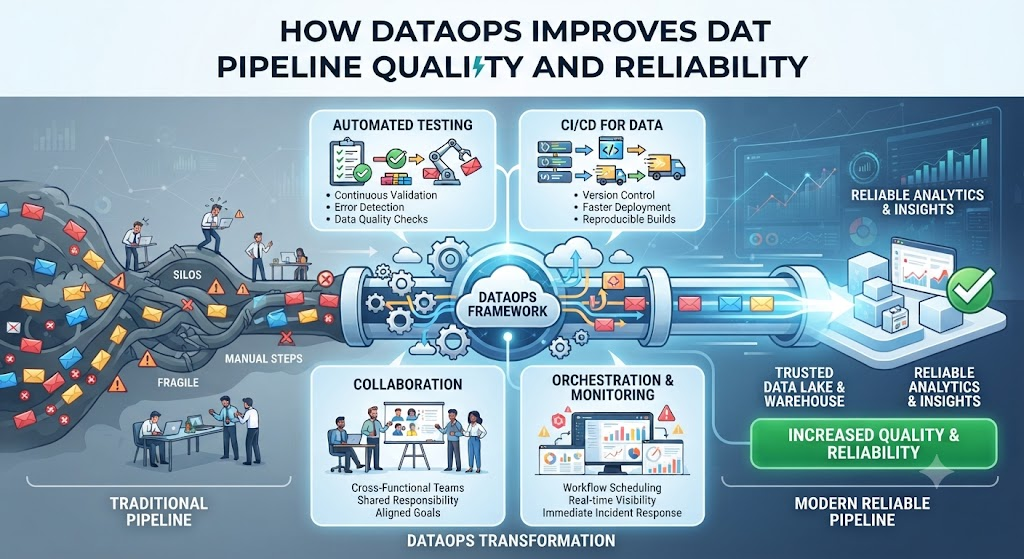
In many organizations, data engineering operates in a silo. Engineers write code locally, push changes to production manually, and hope nothing breaks.
- Lack of visibility: No one knows a pipeline is broken until a business user complains about a weird dashboard.
- Manual bottlenecks: Every code change requires manual review and deployment, slowing down innovation.
- Finger-pointing: When data looks wrong, the data team blames the software engineers, who blame the third-party data vendor.
DataOps replaces this guesswork with automated guardrails.
Core Principles of DataOps
DataOps relies on several key practices to ensure reliability:
1. Automated Testing (Data Quality Gates)
Just like software developers test code before release, DataOps teams run automated checks on data as it moves through the pipeline.
- Example: A test checks if the row count of a daily sales table is within 10% of the historical average. If today’s count is zero, the pipeline pauses and alerts the team instantly.
2. Version Control
Every transformation script, configuration file, and data model is stored in a version-control system (like Git). If a new code update ruins a data model, the team can roll back to a working version in seconds.
3. Continuous Integration and Continuous Deployment (CI/CD)
Changes are tested in a staging environment that mimics production before going live. This prevents untested code from breaking live business reports.
4. Observability and Monitoring
DataOps introduces real-time monitoring for pipelines. Teams track metrics like pipeline runtime, data freshness, error rates, and schema changes through a single dashboard.
Benefits of Implementing DataOps
When an organization successfully adopts DataOps, the impact is visible across the entire business:
- Higher Trust in Data: Business users stop second-guessing reports because errors are caught before they reach production dashboards.
- Faster Delivery: Automated testing and deployment mean new data sources and metrics can be added in days instead of months.
- Reduced Burnout: Engineers spend less time doing manual troubleshooting and firefighting, and more time building high-value data products.
- Cost Efficiency: Catching broken pipelines early prevents wasteful cloud computing spend on looping or failing jobs.
Real-World Scenario: Retail Analytics
Consider an online retail company that relies on daily sales reports to manage inventory.
- Without DataOps: A software update on the checkout page changes how currency symbols are recorded. The data pipeline loads strings like “$50” instead of numbers into the finance database. The morning revenue report shows zero sales. The data team spends six hours searching through thousands of lines of code to find the formatting bug.
- With DataOps: An automated data test catches the unexpected data type during the transformation stage. The pipeline automatically halts loading, sends an alert to Slack with the exact table and column name, and suggests a fix. The team resolves the issue in ten minutes before any executive sees the broken report.
Common Mistakes in DataOps Adoption
Organizations often stumble when trying to implement DataOps. Avoid these frequent pitfalls:
- Buying tools before fixing processes: Purchasing expensive DataOps software will not fix a team culture that lacks communication and accountability.
- Writing too many complex tests: Testing every single row of data slows pipelines down. Focus tests on critical constraints (e.g., uniqueness, null values, and expected value ranges).
- Ignoring the business side: DataOps is not just a technical IT project. Business analysts must be involved in defining what “good data quality” actually means.
Decision Framework: Is Your Organization Ready for DataOps?
Use this simple checklist to determine if your team needs to invest in DataOps practices:
- Do business users frequently find errors in dashboards before your team does? (If yes, you need automated data testing.)
- Does deploying a simple pipeline change take more than a few days? (If yes, you need CI/CD automation.)
- Do you spend more than 30% of your work week fixing broken data pipelines? (If yes, you need pipeline observability and monitoring.)
Key Terms
- Data Pipeline: A set of actions that moves data from a source, modifies it, and loads it into a destination storage system.
- Schema: The structural blueprint of a database or table that defines columns, data types, and relationships.
- CI/CD: Continuous Integration and Continuous Deployment; an automated approach to building, testing, and releasing software changes.
- Data Observability: The ability to fully understand the health, performance, and quality of data within your systems.
- Data Warehouse: A central repository designed to store and query large amounts of structured data from multiple sources.
FAQs
What is the main difference between DevOps and DataOps?
DevOps focuses on automating the software development and deployment lifecycle for applications. DataOps applies those same automation and testing principles specifically to data pipelines, analytics code, and data quality checks.
Do small teams need DataOps?
While small teams might not need complex enterprise tooling, adopting DataOps principles—like version control and automated data tests—saves immense amounts of time as the company grows.
How does DataOps improve data security?
DataOps encourages automated access controls, version-tracked configuration files, and transparent logging, making it easier to audit who accessed or modified data pipelines.
Does DataOps require new software?
Not necessarily. Many DataOps practices rely on changing team workflows and using existing version control and testing frameworks, though specialized data observability tools can help scale the process.
How do we measure the success of DataOps?
Key success metrics include reduced pipeline failure rates, shorter time to recover from errors, faster deployment of new data models, and increased trust from business stakeholders.
Conclusion
Data pipelines are the backbone of modern business intelligence. When they break, decisions stall and trust erodes. DataOps solves this by bringing engineering discipline, automated testing, and continuous monitoring to data workflows. By catching errors early and streamlining collaboration, DataOps ensures that the data flowing into your business is accurate, timely, and ready to drive smart decisions.