Introduction
Most companies sit on mountains of data. They collect customer clicks, sales numbers, inventory levels, and website traffic every second. Yet, when a manager asks a simple question like, “Why did our sales drop last Tuesday?” getting an answer can take two weeks.
The data exists, but it is locked inside messy pipelines, scattered across different cloud storage tools, and managed by overworked data engineers. By the time the report is finally ready, the business moment has passed.
This delay happens because traditional data management cannot keep up with modern business speed. To fix this, companies are turning to DataOps. It is a modern operational approach that brings speed, order, and automation to how organizations handle data.
What Is DataOps?
DataOps (short for Data Operations) is a collaborative management practice that improves the speed, quality, and reliability of data analytics.
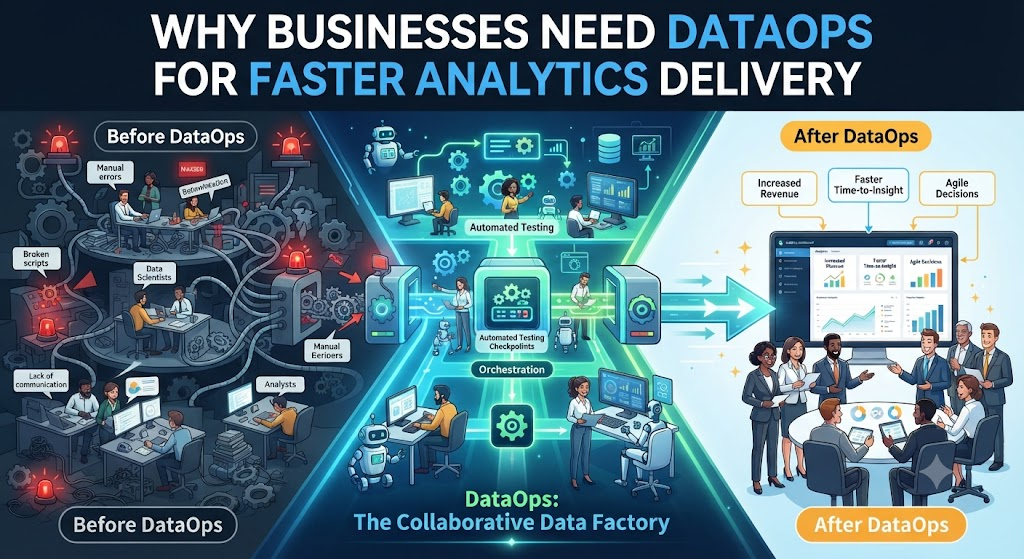
Think of a traditional data workflow like an old-fashioned factory assembly line where workers pass parts manually from one room to the next. If someone drops a part or makes a mistake, the whole factory stops until someone finds the error.
DataOps turns that manual line into an automated, high-speed conveyor belt. It borrows ideas from Agile software development (building things in small, fast steps) and DevOps (automating software testing and deployment).
Why It Matters
In business, bad data or slow data costs money. If your inventory dashboard shows yesterday’s numbers instead of live stock levels, customers buy items that are out of stock. DataOps ensures that data flows smoothly from source systems to business dashboards without breaking, stopping, or lying.
How DataOps Works
DataOps is not a single software tool you install; it is a way of working. It connects data engineers, data scientists, and business users through automated processes.
A standard DataOps pipeline follows these core steps:
- Data Integration: Data is automatically pulled from various sources (like CRM software, payment gateways, and website logs) into a central storage area.
- Automated Testing: As the data moves, automated tests check it for errors, missing values, or sudden drops in volume. If something looks wrong, the system alerts the team immediately.
- Transformation: Raw data is cleaned, sorted, and converted into usable tables and metrics.
- Delivery: Clean data feeds into business dashboards, machine learning models, and executive reports.
- Monitoring: The entire pipeline is tracked in real-time to catch performance bottlenecks or broken connections.
Why Businesses Struggle Without DataOps
Before adopting DataOps, organizations typically face a set of familiar operational pains. Understanding these problems explains why the shift is necessary.
1. The Trust Gap Between Business and IT
When a sales director looks at a revenue dashboard and the finance team looks at a spreadsheet showing different numbers, an argument starts. Both teams spend hours arguing over whose data is correct instead of growing the business. This creates a deep lack of trust in data.
2. Slow Delivery Cycles
Data requests pile up in a backlog. Changing a single metric in a report might require updating a dozen underlying SQL queries, testing them manually, and waiting for deployment approval. This can take weeks.
3. Silent Data Failures
In traditional setups, a third-party software update might change an API field name without warning. The data pipeline keeps running, but it starts loading zeros or blank values. No one notices until a CEO presents broken numbers in a board meeting.
Key Benefits of Implementing DataOps
When an organization successfully adopts DataOps, the operational shift is dramatic.
- Faster Time-to-Insight: New reports and metrics move from concept to production in days rather than months.
- Higher Data Quality: Automated testing catches errors before business users ever see the dashboard.
- Better Team Collaboration: Data engineers, analysts, and business stakeholders speak the same language and work from a shared version of truth.
- Lower Operational Costs: Automation reduces the hours spent on manual data cleaning and firefighting broken pipelines.
Practical Example: Retail Inventory Optimization
Imagine a mid-sized online clothing retailer.
- The Old Way: The marketing team wants to see which products were most popular during a flash sale. They ask the data team for a custom report. The data engineer writes a script, but halfway through, they realize a database schema changed last month. The report takes three weeks to build. By then, the seasonal trend is over, and the inventory has already expired or sold out.
- The DataOps Way: The retailer uses automated pipelines with continuous data quality checks. When the flash sale ends, the data is automatically cleaned, tested, and loaded into an executive dashboard overnight. The marketing team reviews real-time conversion metrics the next morning and adjusts ad spend for the upcoming weekend.
Common Mistakes Businesses Make With DataOps
Organizations transitioning to DataOps often stumble into predictable traps.
| Common Mistake | Why It Happens | What Happens Instead | Correct Approach |
|---|---|---|---|
| Buying tools before fixing processes | Believing software alone solves operational bottlenecks | Expensive software sits unused while old manual habits persist | Define workflows and team collaboration rules first, then select tools |
| Ignoring automated testing | Treating data testing as an afterthought | Silent data corruption goes undetected until users complain | Build automated data quality tests into every stage of the pipeline |
| Keeping teams siloed | Data engineers and analysts working in separate departments | Miscommunication leads to mismatched metrics and finger-pointing | Establish cross-functional squads responsible for end-to-end data products |
Risks and Limitations
While DataOps offers clear advantages, it is not a magic fix for every organizational challenge.
- Cultural Resistance: DataOps requires teams to change how they work. People who are used to working in isolated silos may push back against agile workflows and transparent tracking.
- Initial Setup Complexity: Setting up automated testing, version control, and CI/CD (Continuous Integration/Continuous Deployment) pipelines for data requires skilled engineering talent.
- Over-Engineering: Smaller companies with simple data needs might find full-scale DataOps frameworks unnecessarily heavy and complex.
Decision Framework: Is Your Business Ready for DataOps?
To determine if your organization needs to invest in DataOps, walk through these four evaluation steps:
- Measure Your Current Delivery Speed: How long does it take your team to add a new data source or update a core business metric? If it takes more than two weeks, you have a delivery bottleneck.
- Audit Data Incidents: How often do business users find errors in dashboards before your data team does? Frequent user complaints point to a lack of automated data testing.
- Assess Team Friction: Do your data engineers spend more time fixing broken data pipelines or building new features that drive revenue? Firefighting indicates operational inefficiency.
- Evaluate Scale: Are you planning to ingest more data sources, expand machine learning initiatives, or scale your analytics user base? If yes, manual data management will quickly break down.
Key Terms
- Data Pipeline: A set of actions that moves data from source systems to a destination where it can be stored and analyzed.
- CI/CD (Continuous Integration/Continuous Deployment): Software development practices that automate the building, testing, and releasing of code updates.
- Data Observability: The ability to fully understand the health and quality of data within your systems through continuous monitoring.
- SQL (Structured Query Language): A programming language used to communicate with and extract data from relational databases.
- Schema: The structural blueprint or organization of data within a database.
- Data Warehouse: A centralized repository designed to store, manage, and query large volumes of integrated data from multiple sources.
Frequently Asked Questions
What is the main difference between DevOps and DataOps?
DevOps focuses on automating software application development and deployment. DataOps takes those same principles and applies them specifically to data engineering, data quality, and analytics delivery.
Do small businesses need DataOps?
Small businesses with simple reporting needs usually do not need a formal DataOps framework. However, any company whose core product or daily operations depend heavily on fast, accurate data will benefit from adopting DataOps practices early.
Is DataOps a software tool?
No. DataOps is a methodology and culture supported by a combination of tools, automation scripts, and collaborative processes.
How long does it take to implement DataOps?
Cultural and process changes take time. While basic automation can be set up in a few weeks, full organizational adoption typically takes several months as teams adjust to agile data workflows.
Who is responsible for DataOps in an organization?
DataOps is a shared responsibility. It involves data engineers who build pipelines, data analysts who build reports, data scientists who build models, and business stakeholders who define analytical requirements.
Conclusion
Data is only valuable if it arrives on time and can be trusted. When analytics delivery takes weeks, businesses miss opportunities and make decisions in the dark.
DataOps bridges the gap between raw data and business action. By bringing automation, rigorous quality checks, and agile teamwork to data operations, companies can deliver faster insights without sacrificing accuracy. Start small, automate your core pipelines, and focus on building trust between your technical teams and business decision-makers.