Introduction
Computer Vision (CV) Platforms are specialized artificial intelligence ecosystems that allow machines to identify, interpret, and process visual information from the physical world. These platforms provide a complete software stack for the “Vision AI” lifecycle—spanning from data labeling and dataset management to model training and deployment. By converting raw pixels into structured digital data, these tools act as the “eyes” and “brain” of modern automation, enabling software to “understand” what it sees through a camera lens or an image file.
The importance of these platforms has expanded rapidly as organizations seek to automate high-frequency visual tasks that were previously prone to human error. Computer vision is no longer a futuristic concept but a core operational requirement. These platforms bridge the gap between complex deep learning research and practical business applications. They allow teams to build “vision-aware” products that can monitor factory safety, diagnose medical conditions, or navigate autonomous drones, all while providing the security and scalability required for enterprise-level production.
Key Real-World Use Cases
- Industrial Quality Inspection: Automatically detecting microscopic defects in electronics or mechanical parts on high-speed assembly lines.
- Autonomous Robotics: Providing real-time spatial awareness and obstacle avoidance for warehouse robots and self-driving vehicles.
- Healthcare & Diagnostics: Enhancing radiologist workflows by pre-screening medical images (X-rays, CT scans) for anomalies.
- Smart Retail: Analyzing customer foot traffic, monitoring shelf inventory levels, and enabling “checkout-free” shopping experiences.
- Physical Security: Real-time monitoring for safety compliance, such as ensuring workers are wearing proper Personal Protective Equipment (PPE).
What to Look For (Evaluation Criteria)
- Annotation & Labeling Efficiency: The availability of AI-assisted labeling tools (like Segment Anything Model integrations) to speed up data preparation.
- Deployment Flexibility: Support for various environments, including cloud, on-premises servers, and “edge” devices (e.g., NVIDIA Jetson, mobile).
- Pre-trained Model Library: A “Model Zoo” containing ready-to-use models for common tasks like OCR, face detection, or object tracking.
- Data Management & Lineage: The ability to version datasets and track which data was used to train specific model iterations.
- Scalability & Performance: Low-latency inference capabilities to ensure the system can process high-resolution video in real-time.
Best for: Machine Learning Engineers, Data Scientists, and Operations Managers in manufacturing, healthcare, and logistics sectors who need to build and scale custom visual intelligence solutions.
Not ideal for: Small businesses with extremely basic requirements that can be handled by standard smart-home cameras or teams without any technical capacity to manage an AI workflow.
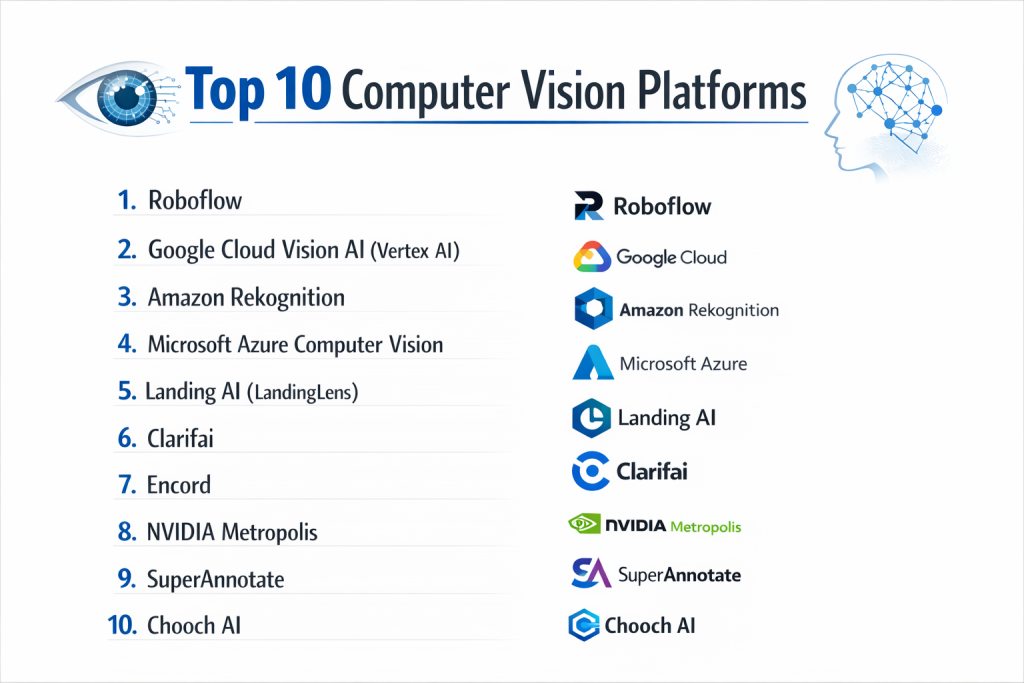
Top 10 Computer Vision Platforms
1 — Roboflow
Roboflow is a developer-first platform designed to streamline the entire computer vision pipeline, making it one of the most popular tools for both rapid prototyping and production-scale AI.
- Key features:
- Roboflow Universe: A massive public repository of over 200,000+ open-source datasets.
- Auto-Labeling: AI-powered annotation tools that suggest labels to reduce manual work by up to 10x.
- Model Health Check: Built-in analytics to detect dataset bias, missing classes, or poor image quality.
- Inference Server: A specialized deployment tool for running models on the edge or in the cloud.
- One-Click Training: Simple AutoML interface for training models without complex coding.
- Pros:
- Extremely intuitive user interface that reduces the barrier to entry for beginners.
- Industry-leading documentation and a vibrant, helpful developer community.
- Cons:
- High-volume enterprise usage can lead to significant monthly costs.
- Some automated features are “black boxes” which may limit highly advanced custom tweaks.
- Security & compliance: SOC 2 Type II, GDPR, and enterprise SSO integration.
- Support & community: Extensive YouTube tutorials, a massive Slack community, and dedicated customer success for enterprises.
2 — Google Cloud Vision AI (Vertex AI)
Google’s Vision AI leverages the same deep learning technology used in Google Search and Photos, offering a powerful mix of pre-trained APIs and custom training via Vertex AI.
- Key features:
- AutoML Vision: A no-code tool for training high-accuracy custom models on Google’s infrastructure.
- Pre-trained APIs: Instant access to face, logo, landmark, and explicit content detection.
- Vertex AI Integration: Connects vision tasks to the broader Google AI and BigQuery ecosystem.
- Vision AI Edge: Tools to deploy and manage models directly on IoT and edge hardware.
- Document AI: Specialized OCR and data extraction for structured business documents.
- Pros:
- Unmatched accuracy for general object and text recognition tasks.
- Effortless scaling for projects involving millions of images.
- Cons:
- Deeply tied to the Google Cloud ecosystem, which may cause vendor lock-in.
- Pricing can be complex to estimate due to per-request and per-node-hour billing.
- Security & compliance: HIPAA, SOC 1/2/3, ISO 27001, and GDPR compliant.
- Support & community: High-tier enterprise support and extensive technical documentation.
Part of the AWS suite, Rekognition provides a fully managed computer vision service that allows developers to add visual analysis to apps without managing underlying servers.
3 — Amazon Rekognition
- Key features:
- Content Moderation: Automatically identifies suggestive or inappropriate visual content.
- Facial Analysis: Detects attributes like emotion, age range, and gender (with privacy safeguards).
- Celebrity Recognition: Identifies hundreds of thousands of public figures in images and video.
- Custom Labels: A guided workflow for training models on objects specific to your business.
- Video Segment Detection: Automatically finds “black frames” or “end credits” in media files.
- Pros:
- Highly cost-effective for AWS-heavy users with pay-as-you-go pricing.
- Superior integration with S3 (storage) and Lambda (serverless computing).
- Cons:
- Training custom models can feel more restricted than specialized platforms like Roboflow.
- User interface for data labeling is functional but less refined than competitors.
- Security & compliance: FedRAMP, SOC, ISO, HIPAA, and GDPR.
- Support & community: Backed by the vast AWS developer network and premium support plans.
4 — Microsoft Azure Computer Vision
Azure offers a comprehensive suite of “Cognitive Services” that excel at enterprise-level document processing, spatial analysis, and handwriting recognition.
- Key features:
- Read API: World-class OCR that can interpret both printed and handwritten text.
- Spatial Analysis: Monitors how people move in physical spaces (ideal for retail and safety).
- Face API: Advanced facial recognition with “Liveness Detection” to prevent spoofing.
- Custom Vision: A user-friendly web portal for building object detection and classification models.
- Container Support: Allows you to run Vision APIs locally in containers for privacy and latency.
- Pros:
- Excellent for organizations already committed to the Microsoft ecosystem.
- Strongest performance for text-heavy and document-centric vision tasks.
- Cons:
- Can be technically complex to navigate between various Azure “AI” sub-brands.
- Edge deployment setup often requires specific Microsoft-certified hardware.
- Security & compliance: Over 100 compliance offerings including ISO, SOC, and GDPR.
- Support & community: Global enterprise-grade support and extensive partner network.
5 — Landing AI (LandingLens)
Founded by AI pioneer Andrew Ng, LandingLens is a “data-centric” platform specifically engineered for the high-precision world of manufacturing.
- Key features:
- Data-Centric AI: Focuses on improving data quality rather than just algorithm tuning.
- Small Data Training: Capable of building accurate models with very few images.
- Visual Inspection: Specifically tuned for finding anomalies on industrial assembly lines.
- Collaborative Labeling: Tools built for factory-floor subject matter experts (SMEs).
- Deployment Connectors: Pre-built integrations for industrial PLCs and smart cameras.
- Pros:
- The best choice for industrial “zero-defect” manufacturing goals.
- Extremely fast time-to-production for quality control use cases.
- Cons:
- Niche focus means it is less ideal for general web-based vision tasks.
- Premium pricing reflects its high-end industrial specialization.
- Security & compliance: SOC 2 Type II and GDPR compliant.
- Support & community: High-touch customer success and expert guidance for industrial teams.
6 — Clarifai
Clarifai is a full-stack, independent AI platform known for its massive pre-trained model library and its ability to handle “multi-modal” data.
- Key features:
- Clarifai Portal: A unified hub for managing models and datasets.
- Model Gallery: Hundreds of pre-trained models for niches like travel and food.
- Scribe: An automated labeling tool that “learns” as you work.
- Visual Search: High-speed vector search that finds visually similar items.
- Deployment Options: Flexible deployment across cloud, on-prem, and bare-metal servers.
- Pros:
- Vendor-neutrality allows you to avoid being locked into a single cloud provider.
- Excellent for building complex AI workflows combining different model types.
- Cons:
- Technical learning curve can be steeper for non-data scientists.
- Reporting features are functional but could be more robust.
- Security & compliance: SOC 2 Type II, ISO 27001, and HIPAA compliance.
- Support & community: Active developer Slack and responsive technical support.
7 — Encord
Encord is a specialized platform that prioritizes the “Data Engine,” making it a top choice for complex video annotation and medical imaging (DICOM).
- Key features:
- Micro-models: Small models used to automate labeling for larger projects.
- DICOM Native Support: First-class support for medical imaging formats.
- Video Intelligence: Handles long-form video natively.
- Curate: A powerful tool for identifying outliers in training data.
- Reviewer Workflows: Built-in QA stages for large annotation teams.
- Pros:
- The premier choice for medical AI and high-stakes video analytics.
- Superior data management tools help prevent “model drift.”
- Cons:
- Not designed as a general-purpose “all-in-one” training platform.
- Feature set is very advanced and may be “overkill” for simple projects.
- Security & compliance: SOC 2, HIPAA, and GDPR.
- Support & community: Deeply engaged with the medical and AI research communities.
8 — NVIDIA Metropolis
Metropolis is a developer ecosystem optimized for building real-time video analytics on NVIDIA GPUs.
- Key features:
- DeepStream SDK: Framework for multi-sensor processing with minimal latency.
- TAO Toolkit: Low-code way to fine-tune pre-trained NVIDIA models.
- Omniverse Integration: Use “synthetic data” from 3D simulations.
- NVIDIA NIM: Microservices that simplify model deployment.
- GPU Acceleration: Optimized for NVIDIA RTX and Jetson hardware.
- Pros:
- Unrivaled performance for real-time surveillance and smart cities.
- Complete control over hardware/software integration.
- Cons:
- Requires high technical expertise in CUDA and GPU architectures.
- Proprietary nature means you must use NVIDIA hardware.
- Security & compliance: Varies by deployment (enterprise-grade available).
- Support & community: Massive developer forum and NVIDIA Deep Learning Institute.
9 — SuperAnnotate
SuperAnnotate provides an end-to-end platform for dataset management, focusing on the collaboration between human annotators and AI models.
- Key features:
- Annotator Marketplace: Access to a curated network of professional labeling experts.
- Pixel-Level Segmentation: Advanced tools for precise image masking.
- MLOps Sync: Connects data to frameworks like PyTorch or TensorFlow.
- Project Management: Dashboards to track human labeler performance.
- Version Control: Track every change made to your dataset.
- Pros:
- Best-in-class tools for teams relying on large-scale human-in-the-loop labeling.
- Very clean, modern interface.
- Cons:
- Focuses more on “Data Prep” than on “Model Training.”
- Total cost can be high with human labeling services.
- Security & compliance: SOC 2 Type II, GDPR, and enterprise SSO.
- Support & community: High-touch customer success and personalized onboarding.
10 — Chooch AI
Chooch AI is an innovative platform that focuses on “Generative Vision,” allowing users to interact with video streams using natural language.
- Key features:
- ImageChat: A chat-based interface to query your video feeds.
- Edge AI: Specialized versions for tiny, low-power sensors.
- Rapid Training: Create simple object detection models in minutes.
- Anomaly Detection: Out-of-the-box models for industrial safety.
- Visual Insights: Translates feeds into business metrics like occupancy.
- Pros:
- Generative approach is incredibly accessible for business users.
- Excellent for safety and security teams needing rapid alerts.
- Cons:
- Less customizable at the code level than open platforms.
- Smaller developer ecosystem than the tech giants.
- Security & compliance: Enterprise-grade encryption and cloud protocols.
- Support & community: Dedicated enterprise support and industry webinars.
Comparison Table
| Tool Name | Best For | Platform(s) Supported | Standout Feature | Rating |
| Roboflow | End-to-end Dev | Cloud / Edge | Roboflow Universe | 4.8 / 5 |
| Google Vision | General Accuracy | GCP (Cloud) | AutoML Vision | 4.7 / 5 |
| Amazon Rekognition | AWS Integration | AWS (Cloud) | Content Moderation | 4.6 / 5 |
| Azure Computer Vision | Document Vision | Azure / Hybrid | Read API (OCR) | 4.7 / 5 |
| Landing AI | Manufacturing | Cloud / Edge | Data-Centric AI | 4.8 / 5 |
| Clarifai | Multi-modal AI | Cloud / On-Prem | Model Gallery | 4.5 / 5 |
| Encord | Medical & Video | Cloud / SaaS | DICOM Support | 4.6 / 5 |
| NVIDIA Metropolis | Smart Cities | GPU / Edge | DeepStream SDK | 4.9 / 5 |
| SuperAnnotate | Data Labeling | Cloud / SaaS | Annotation Market | 4.5 / 5 |
| Chooch AI | Rapid Deployment | Cloud / Edge | ImageChat (Gen AI) | 4.4 / 5 |
Evaluation & Scoring of Computer Vision Platforms
| Category | Weight | Score (1-10) | Evaluation Rationale |
| Core features | 25% | 9 | Most platforms provide complete end-to-end workflows. |
| Ease of use | 15% | 8 | Rise of No-Code/AutoML has increased accessibility. |
| Integrations | 15% | 9 | API support and hardware partnerships are now standard. |
| Security & compliance | 10% | 10 | HIPAA, GDPR, and SOC 2 are standard for top-tier tools. |
| Performance | 10% | 8 | Edge performance has improved, but high-res is heavy. |
| Support & community | 10% | 7 | Documentation is good; community forum activity varies. |
| Price / value | 15% | 7 | ROI is massive, but initial costs can be a barrier for SMBs. |
Which Computer Vision Platform Is Right for You?
Small to Mid-Market vs. Enterprise
For solo researchers and SMBs, Roboflow or Google Cloud Vision are the best starting points due to their ease of use and pay-as-you-go pricing. Enterprises with complex requirements often require the hybrid capabilities of Azure or the high-performance hardware acceleration of NVIDIA Metropolis.
Budget and Value
If you are strictly budget-conscious, Amazon Rekognition offers one of the lowest entry costs for basic tasks. Premium solutions like Landing AI or Encord command higher prices because they offer specialized accuracy for high-stakes industries.
Technical Depth vs. Simplicity
If you prioritize Simplicity, Chooch AI and Roboflow are the winners. If you need Technical Depth to customize neural network layers or manage huge human labeling teams, Clarifai and SuperAnnotate offer the advanced control required.
Security and Compliance Requirements
In Healthcare, Encord and Google Cloud provide the most robust HIPAA-compliant environments. For Government or Defense, AWS Rekognition and Azure provide the highest levels of security clearance and air-gapped support.
Frequently Asked Questions (FAQs)
1. Do I need a PhD in Machine Learning to use these platforms?
No. Most modern platforms are designed for software engineers or operations managers and use “AutoML” to handle complex math automatically.
2. What is the difference between “Cloud” and “Edge” deployment?
Cloud deployment sends data to a remote server for processing, while Edge deployment runs the model directly on a local device for zero-latency results.
3. How much does a typical computer vision project cost?
A basic pilot project typically starts around $10,000–$30,000, while complex enterprise-wide systems can exceed $100,000 annually.
4. Can these tools read text from images?
Yes, this is called OCR. Platforms like Azure and Google Vision are specifically known for their ability to read handwriting or text in complex backgrounds.
5. How many images do I need to train a custom model?
For a simple object, you might only need 100–500 images. However, industrial defect detection can require thousands of examples to reach 99%+ accuracy.
6. Is my data secure on these platforms?
Yes. Top-tier platforms use enterprise-grade encryption and offer SOC 2 and GDPR compliance. Most guarantee they will not use your data for general model training.
7. Can computer vision work in the dark?
Standard models require light, but many platforms can be trained on Infrared (IR) or Thermal data to see in total darkness or detect heat.
8. What is “Synthetic Data”?
Synthetic data is computer-generated imagery used to train AI when real-world photos are too rare, dangerous, or expensive to obtain.
9. Can I change platforms later once I’ve started?
It depends. Tools like Roboflow make it easy to export datasets, while “black-box” cloud APIs like AWS Rekognition are harder to migrate away from.
10. What is a “False Positive”?
A false positive is when the AI incorrectly identifies something (e.g., flagging a shadow as a “human”). Platforms provide tools to “fine-tune” these errors out.
Conclusion
Choosing the right Computer Vision Platform is about finding the best workflow fit. For developers who want to move fast, Roboflow is the gold standard. For manufacturers who need absolute precision, Landing AI is the leader. And for global enterprises, AWS, Google, and Azure offer the scaling power that most startups cannot match. The key to success in vision AI is to start with high-quality data, as the quality of your input determines the success of your automated “eyes.”