Introduction
Work Order Management Software is a specialized digital platform designed to streamline the lifecycle of a service request, from initial creation and scheduling to execution and final invoicing. It acts as a centralized hub where managers can assign tasks, technicians can access job details in the field, and customers can track the progress of their requests. By digitizing what was traditionally a paper-based or spreadsheet-driven process, this software ensures that no task falls through the cracks and that resources are allocated with maximum efficiency.
The importance of these tools lies in their ability to provide real-time visibility and accountability. In industries where “uptime” is critical—such as manufacturing, property management, or field services—having a structured way to handle work orders reduces response times and increases first-time fix rates. Furthermore, the data collected by these systems allows businesses to analyze labor costs, track asset performance, and identify recurring issues that might be draining company profits.
Key Real-World Use Cases
- Field Service Operations: Dispatching HVAC technicians to repair units based on their current GPS location and skill set.
- Manufacturing Maintenance: Automatically generating a work order when a machine sensor detects excessive vibration or heat.
- Property Management: Allowing tenants to submit maintenance requests via a portal and tracking the resolution to ensure lease compliance.
- Fleet Management: Coordinating routine oil changes and emergency repairs for a logistics company with hundreds of vehicles.
What to Look For (Evaluation Criteria)
When evaluating software, prioritize Mobile Accessibility, as your workforce is rarely at a desk. You should also look for Automated Dispatching logic, Inventory Integration, and the ability to generate Custom Reports. A high-quality tool must also offer a user-friendly interface to ensure that field staff actually use the system rather than reverting to phone calls and paper notes.
Best for: Operations managers, facilities directors, field service business owners, and maintenance supervisors in industries like construction, utilities, healthcare, and retail. It is ideal for teams of 5 to 5,000 who need to coordinate labor and assets across multiple locations.
Not ideal for: Solo freelancers with very low task volumes or companies that only handle “internal” digital tasks (like software development), where a standard project management tool like Jira or Trello would be more appropriate.
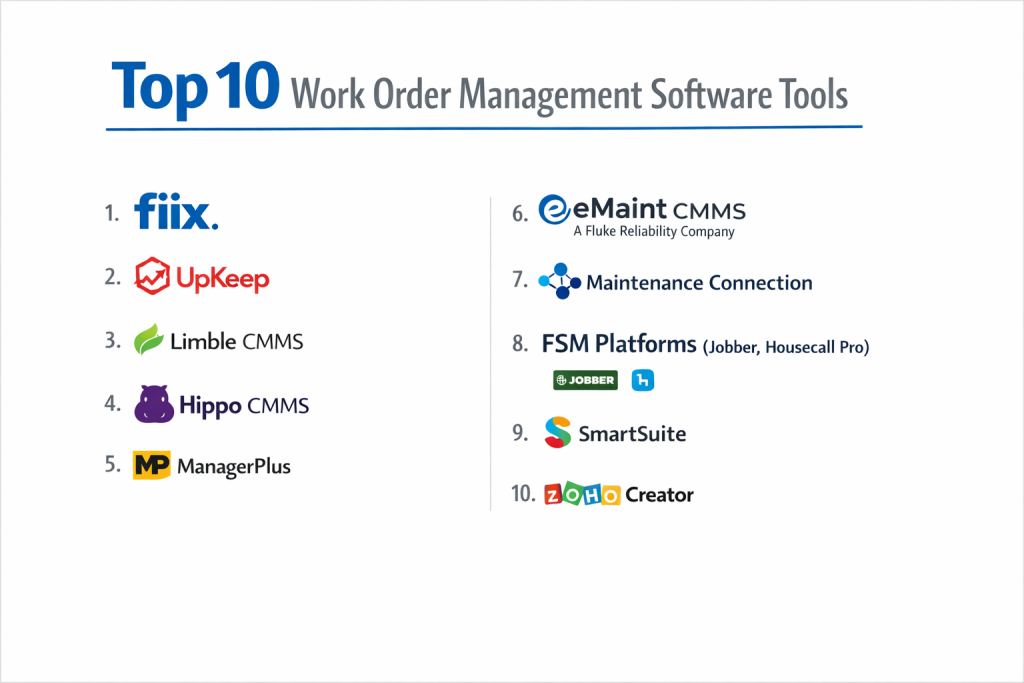
Top 10 Work Order Management Software Tools
1 — UpKeep
UpKeep is a mobile-first solution designed specifically for maintenance and facility teams. It emphasizes ease of use to ensure high adoption rates among technicians.
- Key features
- Mobile-first work order creation with photo and video attachments.
- Asset management with QR code and barcode scanning for quick identification.
- Preventative maintenance scheduling based on time or meter readings.
- Inventory and parts management with automated restock alerts.
- Real-time push notifications for technicians when a new job is assigned.
- Signature capture for work order completion and compliance.
- Robust reporting suite for tracking labor hours and asset downtime.
- Pros
- The most intuitive mobile interface in the industry, requiring almost zero training for field staff.
- Excellent “offline mode” that allows work to continue in basements or remote areas.
- Cons
- The cost can become significant for large teams due to the per-user pricing model.
- Some of the more advanced integration features are locked behind higher enterprise tiers.
- Security & compliance: SOC 2 Type II, GDPR, SSO support (SAML), and data encryption at rest and in transit.
- Support & community: 24/7 technical support, a dedicated success manager for enterprise, and a large “Maintenance Community” Slack group.
2 — MaintainX
MaintainX is a fast-growing, modern platform that combines work order management with real-time team communication and digital procedural checklists.
- Key features
- Integrated instant messaging within each work order for team collaboration.
- Digitized checklists and SOPs to ensure safety and quality standards.
- Automated work order triggers based on preventative maintenance cycles.
- Vendor management portal for coordinating with external contractors.
- Barcode and QR code scanning for assets and parts.
- API access for custom integrations with ERP and accounting software.
- Resource planning tools to balance technician workloads.
- Pros
- The built-in chat function eliminates the need for separate communication tools like WhatsApp.
- Very fast implementation; many teams can go live in a single afternoon.
- Cons
- Reporting is highly visual but lacks some of the hyper-granular customization required by some industries.
- The free version is generous but lacks the automated “preventative” features.
- Security & compliance: SOC 2 Type II, ISO 27001, GDPR, and SSO integrations.
- Support & community: Extensive online documentation, live chat support, and a highly active product feedback loop.
3 — Fiix (by Rockwell Automation)
Fiix is an AI-driven maintenance management platform that focuses on taking companies from reactive to predictive maintenance.
- Key features
- “Fiix Foresight” AI that predicts equipment failure based on historical data.
- Multi-site management for global organizations with several facilities.
- Automated work order assignment based on technician availability.
- Deep integration with industrial PLC and SCADA systems.
- Inventory management with automated purchase order generation.
- Mobile app for iOS and Android with full work order functionality.
- Pros
- Backed by Rockwell Automation, making it the top choice for heavy industrial and manufacturing environments.
- Exceptional at handling massive data sets for predictive maintenance insights.
- Cons
- The platform has a steeper learning curve compared to simple “field service” apps.
- Pricing is enterprise-focused and may be out of reach for very small businesses.
- Security & compliance: SOC 2 Type II, GDPR, and secure data hosting in AWS.
- Support & community: Fiix University for certification, dedicated account managers, and 24/5 support.
4 — ServiceTitan
ServiceTitan is the “all-in-one” giant specifically built for residential and commercial field service contractors (HVAC, Plumbing, Electrical).
- Key features
- Integrated dispatching with “drag-and-drop” scheduling and GPS tracking.
- Mobile pricebook and “Good/Better/Best” sales presentation tools.
- Automated marketing and customer follow-up campaigns.
- Direct payment processing and financing options built into the mobile app.
- Inventory tracking tied specifically to service trucks.
- Deep reporting on technician sales performance and ROI.
- Pros
- The absolute best tool for businesses looking to grow revenue, not just manage tasks.
- Replaces 5 or 6 other pieces of software (CRM, Accounting, Marketing, Scheduling).
- Cons
- High implementation fee and a long onboarding process (usually 6-12 weeks).
- Can be “overkill” for a business that only needs basic work order tracking.
- Security & compliance: PCI DSS for payments, SOC 2, and GDPR.
- Support & community: Massive user community and annual “ServiceTitan Pantheon” conference.
5 — Jobber
Jobber is a highly popular, user-friendly platform designed for smaller field service businesses like landscaping, cleaning, and general contracting.
- Key features
- Online customer booking and quote requests.
- Automated scheduling with “map-view” dispatching.
- One-click invoicing and automated “quote follow-up” emails.
- Client Hub where customers can view quotes, pay invoices, and request work.
- Expense tracking and basic job costing.
- Integration with QuickBooks Online and Xero.
- Pros
- Extremely easy to use; most owners can set it up without any technical help.
- The automated reminders significantly reduce late payments and “no-show” appointments.
- Cons
- Lacks the deep “asset management” features needed for complex industrial plants.
- Not designed for managing large internal maintenance teams (more focused on external clients).
- Security & compliance: GDPR, PCI compliance for payments, and standard data encryption.
- Support & community: Excellent customer service and the “Jobber Academy” for business growth.
6 — Limble CMMS
Limble CMMS provides a professional, robust platform that focuses on being “built for the technician,” emphasizing simplicity without sacrificing power.
- Key features
- Custom fields for work orders to capture industry-specific data.
- Drag-and-drop preventative maintenance calendar.
- Parts and inventory management with “automatic” replenishment.
- Work request portal for non-users (tenants/staff) to submit tickets.
- Detailed asset logs with full maintenance history.
- Mobile app with QR code scanning and offline access.
- Pros
- Highly configurable; you can adapt the software to your specific workflow easily.
- Rated as one of the best for customer support and personalized onboarding.
- Cons
- Lacks some of the built-in “sales” features of ServiceTitan.
- UI is functional but perhaps not as modern-looking as MaintainX.
- Security & compliance: SOC 2 Type II, GDPR, and SSO support.
- Support & community: Dedicated success managers and a very high customer satisfaction rating.
7 — Hippo CMMS (by iOFFICE + SpaceIQ)
Hippo CMMS is a straightforward, visual tool that is particularly effective for healthcare, hospitality, and educational facilities.
- Key features
- Visual dashboard using interactive floor plans to locate assets.
- Simple “Request Portal” for facility occupants to log issues.
- Preventative maintenance scheduling with color-coded status.
- Asset management with storage for manuals and warranties.
- Customizable user permissions based on site location.
- Audit-ready compliance reporting for safety inspections.
- Pros
- The “floor plan” view is a standout feature for facility managers with large buildings.
- Very affordable pricing for mid-market organizations.
- Cons
- Less focus on “Field Service” (external dispatching) and more on “Facilities” (internal).
- Integration ecosystem is smaller than some of the cloud-native giants.
- Security & compliance: SOC 2 Type II, GDPR, and SSO.
- Support & community: Extensive video tutorial library and proactive phone support.
8 — IFS Ultimo
IFS Ultimo is a comprehensive enterprise Asset Management (EAM) platform that handles work orders within the context of the entire asset lifecycle.
- Key features
- Full integration between work orders and safety management (LOTO, Permits).
- Mobile client for field inspections and maintenance execution.
- Fleet management and infrastructure management modules.
- Cost-tracking and budgeting for large-scale maintenance projects.
- Connectivity with building automation systems (BMS).
- Multi-site, multi-language, and multi-currency support.
- Pros
- Unrivaled for industries with high safety and compliance requirements (Healthcare, Energy).
- Scales seamlessly to hundreds of sites and thousands of users.
- Cons
- High barrier to entry in terms of both cost and technical setup.
- User interface is very “powerful” but can be overwhelming for casual users.
- Security & compliance: ISO 27001, SOC 2, GDPR, and specialized healthcare compliance (HIPAA).
- Support & community: Enterprise-grade support with global coverage and a large partner network.
9 — FMX
FMX (Facilities Management eXpress) is a cloud-based solution that excels in managing facility use, maintenance, and equipment for schools and government.
- Key features
- Facility scheduling and community rental management.
- Maintenance and work order tracking with automated routing.
- Inventory management with parts-to-work-order linking.
- Planned maintenance scheduling for recurring inspections.
- Public-facing “Request Portal” for community members.
- Energy and utility consumption tracking.
- Pros
- The best option for public sector organizations that need to manage “room bookings” and “maintenance” in one place.
- Highly rated for its customer-centric implementation process.
- Cons
- Not designed for high-volume residential service contractors.
- Mobile functionality is web-based (PWA) rather than a native high-performance app.
- Security & compliance: GDPR, SSO, and standard data encryption protocols.
- Support & community: Exceptional personalized training and 24/7 emergency support.
10 — Workiz
Workiz is a field service management tool specifically optimized for “on-demand” services like locksmiths, junk removal, and garage door repair.
- Key features
- Integrated “Service Phone” system to track and record customer calls.
- Real-time “On-the-Way” alerts with technician tracking for customers.
- “Lead Management” to track where customers are finding the business.
- Automated review requests (SMS/Email) upon job completion.
- Built-in payment processing and “tipping” features.
- Ad-hoc scheduling for fast-moving dispatcher environments.
- Pros
- The “Phone System” integration is a game-changer for businesses that take lots of ad-hoc calls.
- Focuses heavily on “Closing the Sale” and generating online reviews.
- Cons
- Lacks deep asset-tracking history (more focused on the customer/job).
- Not intended for industrial manufacturing or preventative maintenance.
- Security & compliance: PCI compliance, GDPR, and standard secure hosting.
- Support & community: Responsive live chat and a growing library of business growth podcasts.
Comparison Table
| Tool Name | Best For | Platform(s) Supported | Standout Feature | Rating |
| UpKeep | Internal Maintenance | Web, iOS, Android | Mobile-First UX | 4.8 / 5 |
| MaintainX | Team Collaboration | Web, iOS, Android | Built-in Real-time Chat | 4.9 / 5 |
| Fiix | Industrial / AI | Web, iOS, Android | AI Predictive Analytics | 4.6 / 5 |
| ServiceTitan | Large HVAC/Plumbing | Web, iOS, Android | Full Revenue Engine | 4.7 / 5 |
| Jobber | Small Service Biz | Web, iOS, Android | Client Hub Portal | 4.5 / 5 |
| Limble CMMS | Technical Depth | Web, iOS, Android | Modular Customization | 4.8 / 5 |
| Hippo CMMS | Facilities / Schools | Web, Tablet | Interactive Floor Plans | 4.4 / 5 |
| IFS Ultimo | Enterprise Security | Web, iOS, Android | Integrated Safety Permits | 4.2 / 5 |
| FMX | Public Sector / Edu | Web (Cloud-based) | Facility Rental Booking | 4.6 / 5 |
| Workiz | On-Demand Dispatch | Web, iOS, Android | Integrated Phone System | 4.7 / 5 |
Evaluation & Scoring of Work Order Management Software
| Evaluation Category | Weight | Score (1-10) | Evaluation Rationale |
| Core Features | 25% | 9 | Most top tools now cover scheduling, inventory, and reporting as a baseline. |
| Ease of Use | 15% | 8 | Large gap between mobile-native (UpKeep) and enterprise (IFS). |
| Integrations | 15% | 7 | Connectivity with accounting (QuickBooks) is common; ERP is harder. |
| Security & Compliance | 10% | 10 | SOC 2 and GDPR are now mandatory for serious enterprise entry. |
| Performance | 10% | 9 | Cloud systems have matured; offline modes are becoming standard. |
| Support & Community | 10% | 8 | Varies; “Academy” models are the current gold standard. |
| Price / Value | 15% | 7 | Costs escalate quickly with “per user” models in large teams. |
Which Work Order Management Software Is Right for You?
Small to Mid-Market vs. Enterprise
If you are an SMB or a family-owned service business, you need software that provides a quick return on investment without requiring a full-time IT person. Jobber or Workiz are perfect here as they handle the “office” work (billing/quoting) automatically. For the Enterprise, the focus shifts to data integrity and security. IFS Ultimo or Fiix provide the deep audit logs and asset hierarchies required for a multi-national operation.
Budget and Value
Budget-conscious users should look for platforms with a “free-forever” version like MaintainX, which allows you to digitize your basic work orders without any initial cost. If you are looking for maximum value in terms of business growth, the higher cost of ServiceTitan is usually justified by the significant increase in sales conversion rates it provides to contractors.
Technical Depth vs. Simplicity
Do you need to track the vibration levels of a $2M CNC machine? You need the technical depth of Fiix. Do you just need a plumber to know which house to go to next? The simplicity of Jobber will serve you much better. Choosing a tool that is “too powerful” for your team often leads to them not using it at all.
Integration and Scalability Needs
As your business grows, you will likely move from QuickBooks to a more robust ERP like NetSuite or Sage. Ensure your chosen tool has an Open API or pre-built connectors. UpKeep and MaintainX are particularly strong in their ability to “talk” to other software.
Security and Compliance Requirements
If you work in healthcare, food production, or government, your software must prove that it is secure. Look for SOC 2 Type II reports and GDPR compliance. If you handle patient data, HIPAA compliance is a non-negotiable requirement. IFS Ultimo and Fiix are leaders in these high-stakes compliance environments.
Frequently Asked Questions (FAQs)
1. What is the difference between CMMS and Work Order Management Software?
Work order management is a component of CMMS (Computerized Maintenance Management System). CMMS is broader, including long-term asset lifecycle tracking, while work order software is focused on the execution of specific tasks.
2. Can I use these tools if I don’t have internet access on-site?
Yes, but you must choose a tool with a “native mobile app” that supports offline data syncing (like UpKeep or MaintainX). Web-based tools will stop working if the signal is lost.
3. Does this software integrate with QuickBooks?
Most “Field Service” tools (Jobber, ServiceTitan, Workiz) have direct integrations. “Maintenance” tools (UpKeep, Fiix) usually require an API or a middleware tool like Zapier.
4. How much does work order management software cost?
Basic tools start around $30–$50 per user per month. Enterprise-grade tools can cost hundreds per month and usually include significant implementation fees.
5. How long does it take to get a team trained?
For simple apps like Jobber, a technician can be trained in 15 minutes. For complex EAM tools like IFS, expect several days of training and a few weeks of “learning curve.”
6. Can customers request work themselves?
Yes. Most modern platforms offer a “Request Portal” where a customer or tenant can scan a QR code or visit a link to log an issue without calling the office.
7. Is it possible to track parts used on a job?
Yes. High-quality systems allow you to link inventory to a work order. When the technician marks the job as complete, the parts are automatically deducted from the warehouse stock.
8. Can I track my technicians’ locations?
Yes, most field service platforms use the phone’s GPS to show a “bread-crumb” trail of where the technician has been and where they are currently located for better dispatching.
9. Will this software help me pass safety audits?
Yes. By requiring technicians to complete a digital safety checklist before they can open or close a work order, you create a perfect audit trail for safety inspectors.
10. What is the most common reason for implementation failure?
“Feature Overload.” Managers often buy the most complex tool available, which is too difficult for the field staff to use, leading them to go back to paper notes.
Conclusion
Selecting the right Work Order Management Software is one of the most impactful decisions an operations leader can make. It is the bridge that connects the strategic goals of the office with the tactical reality of the field. Whether you choose the mobile-first simplicity of UpKeep, the revenue-driving power of ServiceTitan, or the industrial intelligence of Fiix, the goal is the same: clarity, efficiency, and data-driven decision-making.
Ultimately, the “best” tool is the one your team will actually use. Focus on the mobile experience, the ease of implementation, and the quality of the support team. By removing the friction from the work order process, you aren’t just managing tasks—you are building a more resilient and profitable business.