Introduction
Whiteboard collaboration tools are digital platforms that replicate the functionality of physical whiteboards while enabling remote collaboration. These tools allow teams to brainstorm, diagram, and visualize ideas in real-time from anywhere. Unlike static slides or documents, whiteboard collaboration tools provide an interactive canvas where multiple users can simultaneously contribute, edit, and annotate content.
These tools are increasingly important in today’s hybrid and remote work environments. They bridge the gap between in-person meetings and distributed teams, facilitating creativity, planning, and decision-making. Visual collaboration helps clarify complex ideas, align stakeholders, and improve engagement during meetings or workshops.
Common use cases include brainstorming sessions, project planning, design thinking workshops, agile sprint planning, diagramming workflows, collaborative problem-solving, educational lessons, and strategy mapping. Teams in technology, education, consulting, product development, marketing, and startups leverage these platforms to increase productivity and creative output.
When choosing a whiteboard collaboration tool, users should consider features such as real-time collaboration, template libraries, integration with productivity tools, visual elements (sticky notes, shapes, connectors), performance, scalability, and pricing. Security, compliance, ease of use, and support resources are also critical, particularly for enterprises.
Best for:
Teams and organizations that require real-time collaboration, visual planning, or remote workshops. Ideal for product managers, educators, designers, consultants, project teams, marketing professionals, and agile teams across SMBs, mid-market companies, and enterprises.
Not ideal for:
Individuals or teams who rarely collaborate visually, or only need static diagrams or documentation, may not require full-featured whiteboard tools. Simple diagramming or note-taking apps may suffice in such cases.
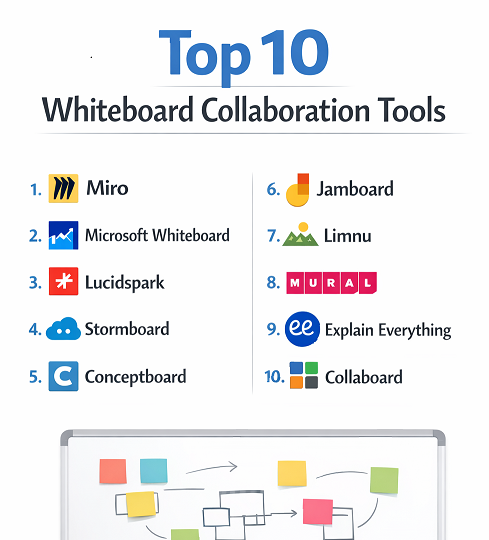
Top 10 Whiteboard Collaboration Tools
1 — Miro
Miro is a leading cloud-based whiteboard collaboration tool designed to support both small teams and large enterprises. It provides an infinite canvas for brainstorming, diagramming, wireframing, and planning. Miro allows multiple users to interact in real-time, making it ideal for workshops, agile planning, design thinking sessions, and remote collaboration. The platform’s versatility allows teams to centralize all collaborative visual content in one workspace, from sticky notes to flowcharts.
Key features:
- Infinite digital canvas for brainstorming
- Pre-built templates for agile, UX, and strategy
- Real-time multi-user collaboration
- Integrations with Slack, Jira, Microsoft Teams, and Google Workspace
- Sticky notes, shapes, and connectors for visualization
- Presentation and voting modes
- Mobile and tablet support
Pros:
- Intuitive interface suitable for all team sizes
- Highly versatile with templates and integrations
- Scales from small teams to large enterprises
Cons:
- Free plan limitations for advanced features
- Performance can slow with large boards
- Learning curve for new users
Security & compliance:
SSO, encryption, audit logs, SOC 2, GDPR
Support & community:
Comprehensive documentation, tutorials, webinars, active user community, and enterprise support.
2 — Microsoft Whiteboard
Microsoft Whiteboard is a collaborative digital canvas integrated into the Microsoft 365 ecosystem. It allows teams to brainstorm, sketch ideas, and annotate content directly from Microsoft apps like Teams and OneNote. It is especially useful for organizations already leveraging Microsoft products, ensuring seamless integration and real-time collaboration across devices.
Key features:
- Infinite canvas with pens, sticky notes, and shapes
- Integration with Teams, OneNote, and Outlook
- Real-time multi-user editing
- Templates for education, agile, and brainstorming
- Export to image or PDF formats
- Touchscreen and stylus support
- Cloud storage via OneDrive
Pros:
- Native integration with Microsoft 365
- Real-time collaboration
- Free for Microsoft 365 users
Cons:
- Limited advanced visual features
- Some tools may feel basic compared to competitors
- Windows/iOS focus; fewer Android features
Security & compliance:
SSO, encryption, HIPAA, GDPR, ISO compliance
Support & community:
Microsoft documentation, user forums, and enterprise support.
3 — Lucidspark
Lucidspark is a collaborative whiteboard designed for creative teams and enterprises. It enables brainstorming, ideation, and workflow mapping with powerful visual tools and real-time collaboration. Lucidspark is particularly well-suited for agile teams, product planning, and cross-functional workshops where clarity and structured collaboration are key.
Key features:
- Infinite collaborative canvas
- Drag-and-drop sticky notes, shapes, and connectors
- Voting and reaction tools for decision-making
- Integration with Slack, Jira, and Google Workspace
- Custom templates for strategy and brainstorming
- Real-time collaboration and comments
- AI-powered suggestions and shape recognition
Pros:
- Strong collaboration and organization tools
- Visual clarity for complex workflows
- Works well for distributed teams
Cons:
- Paid plans required for advanced features
- Can be overwhelming for casual users
- Some integration limitations
Security & compliance:
SSO, encryption, GDPR, SOC 2
Support & community:
Documentation, webinars, community forums, and professional support.
4 — Stormboard
Stormboard is a visual collaboration platform that combines a digital whiteboard with sticky notes, templates, and voting tools. It is designed for teams conducting brainstorming sessions, strategic planning, and agile retrospectives. Stormboard’s structured workspace ensures that ideas are captured, organized, and prioritized efficiently.
Key features:
- Pre-designed templates for meetings and workshops
- Real-time multi-user collaboration
- Sticky notes, drawings, and images
- Voting and prioritization tools
- Export boards to PDF or Excel
- Commenting and tagging
- Cross-device accessibility
Pros:
- Structured brainstorming and idea prioritization
- Templates simplify workshop management
- User-friendly interface
Cons:
- Limited visual design tools
- Paid plan required for larger boards
- Can feel rigid for creative brainstorming
Security & compliance:
SSO, encryption, SOC 2, GDPR
Support & community:
Documentation, video tutorials, customer support, and team training resources.
5 — Conceptboard
Conceptboard is a collaborative whiteboard platform focused on visual collaboration for remote teams. It is especially popular among design, marketing, and project management teams for workshops, presentations, and visual feedback loops. Conceptboard enables detailed discussions and annotations directly on the board to reduce miscommunication and increase efficiency.
Key features:
- Infinite digital canvas
- Real-time collaboration and annotation
- Templates for workshops, retrospectives, and UX planning
- Integration with Slack, Teams, and Jira
- Presentation mode for sharing ideas
- Task assignment and comments
- Version tracking
Pros:
- Excellent for remote design and feedback
- Supports structured workshops
- Real-time collaboration tools
Cons:
- Limited offline support
- Free plan features are basic
- Can be slow with very large boards
Security & compliance:
SSO, encryption, GDPR, SOC 2
Support & community:
Documentation, webinars, tutorials, and enterprise support.
6 — Jamboard
Google Jamboard is a cloud-based whiteboard designed for collaborative work and education. It integrates with Google Workspace, allowing seamless collaboration, real-time editing, and sharing across devices. Jamboard is ideal for educators, classroom activities, and teams using Google Workspace.
Key features:
- Interactive digital whiteboard
- Integration with Google Drive, Docs, and Meet
- Sticky notes, shapes, and drawing tools
- Real-time collaboration and multi-user editing
- Template library for education and team activities
- Cloud-based storage and sharing
Pros:
- Easy integration with Google Workspace
- Intuitive interface
- Free for Google Workspace users
Cons:
- Limited advanced features
- Best suited for Google ecosystem
- Device-dependent experience
Security & compliance:
SSO, encryption, HIPAA, GDPR
Support & community:
Google documentation, support forums, and Workspace tutorials.
7 — Limnu
Limnu is an online whiteboard built to provide a natural drawing experience for teams that need freehand collaboration. It is designed for engineers, designers, and product teams who want a smooth, realistic whiteboard experience with minimal friction.
Key features:
- Infinite whiteboard canvas
- Realistic pen and drawing tools
- Real-time collaboration
- Board sharing and permissions
- Commenting and sticky notes
- Cross-platform access
Pros:
- Natural drawing experience
- Fast and responsive
- Simple interface for rapid brainstorming
Cons:
- Fewer templates than competitors
- Limited advanced visual features
- Paid plans required for full access
Security & compliance:
SSO, encryption, GDPR
Support & community:
Documentation, support articles, and email support.
8 — MURAL
MURAL is a digital workspace for visual collaboration and design thinking. It is designed for teams conducting remote workshops, strategic planning, and brainstorming sessions. MURAL emphasizes structured collaboration, ideation, and mapping of complex processes.
Key features:
- Infinite canvas with templates
- Sticky notes, drawings, and diagrams
- Voting and prioritization features
- Real-time multi-user collaboration
- Integration with Slack, Teams, Jira
- Presentation and workshop modes
Pros:
- Excellent for design thinking and workshops
- Scales for large teams
- Strong collaboration tools
Cons:
- Paid plans required for full functionality
- Can be overwhelming for new users
- Internet dependency
Security & compliance:
SSO, encryption, SOC 2, GDPR
Support & community:
Documentation, tutorials, workshops, and enterprise support.
9 — Explain Everything
Explain Everything is an interactive whiteboard and screencasting tool designed for education and collaborative storytelling. It allows teams and educators to create dynamic presentations, record annotations, and share insights in real-time.
Key features:
- Interactive whiteboard with annotations
- Screencasting and recording
- Real-time collaboration
- Templates for teaching and workshops
- Cloud-based sharing and export
- Cross-device accessibility
Pros:
- Excellent for teaching and visual storytelling
- Supports multimedia content
- Easy to record and share sessions
Cons:
- Paid plans required for advanced features
- Limited corporate templates
- Performance may vary with large files
Security & compliance:
Encryption, GDPR
Support & community:
Documentation, tutorials, and educator community.
10 — Collaboard
Collaboard is a collaborative whiteboard platform for remote teams focusing on real-time brainstorming, agile workflows, and interactive meetings. It is ideal for teams that need structured collaboration, feedback loops, and visual planning.
Key features:
- Infinite canvas for ideas and planning
- Real-time collaboration and chat
- Sticky notes, shapes, connectors
- Templates for agile, UX, and workshops
- Multi-device support
- Export and presentation mode
Pros:
- Good for structured workshops
- Real-time collaboration
- Supports enterprise-scale teams
Cons:
- Fewer creative drawing tools
- Paid plan required for full access
- Slight learning curve for new users
Security & compliance:
SSO, encryption, GDPR, SOC 2
Support & community:
Documentation, tutorials, and professional support.
Comparison Table
| Tool Name | Best For | Platform(s) Supported | Standout Feature | Rating |
|---|---|---|---|---|
| Miro | Teams & workshops | Web, Desktop, Mobile | Infinite canvas | N/A |
| Microsoft Whiteboard | Microsoft users | Windows, Web, iOS | Microsoft 365 integration | N/A |
| Lucidspark | Creative teams | Web, Desktop | Structured collaboration | N/A |
| Stormboard | Brainstorming & workshops | Web, Desktop, Mobile | Voting & prioritization | N/A |
| Conceptboard | Remote design & feedback | Web, Desktop | Annotation & commenting | N/A |
| Jamboard | Education & teams | Web, iOS | Google Workspace integration | N/A |
| Limnu | Designers & product teams | Web, Desktop | Realistic drawing experience | N/A |
| MURAL | Design thinking & workshops | Web, Desktop | Structured templates | N/A |
| Explain Everything | Education & storytelling | Web, Desktop, Mobile | Screencasting & interactive presentations | N/A |
| Collaboard | Agile & corporate teams | Web, Desktop | Enterprise collaboration | N/A |
Evaluation & Scoring of Whiteboard Collaboration Tools
| Criteria | Weight |
|---|---|
| Core features | 25% |
| Ease of use | 15% |
| Integrations & ecosystem | 15% |
| Security & compliance | 10% |
| Performance & reliability | 10% |
| Support & community | 10% |
| Price / value | 15% |
Which Whiteboard Collaboration Tools Tool Is Right for You?
Solo users should prioritize ease of use and cost. SMBs benefit from collaborative tools with templates and basic integrations. Mid-market teams require structured workflows, real-time collaboration, and scalability. Enterprises should focus on security, compliance, enterprise support, and integration with productivity tools. The ideal tool depends on team size, workflow complexity, and collaboration needs.
Frequently Asked Questions (FAQs)
- What is a whiteboard collaboration tool?
It is a digital platform that allows multiple users to create, annotate, and interact on a shared whiteboard in real-time. - Can multiple users collaborate simultaneously?
Yes, most whiteboard tools support real-time multi-user collaboration. - Are these tools suitable for remote teams?
Absolutely, they are designed to facilitate remote workshops and meetings. - Do whiteboard tools support templates?
Many offer templates for brainstorming, workshops, agile planning, and education. - Can I integrate whiteboard tools with other apps?
Most integrate with Slack, Microsoft Teams, Google Workspace, Jira, and more. - Are these tools secure for enterprise use?
Enterprise plans offer SSO, encryption, and compliance with GDPR and SOC 2. - Can I export whiteboards?
Yes, boards can usually be exported as PDF, image, or interactive formats. - Do these tools work on mobile devices?
Many platforms offer web, desktop, and mobile applications. - Are free versions effective?
Free versions cover basic functionality but often limit collaboration or templates. - Which tool is best for education?
Jamboard and Explain Everything are optimized for classrooms and interactive lessons.
Conclusion
Whiteboard collaboration tools are essential for modern teams, enabling brainstorming, workshops, and creative problem-solving regardless of location. They enhance visual communication, engagement, and productivity across industries.
There is no single best tool for everyone. The right choice depends on team size, collaboration requirements, workflow complexity, budget, and security needs. Evaluating features, integrations, and usability ensures that teams can select a platform that drives effective collaboration and long-term value.