Introduction
Voiceover tools represent a specialized category of software and platforms designed to generate, edit, and manage spoken audio content for various media. These tools have evolved from simple recording software into sophisticated platforms utilizing Artificial Intelligence (AI) and Neural Text-to-Speech (TTS) technologies. They allow users to convert written text into lifelike speech or provide high-end recording environments for human talent. In a digital environment where video and audio consumption is at an all-time high, these tools provide the auditory backbone for everything from high-end commercial advertisements to automated internal training modules.
The importance of voiceover tools lies in their ability to democratize professional audio production. Traditionally, a professional voiceover required a studio, a sound engineer, and expensive talent; today, a single creator can produce studio-quality narration in minutes. Key real-world use cases include the creation of e-learning modules with consistent narration, localization of YouTube content into multiple languages, the development of accessible audiobooks, and the generation of voiceovers for corporate presentations. When evaluating these tools, users should look for the naturalness of the “prosody” (rhythm and pitch), the breadth of language and accent support, the ability to control emotional inflection, and the quality of the underlying audio export.
Best for: Content creators, marketing agencies, e-learning developers, and corporate training departments. It is essential for teams that need to produce high volumes of audio content quickly, affordably, and in multiple languages.
Not ideal for: High-stakes dramatic acting in feature films where the subtle emotional complexity of a human actor is irreplaceable. It may also be unnecessary for simple, one-off internal voice notes where basic phone recording suffices.
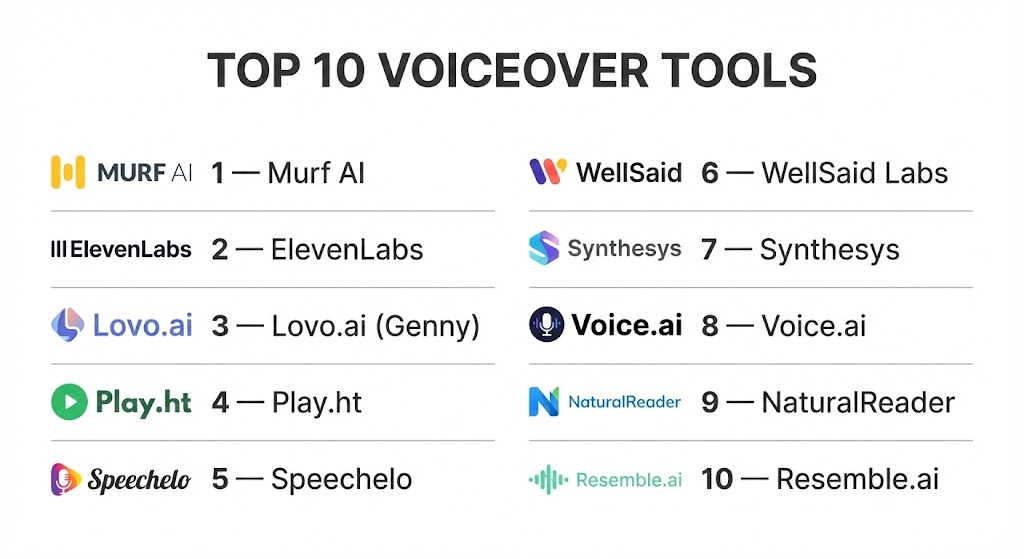
Top 10 Voiceover Tools
1 — Murf AI
Murf AI is a versatile AI voice generator that focuses on providing studio-quality voices for creators and businesses. It is designed for those who need to turn text into professional narration without the need for recording equipment.
- Key features
- Library of over 120+ lifelike AI voices in 20+ languages.
- Ability to sync voiceovers directly with video and images within the app.
- “Voice Changer” feature that allows you to upload a home recording and turn it into a professional AI voice.
- Granular controls for pitch, speed, and emphasis on specific words.
- Collaborative workspace for teams to edit audio projects together.
- Support for multiple export formats including MP3 and WAV.
- Grammar and spell-check integration for scripts.
- Pros
- The interface is exceptionally user-friendly, resembling a simple video editor.
- The “Emphasis” tool allows for much more natural-sounding sentences than basic TTS tools.
- Cons
- The higher-tier plans can be pricey for solo creators.
- Some voices can still sound slightly robotic in very long-form narrations.
- Security & compliance: GDPR compliant, SSO for enterprise, and secure cloud storage.
- Support & community: Priority email support, extensive documentation, and a helpful user blog.
2 — ElevenLabs
ElevenLabs is widely considered the industry leader in high-fidelity neural speech synthesis. It uses advanced deep learning to create voices that are almost indistinguishable from human speakers.
- Key features
- Industry-leading “Speech-to-Speech” and “Text-to-Speech” engines.
- Professional “Voice Cloning” that requires only a few minutes of audio data.
- Instant translation and dubbing that maintains the original speaker’s tone.
- Emotion and stability controls to fine-tune the “performance” of the voice.
- API for developers to integrate ultra-realistic voices into apps or games.
- Global language support with high-quality regional accents.
- High-bitrate audio exports for professional use.
- Pros
- The most realistic and emotionally expressive AI voices currently available.
- Exceptional at long-form content like audiobooks where listener fatigue is a concern.
- Cons
- Rapid credit consumption on high-quality settings.
- The power of the cloning tool requires strict ethical oversight to prevent misuse.
- Security & compliance: SOC 2 (Varies), GDPR compliant, and advanced encryption protocols.
- Support & community: Active Discord community, developer-centric documentation, and email support.
3 — Lovo.ai (Genny)
Lovo.ai, through its platform Genny, is a full-featured creative suite that combines AI voice generation with video editing and AI image generation. It is designed as a one-stop shop for content marketers.
- Key features
- 500+ voices across 100+ languages and diverse emotional tones.
- Built-in video editor with timeline-based audio syncing.
- AI Art Generator to create visuals for the voiceover content.
- Pronunciation editor for unique brand names or technical terms.
- Ability to add background music and sound effects directly.
- Mass production tools for high-volume content creators.
- Custom voice cloning for brands seeking a unique identity.
- Pros
- The “All-in-One” nature saves users from jumping between multiple apps.
- Excellent variety of “character” voices for gaming and animation.
- Cons
- The sheer number of tools can make the UI feel a bit cluttered.
- Processing times for long video exports can be slow.
- Security & compliance: GDPR compliant and standard SSL encryption.
- Support & community: Help center, community forums, and video tutorials.
4 — Play.ht
Play.ht is a powerful AI voice platform that excels in providing realistic voices for articles, blog posts, and long-form web content. It is a favorite for publishers looking to add “Listen” buttons to their sites.
- Key features
- Integration with WordPress and Medium for automatic audio conversion.
- High-fidelity “UltraRealistic” voice models.
- Multi-voice features allowing for “dialogue” within a single script.
- Custom pronunciations and acronym handling.
- Direct distribution to podcast platforms like Spotify and iTunes.
- White-label audio players for websites.
- Secure API for large-scale enterprise content pipelines.
- Pros
- Best-in-class integration for web publishers and bloggers.
- Huge library of voices that covers almost every niche and demographic.
- Cons
- Editing the timing between sentences can be a bit tedious.
- Some of the older “Standard” voices are noticeably lower quality than the “Ultra” ones.
- Security & compliance: SOC 2 Type II, GDPR, and secure API keys.
- Support & community: 24/7 live chat, extensive documentation, and a dedicated Slack community.
5 — Speechelo
Speechelo is a desktop-based (and cloud) application that targets video creators who want a simple, one-time-payment alternative to expensive monthly subscriptions.
- Key features
- “Normal,” “Joyful,” and “Serious” tone settings for voices.
- Simple three-click process: Paste text, choose voice, and generate.
- Works with any video creation software (Camtasia, Adobe, etc.).
- Supports over 30 languages with basic accent variations.
- Automatic punctuation and breath-sound insertion.
- Lifetime update options for specific tiers.
- Clean, no-frills interface.
- Pros
- Very cost-effective for users who dislike monthly SaaS subscriptions.
- Extremely fast generation times for short marketing scripts.
- Cons
- Lacks the deep emotional nuance found in ElevenLabs or Murf.
- The upsell-heavy marketing can be off-putting to some users.
- Security & compliance: Standard web security (Varies / N/A).
- Support & community: Ticket-based support and a basic knowledge base.
6 — WellSaid Labs
WellSaid Labs is an enterprise-focused platform that prioritizes the highest possible audio quality for corporate training and internal communications.
- Key features
- “Studio” interface for fine-tuning word-for-word delivery.
- Ethical voice sourcing—all AI voices are based on real actors who are compensated.
- High-quality team collaboration features and project folders.
- “Cues” system to tell the AI how to emphasize specific phrases.
- API for automated, high-scale content generation.
- Enterprise-grade security and user management.
- Consistent voice quality across the entire library.
- Pros
- Known for having the most consistent “professional” tone for corporate use.
- Strong ethical stance on AI voice sourcing gives businesses peace of mind.
- Cons
- Does not offer as many “character” or “emotional” voices as competitors.
- No built-in video editor; purely focused on audio output.
- Security & compliance: SOC 2 Type II, GDPR, SSO, and data encryption.
- Support & community: Dedicated account managers for enterprise and a comprehensive help center.
7 — Synthesys
Synthesys is an AI media platform that offers “Human Synthesis Studios,” which provides not only voiceovers but also AI video avatars to speak the lines.
- Key features
- AI “Humatars” that sync lip movements to the generated voiceover.
- Large library of professional-sounding male and female voices.
- Cloud-based application accessible from any device.
- Support for high-resolution video output.
- Simple “point-and-click” interface for avatar selection.
- Multi-language support for global marketing campaigns.
- Frequent updates adding new voices and characters.
- Pros
- Great for creating “talking head” videos without a camera or actor.
- Simplifies the entire process of creating a narrated video from scratch.
- Cons
- The avatar movements can sometimes look a bit stiff compared to real video.
- Limited control over deep audio technicals compared to WellSaid or ElevenLabs.
- Security & compliance: Standard encryption and GDPR compliance.
- Support & community: Email support and a growing user community on social media.
8 — Voice.ai
Voice.ai is a leading “Voice Changer” tool that focuses on real-time transformation. It is popular among streamers, gamers, and content creators who want to sound like someone else.
- Key features
- Real-time voice conversion for apps like Discord, Zoom, and Skype.
- Huge library of community-generated “Voice Universes.”
- “Voice Cloning” tool to create your own unique voice profile.
- Parody and celebrity voice options for comedic content.
- Ultra-low latency for gaming applications.
- Support for both live streaming and file-based recording.
- Built-in soundboard for creators.
- Pros
- The best option for live interactions and streaming entertainment.
- Completely free “community” voices allow for massive variety.
- Cons
- Requires significant GPU power for smooth real-time performance.
- Not designed for high-end text-to-speech narration (requires input speech).
- Security & compliance: Standard web encryption and privacy policy (Varies / N/A).
- Support & community: Massive Discord community and active developer updates.
9 — NaturalReader
NaturalReader is an accessibility-first tool that has expanded into a powerful commercial voiceover platform. It is particularly strong for education and long-form reading.
- Key features
- Chrome extension to read any webpage or Google Doc aloud.
- “AI Voices” with improved natural cadence for study materials.
- OCR (Optical Character Recognition) to read text from images and PDFs.
- Commercial license for YouTube and advertising use.
- Support for multi-lingual reading.
- Clean, distraction-free “Reader” interface.
- Mobile app that syncs with desktop libraries.
- Pros
- Unrivaled for accessibility and educational use cases.
- Very simple and clean pricing structure.
- Cons
- The editing tools for professional voiceovers are basic.
- Fewer “emotional” or “dramatic” voices than specialized creative tools.
- Security & compliance: GDPR compliant and secure data handling.
- Support & community: Extensive FAQ, email support, and educational guides.
10 — Resemble.ai
Resemble.ai is an advanced platform that focuses on “Generative Voice” for developers and high-end creative projects. It excels in real-time personalization and voice cloning.
- Key features
- Instant voice cloning with very little sample data.
- “Resemble Fill” which allows you to edit a single word in a recording without re-recording the whole thing.
- Deep-fake detection and watermarking for security.
- API and mobile SDKs for real-time game and app integration.
- Cross-lingual voice cloning (keep your voice, but speak in another language).
- Integrated “Emotion” API for programmatic control.
- Enterprise-level security and deployment options.
- Pros
- The “Fill” feature is a massive time-saver for correcting small audio errors.
- Extremely powerful for developers building voice-enabled applications.
- Cons
- Higher technical barrier to entry than simpler tools like Speechelo.
- Pricing is geared more toward professional and enterprise users.
- Security & compliance: SOC 2, GDPR, and advanced audio watermarking for anti-fraud.
- Support & community: Professional technical support, developer docs, and GitHub integrations.
Comparison Table
| Tool Name | Best For | Platform(s) Supported | Standout Feature | Rating |
| Murf AI | Marketing Videos | Web / Cloud | Voice Changer / Video Sync | 4.8/5 |
| ElevenLabs | Ultra-Realism | Web / API | Neural Speech Synthesis | 4.9/5 |
| Lovo.ai | All-in-One Content | Web / Cloud | Built-in Video & Image AI | 4.7/5 |
| Play.ht | Blog/Web Publishing | Web / WordPress | “UltraRealistic” Web Player | 4.6/5 |
| Speechelo | Budget Creators | Web / Desktop | One-time Payment Option | 4.1/5 |
| WellSaid Labs | Corporate Training | Web / API | Ethical Voice Sourcing | 4.7/5 |
| Synthesys | Video Avatars | Web / Cloud | AI Video Humatars | 4.2/5 |
| Voice.ai | Live Streaming | Windows / Mac | Real-time Voice Changing | 4.5/5 |
| NaturalReader | Accessibility/Education | Web / Chrome / App | OCR Text-to-Speech | 4.4/5 |
| Resemble.ai | Developers/Game Dev | Web / API / SDK | “Resemble Fill” Editing | 4.6/5 |
Evaluation & Scoring of Voiceover Tools
To ensure a fair comparison, we evaluated these tools across seven key dimensions weighted according to their importance in professional production.
| Category | Weight | Evaluation Highlights |
| Core Features | 25% | Naturalness of voices, language count, and editing depth. |
| Ease of Use | 15% | Intuitiveness of the UI and speed of the generation process. |
| Integrations | 15% | API availability and connectivity with video editors/CRMs. |
| Security & Compliance | 10% | Ethical sourcing, data privacy, and enterprise standards. |
| Performance | 10% | Rendering speed and audio export quality (WAV/MP3). |
| Support & Community | 10% | Quality of documentation and responsiveness of support. |
| Price / Value | 15% | ROI for different user tiers and credit fairness. |
Which Voiceover Tool Is Right for You?
Solo Users vs SMB vs Mid-Market vs Enterprise
If you are a Solo User or freelancer starting out, ElevenLabs (for its quality) or Speechelo (for its budget-friendliness) are excellent starting points. SMBs and marketing departments will likely find the most value in Murf AI or Lovo.ai due to their integrated video features. Mid-Market firms looking to automate their publishing should consider Play.ht. For the Enterprise, especially those in HR and internal training, WellSaid Labs is the industry standard for ethical, consistent, and secure corporate narration.
Budget-Conscious vs Premium Solutions
If you are strictly budget-conscious, Speechelo offers a “buy once, use forever” model that avoids the monthly SaaS trap. However, if your business depends on audio quality to maintain its brand image, investing in a premium solution like ElevenLabs or WellSaid Labs is a necessary expense to ensure your content doesn’t sound “cheap” or robotic.
Feature Depth vs Ease of Use
For those who want a tool that “just works” with minimal configuration, Synthesys and Speechelo are the winners. If you need Feature Depth—including the ability to programmatically adjust emotions, edit specific words within a recording, or integrate audio into a custom app—Resemble.ai and ElevenLabs provide the developer tools and granular controls required for high-end projects.
Integration and Scalability Needs
For web publishers with thousands of articles, Play.ht’s WordPress and API integrations make it the most scalable choice. If your voiceover needs are tied to real-time gaming or customer support bots, Resemble.ai and Voice.ai offer the SDKs and low-latency performance needed to scale interactive voice experiences.
Security and Compliance Requirements
Businesses in regulated industries must prioritize SOC 2 and GDPR compliance. WellSaid Labs and Murf AI provide the best enterprise-level security protocols. Furthermore, companies concerned with the ethics of AI should choose WellSaid Labs, as they have a transparent system for compensating the original voice actors used in their models.
Frequently Asked Questions (FAQs)
What is the difference between Text-to-Speech (TTS) and AI Voice Generation?
Traditional TTS uses “concatenative” synthesis (piecing together recorded syllables), which sounds robotic. Modern AI Voice Generation uses Neural Networks to predict the “human” way a sentence should flow, resulting in much more natural prosody and emotion.
Are AI voiceovers legal for commercial use?
Most platforms (like Murf, ElevenLabs, and WellSaid) grant you full commercial rights if you have a paid subscription. Always check the specific terms of service, as some “Free” tiers are for personal use only.
Can I clone my own voice with these tools?
Yes, tools like ElevenLabs, Resemble.ai, and Voice.ai allow you to upload a recording of yourself to create a digital “clone” that you can then use to generate new content from text.
Which tool is best for foreign languages?
Lovo.ai and NaturalReader have some of the largest libraries of non-English voices. ElevenLabs is also highly regarded for its ability to maintain a consistent “speaker identity” across multiple languages.
How do I make an AI voice sound more human?
Use the “Emphasis” and “Pitch” tools to highlight key words. Adding pauses (commas and periods) and using high-quality platforms that support “emotional” presets will also significantly improve the naturalness.
Can AI replace professional voice actors?
For short social media clips, training videos, and basic narration, yes. However, for high-end artistic roles requiring deep character development or specific directorial feedback, human voice actors still provide a level of nuance AI hasn’t reached.
What is “Speech-to-Speech” (STS)?
STS allows you to record yourself speaking with a specific cadence and emotion, and then the AI replaces your voice with a professional “identity” while keeping your original timing and acting.
Do I need a special microphone to use these tools?
If you are using Text-to-Speech, no—the software handles all audio. If you are using “Voice Cloning” or “Voice Changing,” a decent-quality USB microphone will help the AI create a cleaner, more accurate model.
What audio file formats do these tools support?
Almost all support MP3 (for web/social) and WAV (for high-fidelity professional editing). Some enterprise tools also support AAC and OGG.
Are there ethical concerns with AI voices?
Yes, particularly around “deep-fakes” and the displacement of human jobs. This is why tools like WellSaid Labs focus on ethical sourcing and platforms like Resemble.ai include watermarking to verify the audio is AI-generated.
Conclusion
The evolution of voiceover tools has reached a point where high-quality audio is accessible to anyone with a script. For marketing and content creation, Murf AI and Lovo.ai offer a powerful combination of quality and ease. For those pushing the boundaries of what AI can do, ElevenLabs provides a level of realism that was unimaginable just a few years ago.
Ultimately, the best voiceover tool is the one that fits your specific project requirements. If you need consistency for a 50-hour corporate training course, you prioritize reliability and ethics. If you are a streamer, you prioritize real-time performance. Regardless of your choice, the ability to give your brand or project a professional voice has never been easier or more affordable.