Introduction
A smart thermostat app is the software companion that allows you to control a Wi-Fi or smart-connected thermostat from your smartphone, tablet, or computer. It is the interface that turns a simple temperature dial into an intelligent system for home comfort and energy management. These apps let you adjust settings from anywhere, create heating and cooling schedules, receive maintenance alerts, and see detailed reports on your energy use.
These apps are important because they unlock the true value of a smart thermostat. While the physical device on your wall is the brain, the app is the remote control and dashboard that gives you insight and control. This leads to tangible benefits like significant energy savings by automatically reducing heating or cooling when you’re away, improved comfort by having the house at the right temperature when you arrive home, and early detection of potential HVAC system problems.
In everyday life, smart thermostat apps enable use cases like geofencing, which uses your phone’s location to turn the HVAC on when you’re heading home, or setting vacation modes remotely to save energy while you’re gone. They also allow for multi-room zoning control if you have multiple thermostats. When choosing which ecosystem to buy into, you should evaluate the user interface and ease of programming, the intelligence of its learning and scheduling features, the quality and clarity of its energy reports, its integration with other smart home platforms (like Alexa or Google Home), and the reliability of its connectivity.
Best for: Smart thermostat apps are ideal for homeowners, landlords, and property managers who want to reduce utility bills, increase comfort, and have remote control of their HVAC systems. They are also valuable for small business owners managing office or retail space climate control. Energy-conscious individuals and tech-savvy users get the most benefit.
Not ideal for: These apps are not needed if you have a basic, non-Wi-Fi thermostat. They are also not ideal for renters who cannot install new hardware, or for individuals who strictly prefer a simple, manual dial and have no interest in scheduling or remote access. In some cases, complex HVAC systems may require a professional installer regardless of the app’s simplicity.
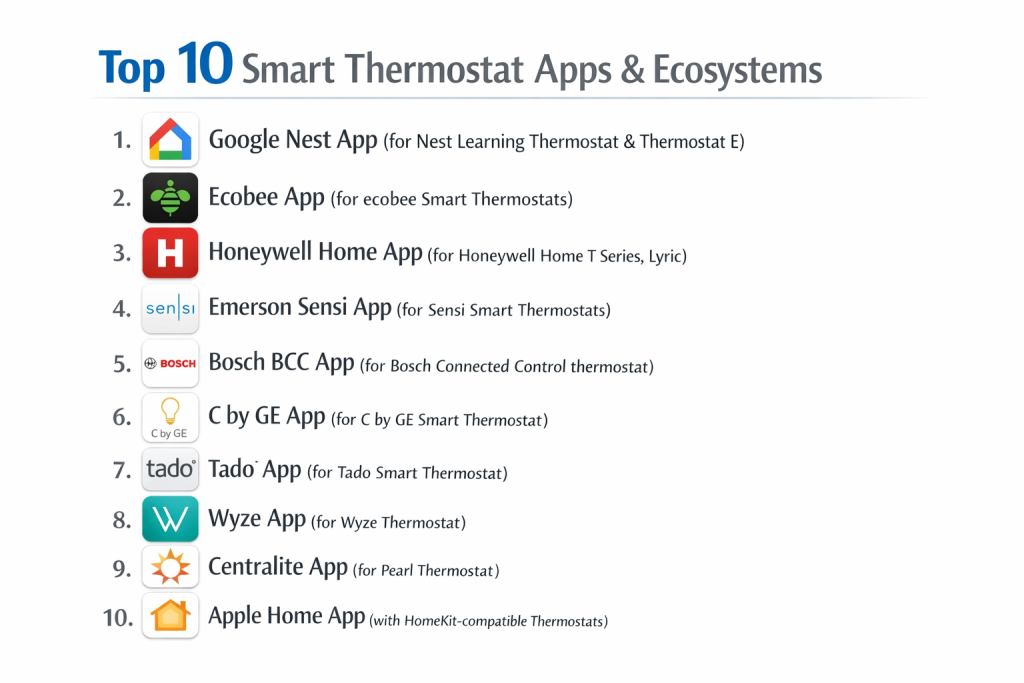
Top 10 Smart Thermostat Apps
This guide covers the leading apps that control the most popular smart thermostats on the market.
1 — Nest App (Google)
The Nest app is designed to control Google Nest learning thermostats and other Nest products. It’s known for its clean, intuitive design and focus on a seamless, automated experience that learns your habits.
Key features:
- Auto-Schedule: Learns your temperature preferences and creates a custom schedule over time.
- Home/Away Assist: Uses phone location and sensors to set an Eco Temperature when no one is home.
- Energy History: Shows daily, weekly, and monthly energy use in a clear, visual timeline.
- Seasonal Savings: Automatically runs your system more efficiently when it can.
- Farsight: Displays the temperature, time, or weather on the thermostat’s screen when it senses you walking by.
- Integration: Works with Google Home, Alexa, and many other smart home platforms.
Pros:
- The “learning” feature is genuinely helpful for those who don’t want to program a schedule manually.
- Beautiful, simple app design that makes it easy to see and adjust the basics.
- Strong energy-saving features that are automated and effective.
Cons:
- Can be frustrating for users who want precise, manual control over their schedule; the learning can feel opaque.
- Some advanced settings are buried or require using the website instead of the app.
- Increasingly integrated into the Google Home app, which can cause confusion about which app to use.
Security & compliance: Data is encrypted in transit and at rest. Google has strong cloud security infrastructure and complies with standards like SOC 2 and GDPR.
Support & community: Support is provided through Google. There’s a large user community, extensive online help, and professional installer networks.
2 — ecobee App
The ecobee app controls ecobee smart thermostats, which are known for their detailed configurability and use of remote room sensors to manage comfort in multiple areas.
Key features:
- Remote Smart Sensors: Manages sensors that detect occupancy and temperature in other rooms, allowing the thermostat to focus on occupied spaces.
- Comfort Settings: Create detailed profiles (Home, Away, Sleep) with different sensor participation and temperature targets.
- Beestat.io Integration: (Third-party) Allows for incredibly deep, community-created energy usage analytics.
- Smart Home & Voice Control: Deep integration with Apple HomeKit, Alexa, SmartThings, and Google Assistant.
- HVAC Monitoring: Alerts for extreme temperature ranges or if your system is running excessively.
- Detailed Scheduling: Highly granular, manual schedule programming with copy/paste day functionality.
Pros:
- Unmatched for multi-room comfort management thanks to the remote sensor system.
- Offers both powerful automation and deep manual control for users who want it.
- Arguably the best data and reporting for users who love to analyze and optimize.
Cons:
- The sheer number of options can be overwhelming for users who want a simple, set-and-forget device.
- The official app’s energy reports are less visually intuitive than Nest’s.
- Requires purchasing additional sensors for the full multi-room benefit.
Security & compliance: Uses encryption and secure cloud practices. SOC 2 and GDPR compliant. A key player with a strong focus on data privacy and security.
Support & community: Excellent customer support via phone, chat, and email. A very active, knowledgeable user community, especially around data analysis.
3 — Honeywell Home T9/T10 App
The Honeywell Home app (formerly Resideo) controls the Honeywell Home T9, T10, and other Wi-Fi thermostats. It positions itself as a reliable, professional-grade system with strong zoning and remote sensor capabilities.
Key features:
- Room Sensor Focus: Like ecobee, uses remote room sensors for occupancy-based temperature control.
- RedLINK Plus Technology: Offers a robust, proprietary wireless connection for sensors and equipment (for T10).
- Geofencing: Creates a “Geofence” around your home to trigger “Away” and “Home” modes.
- Flexible Scheduling: 7-day programmable schedules with period hold options.
- Smart Home Integration: Works with Amazon Alexa, Google Assistant, Apple HomeKit (T6 model), and Samsung SmartThings.
- Alerts & Monitoring: Sends alerts for temperature extremes, humidity, and filter changes.
Pros:
- A trusted, reliable brand with a long history in HVAC controls.
- Excellent performance in homes where the thermostat is in a poor location (uses remote sensors for accurate readings).
- Often recommended by HVAC professionals for its compatibility and reliability.
Cons:
- The app and user interface can feel utilitarian and less polished than Nest or ecobee.
- Setup can be more complex, sometimes benefiting from professional installation.
- The branding and app transition from “Honeywell” to “Resideo” to “Honeywell Home” has caused some user confusion.
Security & compliance: Employs industry-standard encryption and security protocols. Specific compliance details are available from Resideo.
Support & community: Support is available through the app, website, and professional installers. Has a solid user base, particularly among those who value the brand’s heritage.
4 — Emerson Sensi App
The Sensi app controls Emerson Sensi thermostats, which are popular for their affordability, DIY-friendly installation, and compatibility with a wide range of HVAC systems.
Key features:
- DIY Installation: Excellent step-by-step guided installation within the app, including system compatibility checking.
- Flexible Scheduling: Easy 7-day scheduling with “Away” mode and temporary hold options.
- Smart Maintenance Alerts: Reminders for filter changes and alerts for extreme temperatures or system usage.
- Usage Reports: Monthly energy usage reports and comparisons.
- Geofencing: Uses location to switch between “Home” and “Away” modes.
- Wide Compatibility: Works with Amazon Alexa, Google Assistant, and Apple HomeKit.
Pros:
- One of the easiest thermostats for a homeowner to install themselves, saving on professional costs.
- Reliable performance and a straightforward, no-fuss app experience.
- Excellent value, offering core smart features at a very competitive price point.
Cons:
- Lacks the advanced learning features of Nest or the multi-room intelligence of ecobee/Honeywell.
- App design is functional but basic.
- Geofencing feature can be less reliable than competitors for some users.
Security & compliance: Uses encryption for data. Details on specific certifications should be confirmed with Emerson, but they are a established, reputable brand in the space.
Support & community: Good customer support with an emphasis on DIY help. Community is smaller than the top brands but focused on installation troubleshooting.
5 — Wyze Thermostat App
The Wyze app (which controls many Wyze products) includes management for the Wyze Thermostat. It reflects Wyze’s philosophy: delivering a surprising number of features at a very aggressive price point.
Key features:
- Extreme Affordability: Offers smart scheduling, remote control, and voice control at a fraction of the cost of leaders.
- Voice Control: Works with Alexa and Google Assistant.
- Scheduling: 7-day programmable schedules.
- Vacation Mode: Set extended away periods easily.
- System Monitoring: Alerts for high/low temperature and usage.
- Integrated App: Controls the thermostat within the same app as Wyze cameras, lights, and plugs.
Pros:
- Unbeatable price for core smart thermostat functionality.
- Clean, simple app that works well for basic control.
- Great for budget-conscious users or for secondary properties.
Cons:
- Build quality and materials feel less premium than higher-priced competitors.
- Lacks advanced features like learning, geofencing, or remote sensors.
- Some users report minor connectivity or software bugs, as with many budget tech products.
Security & compliance: Wyze has faced scrutiny over data privacy and security in the past. They state they use encryption. Potential buyers should review their current privacy policy carefully.
Support & community: Support is primarily through the app and online knowledge base. Has a large community of budget-focused smart home users.
6 — Bosch BCC100 / Connected Control App
The Bosch Connected Control app manages the Bosch BCC100 thermostat and other connected Bosch climate products. It represents a premium, European-engineered approach focused on efficiency and integration with advanced heat pump systems.
Key features:
- Heat Pump Optimization: Specifically designed for superior control and efficiency with heat pump systems, including geothermal.
- Weather Adaptation: Uses local weather data to anticipate heating and cooling needs.
- Multi-Stage System Support: Excellent support for complex, multi-stage HVAC systems.
- Simple Interface: Clean, circular design on the thermostat and a straightforward app.
- OpenTherm Support: (In some markets) Allows for advanced modulation of compatible boilers for maximum efficiency.
- Zoning Capabilities: Can work within multi-zone systems.
Pros:
- Arguably the best smart thermostat on the market for homes with advanced heat pump systems.
- High build quality and a focus on precise, efficient control.
- Simple, elegant user interface.
Cons:
- Premium pricing.
- Less focused on “smart home” integrations and learning features; more of a “smart control” device.
- Smaller market share in North America means a smaller community and potentially less DIY support.
Security & compliance: As a division of a global industrial giant, Bosch employs strong security engineering. Specific app compliance details should be confirmed.
Support & community: Support is often channeled through certified HVAC installers. The user community is more niche, consisting of owners with high-efficiency systems.
7 — Lux Geo Wi-Fi App
The Lux Geo Wi-Fi app controls the Lux GEO Wi-Fi thermostat, a product that emphasizes simplicity, reliability, and value. It’s a straightforward option for users who want remote access without complexity.
Key features:
- Simple Setup & Use: Designed to be intuitive and easy for anyone to operate.
- Geofencing: The core “smart” feature, automatically switching to Away mode when all phones leave a defined zone.
- Flexible Scheduling: Standard 7-day programming.
- Alerts: Temperature and equipment alerts.
- Voice Control: Compatible with Amazon Alexa and Google Assistant.
- Energy Tracking: Basic usage history.
Pros:
- Very user-friendly for those intimidated by more complex smart thermostats.
- Reliable performance and strong geofencing implementation.
- Good mid-range price point.
Cons:
- The app and thermostat design are basic and not as visually polished.
- Lacks learning capabilities, detailed energy reports, or room sensors.
- Brand has lower recognition than the market leaders.
Security & compliance: States use of data encryption. A smaller company, so specific enterprise-level certifications may not be applicable.
Support & community: Provides customer support via phone and email. Community is smaller but loyal.
8 — Johnson Controls (GLAS) App
The Johnson Controls app controls the GLAS smart thermostat, a unique, premium device with a transparent OLED touchscreen and air quality monitoring. It’s for users who want a high-tech centerpiece.
Key features:
- Air Quality Monitoring: Built-in sensors for PM2.5, VOCs, and more, displayed on the screen.
- Stunning OLED Display: A full-color, sharp, transparent touch interface.
- Microsoft Cortana Integration: Unique built-in voice control via Cortana (though standard Alexa/Google are also supported).
- Weather & Calendar: Displays weather forecasts and can connect to your calendar.
- Smart Scheduling: Learning capabilities similar to Nest.
- High-Efficiency Focus: Optimized for controlling advanced HVAC systems.
Pros:
- The most visually striking and futuristic thermostat on the market.
- Unique value proposition with integrated air quality sensing.
- High-quality hardware and performance.
Cons:
- Very expensive.
- Some see the air quality features as a gimmick if not paired with an air purifier.
- Smaller ecosystem and less brand recognition in the consumer space.
Security & compliance: Johnson Controls is a massive player in building controls with enterprise-grade security expectations. Specifics for the GLAS product line should be verified.
Support & community: Support is available, but the product caters to a niche, premium market. Community is very small.
9 — Mysa App
The Mysa app is designed specifically for controlling electric baseboard heaters and smart AC units. It fills a crucial niche for homes with high-voltage heating systems that most smart thermostats cannot support.
Key features:
- High-Voltage Compatibility: Safely and easily controls 120V/240V electric baseboard heaters and fan-forced heaters.
- Smart AC Control: Also makes window/portable AC units smart.
- Scheduling & Geofencing: Standard smart features tailored for these heating/cooling types.
- Energy Tracking: See how much electricity your heaters or AC are using.
- Room-by-Room Control: Ideal for creating zones in homes with multiple baseboard heaters.
- Voice Control: Works with Alexa, Google Assistant, and HomeKit.
Pros:
- The leading smart solution for a challenging and common heating system type (electric baseboards).
- Clean, modern design and a well-made app.
- Excellent safety features and DIY installation guidance.
Cons:
- A specialized tool; irrelevant for homes with forced air furnaces or central heat pumps.
- Higher per-unit cost can add up if you need to equip many rooms.
- Limited to the specific HVAC types it supports.
Security & compliance: Employs standard encryption and security practices for a smart home IoT device. As a smaller, focused company, enterprise certifications may not apply.
Support & community: Known for responsive customer support. Has a dedicated community of users in older homes, apartments, and condos with electric heat.
10 — Cielo Home App
The Cielo Home app controls Cielo Breez smart AC controllers and thermostats. Its specialty is making existing ductless mini-split systems, window ACs, and central ACs smarter without replacing the entire thermostat.
Key features:
- Ductless Mini-Split Focus: The best solution for adding smart control to ductless mini-split air conditioners/heat pumps.
- Universal Compatibility: Works with a vast array of AC/heat pump brands via infrared (IR) blaster or direct wiring.
- Multi-Zone Management: Control multiple Cielo devices (rooms/zones) from a single app.
- Advanced Scheduling & Modes: Features like “Follow Me” (uses phone location) and “Best Shot” (quickly reaches set temperature).
- Energy Reports: Detailed consumption data for each device.
- Smart Integrations: Works with Alexa, Google Assistant, and IFTTT.
Pros:
- Unlocks smart features for systems that traditionally have “dumb” remotes (mini-splits).
- Incredibly versatile across different types of cooling/heating equipment.
- Powerful scheduling and automation features specific to comfort control.
Cons:
- For mini-splits, it’s an add-on box, not a replacement for the wall unit itself.
- Setup can involve some technical steps to match IR codes or wiring.
- Less of a traditional “thermostat” and more of a universal smart controller.
Security & compliance: Uses standard IoT security protocols. Details on specific compliance should be checked with the vendor.
Support & community: Good support with a strong focus on compatibility help. Active user community, especially among mini-split owners.
Comparison Table
| Tool Name | Best For (Target User or Scenario) | Platform(s) Supported | Standout Feature | Rating |
|---|---|---|---|---|
| Nest App (Google) | Users who want automated learning and a beautiful, simple interface | iOS, Android, Web | Self-Learning Schedule & Clean Design | N/A |
| ecobee App | Data-savvy users & homes needing multi-room comfort via sensors | iOS, Android, Web | Best-in-Class Remote Room Sensors & Data | N/A |
| Honeywell Home App | Reliability-focused users & homes where thermostat location is poor | iOS, Android | Professional-Grade Reliability & Room Sensors | N/A |
| Emerson Sensi App | DIY installers looking for value and wide system compatibility | iOS, Android | Best DIY Installation Guidance & Value | N/A |
| Wyze Thermostat App | Budget-first users needing core smart features | iOS, Android | Extreme Affordability within Ecosystem | N/A |
| Bosch Connected Control | Homes with advanced heat pump/geothermal systems | iOS, Android | Precision Control for High-Efficiency Heat Pumps | N/A |
| Lux Geo Wi-Fi App | Users wanting simple, reliable geofencing without complexity | iOS, Android | Simple & Effective Geofencing | N/A |
| Johnson Controls (GLAS) | Tech enthusiasts wanting a display-centric device with AQ monitoring | iOS, Android | Transparent OLED Display & Air Quality Sensing | N/A |
| Mysa App | Homes with electric baseboard heaters or smart ACs | iOS, Android | Safe Smart Control for High-Voltage Electric Heat | N/A |
| Cielo Home App | Owners of ductless mini-split systems or window ACs | iOS, Android | Smart Control for Ductless Mini-Splits & ACs | N/A |
Evaluation & Scoring of Smart Thermostat Apps
To compare effectively, score each app/thermostat system from 1 (Poor) to 5 (Excellent) based on your priorities.
| Evaluation Criteria | Weight | Score (1-5) | Weighted Score | Notes on What to Look For |
|---|---|---|---|---|
| Core Features | 25% | Does it have your must-haves: scheduling, geofencing, learning, remote sensors? | ||
| Ease of Use | 15% | Is the app intuitive? Is programming the schedule simple? | ||
| Integrations & Ecosystem | 15% | Does it work with your voice assistant (Alexa/Google/HomeKit) and other smart home gear? | ||
| Security & Compliance | 10% | How does the company handle your data (schedule, location)? Is communication encrypted? | ||
| Performance & Reliability | 10% | Does it stay connected? Do automations (geofence) work consistently? | ||
| Support & Community | 10% | Can you get help if installation or a feature is confusing? | ||
| Price / Value | 15% | Consider the thermostat cost, any required sensors, and the value of the features provided. | ||
| TOTAL SCORE | 100% | /100 |
Which Smart Thermostat App Is Right for You?
Your HVAC system, budget, and desired level of control are the key deciding factors.
- Standard Forced-Air HVAC (Furnace/AC) Users: This is the biggest category. For automation and simplicity, choose Nest. For data and multi-room control, choose ecobee. For reliability and professional feel, choose Honeywell Home. For DIY value, choose Emerson Sensi or Lux.
- Heat Pump Owners (Especially High-Efficiency): Your system is more complex. The Bosch Connected Control is the top-tier choice for optimization. ecobee and Nest also offer good heat pump support, but Bosch is specialized.
- Electric Baseboard Heat Owners: Your options are limited. Mysa is the dedicated, safe, and excellent choice for this system type.
- Ductless Mini-Split Owners: Most smart thermostats won’t work. The Cielo Home system is the premier solution to make your existing mini-splits smart.
- Budget-Conscious vs. Premium: Wyze and Sensi lead on budget. Nest, ecobee, and Honeywell are mid-range premium. Bosch GLAS and Johnson Controls GLAS are in the luxury tier.
- Feature Depth vs. Ease of Use: Nest and Lux prioritize ease. ecobee and Cielo offer immense depth and configurability. Honeywell and Bosch balance both with a professional tilt.
- Integration Needs: If you use Apple HomeKit, ensure compatibility (ecobee, Emerson Sensi T6, Mysa are strong). For SmartThings or other hubs, check individual compatibility. Most work with Alexa and Google Assistant.
- Security & Compliance Requirements: For general privacy, review each company’s data policy. All major brands use encryption. If you are highly sensitive, a model that works fully locally with a home automation hub (like some ecobee models with HomeKit) minimizes cloud data flow.
Frequently Asked Questions (FAQs)
1. Will a smart thermostat really save me money?
Yes, if used correctly. Studies show average savings of 8-15% on heating and cooling bills. The savings come from reduced energy use when you’re asleep or away. The key is using (or allowing) its automated features like scheduling and geofencing, not just using it as a remote-control manual thermostat.
2. Is it difficult to install a smart thermostat myself?
It varies. Emerson Sensi and Wyze are known for excellent DIY guides. If you have a standard low-voltage (24V) system and are comfortable turning off power at the breaker, many are DIY-friendly. If you have a complex system (heat pump with auxiliary heat, multi-stage) or a high-voltage system (like baseboards), professional installation is strongly recommended for safety and correctness.
3. What is a C-Wire and do I need one?
A Common wire (C-wire) provides constant 24V power to the thermostat. Many smart thermostats require it for stable operation. Check your existing wiring first. Some thermostats (like Nest and ecobee) include adapters to work without a C-wire in some cases, but a C-wire is the most reliable solution.
4. Can I use multiple thermostats with one app?
Yes, all these apps support adding multiple thermostats for zoning or controlling separate properties (e.g., your home and a cabin). You can view and control them all from one login.
5. What happens if my Wi-Fi goes out?
The thermostat will continue to operate based on its last programmed schedule and settings. You will lose remote control and smart features until the connection is restored, but your home will not be without heat or AC.
6. Are there monthly subscription fees?
No. All core features of the thermostats and apps listed are free. Some brands may offer optional extended warranties or professional monitoring services for a fee, but the app functionality itself does not require a subscription.
7. Which is better: geofencing or a schedule?
They work best together. A schedule handles predictable times (night, workday). Geofencing handles the unpredictable (coming home early, running errands). Using both ensures you’re never heating/cooling an empty house.
8. How do remote room sensors work?
Sensors (ecobee, Honeywell) measure temperature and occupancy in other rooms. The thermostat can then use the sensor in the occupied room to control the system, ensuring the living room is comfortable while ignoring an empty bedroom. This solves hot/cold spots.
9. Is my data secure with a smart thermostat?
Reputable brands use encryption for data transmission. Your schedule, temperature settings, and some usage data are stored in the cloud. Review the privacy policy to understand how data is used. For maximum privacy, choose a thermostat that can be integrated locally via Apple HomeKit or a home automation hub.
10. Can I take my smart thermostat with me when I move?
Yes, you can. However, you should keep the original thermostat that you replaced. When you move, reinstall the original thermostat and take your smart one with you to your new home. Be sure to reset it to factory settings to remove your personal data.
Conclusion
Choosing a smart thermostat is less about the physical device and more about selecting the software ecosystem—the app—that will govern your home’s comfort and efficiency for years. The right app feels like a helpful partner, not a complicated piece of technology. It should make saving energy effortless and maintaining comfort intuitive.
Your decision must start with your home’s infrastructure. The most elegant app is useless if it’s incompatible with your HVAC system. Once compatibility is confirmed, let your personal style guide you: do you prefer to set it and forget it, or dive into data and fine-tune every detail?
Remember, there is no single “best” smart thermostat app for everyone. The winner is the one that matches your system, fits your budget, and provides an interface you’ll actually use to its full potential. By investing in the right platform, you’re not just buying a gadget; you’re making a long-term investment in lower bills, greater comfort, and modern control over one of your home’s most vital systems.