Introduction
Sales Force Automation (SFA) refers to the use of software to streamline and automate the repetitive tasks associated with the sales process. While often used interchangeably with Customer Relationship Management (CRM), SFA is a specific subset focused on the “action” side of selling. It handles lead distribution, contact management, pipeline tracking, and automated follow-ups. By removing the administrative burden from sales representatives—such as manually logging calls or BCCing emails into a database—SFA allows sellers to spend more time on high-value activities: building relationships and closing deals.
The importance of SFA lies in its ability to bring predictability to a business. Without automation, sales data is often trapped in individual spreadsheets or the “gut feelings” of account executives. SFA creates a centralized system of record where every interaction is logged. This visibility is crucial for sales managers to forecast revenue accurately and identify where deals are getting stuck in the funnel. Furthermore, it ensures that no lead falls through the cracks, as automated reminders and task assignments keep the momentum moving forward at every stage of the buyer’s journey.
Key Real-World Use Cases
- Lead Scoring and Routing: When a new lead downloads a whitepaper, the SFA tool automatically scores their potential value and assigns them to the correct salesperson based on territory or expertise.
- Automated Email Sequences: A salesperson can enroll a prospect in a “nurture” sequence that sends personalized follow-ups over two weeks, stopping automatically the moment the prospect replies.
- Pipeline Management: Sales leaders can view a visual “drag-and-drop” board of every active deal, showing the total dollar value at each stage from “Discovery” to “Contract Sent.”
- Mobile Field Sales: For reps on the road, SFA tools offer GPS-enabled mobile apps that allow them to update deal statuses and log meeting notes via voice-to-text immediately after leaving a client site.
- Sales Forecasting: AI-driven SFA tools analyze historical data to predict which deals are likely to close by the end of the month, helping the finance team plan for future growth.
What to Look For (Evaluation Criteria)
When selecting an SFA platform, you should focus on these five core pillars:
- Ease of Use (Adoption): If the interface is too complex, your sales team will simply refuse to use it. Look for tools that require the fewest “clicks” to complete a task.
- Mobile Functionality: Sales happens everywhere. The mobile app should be as powerful as the desktop version, including offline access.
- Integration Ecosystem: Your SFA must talk to your email provider (Outlook/Gmail), your marketing tools, and your accounting software.
- Customization: Every sales process is unique. You need to be able to create custom stages, fields, and automated workflows without hiring a developer.
- AI and Analytics: Modern SFA should offer more than just storage; it should provide insights, such as “Best time to call” or “Likelihood to close.”
Best for: Sales teams in B2B industries, real estate, SaaS, and manufacturing where multi-stage deal cycles are the norm. It is ideal for Sales Operations managers and VPs of Sales who need to scale their teams and standardize their processes.
Not ideal for: B2C businesses with simple, one-click transactions (like basic e-commerce) or solo freelancers who only have 2–3 clients and can manage their interactions perfectly well with a simple calendar and email inbox.
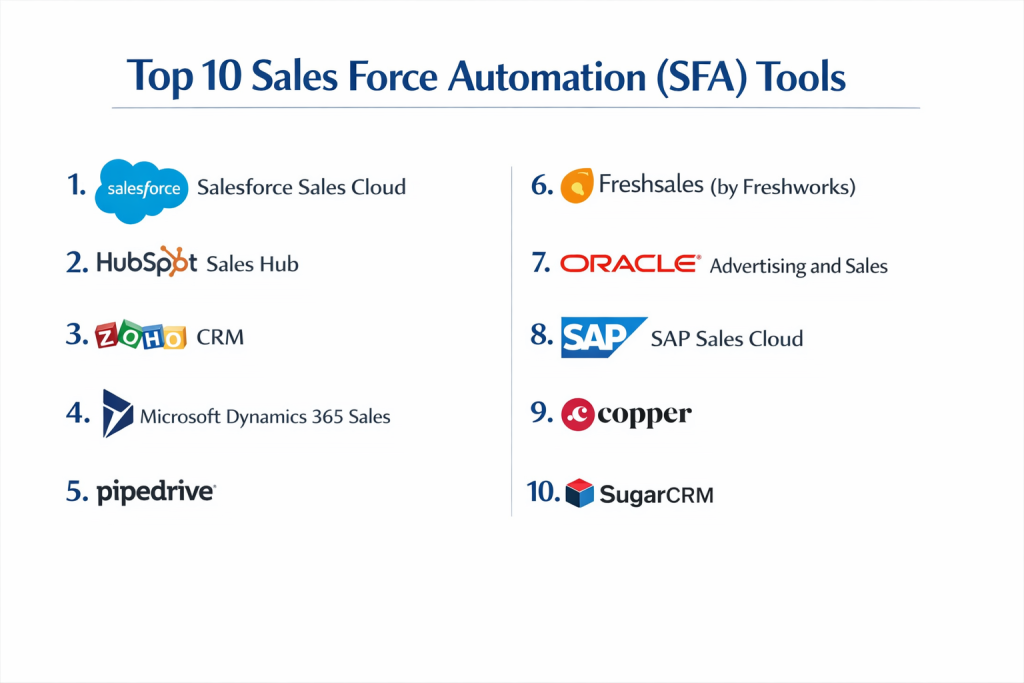
Top 10 Sales Force Automation (SFA) Tools
1 — Salesforce Sales Cloud
Salesforce is the global pioneer of SFA. It is a massive, highly customizable platform that serves as the “operating system” for sales organizations of all sizes, though it excels in large-scale enterprises.
- Key features:
- Opportunity and lead management with Einstein AI insights.
- Highly customizable reporting dashboards and forecasting.
- Process Builder for complex, automated sales workflows.
- Integration with Slack for real-time deal collaboration.
- AppExchange: a massive marketplace of 3,000+ third-party apps.
- Advanced territory and quota management.
- Pros:
- Unmatched scalability; the tool grows with you from 5 to 50,000 users.
- The most extensive ecosystem of integrations and certified experts in the world.
- Cons:
- High cost of ownership; you often need an “Admin” to manage it.
- The interface can feel cluttered and overwhelming for small teams.
- Security & compliance: SOC 2, ISO 27001, GDPR, HIPAA, and Shield encryption.
- Support & community: “Trailhead” is an industry-leading training platform; 24/7 global support and a massive user community.
2 — HubSpot Sales Hub
HubSpot is famous for its ease of use and “inbound” methodology. Its Sales Hub is designed to be powerful yet simple, making it the top choice for mid-market companies that want to get up and running quickly.
- Key features:
- Email tracking, templates, and automated sequences.
- Call tracking and recording directly from the browser.
- Meeting scheduler that syncs with Google/Outlook calendars.
- Predictive lead scoring and automated pipeline management.
- Native integration with HubSpot’s free Marketing and Service hubs.
- Mobile app with document tracking and business card scanning.
- Pros:
- One of the most user-friendly interfaces in the software world.
- “All-in-one” platform that keeps marketing and sales on the same page.
- Cons:
- Costs can rise steeply as you add more contacts or advanced features.
- Less flexible than Salesforce for highly complex, non-standard business logic.
- Security & compliance: SOC 2 Type II, GDPR, and HIPAA (with Enterprise tier).
- Support & community: High-quality phone/chat support and a very active online academy and forum.
3 — Zoho CRM
Zoho CRM is a part of the massive Zoho ecosystem, known for providing a feature-rich SFA experience at a much lower price point than the big-name competitors.
- Key features:
- “Zia” AI assistant for sales forecasting and anomaly detection.
- Canvas design studio for customizing the user interface.
- Blueprint feature for enforcing a step-by-step sales process.
- Built-in telephony and social media integration.
- Multi-currency and multi-language support for global teams.
- Advanced workflow automation based on “Triggers.”
- Pros:
- Incredible value for money, especially for small to mid-sized teams.
- Very strong customization options that don’t require heavy coding.
- Cons:
- Some of the AI features are only available in the most expensive plans.
- The sheer number of Zoho products can make the ecosystem feel fragmented.
- Security & compliance: SOC 2, ISO 27001, GDPR, and HIPAA compliant.
- Support & community: 24/5 support; extensive webinars, and a global network of partners.
4 — Microsoft Dynamics 365 Sales
Dynamics 365 is the natural choice for organizations already deeply invested in the Microsoft stack (Office 365, Azure, Teams). It offers deep intelligence and a familiar interface.
- Key features:
- Deep integration with LinkedIn Sales Navigator.
- Real-time collaboration via Microsoft Teams.
- AI-driven “Next Best Action” suggestions for reps.
- Seamless sync with Outlook for email and calendar management.
- Power BI integration for advanced sales analytics.
- Mixed reality capabilities for visualizing products in a space.
- Pros:
- Perfect for companies that already live in Outlook and Excel.
- Strongest LinkedIn integration on the market for social selling.
- Cons:
- Can be technically difficult to set up without Microsoft-certified help.
- User interface can feel “heavy” and corporate compared to modern SaaS.
- Security & compliance: FedRAMP, SOC 2, ISO 27001, and HIPAA.
- Support & community: Enterprise-grade support and a massive global partner network.
5 — Pipedrive
Pipedrive was built by salespeople, for salespeople. It is a “sales-first” CRM that prioritizes the visual pipeline above all else, making it a favorite for small teams.
- Key features:
- Visual sales pipeline with drag-and-drop deal management.
- Activity-based selling: focus on the tasks that lead to sales.
- Smart Contact Data: pulls info from social media automatically.
- Automated workflow “recipes” for common sales tasks.
- Revenue forecasting based on deal probability.
- Clean, distraction-free mobile app.
- Pros:
- Extremely low learning curve; most reps can learn it in an hour.
- Focused entirely on sales, avoiding the “feature bloat” of other tools.
- Cons:
- Not ideal for post-sales support or complex marketing automation.
- Reporting is basic compared to enterprise tools like Salesforce.
- Security & compliance: SOC 2, SOC 3, and GDPR compliant.
- Support & community: 24/7 chat support in multiple languages and a helpful “Pipedrive Academy.”
6 — Freshsales (by Freshworks)
Freshsales is a modern, AI-powered SFA tool that aims to provide a 360-degree view of the customer without the complexity of legacy systems.
- Key features:
- “Freddy” AI for lead scoring and “Deal at Risk” alerts.
- Built-in phone, email, and WhatsApp integration.
- Visual sales sequences for automated outreach.
- Auto-profile enrichment: pulls company and social data automatically.
- Multi-currency and multi-language capabilities.
- Mobile app with “Check-in” feature for field reps.
- Pros:
- High-quality AI features that are easier to set up than Salesforce.
- Great interface that feels modern and fast.
- Cons:
- The “Free” tier is very limited for actual growing businesses.
- Marketplace for third-party apps is smaller than Salesforce.
- Security & compliance: SOC 2 Type II, ISO 27001, and GDPR compliant.
- Support & community: 24/5 email/phone support and a growing user community.
7 — Oracle Advertising and Sales
Oracle’s solution is a high-end, data-driven platform designed for enterprise organizations that need to manage massive amounts of customer data alongside their sales process.
- Key features:
- Deep data enrichment from the Oracle Data Cloud.
- AI-based lead and opportunity scoring.
- Integrated sales planning and performance management (SPM).
- Robust mobile app with “Sales Assistant” voice commands.
- Seamless connection to Oracle ERP for quote-to-cash workflows.
- Advanced analytics for white-space analysis (finding new sales gaps).
- Pros:
- Unmatched data processing power for large corporations.
- Excellent for connecting sales data to financial and supply chain systems.
- Cons:
- One of the most expensive and complex tools on this list.
- User interface can feel dated and requires professional training.
- Security & compliance: FedRAMP, ISO 27001, SOC 1, and SOC 2.
- Support & community: Global 24/7 support and enterprise-grade consulting services.
8 — SAP Sales Cloud
SAP Sales Cloud is part of the SAP C/4HANA suite. It is designed for businesses that need a cohesive link between their sales activities and their back-end SAP operations.
- Key features:
- Influencer mapping to see who really makes the decisions in a deal.
- Real-time pricing and inventory checks during the quote process.
- Guided selling and interactive playbooks for reps.
- Deep mobile functionality for offline field work.
- Automated commission and incentive tracking.
- Integration with SAP S/4HANA for order fulfillment.
- Pros:
- The best choice for companies already running their whole business on SAP.
- Very strong for manufacturing and wholesale industries with complex pricing.
- Cons:
- Extremely complex; not suitable for small businesses without an IT team.
- High implementation cost and slow deployment time.
- Security & compliance: ISO 27001, SOC 1, SOC 2, and GDPR.
- Support & community: Extensive enterprise support and a massive global ecosystem.
9 — Copper
Copper is a unique SFA tool designed specifically for companies that use Google Workspace. It lives entirely inside your Gmail and Drive, requiring zero manual data entry.
- Key features:
- Native integration into Gmail, Calendar, and Drive.
- Automatic relationship tracking (no manual logging of emails).
- Visual pipeline and lead management.
- Task automation based on deal stage changes.
- Chrome extension for managing deals directly from your inbox.
- Simple reporting on sales activities and revenue.
- Pros:
- The highest adoption rate because it doesn’t “feel” like extra work.
- Zero training needed for anyone who already uses Google apps.
- Cons:
- Only works for companies that use Google (not for Outlook users).
- Lacks the advanced AI and deep customization of Salesforce or Zoho.
- Security & compliance: SOC 2 Type II and GDPR compliant.
- Support & community: Responsive chat/email support and a very clear help center.
10 — SugarCRM
SugarCRM is known for its flexibility and openness. It is a “no-compromise” platform that allows businesses to build the exact SFA experience they need.
- Key features:
- Sugar Hint: pulls all prospect data from the web with one click.
- Predictive forecasting and lead scoring.
- “Customer Journey” workflows to map the sales process to buyer needs.
- Self-service portals for customers.
- Mobile app with full offline data access.
- Open API for unlimited custom integrations.
- Pros:
- Highly flexible for companies with very unique or non-standard sales cycles.
- More affordable than Salesforce while offering similar power.
- Cons:
- Requires some technical skill to get the most out of the customization.
- The user interface has improved but can still feel slightly behind HubSpot.
- Security & compliance: SOC 2, ISO 27001, and GDPR compliant.
- Support & community: Strong developer community and 24/7 technical support for higher tiers.
Comparison Table
| Tool Name | Best For | Platform(s) Supported | Standout Feature | Rating (Gartner) |
| Salesforce | Enterprise / Scalability | Web, iOS, Android | Einstein AI Insights | 4.4 / 5 |
| HubSpot | Mid-Market / Ease of Use | Web, iOS, Android | Seamless Marketing Sync | 4.5 / 5 |
| Zoho CRM | Budget / SMBs | Web, iOS, Android | Value for Money | 4.0 / 5 |
| MS Dynamics | Microsoft Ecosystem | Web, iOS, Android | LinkedIn Sales Navigator | 4.3 / 5 |
| Pipedrive | Simple Sales Cycles | Web, iOS, Android | Visual Activity Focus | 4.2 / 5 |
| Freshsales | Modern AI Experience | Web, iOS, Android | Freddy AI Assistant | 4.6 / 5 |
| Oracle Sales | Data-Heavy Enterprise | Web, iOS, Android | ERP/Data Cloud Depth | 4.1 / 5 |
| SAP Sales | Manufacturing / SAP Orgs | Web, iOS, Android | Back-end Inventory Sync | 4.0 / 5 |
| Copper | Google Workspace Users | Chrome, Web, iOS | Gmail-native Interface | 4.3 / 5 |
| SugarCRM | Customization | Web, iOS, Android | Customer Journey Maps | 3.9 / 5 |
Evaluation & Scoring of SFA
| Criteria | Weight | Description |
| Core Features | 25% | Lead routing, pipeline, and automated outreach. |
| Ease of Use | 15% | Adoption speed and interface intuition. |
| Integrations | 15% | Connectivity to Email, Marketing, and Accounting. |
| Security & Compliance | 10% | SOC 2, GDPR, and data encryption. |
| Performance | 10% | Mobile speed and system uptime reliability. |
| Support & Community | 10% | Help docs, training, and customer success. |
| Price / Value | 15% | ROI based on time saved and deal speed. |
Which Sales Force Automation (SFA) Tool Is Right for You?
Solo Users vs SMB vs Mid-Market vs Enterprise
If you are a solo user, you probably don’t need SFA; a basic CRM or even a well-managed Google Sheet is enough. For SMBs (under 50 people), Pipedrive or Copper are the best choices because they don’t require a full-time admin. Mid-Market companies (50–500 people) should look at HubSpot or Zoho CRM to balance power with usability. Enterprises (500+ employees) almost always land on Salesforce, Dynamics 365, or Oracle/SAP because they need the global security and deep ERP integrations.
Budget-Conscious vs Premium Solutions
If you are budget-conscious, Zoho CRM and Freshsales offer incredible feature sets for a fraction of the price of the leaders. Salesforce and Oracle are premium solutions; you pay more for the platform, but you gain access to an unlimited ecosystem and the ability to build virtually any business logic you can imagine.
Feature Depth vs Ease of Use
There is usually a trade-off here. Salesforce has the most feature depth but the steepest learning curve. HubSpot and Pipedrive win on ease of use, making them better for teams that need to start closing deals today rather than spending three months in implementation.
Integration and Scalability Needs
If you use Microsoft Teams and Outlook, Dynamics 365 is non-negotiable. If you are a high-growth startup planning to triple your team size every year, Salesforce is the most scalable choice, as you will never outgrow its capabilities.
Security and Compliance Requirements
If you work in healthcare (HIPAA) or government contracting (FedRAMP), you must pick an enterprise tool like Salesforce, Dynamics 365, or Oracle. Small tools often lack these high-level certifications, which could be a dealbreaker for your legal department.
Frequently Asked Questions (FAQs)
What is the difference between CRM and SFA?
CRM is the broad strategy of managing customer relationships. SFA is the specific technology that automates the “grunt work” of sales, like logging calls and routing leads.
How does SFA improve sales productivity?
It eliminates manual data entry, which typically consumes 20% to 50% of a salesperson’s time. This allows them to focus on talking to prospects.
Is SFA only for large companies?
No. Even small teams benefit from SFA by ensuring that follow-ups happen automatically, making a small team look much larger and more professional.
Can SFA help with sales forecasting?
Yes. By tracking the stage and value of every deal, the software uses historical “win rates” to predict exactly how much revenue will come in next month.
What is “Lead Scoring”?
It is a feature where the software assigns points to a prospect based on their actions (e.g., +10 points for visiting the pricing page). This tells the rep who to call first.
Do these tools work offline?
Most top-tier SFA tools like Salesforce, Zoho, and Pipedrive have mobile apps that allow you to work offline and sync your changes once you have a signal.
Is my data safe in an SFA tool?
Yes. Modern SFA providers use the same level of encryption as banks and undergo regular audits (SOC 2) to ensure your customer data is never leaked.
How long does implementation take?
For Pipedrive or HubSpot, you can be live in a few days. For Salesforce or SAP, it typically takes 3 to 6 months to customize and train the team.
What is the most common mistake when buying SFA?
Buying too much complexity. If the tool is too hard to use, the sales reps will enter “garbage” data or not use it at all, wasting the entire investment.
Can SFA integrate with my email?
Yes. Every tool on this list integrates with Gmail or Outlook, allowing you to see your deal info right next to your emails.
Conclusion
Selecting a Sales Force Automation platform is one of the most consequential decisions a sales leader can make. The “best” tool isn’t the one with the most features—it’s the one that your sales team will actually use every day. If your reps find the tool helpful rather than burdensome, your data quality will soar, your forecasting will become accurate, and your revenue will grow.
For small teams, simplicity and speed are king, making tools like Pipedrive or Copper the logical starting point. As you grow and your processes become more complex, the power of HubSpot or the sheer scale of Salesforce becomes necessary. Ultimately, SFA is about giving your sales team their time back so they can do what they do best: solve customer problems and drive the business forward.