Introduction
Policy & Procedure Management Tools are specialized software solutions designed to simplify the way organizations create, store, distribute, and track their internal rules and operational guidelines. Think of these tools as a dynamic “living library” for a company’s most important documents. Instead of policies gathering dust in three-ring binders or getting lost in cluttered email threads, these platforms provide a central digital hub. They manage the entire lifecycle of a document—from the initial draft and expert review to the final approval, employee signature, and eventual retirement or update.
The importance of these tools lies in their ability to reduce corporate risk and improve clarity. When a company grows, keeping everyone on the same page becomes a massive challenge. Without a central system, employees might follow outdated safety rules, or HR might apply inconsistent disciplinary actions, leading to legal liabilities. These tools provide a “single source of truth,” ensuring that every staff member has access to the most current version of a procedure. Furthermore, they provide a legally defensible “audit trail,” proving that an employee received, read, and understood a specific policy, which is vital during lawsuits or regulatory inspections.
Key Real-World Use Cases
- Regulatory Compliance: Automatically tracking the review and approval of documents required for ISO, SOC 2, or HIPAA certifications.
- Employee Onboarding: Distributing a “New Hire Packet” digitally and tracking when the employee has signed the handbook and code of conduct.
- Safety Training: Ensuring all factory or field workers have read the latest hazardous material handling procedures before they start their shift.
- Incident Response: Providing quick, searchable access to emergency protocols during a data breach or physical security event.
- Standard Operating Procedures (SOPs): Managing step-by-step instructions for complex manufacturing or laboratory processes to ensure consistent quality.
What to Look For (Evaluation Criteria)
When choosing a tool, prioritize Automated Workflows that remind managers when it is time to review a policy. Attestation Tracking (digital signatures) is equally important, as it provides proof of receipt. Finally, look for Version Control to prevent old versions from circulating and a Robust Search feature that allows employees to find answers in seconds using natural language.
Best for:
These tools are most beneficial for HR Directors, Compliance Officers, Operations Managers, and Legal Counsel. They are essential for mid-market and enterprise companies in highly regulated sectors like healthcare, finance, manufacturing, and public services, as well as fast-growing startups preparing for an IPO or major audit.
Not ideal for:
Small businesses with fewer than 10–15 employees where verbal communication and a simple shared folder (like Google Drive or Dropbox) are still sufficient. If your policies rarely change and you have no legal requirement to track signatures, the cost of a dedicated management suite may not be justified.
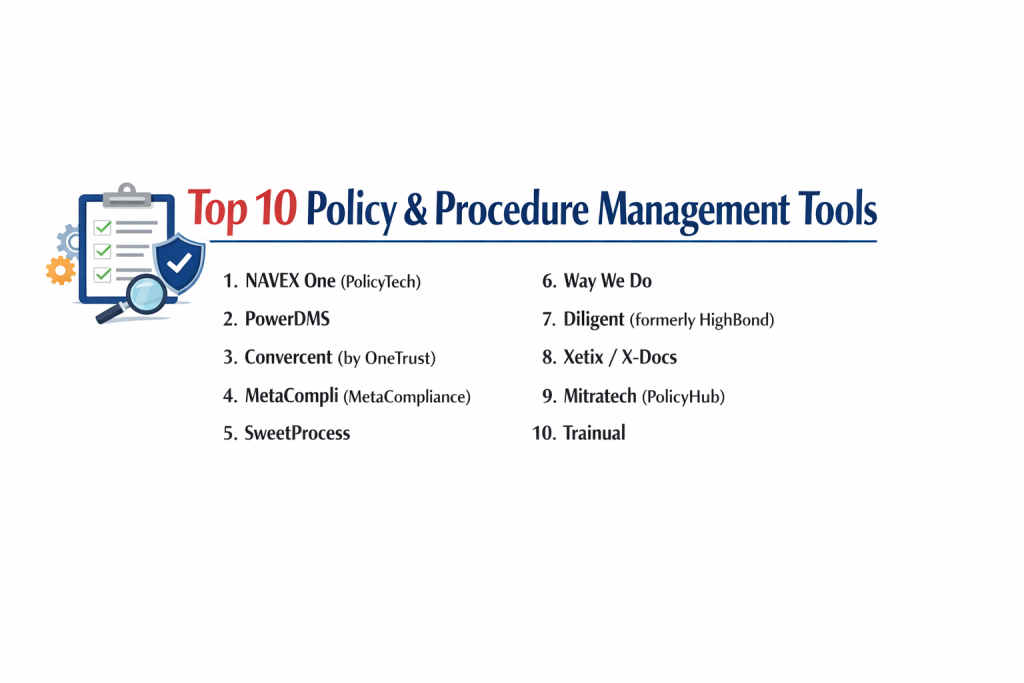
Top 10 Policy & Procedure Management Tools
1 — NAVEX One (PolicyTech)
NAVEX is a global leader in the GRC space, and its PolicyTech module is the gold standard for organizations that need high-level automation and strict legal defensibility. It is designed for large-scale operations with complex approval hierarchies.
- Key features:
- Automated document lifecycle management from draft to archive.
- Integration with Microsoft Word for familiar editing within the platform.
- Granular permission controls for different departments and roles.
- Advanced reporting dashboards to identify “non-compliant” employees.
- Questionnaires and quizzes to test employee comprehension.
- Automated email reminders for reviewers and signers.
- Pros:
- Extremely powerful for handling thousands of documents across global locations.
- Part of a larger ecosystem that includes whistleblowing hotlines and training.
- Cons:
- The user interface can feel a bit dated and “corporate.”
- High implementation cost and steep learning curve for administrators.
- Security & compliance: SOC 2 Type II, ISO 27001, GDPR, and HIPAA compliant; uses robust encryption and SSO.
- Support & community: Extensive professional services, 24/7 global support, and a dedicated customer success portal.
2 — PowerDMS
PowerDMS is a highly specialized tool that is particularly popular in law enforcement, healthcare, and government sectors. It focuses on “Living Compliance,” where policies are directly linked to the standards required for accreditation.
- Key features:
- Side-by-side document comparison to see exactly what changed in a revision.
- Mapping policies directly to accreditation standards (like CALEA or Joint Commission).
- Integrated training and testing modules.
- Mobile app for access to procedures in the field.
- Public-facing folders for transparency (often used by police departments).
- Electronic signatures with unchangeable timestamps.
- Pros:
- Best-in-class for public sector and high-stakes accreditation needs.
- The document comparison feature saves hours during the review process.
- Cons:
- Can be more expensive than general-purpose document managers.
- The setup is very detailed and requires a dedicated “Power User.”
- Security & compliance: CJIS, HIPAA, and SOC 2 compliant; CJIS compliance is a major differentiator for law enforcement.
- Support & community: Excellent localized support and a very active user community in the public sector.
3 — Convercent (by OneTrust)
Convercent focuses on “Ethics and Compliance.” It is designed for modern companies that want to build a positive culture rather than just “ticking a box.” It integrates policy management with ethics reporting.
- Key features:
- Mobile-optimized “Policy Portal” for easy employee access.
- Campaign-based distribution to push specific policies to specific groups.
- Integration with OneTrust’s wider privacy and GRC suite.
- Real-time insights into which policies are generating the most questions.
- Automated translation for multi-language workforces.
- Anonymous reporting linked to policy violations.
- Pros:
- Very modern, user-friendly interface that employees actually like.
- Excellent for global companies with diverse, multi-lingual teams.
- Cons:
- Some features are only available if you buy into the wider OneTrust ecosystem.
- Can be “too much” software for a company only looking for simple SOP storage.
- Security & compliance: ISO 27001, SOC 2, and GDPR compliant; uses high-level data residency controls.
- Support & community: Large-scale enterprise support and a huge library of ethics-focused research.
4 — MetaCompli (Metacompliance)
Metacompliance specializes in cyber security and privacy compliance. Their policy management tool is built to help IT and Security teams ensure that everyone follows data protection rules.
- Key features:
- Targeted policy delivery based on risk profiles.
- Automated “Policy Life-cycle” management.
- “Compliance Dashboards” that provide a single view of the organization’s status.
- Integration with security awareness training.
- Multi-lingual support with professional translations.
- Simple “click-to-accept” attestations for employees.
- Pros:
- Exceptional for managing security-specific policies like Password or Data Privacy.
- Very quick to deploy compared to larger GRC suites.
- Cons:
- Less focus on general HR or operational “how-to” procedures.
- Reporting is good but not as deep as specialized audit tools.
- Security & compliance: ISO 27001 certified and GDPR compliant; focuses heavily on data privacy.
- Support & community: Strong UK-based support and a wealth of cybersecurity education content.
5 — SweetProcess
SweetProcess is the opposite of a “heavy” corporate tool. It is a lightweight, modern platform designed for mid-market companies that need to document their processes and SOPs without the “legalistic” bloat.
- Key features:
- Easy-to-use editor for creating “Visual SOPs” with images and videos.
- Step-by-step checklists that employees can follow in real-time.
- Simple version control and approval workflows.
- Searchable knowledge base for the entire company.
- Integration with Zapier for connecting to 1,000+ other apps.
- Public or private sharing options for different team levels.
- Pros:
- Incredibly intuitive; if you can use a word processor, you can use this.
- Focuses on doing the work (procedures) rather than just reading it (policies).
- Cons:
- Lacks the deep “Audit Trail” features required for some government regulations.
- Not designed for massive, multi-thousand-page legal handbooks.
- Security & compliance: Standard data encryption and SSO support; Varies / N/A on specific ISO certifications.
- Support & community: Responsive email support and a very practical blog on operational efficiency.
6 — Way We Do
Way We Do is a cloud-based SOP and policy tool that integrates compliance into the daily workflow. It is built for businesses that want their policies to be “active” rather than “passive.”
- Key features:
- “Activated Checklists” that turn a procedure into a live task.
- Integrated “Compliance Dashboard” to see completion rates.
- Scheduled reminders for recurring tasks (like monthly safety checks).
- Integration with Microsoft 365 and Google Workspace.
- Simple signature tracking for policy updates.
- Role-based access control.
- Pros:
- Great for franchises or service businesses that need consistency across sites.
- Very affordable pricing for mid-sized teams.
- Cons:
- The interface is functional but not as “slick” as newer SaaS competitors.
- Reporting is basic compared to enterprise GRC platforms.
- Security & compliance: SOC 2 compliant; uses SSL/TLS encryption for all data.
- Support & community: Helpful onboarding sessions and a clear online help center.
7 — Diligent (formerly HighBond)
Diligent is a heavy-duty GRC platform. Its policy management module is built for the “Modern Board” and executive teams who need to oversee risk across a massive enterprise.
- Key features:
- Links policies directly to risks and controls in the GRC module.
- Automated assessment workflows for policy effectiveness.
- Centralized policy library with advanced metadata tagging.
- Executive-level reporting and heat maps.
- Integrated vendor risk management.
- AI-powered search and document analysis.
- Pros:
- Provides the highest level of oversight for board-level reporting.
- Seamlessly connects policy to the company’s overall risk profile.
- Cons:
- Very expensive and usually requires a dedicated administrator.
- The system can be intimidating for regular employees who just want to find a form.
- Security & compliance: FedRAMP, ISO 27001, SOC 1/2, and HIPAA compliant.
- Support & community: World-class enterprise support and a global network of consultants.
8 — Xetix/X-Docs
Note: Depending on the specific market, tools like X-Docs or Qualsys are often cited here. Qualsys (by Ideagen) is the standout for manufacturing and life sciences, where policy management must meet strict “Quality Management” standards.
- Key features:
- Full GxP compliance for pharmaceutical and medical device companies.
- Integrated Document Control and Training Management.
- Detailed Change Control workflows with impact analysis.
- Electronic signatures that meet FDA 21 CFR Part 11 requirements.
- Automated document numbering and watermarking.
- Audit management integrated with policies.
- Pros:
- One of the few tools that meets the extreme requirements of the medical industry.
- Very strong “locked-down” security for intellectual property.
- Cons:
- Very rigid; it is difficult to change the workflow if you don’t like it.
- Expensive and requires a long implementation period.
- Security & compliance: FDA 21 CFR Part 11, ISO 9001, ISO 13485, and SOC 2.
- Support & community: Industry-specific experts on staff to help with validation and audits.
9 — Mitratech (PolicyHub)
Mitratech’s PolicyHub is built for the “Corporate Legal” department. It is designed to ensure that the company’s legal defense is airtight by managing policies with extreme precision.
- Key features:
- Global repository with multi-brand and multi-region support.
- Advanced “Attestation” tracking with detailed audit trails.
- Automated policy review cycles based on legal risk profiles.
- Integration with Mitratech’s wider legal and risk suite.
- “Smart” versioning that archives all historical edits.
- Detailed reporting on “knowledge gaps” across the workforce.
- Pros:
- Built with a “Legal First” mindset, making it very defensible in court.
- Excellent for highly litigious industries like insurance or finance.
- Cons:
- Can feel overly formal and technical for the average employee.
- Less focused on “visual” or “creative” SOP documentation.
- Security & compliance: SOC 2 Type II and HIPAA compliant; high-tier encryption.
- Support & community: Strong professional services team and regular user group meetings.
10 — Trainual
Trainual is a fast-growing platform that focuses on “The Business Playbook.” It is a favorite for high-growth tech companies and modern agencies that want to document their “Way of Doing Things.”
- Key features:
- Modern, “Instagram-like” interface that is fun for employees.
- Organized by “Company,” “People,” “Policies,” and “Processes.”
- Integrated screen recording to document digital procedures.
- Testing and “Step-Completion” tracking.
- Mobile app with “dark mode” and notifications.
- Direct integrations with Slack, Gusto, and Loom.
- Pros:
- Best-in-class user experience; employees actually enjoy using it.
- Very affordable and scales perfectly from 5 to 500 employees.
- Cons:
- Not designed for heavy-duty regulatory compliance (like FDA or SEC).
- Reporting is focused on training completion rather than legal audit trails.
- Security & compliance: SOC 2 compliant; standard data privacy and encryption.
- Support & community: Excellent modern support via chat and a very helpful “Playbook” community.
Comparison Table
| Tool Name | Best For | Platform(s) Supported | Standout Feature | Rating |
| PolicyTech | Global Enterprises | Web / Cloud | Deep GRC Integration | 4.4/5 |
| PowerDMS | Law Enforcement / Gov | Web / Mobile | Accreditation Mapping | 4.8/5 |
| Convercent | Ethics & Culture | Web / Mobile | Employee Ethics Portal | 4.5/5 |
| MetaCompli | Cybersecurity Teams | Web / Cloud | Targeted Security Banners | 4.3/5 |
| SweetProcess | Mid-Market SOPs | Web / Cloud | Visual Checklist Editor | 4.7/5 |
| Way We Do | Franchises / Small Biz | Web / Cloud | Active Workflow Tasks | 4.2/5 |
| Diligent | Board Level / Risk | Web / Hybrid | Risk-to-Policy Mapping | 4.1/5 |
| Qualsys | Life Sciences / Mfg | Web / On-Prem | FDA 21 CFR Part 11 Support | 4.3/5 |
| PolicyHub | Legal Departments | Web / Cloud | Defensible Audit Trails | 4.2/5 |
| Trainual | Fast-Growth Tech | Web / Mobile | “Business Playbook” UX | 4.9/5 |
Evaluation & Scoring of Policy & Procedure Management Tools
| Criteria | Weight | Evaluation Method |
| Core features | 25% | Presence of version control, attestations, and workflows. |
| Ease of use | 15% | How simple it is for an employee to find and read a policy. |
| Integrations | 15% | Native links with HRIS, SSO, and productivity tools. |
| Security & compliance | 10% | Internal security standards (SOC 2) and legal auditability. |
| Performance | 10% | Loading speed and mobile app reliability. |
| Support & community | 10% | Quality of documentation and customer success availability. |
| Price / value | 15% | Whether the features justify the total cost of ownership. |
Which Policy & Procedure Management Tool Is Right for You?
Solo Users vs. SMB vs. Mid-Market vs. Enterprise
A solo user or small consultancy rarely needs a full platform; a clean folder structure is usually enough. For SMBs (10-50 people), Trainual or Way We Do offer incredible value without the complexity. Mid-Market firms looking for efficiency should prioritize SweetProcess. Enterprises with thousands of employees and high legal risks have no choice but to invest in “Heavy Duty” tools like PolicyTech, Diligent, or PowerDMS.
Budget-Conscious vs. Premium Solutions
If budget is your biggest constraint, Trainual and CookieYes (for simple web notices) are very affordable. If you are a premium business in a high-risk field (like a hospital or a bank), the “premium” cost of NAVEX or Mitratech is essentially an insurance policy against million-dollar fines.
Feature Depth vs. Ease of Use
This is the most common trade-off. Tools like Archer or PolicyTech have incredible depth but are hard to use. Tools like SweetProcess are incredibly easy but lack deep “Audit” capabilities. Always ask: “Is my goal to pass a government audit (Depth) or to make my team more efficient (Ease)?”
Integration and Scalability Needs
If you use Microsoft 365, ensure the tool allows you to edit in Word. If you use Slack, look for a tool that can send “Policy Alerts” directly to a channel. A tool that doesn’t integrate with your daily work will eventually be ignored by your staff.
Security and Compliance Requirements
Check your specific industry rules. If you are in Law Enforcement, CJIS compliance is non-negotiable (look at PowerDMS). If you are in Medicine, FDA 21 CFR Part 11 is the requirement (look at Qualsys). For everyone else, SOC 2 Type II is the modern standard for data safety.
Frequently Asked Questions (FAQs)
1. What is the difference between a document manager and a policy manager?
A document manager (like Dropbox) just stores files. A policy manager tracks who signed the file, reminds you when it needs to be updated, and keeps a legal record of all old versions.
2. Do employees really need to sign every policy?
Not necessarily. Most companies use “Attestations” for high-stakes documents like the Employee Handbook or Security Policy, but not for simple “how-to” guides for the coffee machine.
3. Can these tools help during a lawsuit?
Yes. If an employee claims they were never told about a rule, these tools provide a timestamped report proving they opened the document and signed it on a specific date.
4. How long does it take to implement?
A simple tool like Trainual can be ready in a day. An enterprise system like PolicyTech usually takes 3 to 6 months to correctly set up all the workflows and permissions.
5. Can I import my existing Word and PDF files?
Yes, almost all platforms allow for bulk uploading. Some even use AI to help you “tag” and categorize your old documents automatically.
6. Is my data safe if the software company goes out of business?
Most “Enterprise” contracts allow you to export all your documents and signature logs at any time. Always verify this “Export Clause” before signing a contract.
7. Can I use these tools for training?
Many of them (like PowerDMS and Trainual) have built-in quizzes. This allows you to prove not just that an employee read the policy, but that they understood it.
8. Do these tools work on mobile phones?
The modern ones do. This is vital for “Deskless Workers” like nurses, construction workers, or retail staff who don’t have a company computer.
9. What is “Version Control”?
It ensures that if you update a policy to “Version 2,” nobody can accidentally access “Version 1” anymore. It also keeps a hidden copy of Version 1 for legal history.
10. How much do these tools cost?
Small tools start at around $10–$20 per user per month. Enterprise systems usually involve a large setup fee plus a recurring annual contract that can range from $5,000 to $50,000+.
Conclusion
Managing policies and procedures is no longer just an “administrative task”—it is a core part of modern risk management. As companies become more digital and decentralized, the need for a “single source of truth” is more urgent than ever. The right tool doesn’t just store information; it protects the company from legal trouble and helps employees do their jobs with more confidence.
When selecting your tool, ignore the flashy marketing and focus on your specific “Compliance Weight.” If you are in a low-risk field, choose a tool that focuses on Ease of Use. If you are in a high-risk field, choose Feature Depth. By matching the software to your actual daily needs, you turn your policies from “forgotten files” into a powerful engine for company growth.