Introduction
Online Booking Software is a digital platform that enables businesses and service providers to automate the scheduling of appointments, classes, or rentals. Rather than relying on manual phone calls or email back-and-forth, these systems provide a 24/7 self-service portal where clients can view real-time availability, select a time slot, and often pay for the service upfront. In 2026, these tools have evolved into comprehensive business management hubs that synchronize calendars across multiple time zones, manage staff shifts, and send automated reminders to reduce “no-show” rates.
The importance of online booking software lies in its ability to reclaim time and improve the customer experience. For a business, it eliminates the administrative burden of manual scheduling and reduces human error, such as double bookings. For the consumer, it offers the convenience of booking a service at any time of day, even outside of business hours. Beyond simple scheduling, these platforms provide valuable data insights, allowing owners to track peak times, revenue per service, and customer retention rates, which are essential for strategic growth.
Key Real-World Use Cases
- Professional Services: Law firms, accounting agencies, and consultants use booking software to schedule client discovery calls and project updates without the “email tag” game.
- Health & Wellness: Doctors, therapists, and spa owners utilize these tools to manage patient intakes, health history forms, and recurring therapy sessions.
- Education & Training: Tutors, fitness instructors, and driving schools manage class rosters, student attendance, and lesson cancellations.
- Beauty & Grooming: Salons and barbershops use booking apps to allow clients to select specific stylists and add on services like hair coloring or beard trims.
What to Look For (Evaluation Criteria)
When choosing a tool, prioritize Calendar Synchronization—the software must sync perfectly with Google, Outlook, and iCloud to prevent conflicts. Automated Communications are also vital; look for robust SMS and email reminder customization. Payment Integration is a high-value feature, as collecting deposits at the time of booking significantly reduces cancellations. Finally, evaluate the Mobile Experience, as the majority of your clients will likely attempt to book services from their smartphones.
Best for: Solopreneurs, small-to-medium businesses (SMBs), and large service enterprises in industries like healthcare, beauty, education, and professional consulting. It is ideal for anyone whose revenue is tied to time-based appointments.
Not ideal for: E-commerce businesses selling physical goods, or highly complex industrial manufacturing where scheduling is internal and tied to supply chain logistics rather than external client appointments.
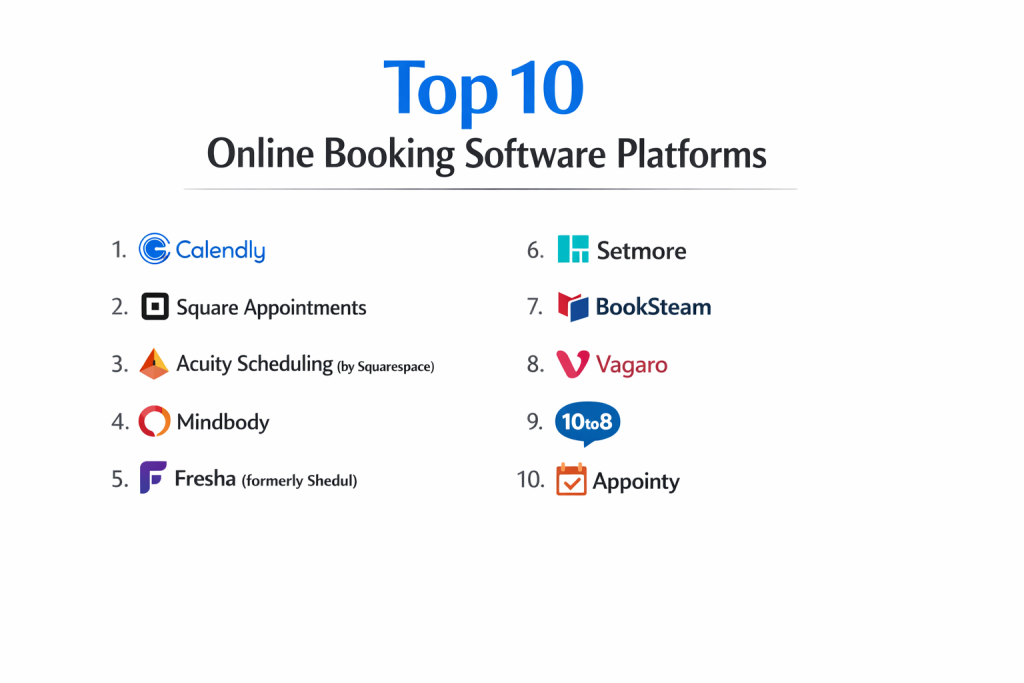
Top 10 Online Booking Software Tools
1 — Calendly
Calendly is perhaps the most recognized name in scheduling, famous for its simplicity and “booking link” approach that works across any industry.
- Key features
- Multi-user scheduling including Round Robin and Collective meetings.
- Automated workflow triggers (e.g., send a “Thank You” email after the meeting).
- Embedded booking pages for websites and email signatures.
- Integration with Zoom, Microsoft Teams, and Google Meet.
- Time zone detection to ensure everyone arrives at the right time.
- Payment collection via Stripe and PayPal.
- Polling features to find the best time for a large group.
- Pros
- Incredibly intuitive for the person booking; zero learning curve.
- The most extensive integration library of any tool on this list.
- Cons
- Lacks advanced “business management” features like inventory or staff shifts.
- The free version is quite limited, requiring a paid tier for multiple event types.
- Security & compliance: SOC 2 Type II, GDPR compliant, HIPAA (with Enterprise plan), and supports SSO.
- Support & community: Massive user community, extensive video tutorials, and 24/7 email support for paid users.
2 — Acuity Scheduling (by Squarespace)
Acuity is a powerhouse for service providers who need deep customization and the ability to manage complex intake forms.
- Key features
- Deeply customizable intake forms to collect client data before arrival.
- Support for memberships, packages, and gift certificates.
- Real-time availability syncing across multiple calendars.
- Ability to manage multiple locations and staff members.
- Automated SMS and email reminder sequences.
- “Click-to-book” integration directly inside Squarespace websites.
- Sophisticated “Buffer” settings to ensure you have time between appointments.
- Pros
- One of the best tools for businesses that offer “upsells” and add-on services.
- Very flexible CSS customization for the booking page to match your brand.
- Cons
- The administrative back-end can feel cluttered and overwhelming at first.
- Mobile app functionality for the business owner is slightly less robust than the web version.
- Security & compliance: HIPAA compliant (at higher tiers), GDPR, and PCI-DSS for payments.
- Support & community: High-quality help center, email support, and a strong community of creative entrepreneurs.
3 — Bookafy
Bookafy stands out for its elegant user interface and its focus on both “Appointment” and “On-Site” service industries.
- Key features
- White-labeling capabilities to remove Bookafy branding.
- 2-way synchronization with all major calendar providers.
- Group scheduling and class-based booking.
- Automated staff scheduling based on skills and availability.
- Recurring appointment options for long-term clients.
- In-depth reporting on staff performance and revenue.
- SMS/Email notifications with customizable branding.
- Pros
- The white-labeling options are excellent for agencies managing multiple clients.
- Very competitive pricing for the number of features provided.
- Cons
- The mobile app interface isn’t as polished as Calendly’s.
- Fewer third-party “Native” integrations (relies heavily on Zapier).
- Security & compliance: GDPR compliant, SOC 2, and 256-bit AES encryption.
- Support & community: Knowledge base, chat support, and dedicated onboarding for enterprise accounts.
4 — SimplyBook.me
SimplyBook.me is a highly versatile, modular platform designed specifically for service businesses with international footprints.
- Key features
- Modular “Custom Features” system (only activate what you need).
- Support for 30+ languages and multiple time zones.
- Professional “Booking Website” generator included.
- Integration with Facebook, Instagram, and Google Maps.
- POS (Point of Sale) system for on-site payments.
- Dedicated “Client App” for recurring customers.
- Waiting list feature for fully booked time slots.
- Pros
- The most globally-friendly tool on the list with diverse language support.
- Modular design prevents the UI from becoming bloated for simple users.
- Cons
- Can become expensive if you need many “Custom Features” simultaneously.
- The “Booking Website” templates can look a bit dated without manual tweaking.
- Security & compliance: HIPAA compliant, GDPR, and ISO 27001 certified.
- Support & community: Live chat support (highly responsive), video tutorials, and forum access.
5 — Setmore
Setmore is the leading choice for small businesses and nonprofits due to its generous free tier and beautiful, modern design.
- Key features
- Beautiful mobile app for managing appointments on the go.
- Booking via Instagram and Facebook “Book Now” buttons.
- Integrated video meetings via Teleport (built-in).
- Reviews management—automatically ask clients for reviews after booking.
- Staff profiles with individual schedules and service lists.
- Kiosk mode for tablet-based check-ins at physical locations.
- Easy “QR Code” generator for your booking link.
- Pros
- The best “Free” plan in the industry (includes unlimited appointments).
- One of the most visually appealing and modern user interfaces.
- Cons
- Limited advanced logic for complex, multi-stage scheduling.
- Customer support is generally digital-only (no phone support for low tiers).
- Security & compliance: GDPR, HIPAA (Pro plans), and SSL/TLS encryption.
- Support & community: 24/7 chat support, high-quality blog, and strong social media community.
6 — Vagaro
Vagaro is a specialized, all-in-one platform for the beauty, fitness, and wellness industries, including a built-in marketplace.
- Key features
- Listing in the Vagaro marketplace to help new customers find you.
- Integrated POS hardware for salon/gym checkouts.
- Robust membership and payroll management tools.
- Email and SMS marketing campaign builder.
- Custom mobile app for your own business (extra fee).
- Forms and waivers for health history and liability.
- Inventory management for retail products.
- Pros
- The marketplace feature acts as a lead generation tool for your business.
- Everything is built-in—no need for separate payroll or marketing software.
- Cons
- Strictly tailored for wellness; not a good fit for legal or tech consulting.
- The fee structure can be confusing with many “Add-on” monthly costs.
- Security & compliance: HIPAA, PCI DSS Level 1, and GDPR compliant.
- Support & community: 24/7 phone, chat, and email support; massive community of beauty pros.
7 — Appointy
Appointy is a robust, multi-location booking tool that excels in managing high volumes of appointments across different departments.
- Key features
- Multi-location and multi-timezone support.
- Integration with Google Calendar, iCal, and Outlook.
- Loyalty program management to reward frequent clients.
- Flexible scheduling for classes, workshops, and 1-on-1s.
- Custom branding for the entire booking experience.
- Lead capture via website widgets.
- Automated staff allocation based on availability.
- Pros
- Highly reliable for businesses that manage hundreds of bookings a day.
- Very strong CRM features built directly into the scheduling dashboard.
- Cons
- The user interface feels a bit industrial and less “slick” than Setmore.
- Learning curve for staff can be steep due to the density of features.
- Security & compliance: GDPR compliant and uses 256-bit SSL encryption.
- Support & community: 24/7 support, dedicated account managers, and detailed documentation.
8 — 10to8 (now Sign In Scheduling)
Focused on “No-Shows” and enterprise-level coordination, 10to8 is a high-performance scheduling tool for teams.
- Key features
- Sophisticated automated reminder system (Email, SMS, Voice).
- Real-time 2-way chat with clients during the booking process.
- Enterprise-wide visibility into staff calendars.
- Accessibility features for vision-impaired users.
- Integration with Salesforce and other major CRMs.
- Detailed tracking of “Reminder Status” (sent, delivered, read).
- Resource booking (e.g., room or equipment) linked to appointments.
- Pros
- Probably the most effective tool at reducing “No-shows” through aggressive reminders.
- Excellent accessibility compliance for public sector use.
- Cons
- The branding customization is limited compared to Acuity.
- The pricing jumps significantly once you move past the “Small Team” plan.
- Security & compliance: HIPAA, GDPR, ISO 27001, and Cyber Essentials certified.
- Support & community: Strong UK-based support, webinars, and developer-focused API documentation.
9 — YouCanBookMe
YouCanBookMe focuses on “Team Scheduling” for organizations that have complex availability requirements and multiple team members.
- Key features
- Group bookings and “Team” pages with multiple staff options.
- Customizable “Booking Rules” to prevent last-minute appointments.
- Personalized follow-up sequences based on appointment type.
- High-level password protection for booking pages.
- Integration with Zapier for connecting to thousands of apps.
- Support for “Paddable” time slots for prep and travel.
- “On-Behalf” booking for executive assistants.
- Pros
- Very stable; rarely experiences bugs or syncing delays.
- Ideal for internal team scheduling or recruitment interviews.
- Cons
- Not designed for “Retail” or “Salon” environments (no POS).
- Limited ability to customize the look of the booking form.
- Security & compliance: GDPR, SOC 2, and data encryption at rest.
- Support & community: Responsive email support and a very detailed user guide.
10 — Square Appointments
Square Appointments is the logical choice for any business already using Square for their credit card processing.
- Key features
- Integrated with Square POS for a seamless checkout experience.
- Free booking website included for every user.
- Assistant tools that use AI to help customers book via text.
- Advanced “No-show” protection by requiring a credit card on file.
- Detailed inventory management for retail and service.
- Multi-staff management with individual login permissions.
- Customer profiles with purchase and appointment history.
- Pros
- Completely free for individuals—you only pay for payment processing.
- The most integrated hardware/software experience on the market.
- Cons
- You are largely “locked in” to the Square ecosystem.
- Advanced scheduling logic (like multi-stage classes) is less developed than in Acuity.
- Security & compliance: PCI DSS compliant, GDPR, and uses Square’s robust security framework.
- Support & community: 24/7 phone support, huge community forum, and local retail meetups.
Comparison Table
| Tool Name | Best For | Platform(s) Supported | Standout Feature | Rating |
| Calendly | Modern Professionals | iOS, Android, Web | Ecosystem Integrations | 4.7 / 5 |
| Acuity Scheduling | Complex Services | Web, iOS, Android | Customizable Intake Forms | 4.8 / 5 |
| Bookafy | Agencies / White-Label | Web, iOS, Android | Enterprise White-Labeling | 4.5 / 5 |
| SimplyBook.me | Global Enterprises | Web, iOS, Android | Modular Feature System | 4.4 / 5 |
| Setmore | SMBs / Nonprofits | Web, iOS, Android | Generous Free Tier | 4.6 / 5 |
| Vagaro | Wellness / Beauty | Web, iOS, Android | Built-in Marketplace | 4.7 / 5 |
| Appointy | High-Volume Clinics | Web, iOS, Android | Loyalty Program CRM | 4.3 / 5 |
| 10to8 | No-Show Reduction | Web, iOS, Android | SMS Delivery Tracking | 4.5 / 5 |
| YouCanBookMe | Team Coordination | Web | Team Scheduling Logic | 4.4 / 5 |
| Square Appointments | Retail / Salons | Web, iOS, Android | Square Ecosystem Sync | 4.8 / 5 |
Evaluation & Scoring of Online Booking Software
| Category | Weight | Score (1-10) | Evaluation Rationale |
| Core Features | 25% | 9 | Most tools have mastered the basics of scheduling and syncing. |
| Ease of Use | 15% | 9 | Calendly and Setmore lead in intuitive design for both sides. |
| Integrations | 15% | 8 | Highly developed ecosystem, especially with Zoom and CRMs. |
| Security & Compliance | 10% | 7 | HIPAA compliance is widely available but often behind a paywall. |
| Performance | 10% | 9 | Reliability is high; calendar sync lag is rarely an issue in 2026. |
| Support & Community | 10% | 8 | Strong documentation and chat support across the top brands. |
| Price / Value | 15% | 9 | Extremely high ROI for any business with manual booking. |
Which Online Booking Tool Is Right for You?
Small to Mid-Market vs. Enterprise
For Solopreneurs and SMBs, Calendly or Setmore offer the best path to starting. They require minimal technical knowledge and provide a professional front-end for clients immediately. Mid-Market businesses with 10–50 employees should look at Acuity or Appointy, as these tools offer the staff management and reporting necessary to oversee a larger team. Enterprise users require the compliance and white-labeling of SimplyBook.me or Bookafy, allowing for global deployment while maintaining a consistent brand image.
Budget and Value
If your primary concern is Budget, Setmore and Square Appointments are the winners. They allow you to run a full-featured booking system with zero monthly cost, only taking a percentage of payments processed. For those looking for Premium Value, Acuity is worth the investment because its intake forms and upsell capabilities often pay for the subscription through increased revenue per client.
Technical Depth vs. Simplicity
If you want Simplicity, Calendly is the gold standard; it does one thing exceptionally well and stays out of the way. If you need Technical Depth—such as a system that can manage a multi-step medical intake, liability waivers, and inventory for a spa—Vagaro or Acuity are the better choices.
Security and Compliance Requirements
If you operate in Healthcare, HIPAA compliance is non-negotiable. You should focus on SimplyBook.me, 10to8, or Vagaro, as they have dedicated compliance modules and are willing to sign Business Associate Agreements (BAAs). For Public Sector or government entities, 10to8 (Sign In Scheduling) offers the accessibility and data sovereignty features required for public-facing utilities.
Frequently Asked Questions (FAQs)
1. Does online booking software sync with my personal calendar?
Yes. Almost all top-tier tools offer “2-way sync” with Google, Outlook, and iCloud. This means if you add a personal doctor’s appointment to your phone, that time slot will automatically be marked as “Busy” on your booking page.
2. Can I collect payments at the time of booking?
Absolutely. Most platforms integrate with Stripe, PayPal, or Square. You can choose to require a full payment, a percentage-based deposit, or simply hold a card on file in case of a no-show.
3. Will the software handle different time zones?
Yes. Modern booking software automatically detects the client’s time zone and displays your availability in their local time, while recording the appointment in your local time.
4. How do I prevent people from booking at the last minute?
You can set “Scheduling Limits” or “Lead Times.” For example, you can specify that clients cannot book an appointment less than 24 hours in advance, giving you plenty of time to prepare.
5. Can I manage multiple staff members from one account?
Yes, most “Pro” or “Team” plans allow you to add multiple users. Each staff member can have their own unique schedule, service list, and even their own synced calendar.
6. Does the software send reminders automatically?
Yes. Automated email and SMS reminders are standard features. You can typically customize when they are sent (e.g., 24 hours before and 1 hour before) to ensure the client doesn’t forget.
7. Can clients cancel or reschedule their own appointments?
Most platforms include a “Manage Booking” link in the confirmation email, allowing clients to cancel or reschedule themselves based on your specific cancellation policy.
8. Is my data secure if I use a cloud-based booking tool?
Top-tier providers use bank-level encryption and are SOC 2 certified. However, if you handle sensitive medical data, you must ensure you are using a HIPAA-compliant plan.
9. Can I embed the booking calendar on my own website?
Yes. Almost all of these tools provide a small snippet of code (an iFrame or widget) that you can paste into WordPress, Wix, Squarespace, or any custom-built site.
10. What happens if I double-book myself?
The software is designed to prevent this by checking your availability in real-time. If you have a conflict on your synced calendar, that time slot will simply not appear as an option for the client.
Conclusion
Selecting the “best” Online Booking Software is less about finding a universal winner and more about matching the tool to your specific business workflow. If you are a consultant looking for a simple way to book calls, Calendly is unmatched. If you are a salon owner who needs to manage inventory and staff payroll alongside appointments, Vagaro or Square Appointments are the superior choices.
Ultimately, the right tool will act as a silent business partner, working 24/7 to fill your calendar while you focus on providing your service. When evaluating your options, start with a free trial to test the “Client Experience”—if it’s easy for your customers to book, your business will naturally grow.