Introduction
Digital Forensics Tools act as a digital microscope, allowing investigators to peer into deleted files, encrypted partitions, and volatile memory to uncover the truth behind a security breach or criminal act. Whether it is a corporate insider leaking trade secrets, a hacker deploying ransomware, or a legal dispute involving deleted emails, these tools provide a structured, scientific way to extract data without altering the original source—preserving the “chain of custody.”
The importance of these tools lies in their integrity and precision. In a court of law or a high-stakes board meeting, “guessing” isn’t enough. Digital forensics provides the empirical evidence needed to prove who did what, when they did it, and how.
Key Real-World Use Cases
- Incident Response: Determining the entry point of a malware infection and identifying which files were exfiltrated.
- Criminal Investigations: Law enforcement using mobile forensics to recover deleted messages or GPS data related to a crime.
- Employment Litigation: Investigating a departing employee suspected of downloading proprietary data to a personal USB drive.
- Regulatory Compliance: Performing internal audits to ensure sensitive data (like HIPAA or PCI-DSS) hasn’t been mishandled.
Evaluation Criteria
When selecting a tool, professionals look for Artifact Support (the ability to find specific data like WhatsApp chats or browser history), Processing Speed (how fast it can index terabytes of data), and Court Admissibility (is the tool globally recognized by legal systems?).
Best for: Digital Forensic Examiners (DFE), Law Enforcement, Tier 3 SOC Analysts, and Large Enterprise Legal/Compliance teams.
Not ideal for: Small business owners with no technical background or basic IT helpdesk staff who only need to perform simple file recovery.
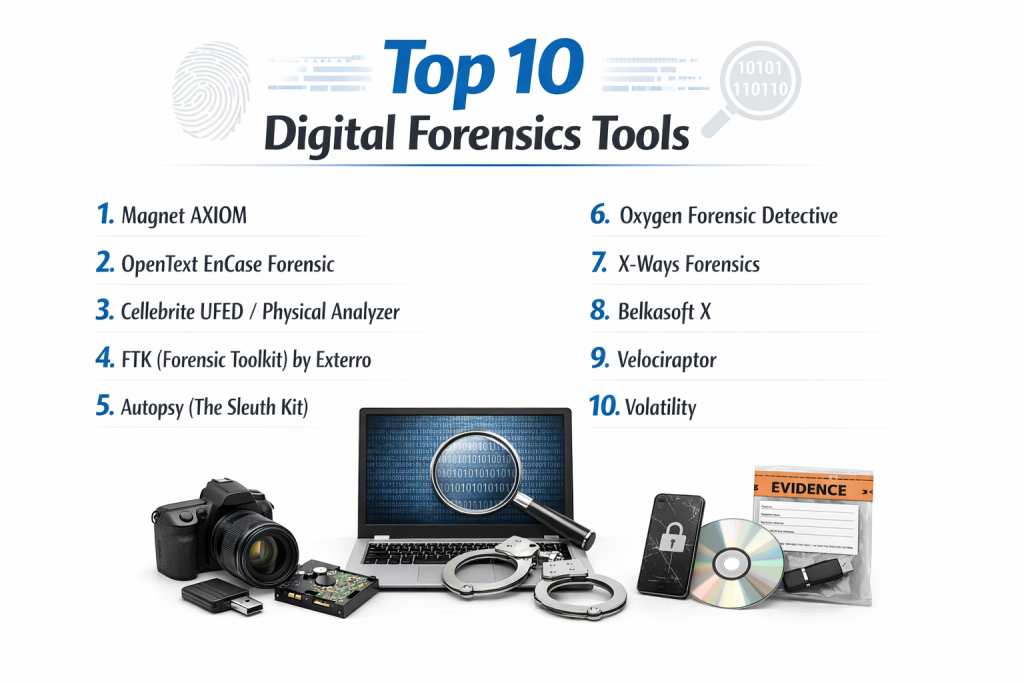
Top 10 Digital Forensics Tools
1 — Magnet AXIOM
Magnet AXIOM has rapidly become the favorite “all-in-one” platform for modern investigators. It is designed to handle evidence from smartphones, computers, and cloud accounts simultaneously, providing a unified timeline of events.
- Key Features:
- Artifact-First Approach: Automatically prioritizes finding social media, chat, and browser data.
- Magnet.AI: Uses machine learning to automatically flag images containing nudity, weapons, or drugs.
- Connections: A visual link-analysis tool that shows how different people and files are related.
- Cloud Integration: Directly pulls evidence from platforms like iCloud, Google Drive, and Slack.
- Timeline View: Consolidates data from multiple devices into a single, easy-to-read chronological map.
- Pros:
- Incredible ease of use with an intuitive, modern interface.
- The best tool for recovering deleted chat artifacts from modern mobile apps.
- Cons:
- Extremely resource-intensive; requires a high-end workstation to run efficiently.
- High cost compared to niche or open-source alternatives.
- Security & Compliance: SSO, advanced encryption for case files, and SOC 2 compliant.
- Support & Community: Exceptional documentation, a highly active “Magnet User Group,” and world-class technical support.
2 — OpenText EnCase Forensic
Long considered the “Gold Standard” in the industry, EnCase is synonymous with digital forensics. It is famous for its deep file system analysis and its impeccable reputation in global courtrooms.
- Key Features:
- Evidence Integrity: Uses industry-standard hashing (MD5/SHA-1) to ensure zero data alteration.
- EnCase Evidence File (E01): Created the industry-standard format for forensic images.
- Remote Acquisition: Can pull data from a computer over a network without physical access.
- EnScript: A powerful scripting language that allows experts to automate complex tasks.
- Advanced Decryption: Integrated support for Microsoft BitLocker, Apple APFS, and more.
- Pros:
- Unmatched courtroom credibility and legal acceptance.
- Extremely deep “manual” analysis capabilities for expert examiners.
- Cons:
- Steep learning curve; often requires specialized certification to use effectively.
- The interface can feel dated and slower than newer competitors.
- Security & Compliance: FIPS 140-2, GDPR, and ISO 27001 standards.
- Support & Community: Extensive global training programs and high-tier enterprise support.
3 — Cellebrite UFED / Physical Analyzer
When it comes to mobile phones, Cellebrite is the undisputed leader. It is the tool most often used by law enforcement to bypass locks and extract data from the latest iOS and Android devices.
- Key Features:
- Advanced Decryption: Bypasses screen locks and encryption on thousands of mobile models.
- Physical Extraction: Performs bit-for-bit imaging of mobile flash memory.
- App Graphing: Visualizes communication threads across encrypted apps like Signal and Telegram.
- Facial Recognition: Built-in engine to find specific people across thousands of photos.
- Malware Detection: Scans mobile devices for spyware or suspicious APK files.
- Pros:
- The highest success rate for unlocking encrypted smartphones.
- Constant updates to stay ahead of Apple and Google security patches.
- Cons:
- Very expensive; often limited to law enforcement or high-budget firms.
- Requires specialized hardware (the UFED Touch or specialized cables).
- Security & Compliance: HIPAA, GDPR, and audit logs for chain of custody.
- Support & Community: Excellent portal and 24/7 support for mission-critical investigations.
4 — FTK (Forensic Toolkit) by Exterro
FTK is known for its speed and scalability. While other tools might hang when processing a 10TB server, FTK uses a distributed database architecture to power through massive datasets.
- Key Features:
- Distributed Processing: Uses multiple computers to process a single case up to 4x faster.
- Integrated Database: No need to re-index data when switching between modules.
- Live Memory Analysis: Can analyze volatile RAM to find passwords and active connections.
- Advanced OCR: Optical Character Recognition to find text hidden inside images or PDFs.
- Web Viewer: Allows non-technical stakeholders (like lawyers) to review evidence in a browser.
- Pros:
- The best choice for “Big Data” forensics and massive enterprise cases.
- Excellent stability when working with complex server environments.
- Cons:
- The database-heavy setup can be difficult to install and maintain.
- The user interface is functional but can be overwhelming for beginners.
- Security & Compliance: ISO 27001 and court-certified reporting.
- Support & Community: Robust training via Exterro and a large corporate user base.
5 — Autopsy (The Sleuth Kit)
Autopsy is the leading open-source digital forensics platform. It proves that you don’t always need to spend thousands of dollars to get professional results.
- Key Features:
- Multi-User Support: Allows multiple examiners to work on the same case simultaneously over a network.
- Keyword Search: Fast, indexed searching for specific terms across a disk image.
- Web Artifact Analysis: Automatically extracts history and cookies from all major browsers.
- Data Carving: Uses PhotoRec to recover deleted files from unallocated space.
- Modular Design: Supports community-built plugins for things like registry analysis or skin-tone detection.
- Pros:
- Completely free and open-source.
- Very user-friendly GUI compared to other free command-line tools.
- Cons:
- Slower processing speeds than high-end commercial tools.
- Limited mobile forensics support compared to Cellebrite or Magnet.
- Security & Compliance: Audit logs and hash-based integrity checking.
- Support & Community: Massive community support on forums and extensive free documentation.
6 — X-Ways Forensics
X-Ways is a high-performance, lightweight tool favored by “old-school” forensic examiners who want maximum control over the hex-level data.
- Key Features:
- Portable Edition: Can run from a USB stick without installation.
- Low Overhead: Extremely fast and efficient; it doesn’t “bloat” your system.
- Advanced Template Support: View and edit binary data structures using custom templates.
- Disk Cloning: Highly efficient imaging of physical drives.
- Registry Viewer: Deep, manual inspection of Windows Registry files.
- Pros:
- Incredibly fast searching and processing.
- No hidden “magic”—it shows the examiner exactly what is happening at the bit level.
- Cons:
- Notorious for having a very difficult-to-learn, non-intuitive interface.
- Requires a deep understanding of file systems to be truly effective.
- Security & Compliance: Varies / N/A (Standard hashing and logging included).
- Support & Community: High-quality technical forum, but “no-nonsense” support style.
7 — Oxygen Forensic Detective
Oxygen is a strong competitor to Cellebrite, focusing heavily on cloud artifacts, IoT devices, and “all-in-one” mobile analysis.
- Key Features:
- IoT Extraction: Retrieves data from smartwatches, drones, and smart home devices.
- Cloud Token Discovery: Automatically finds tokens on a PC to log into a user’s cloud accounts.
- Facial Categorization: Groups similar faces found in photos for faster review.
- Encrypted App Bypass: Supports over 600 unique mobile app versions.
- Call Data Record (CDR) Analysis: Imports and visualizes phone company records.
- Pros:
- Excellent for modern “Cloud and IoT” heavy investigations.
- More affordable for many private labs than Cellebrite.
- Cons:
- Physical extraction capabilities are slightly behind the industry leader.
- Updates for the very latest phone security can sometimes lag by a few weeks.
- Security & Compliance: GDPR, HIPAA, and SOC 2.
- Support & Community: Very helpful onboarding and regular training webinars.
8 — Belkasoft X
Belkasoft is known for its automation. It is designed to find evidence quickly so that examiners can spend more time analyzing and less time searching.
- Key Features:
- Remote Acquisition: Supports remote imaging of computers and endpoints.
- SQLite Viewer: One of the best tools for manually exploring app databases.
- RAM Analysis: Integrated memory forensics to find hidden processes or passwords.
- Checkm8 Support: Integrated bypass for many older iOS devices.
- Incident Response Module: Specific features for finding malware and persistence mechanisms.
- Pros:
- Fantastic “Artifact Discovery”—it finds things other tools miss.
- Very competitive pricing for an all-in-one suite.
- Cons:
- The user interface can feel slightly cluttered compared to AXIOM.
- Smaller community of users than the “Big Three” (Magnet, EnCase, FTK).
- Security & Compliance: GDPR and ISO 27001.
- Support & Community: Personalized customer support and detailed manual guides.
9 — Velociraptor
Velociraptor is a modern, open-source tool for Endpoint Visibility and Forensics. It is unique because it allows you to “hunt” for evidence across thousands of machines at once.
- Key Features:
- VQL (Velociraptor Query Language): Powerful language to ask questions of your endpoints.
- Agent-Based: Lightweight agents installed on company laptops allow for instant forensics.
- Offline Collection: Can be packaged into a “collector” to run on a machine without internet.
- Centralized Server: Collects all evidence into one central location for analysis.
- Vast Library: Hundreds of community-created “artifacts” to find specific threats.
- Pros:
- The best tool for large-scale enterprise incident response.
- Free and open-source with professional-grade capabilities.
- Cons:
- Requires strong technical knowledge of query languages (VQL).
- Not a traditional “disk imaging” tool; focuses more on live triage.
- Security & Compliance: Audit logs, TLS encryption, and Role-Based Access Control (RBAC).
- Support & Community: Rapidly growing community and excellent GitHub-based documentation.
10 — Volatility
Volatility is the world’s most popular framework for Memory Forensics. Since malware often stays in the RAM and never touches the hard drive, Volatility is essential for catching advanced threats.
- Key Features:
- Malware Detection: Finds hidden DLLs and rootkits in a memory dump.
- Password Extraction: Recovers clear-text passwords and NTLM hashes from RAM.
- Network Artifacts: Shows which IP addresses the computer was talking to at the time of the dump.
- OS Agnostic: Supports Windows, macOS, Linux, and Android memory images.
- Command-Line Power: Allows for extreme precision in data extraction.
- Pros:
- The undisputed champion of memory (RAM) analysis.
- Extensible via a massive ecosystem of community plugins.
- Cons:
- Command-line only; no official GUI, which is hard for beginners.
- Requires a high level of expertise in operating system internals.
- Security & Compliance: Varies / N/A.
- Support & Community: The SANS Institute and the wider DFIR community provide huge support for this tool.
Comparison Table
| Tool Name | Best For | Platform(s) Supported | Standout Feature | Rating (Gartner/Peer) |
| Magnet AXIOM | Modern Multi-Platform | Win, Mac, iOS, Android, Cloud | Artifact-First Approach | 4.8 / 5 |
| EnCase Forensic | Courtroom/Expert Use | Win, Mac, Linux | EnScript Automation | 4.3 / 5 |
| Cellebrite UFED | Mobile Cracking | iOS, Android, Feature Phones | Physical Decryption | 4.7 / 5 |
| FTK (Exterro) | Large Enterprise Data | Win, Server, Cloud | Distributed Processing | 4.4 / 5 |
| Autopsy | Budget / Education | Windows, Linux, Mac | Open-Source GUI | 4.5 / 5 |
| X-Ways | Performance/Hex Experts | Windows (Portable) | Ultra-Fast Processing | 4.6 / 5 |
| Oxygen Detective | IoT & Cloud Forensics | Mobile, IoT, Cloud | IoT Device Support | 4.5 / 5 |
| Belkasoft X | Automation / Value | Win, Mac, Mobile, RAM | Integrated SQLite Analysis | 4.5 / 5 |
| Velociraptor | Enterprise Hunting | Win, Mac, Linux | VQL Query Language | N/A |
| Volatility | Memory (RAM) Analysis | Win, Mac, Linux, Android | Malware/Rootkit Detection | N/A |
Evaluation & Scoring of Digital Forensics Tools
| Category | Weight | Evaluation Rationale |
| Core Features | 25% | Capacity to acquire, analyze, and report on diverse artifacts. |
| Ease of Use | 15% | Intuitiveness of the GUI and time to reach a “Lead” in a case. |
| Integrations | 15% | How well the tool talks to SIEMs, cloud APIs, and other software. |
| Security/Compliance | 10% | Support for hashing, audit logs, and courtroom standards. |
| Performance | 10% | Speed of indexing, searching, and handling massive data volumes. |
| Support | 10% | Quality of documentation, training, and vendor responsiveness. |
| Price / Value | 15% | Balancing the licensing cost with the tool’s “hit rate” on evidence. |
Which Digital Forensics Tool Is Right for You?
Choosing a forensics tool is a major investment. Here is how to navigate the choice.
By Role and Scale
- Solo Examiners & Students: Start with Autopsy and Volatility. They are free, globally used, and will teach you the fundamentals without a financial barrier.
- SMB & Private Firms: Magnet AXIOM or Belkasoft X are the best “bang for your buck.” They handle phones and PCs in one interface, saving you from buying multiple licenses.
- Law Enforcement: Cellebrite is a must-have for mobile, paired with EnCase or AXIOM for computer analysis.
- Large Enterprise SOC: Velociraptor for “hunting” across endpoints and FTK for processing massive server-level breaches.
Budget vs. Premium
If budget is no object, the combination of Magnet AXIOM (for ease of use) and Cellebrite (for mobile access) is the “Dream Team” for 2026. If budget is tight, Autopsy is a remarkably capable substitute that can do 80% of what commercial tools can do.
Integration and Scalability
For organizations that need to collaborate, look at FTK or Magnet One. These platforms allow multiple investigators to work on the same case from different locations, which is vital for modern, global businesses.
Frequently Asked Questions (FAQs)
1. Is digital forensics the same as data recovery?
No. Data recovery is about getting a file back. Digital forensics is about getting the file back and proving who put it there, when it was last accessed, and if it was intentionally deleted—all while maintaining a legal chain of custody.
2. Can these tools recover data from a wiped phone?
It depends. For older phones, tools like Cellebrite can often recover deleted data via physical extraction. On modern, encrypted smartphones, once data is “factory reset,” it is often mathematically impossible to recover.
3. Does digital forensics work on encrypted drives like BitLocker?
Yes. Tools like EnCase and Magnet AXIOM can ingest BitLocker recovery keys or use brute-force modules to attempt to unlock encrypted partitions.
4. How long does a forensic investigation take?
Imaging a 1TB drive takes 2–4 hours. Processing and indexing take another 4–8 hours. The actual human analysis can take anywhere from a few days to several months depending on the complexity of the case.
5. What is an E01 file?
The E01 format is a “Forensic Image.” It is a compressed copy of a hard drive that includes metadata and hash values to ensure the data is an exact, unchangeable copy of the original.
6. Can I perform forensics on cloud accounts like Gmail?
Yes. Modern tools can use “tokens” (stored on a user’s computer) or login credentials to pull a forensic copy of emails, drive files, and even location history directly from the cloud provider.
7. Why do I need Volatility if I have EnCase?
EnCase looks at “cold” data on the hard drive. Volatility looks at “live” data in the RAM. Many modern malware strains never save themselves to the hard drive, meaning they are invisible to tools that only look at disks.
8. Are open-source tools as good as paid ones?
Open-source tools like Autopsy are excellent for core analysis. However, paid tools usually have much better support for “artifacts”—automatically finding and decoding the thousands of different app databases found on modern devices.
9. What is a “Write Blocker”?
A write blocker is a hardware device used during the imaging process. It allows data to flow from the suspect drive to the examiner’s computer but prevents any data from flowing to the suspect drive, preventing accidental evidence contamination.
10. Do I need a certification to use these tools?
Technically, no. However, if you plan to testify in court, having a certification (like GCFE, EnCE, or MCFE) proves to the judge and jury that you are a qualified expert who knows how to use the tools correctly.
Conclusion
The landscape of Digital Forensics Tools in 2026 is defined by two major shifts: the move to the cloud and the use of AI. As data volumes grow into the petabytes, investigators can no longer look at every file manually.
The “best” tool for you depends on your specific mission. If your focus is mobile, Cellebrite is non-negotiable. If you need a versatile, powerful suite for general investigations, Magnet AXIOM is the current industry leader in user satisfaction. For the budget-conscious or the learner, Autopsy remains a pillar of the community.
Regardless of which tool you choose, the most important factor is validation. A good forensic examiner never relies on just one tool; they use a secondary tool to verify their findings, ensuring that the digital truth they uncover is beyond reproach.