Introduction
Data quality tools are specialized software designed to act as a “health check” for a company’s information. Imagine a factory that makes cars; if the raw steel is weak or the bolts are the wrong size, the final car will be dangerous. Data works the same way. Businesses use these tools to find and fix errors in their information, such as duplicate customer names, missing email addresses, or dates that don’t make sense. These platforms scan, clean, and monitor data to ensure it is accurate, complete, and reliable before it is used to make big business decisions.
Having high-quality data is vital because bad data leads to expensive mistakes. If a company sends marketing letters to the wrong addresses or makes financial plans based on incorrect sales numbers, they lose money and time. Data quality tools provide “trust.” They allow a team to look at a dashboard and know for a fact that the numbers they see are correct. By automating the cleaning process, these tools take the “guessing” out of business and replace it with solid, verifiable facts.
Key Real-World Use Cases
- Reducing Shipping Errors: An e-commerce brand uses data quality tools to verify shipping addresses as customers type them in, preventing packages from being sent to non-existent locations.
- Banking Compliance: Banks use these tools to ensure that customer ID numbers and tax records are perfectly accurate to meet strict government anti-money laundering laws.
- Healthcare Record Accuracy: Hospitals use quality tools to merge patient records from different clinics, ensuring a doctor doesn’t miss a patient’s allergy because it was hidden under a duplicate profile.
- Marketing Efficiency: Companies clean their email lists to remove “fake” or inactive addresses, ensuring their messages actually reach real people and don’t get marked as spam.
What to Look For (Evaluation Criteria)
When searching for the right data quality tool, consider these four main pillars:
- Profiling: Can the tool automatically “look” at your data and tell you where the problems are, or do you have to find them yourself?
- Cleaning & Standardization: Does it have the power to fix common mistakes, like changing “St.” to “Street” or fixing capitalization?
- Real-Time Monitoring: Will the tool alert you the moment bad data enters your system, or does it only check once a month?
- Ease of Use: Is the software designed for technical engineers who write code, or can a regular business manager use it?
Best for: Data stewards, compliance officers, and IT managers at mid-sized to large organizations. It is essential for industries with high “risk” like finance, insurance, and healthcare where an error can lead to legal trouble.
Not ideal for: Very small businesses with only a few hundred rows of data that can be easily checked in a spreadsheet. It is also not a replacement for a standard database; it is a “cleaning service” that sits on top of your database.
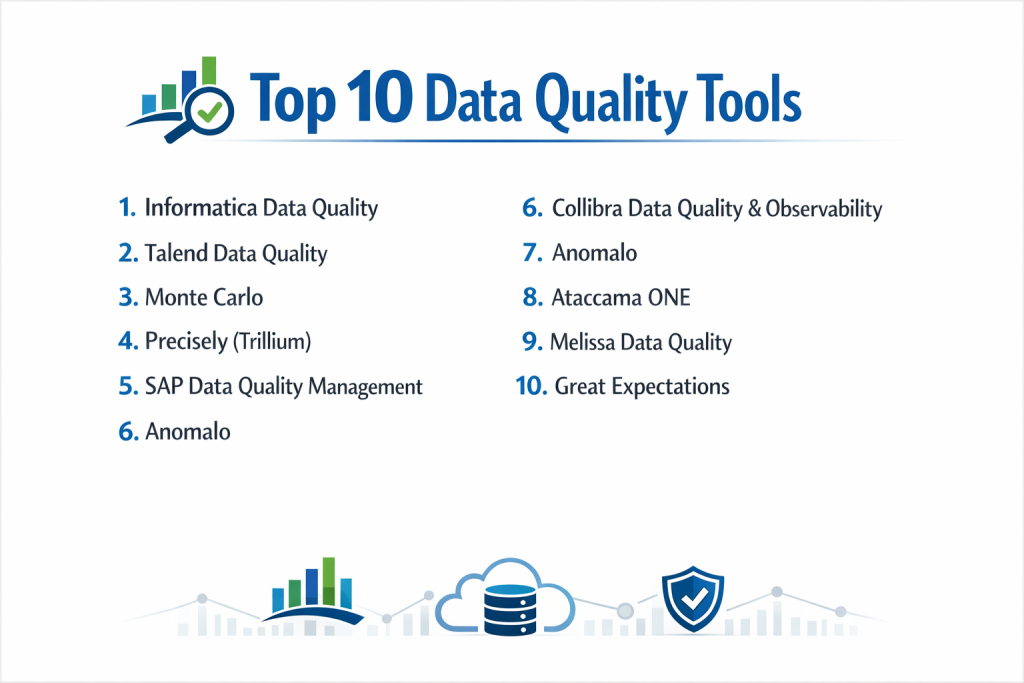
Top 10 Data Quality Tools
1 — Informatica Data Quality
Informatica is a world leader in the data space. Their quality tool is built for giant companies that have data spread across many different countries and systems.
- Key features:
- Automated data profiling that spots errors in seconds.
- Rule-based cleaning that works for any language.
- Strong “de-duplication” to find and merge twin records.
- Visual dashboards to show the “Health Score” of your data.
- Integration with Informatica’s massive data warehouse tools.
- Pros:
- It is incredibly powerful and can handle billions of rows of data.
- Excellent for meeting global laws like GDPR because of its deep audit logs.
- Cons:
- It is very expensive and usually out of reach for small companies.
- Setup is complex and often requires hiring a specialized consultant.
- Security & compliance: SOC 2, HIPAA, and GDPR compliant with enterprise-grade encryption.
- Support & community: Extensive documentation, global training centers, and 24/7 dedicated support.
2 — Talend Data Quality
Talend offers a highly flexible platform that is well-loved for its “open source” roots. It is perfect for companies that want to build custom rules for their specific business.
- Key features:
- Massive library of “ready-to-use” cleaning components.
- Machine learning that learns how to spot bad data over time.
- Browser-based portal where regular employees can clean data.
- Connects to almost any cloud or office server.
- Strong community-developed plugins.
- Pros:
- Very flexible; you can start for free with the open-source version.
- Great for technical teams who want to write their own data rules.
- Cons:
- The interface can feel a bit cluttered and old-fashioned.
- The paid version gets expensive quickly as you add more users.
- Security & compliance: SOC 2 Type II compliant with role-based access control.
- Support & community: Huge online community and various levels of paid technical support.
3 — Monte Carlo
Monte Carlo is a modern tool that focuses on “Data Observability.” It uses AI to monitor your data like a security camera, alerting you if something looks “weird.”
- Key features:
- No-code setup that connects to your warehouse in minutes.
- Automated alerts sent to Slack or Microsoft Teams.
- “Lineage” tracking to show you which report was broken by bad data.
- Incident management to help teams fix problems together.
- Checks for “Freshness” (is the data old?) and “Volume” (did data go missing?).
- Pros:
- It finds problems you didn’t even think to look for.
- Very easy to use for modern data teams who work in the cloud.
- Cons:
- It doesn’t “clean” the data for you; it just tells you it’s broken.
- Pricing is based on how much data you have, which can grow fast.
- Security & compliance: SOC 2 compliant; it doesn’t store your raw data, keeping it safe.
- Support & community: Strong startup-style support and a very active modern data community.
4 — Precisely (Trillium)
Precisely is famous for its “Trillium” software. They are specialists in address verification and ensuring that geographical data is perfect.
- Key features:
- Best-in-class address and location cleaning.
- High-speed processing for massive batches of data.
- Strong focus on “Big Data” environments like Hadoop.
- Automated “Identity Resolution” to connect people across apps.
- Enterprise governance tools.
- Pros:
- The gold standard if your business relies on physical addresses.
- Highly reliable for large-scale financial institutions.
- Cons:
- The software can be heavy and slow to install.
- Less focus on modern “cloud-native” features compared to newer tools.
- Security & compliance: Meets strict ISO and banking security requirements.
- Support & community: Dedicated account managers and professional service teams.
5 — SAP Data Quality Management
SAP is the backbone of many global businesses. Their quality tool is built to ensure that the data inside your SAP system is never messy.
- Key features:
- Direct integration with SAP ERP and S/4HANA.
- Real-time address cleaning as users type.
- Geocoding to turn addresses into map coordinates.
- Dashboard for monitoring data “health” across the company.
- Built-in rules for many specific industries.
- Pros:
- A “must-have” if your company already runs on SAP.
- Excellent at handling very complex manufacturing and supply chain data.
- Cons:
- Hard to use if you don’t use other SAP products.
- Can be very slow and technical to configure.
- Security & compliance: Top-tier enterprise security; GDPR and HIPAA ready.
- Support & community: Global support network and massive training ecosystem.
6 — Collibra Data Quality & Observability
Collibra is a “Governance” platform. Their quality tool is designed to make data easy to find, understand, and trust for everyone in the company.
- Key features:
- Predictive quality rules generated by AI.
- “Data Catalog” that shows you where all your data comes from.
- Collaborative workflows for fixing data errors.
- Scans for privacy risks (like hidden credit card numbers).
- Integration with all major cloud warehouses like Snowflake.
- Pros:
- Great for getting the whole company involved in data quality.
- Very strong focus on data privacy and legal rules.
- Cons:
- It is a large, expensive platform that takes time to learn.
- Might be “too much tool” for a team that just wants to fix names.
- Security & compliance: SOC 2, ISO 27001, and FedRAMP compliant.
- Support & community: Professional university for training and global support.
7 — Anomalo
Anomalo is a “hands-off” tool that uses deep machine learning to understand what your data should look like, so it can catch errors without you writing rules.
- Key features:
- Automatic “Root Cause” analysis (it tells you why data broke).
- Visualizations that show exactly where a dataset changed.
- No SQL or coding required to set up basic checks.
- High-level summary of data “Trust.”
- Deep integration with modern data stacks.
- Pros:
- Saves hours of time because you don’t have to write thousands of rules.
- Very friendly for non-technical data analysts.
- Cons:
- Smaller library of connectors compared to the older giants.
- Can sometimes give “false alarms” if your data naturally changes.
- Security & compliance: SOC 2 Type II compliant; data remains in your warehouse.
- Support & community: High-touch customer success and technical Slack help.
8 — Ataccama ONE
Ataccama offers an “all-in-one” platform that handles data quality, master data management, and data cataloging in a single interface.
- Key features:
- Self-driving data quality that suggests fixes.
- Clean, modern web interface.
- Ability to run on any cloud or in your own office.
- “Data Stories” feature to explain data issues to bosses.
- High-speed automated profiling.
- Pros:
- Very high value because it combines three tools into one.
- The “suggested fixes” are a huge time saver for small teams.
- Cons:
- Setting up the “all-in-one” experience can be a big project.
- The pricing can be confusing because of the many modules.
- Security & compliance: ISO 27001 and SOC 2 compliant; HIPAA ready.
- Support & community: Good documentation and a dedicated support portal.
9 — Melissa Data Quality
Melissa is a specialist tool that has been around for decades. They focus on “Contact Data,” making them the best choice for checking names, phones, and emails.
- Key features:
- Global address verification for over 240 countries.
- ID verification to check if a person is real.
- Email and phone number “pinging” to see if they work.
- Simple API that developers can add to any website.
- Low-cost “pay-as-you-go” options.
- Pros:
- The most accurate tool for customer contact information.
- Very easy to add to a signup form on your website.
- Cons:
- It doesn’t handle “internal” business data (like factory logs) very well.
- It is a specialized tool, not a full data observability platform.
- Security & compliance: SOC 2, HIPAA, and GDPR compliant.
- Support & community: Great technical support for developers and clear API guides.
10 — Great Expectations
Great Expectations is the most popular “Open Source” tool for data quality. It is a library used by programmers to test data like they test computer code.
- Key features:
- “Expectations” (rules) written in simple English-like code.
- Automated “Data Docs” that explain your data quality to others.
- Connects to almost any data tool (Spark, SQL, Pandas).
- Entirely free to use the core version.
- Strong focus on “Data Testing” during the move process.
- Pros:
- You have total control over every rule and it costs zero dollars.
- Very popular with modern data engineers.
- Cons:
- You MUST know how to code (Python) to use it.
- There is no “dashboard” to click unless you pay for a hosted version.
- Security & compliance: N/A (Depends on how you host it yourself).
- Support & community: Massive Slack community and thousands of online tutorials.
Comparison Table
| Tool Name | Best For | Platform(s) Supported | Standout Feature | Rating |
| Informatica | Giant Enterprises | Cloud & On-Prem | Global Scale Power | 4.6 / 5 |
| Talend | Technical Teams | Multi-Cloud | Open Source Roots | 4.4 / 5 |
| Monte Carlo | Cloud Observability | AWS, Azure, GCP | Automated Alerts | 4.7 / 5 |
| Precisely | Address Accuracy | Big Data & Mainframe | Location Specialist | 4.3 / 5 |
| SAP | SAP Users | SAP Ecosystem | ERP Integration | 4.1 / 5 |
| Collibra | Governance & Privacy | Multi-Cloud | Data Cataloging | 4.5 / 5 |
| Anomalo | Hands-off Monitoring | Cloud Warehouse | No-Rule AI | 4.6 / 5 |
| Ataccama | All-in-One Needs | Hybrid Cloud | Suggested Fixes | 4.4 / 5 |
| Melissa | Contact Verification | API & Web | Phone/Email Check | 4.2 / 5 |
| Great Expectations | Programmers | Any (Python) | Code-based Testing | 4.7 / 5 |
Evaluation & Scoring of Data Quality Tools
| Criteria | Weight | What we look for |
| Core features | 25% | Can it profile, clean, and monitor data? |
| Ease of use | 15% | Can a regular employee learn it in a week? |
| Integrations | 15% | Does it connect to Snowflake, Excel, and Salesforce? |
| Security & compliance | 10% | Does it follow HIPAA/GDPR and use encryption? |
| Performance | 10% | Is it fast when checking millions of rows? |
| Support & community | 10% | Is there a Slack or a 24/7 help line? |
| Price / value | 15% | Is the cost worth the errors it prevents? |
Which Data Quality Tool Is Right for You?
Small to Mid-Market vs. Enterprise
If you are an Enterprise, you need the safety and power of Informatica or Collibra. These tools can handle the massive complexity of thousands of employees. For Small to Mid-Market companies, Anomalo or Ataccama are better because they are easier to set up and don’t require a giant team to manage.
Budget and Value
If you have Zero Budget, your only real choice is Great Expectations (if you can code) or the free version of Talend. If you want the Best Value, Melissa is great because you only pay for the data you clean. If you want a “premium” experience where the tool does all the thinking, Monte Carlo is a top-tier choice.
Technical Depth vs. Simplicity
Do you have a team of Python experts? Then Great Expectations or Talend will give them the “depth” they want. If your team is mostly made of business analysts who don’t want to code, Anomalo and Ataccama are the winners because they use simple screens and buttons.
Security and Compliance Requirements
If you are in a Bank or Hospital, you cannot take risks. Informatica and SAP have the longest history of meeting strict government rules. If you are a Modern Tech Company that stores everything in the cloud, Monte Carlo and Anomalo offer excellent security that is built for the modern internet.
Frequently Asked Questions (FAQs)
1. What is a data quality tool?
It is software that scans your business information to find mistakes like duplicates, missing info, or wrong formats, and then helps you fix them.
2. Why can’t I just use Excel to clean data?
Excel is fine for 100 rows. But if you have 100,000 rows or data that changes every hour, Excel is too slow and will lead to more human mistakes.
3. Is “Data Quality” the same as “Data Observability”?
They are cousins. Quality tools usually “fix” things (like changing “NY” to “New York”). Observability tools “watch” things and alert you if the data stops flowing or looks wrong.
4. How long does it take to see results?
Modern tools like Anomalo can give you a health report in just a few hours. Older enterprise tools can take weeks to fully set up.
5. Do these tools move my data?
Most modern tools (like Monte Carlo) stay “in place.” They look at your data inside your warehouse and never actually move it, which is much safer.
6. Can these tools fix data automatically?
Some can. Tools like Ataccama and Talend can be set to “auto-fix” simple things like zip codes. However, for big things, a human should always double-check.
7. How much do they cost?
It varies widely. Small API tools like Melissa cost pennies per check. Giant enterprise platforms can cost $50,000 to $100,000 per year.
8. What is a “Data Swamp”?
A data swamp is a data lake that has become so messy and poor-quality that no one can find anything or trust any of the numbers inside it.
9. Can these tools help with GDPR?
Yes. They can find “Hidden” private info (like a credit card number in a comment box) and alert you so you can delete it and stay legal.
10. What is the most common mistake?
Buying a tool and thinking it will “magically” fix everything. You still need a human to decide what “good data” looks like for your specific business.
Conclusion
Choosing a data quality tool is an investment in your company’s future. In a world where every business is trying to use AI, remember that AI is only as smart as the data you give it. If you give it “trash,” it will give you “trash” answers. By picking a tool that fits your budget and your team’s skills, you are ensuring that your business stays healthy and honest.
The “best” tool is the one that your team will actually use every day. If you want something modern and hands-off, Anomalo or Monte Carlo are great. If you need a powerful, global system, Informatica is the way to go. No matter what you choose, starting today is better than waiting for a major data error to happen.