Introduction
Data Loss Prevention (DLP) is a set of tools and rules designed to keep a company’s private information safe. Think of it as a smart security guard for your digital files. It watches how data moves—whether it is being sent in an email, uploaded to a website, or copied to a USB drive—and stops sensitive information from leaving the company by mistake or on purpose.
This technology is important because data is the lifeblood of modern business. If a list of customer credit card numbers or a secret product design is leaked, it can lead to massive fines, lost trust, and damaged reputations. DLP tools work by identifying “sensitive” data (like social security numbers or private code) and applying rules to protect it.
Key Real-World Use Cases
- Stopping Accidental Leaks: Blocking an employee from accidentally emailing a spreadsheet full of customer IDs to the wrong person.
- Protecting Intellectual Property: Preventing a departing worker from copying secret company designs to a personal cloud storage account.
- Meeting Legal Rules: Helping a hospital stay compliant with laws like HIPAA by ensuring patient records are always encrypted.
- Visibility: Showing managers exactly where their most sensitive files are stored across the entire company network.
Evaluation Criteria
When choosing a DLP tool, look for:
- Detection Accuracy: Does it catch real threats without creating too many “false alarms”?
- Channel Coverage: Does it protect email, the web, cloud apps, and physical devices (endpoints)?
- Ease of Use: Is the dashboard easy for a human to understand and manage?
- Integration: Does it play well with the software your team already uses every day?
Best for: Large banks, healthcare providers, government agencies, and any company with valuable trade secrets or strict privacy laws. It is ideal for IT teams that need to manage thousands of devices and accounts.
Not ideal for: Very small teams with no sensitive data, or companies that prefer “Trust-Based” cultures where employees have total freedom over all files without technical checks.
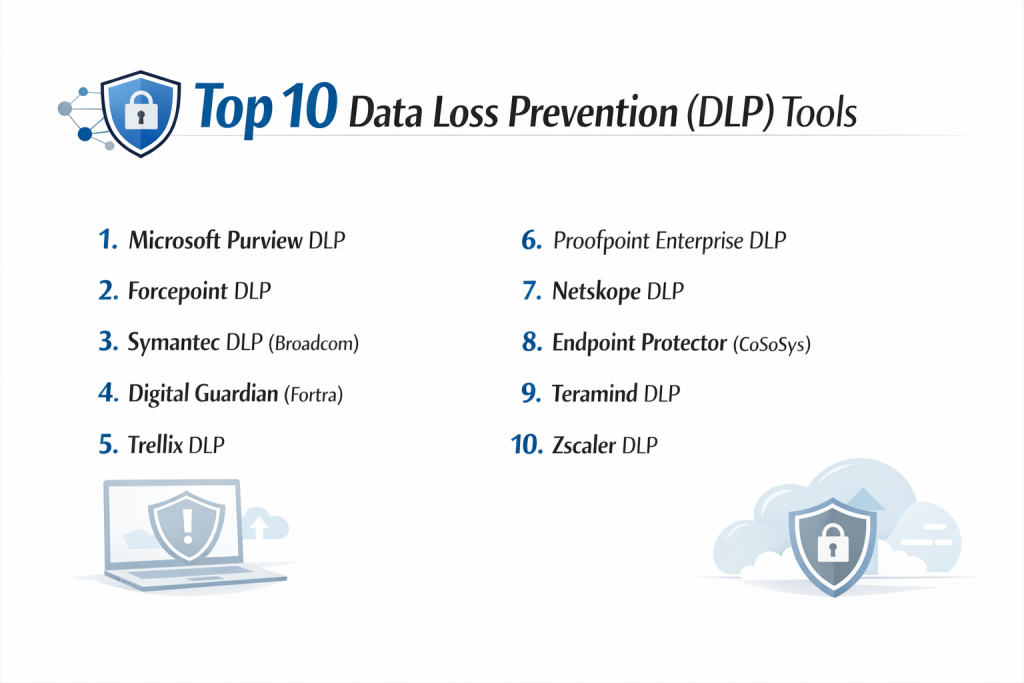
Top 10 Data Loss Prevention (DLP) Tools
1 — Microsoft Purview DLP
Microsoft Purview is the go-to choice for companies that already live in the Microsoft 365 world. It is built directly into apps like Word, Excel, and Teams, making it very easy to start using without installing extra software.
Key Features
- Native protection inside Word, Excel, and PowerPoint.
- Deep integration with Microsoft Teams and Outlook.
- Automated “Sensitivity Labels” that follow a file wherever it goes.
- Monitoring for Windows and macOS computers.
- Pre-built templates for common laws like GDPR and HIPAA.
- “Policy Tips” that teach employees how to stay safe while they work.
Pros
- No extra software to install if you already use Office 365.
- Very easy for employees to understand through simple pop-up warnings.
Cons
- It can be much less effective for non-Microsoft applications.
- Managing complex policies requires a higher-tier (and more expensive) license.
Security & Compliance: Top-tier certifications including SOC 2, HIPAA, and FedRAMP. Includes deep audit logs.
Support & Community: Massive online help guides and a global community of experts. Enterprise support is available 24/7.
2 — Forcepoint DLP
Forcepoint is known for being a powerful and “smart” tool. It focuses on how users behave, helping security teams understand if a user is acting dangerously or just making a common mistake.
Key Features
- “Risk-Adaptive Protection” that changes rules based on user behavior.
- Fingerprinting technology to find exact matches of sensitive files.
- Optical Character Recognition (OCR) to find text hidden inside images.
- Centralized dashboard to manage web, email, and devices.
- Advanced data discovery to find “lost” files on the network.
- Detailed incident reporting for management.
Pros
- Excellent at reducing “false alarms” through smart behavior analysis.
- Very strong for large global companies with complex networks.
Cons
- The initial setup can be quite difficult and requires training.
- It can sometimes slow down older laptops due to its deep scanning.
Security & Compliance: Fully compliant with GDPR, PCI-DSS, and ISO 27001. Features strong encryption for all logs.
Support & Community: Offers professional onboarding and a large portal of technical documentation.
3 — Symantec DLP (Broadcom)
Symantec is one of the oldest and most trusted names in the business. It is a “heavyweight” tool designed for the biggest companies in the world that need to protect data across every possible path.
Key Features
- Comprehensive coverage of email, web, cloud, and physical storage.
- Industry-leading data matching technology (Vector Machine Learning).
- Protection for data even when a device is not connected to the internet.
- Advanced discovery for sensitive data kept in databases.
- Integration with Broadcom’s other security products.
- Detailed forensics to help investigate what happened after a leak.
Pros
- Proven reliability in very large, high-security environments.
- Can manage an incredible amount of data and many thousands of users.
Cons
- Since being bought by Broadcom, some users feel support has become slower.
- The interface can feel outdated and “clunky” compared to newer tools.
Security & Compliance: Meets all major global standards including FIPS 140-2.
Support & Community: Focuses mostly on large enterprise customers with dedicated support teams.
4 — Digital Guardian (Fortra)
Digital Guardian is a specialist in protecting “Intellectual Property”—the secret ideas and designs that make a company unique. It is very good at watching how data moves between different apps.
Key Features
- Kernel-level agents for deep visibility into every action on a computer.
- Automated data classification based on where a file came from.
- Protection against data being copied to USB drives or printed.
- Cloud-native platform that doesn’t require local servers.
- Detailed “play-by-play” history of how a file was used.
- Integration with other Fortra security tools.
Pros
- Exceptional at protecting secret designs and source code.
- Flexible enough to work on Windows, macOS, and Linux.
Cons
- Can be very “heavy” on computer performance if not tuned correctly.
- Requires a skilled security person to manage the detailed alerts.
Security & Compliance: SOC 2 Type II compliant. Supports all major privacy regulations.
Support & Community: Known for having high-quality technical support and a “managed service” option.
5 — Trellix DLP
Trellix (formerly McAfee) provides a unified system that is great for companies that want to manage all their security—antivirus, firewalls, and DLP—from one single screen.
Key Features
- “Device-to-Cloud” protection for a consistent safety policy.
- Real-time feedback to users to teach them about security.
- Strong management of USB drives and other removable hardware.
- Automated discovery of sensitive data stored on local computers.
- Built-in compliance reports for auditors.
- Integration with the Trellix ePO management system.
Pros
- Great “all-in-one” management if you already use other Trellix tools.
- The “user coaching” pop-ups help reduce repeat mistakes.
Cons
- The setup can feel very complex for smaller IT teams.
- Some features are only available in the older, on-premise version.
Security & Compliance: HIPAA, GDPR, and PCI-DSS ready. Focuses on least-privilege access.
Support & Community: Large network of partners and consultants worldwide to help with setup.
6 — Proofpoint Enterprise DLP
Proofpoint is famous for email security. Its DLP tool is built around the “Human Factor,” focusing on the specific people in your company who are most likely to be targeted by hackers or make mistakes.
Key Features
- Best-in-class protection for outgoing and incoming email.
- “People-Centric” risk scoring to identify high-risk employees.
- Unified view of data movement across email, cloud, and web.
- Automated response to suspicious activity.
- High-accuracy detection of credit card numbers and medical data.
- Training modules to help employees learn from their errors.
Pros
- The best choice for companies where email is the main way data moves.
- Very easy to use and understand for non-technical managers.
Cons
- Not as deep as others when it comes to protecting files on physical computers.
- Can be expensive if you don’t already use Proofpoint’s email security.
Security & Compliance: GDPR and SOC 2 compliant. Strong focus on privacy.
Support & Community: Excellent training materials and a very responsive customer support team.
7 — Netskope DLP
Netskope is a “Cloud-First” tool. It is designed for modern companies where employees work from home and use apps like Slack, Zoom, and Google Drive more than traditional office software.
Key Features
- Real-time protection for thousands of cloud applications.
- Advanced “Cloud Confidence Index” to score how safe an app is.
- Protection for users working from unmanaged devices (like home PCs).
- Zero-trust security model built in.
- Fast, internet-native scanning that doesn’t slow down the user.
- Unified policy for web and cloud traffic.
Pros
- Perfectly suited for the “Work from Anywhere” world.
- Very fast to set up for cloud-heavy teams.
Cons
- Less focus on protecting physical hardware like office printers.
- Can be complex to set up “Zero Trust” policies correctly.
Security & Compliance: ISO 27001, SOC 2, and GDPR compliant.
Support & Community: Growing community and helpful online documentation.
8 — Endpoint Protector (CoSoSys)
This tool is a specialist in “Endpoint” security—protecting the actual laptops and computers people use. It is widely praised for being much easier to install than the big enterprise suites.
Key Features
- “Content-Aware” protection that reads files before they are sent.
- Very strong control over USB ports and hardware.
- Enforced encryption for data copied to portable drives.
- Cross-platform support (Windows, macOS, and Linux).
- Friendly dashboard that is easy for small teams to use.
- Fast installation that can be done in under 30 minutes.
Pros
- Much easier and faster to set up than Symantec or Forcepoint.
- Excellent value for money for mid-sized companies.
Cons
- Does not have the deep behavior analysis of more expensive tools.
- The reporting is not as detailed as large enterprise options.
Security & Compliance: HIPAA, PCI-DSS, and GDPR compliant.
Support & Community: Known for very fast and helpful customer service.
9 — Teramind DLP
Teramind combines DLP with “User Activity Monitoring.” It doesn’t just watch the data; it watches exactly what the user is doing on their screen, which is very helpful for finding “Insider Threats.”
Key Features
- Video recording of user screens during a security event.
- Keystroke logging to see exactly what was typed.
- Real-time alerts when a user tries to do something risky.
- Analysis of user productivity and behavior.
- Automated blocking of certain websites or apps.
- Forensic tools to “play back” a security incident.
Pros
- Provides the most detail on “Who, What, and When” for any leak.
- Very powerful for stopping employees from stealing data.
Cons
- Some employees might feel it is too “invasive” or “Big Brother.”
- You must check local privacy laws before using screen recording.
Security & Compliance: Provides the detailed logs needed for high-level audits.
Support & Community: Good online help desk and video training library.
10 — Zscaler DLP
Zscaler is part of a “Security Service Edge” platform. It is designed for global companies that want to protect their internet traffic without routing everything through a central office.
Key Features
- Cloud-native security that works from anywhere in the world.
- “Exact Data Match” to find specific records in huge databases.
- Integrated with Zscaler’s global secure internet gateway.
- Prevention of data leaks even in encrypted web traffic.
- Simple, centralized policy management.
- High-speed scanning using Zscaler’s global cloud network.
Pros
- No hardware to manage; everything runs in the cloud.
- Great for companies with many small offices or remote workers.
Cons
- It works best as part of the full Zscaler system, which can be pricey.
- Can be overwhelming due to the number of network settings.
Security & Compliance: Meets the highest global security certifications.
Support & Community: Global 24/7 support for large enterprise clients.
Comparison Table
| Tool Name | Best For | Platform(s) Supported | Standout Feature | Rating (Gartner/True) |
| MS Purview | Office 365 Users | Win, Mac, Cloud | Native Office Integration | 4.4 / 5.0 |
| Forcepoint | Behavior Analysis | Win, Mac, Web | Risk-Adaptive Rules | 4.5 / 5.0 |
| Symantec | Huge Enterprises | Every Platform | Massive Data Scale | 4.3 / 5.0 |
| Digital Guardian | IP Protection | Win, Mac, Linux | Kernel-Level Visibility | 4.6 / 5.0 |
| Trellix | Unified Security | Win, Mac, Cloud | User Coaching Pop-ups | 4.4 / 5.0 |
| Proofpoint | Email-Heavy Teams | Email, Cloud, Web | People-Centric Scoring | 4.6 / 5.0 |
| Netskope | Cloud-First Teams | SaaS, Web, Cloud | Real-time Cloud API | 4.7 / 5.0 |
| Endpoint Prot. | Mid-Market / SMB | Win, Mac, Linux | Easy Hardware Control | 4.5 / 5.0 |
| Teramind | Insider Threats | Win, Mac | Video Screen Recording | 4.7 / 5.0 |
| Zscaler | Remote Workforce | Web, SaaS, Cloud | Cloud-Native Network | 4.5 / 5.0 |
Evaluation & Scoring of Data Loss Prevention (DLP)
We use a specific “scorecard” to judge these tools. This helps you see where a tool is strongest.
| Criteria | Weight | Why it Matters |
| Core Features | 25% | Can it actually stop data from leaking? |
| Ease of Use | 15% | Is the dashboard simple enough to use daily? |
| Integrations | 15% | Does it connect to the apps you already use? |
| Security/Compliance | 10% | Is the tool itself safe and compliant? |
| Performance | 10% | Does it slow down the users’ computers? |
| Support | 10% | Is help available when things go wrong? |
| Price / Value | 15% | Is the protection worth the cost? |
Which DLP Tool Is Right for You?
Choosing a DLP tool is a big decision. Here is a simple guide to help you decide.
By Company Size
- Solo Users: You probably don’t need a full DLP suite. Use strong passwords and the built-in security features in your email and cloud drive.
- Small to Medium Businesses (SMB): Look for Endpoint Protector or Netskope. They are easier to manage and don’t require a large team of security experts.
- Large Enterprises: You need Symantec, Forcepoint, or Microsoft Purview. These can handle the complex rules needed for thousands of employees.
By Budget and Needs
- Budget-Conscious: If you already pay for Microsoft 365, start with Microsoft Purview. It might already be included in your plan.
- Focus on Secret Ideas: If you are a manufacturing or tech company protecting secret designs, choose Digital Guardian.
- Focus on Employees: If you are worried about employees stealing data, Teramind provides the most evidence for investigations.
- Focus on “Work from Home”: If your team is 100% remote and uses many cloud apps, Netskope or Zscaler are the modern choices.
Frequently Asked Questions (FAQs)
1. Does DLP slow down computers?
Some can. Tools that scan every single file in the background can use a lot of “CPU power.” However, modern tools like Netskope or Zscaler are built to be very lightweight.
2. Can DLP see my personal files?
Most DLP tools are set to only watch “Company Data.” However, if you are using a company laptop, it is always best to assume the IT team can see your activity.
3. Is DLP hard to set up?
Yes, it can be. Unlike a simple app, DLP requires you to “teach” it what data is sensitive. This usually takes a few weeks of “tuning” to get right.
4. How much does DLP cost?
Pricing is usually “per user, per year.” It can range from $30 to $150 per user depending on how many features you want.
5. Can I use DLP for my personal laptop?
These tools are made for businesses. For a personal laptop, it is better to use built-in tools like “Find My Mac” or simple file encryption.
6. Does DLP block every single leak?
No tool is 100% perfect. DLP is one part of security. You still need good passwords, firewalls, and employee training.
7. Can DLP help with GDPR?
Yes. DLP tools have special “Compliance” modes that automatically find data that falls under GDPR rules and help you protect it.
8. What is the most common mistake when using DLP?
Trying to block everything at once. This makes employees frustrated. It is better to start by “Monitoring” first, then “Blocking” later.
9. Can DLP work when the internet is off?
Yes. Tools that use an “Agent” (a small program on the laptop) can keep working even when there is no Wi-Fi.
10. Do I need a special team to run DLP?
For large companies, yes. You usually need one or two people who check the alerts every day and fix the rules when they make mistakes.
Conclusion
Data Loss Prevention is a powerful way to keep your company’s secrets safe. There is no “one-size-fits-all” winner. The best tool for you depends on whether you use Microsoft apps, if your team works from home, or if you have very high-security needs for secret designs.
When you choose a tool, remember that simplicity is key. A tool that is too complex will just be ignored by your team. Look for a balance of strong protection and a dashboard that your IT team can actually manage. By picking the right DLP partner, you can stop worrying about leaks and focus on growing your business.