Introduction
Cloud Workload Protection Platforms (CWPP) are security tools that act like an “on-site mechanic” for your digital apps. While a standard firewall keeps bad actors away from your front door, a CWPP stays inside your cloud servers and containers to make sure the “engine” is running safely. It watches your software while it is running to catch hackers or viruses that might have slipped past other defenses.
This is important because modern business apps are complex and change almost every day. CWPP tools help by providing real-time threat detection (stopping an attack as it happens), vulnerability scanning (finding weak spots in your code), and compliance tracking (making sure you follow privacy laws). If you are running an online store or a medical app in the cloud, these tools ensure that your data stays private and your services stay online. When looking for a tool, you should check how easy it is to install, if it works with your specific cloud (like AWS or Azure), and if it catches threats without slowing down your website.
Best for: Security teams at growing companies and large businesses. It is a “must-have” for banks, healthcare providers, and tech companies that need to protect customer data 24/7.
Not ideal for: Very small teams or solo bloggers who just run a basic website. If you don’t manage your own servers or containers, the free security features built into your cloud provider (like AWS or Google) are usually enough.
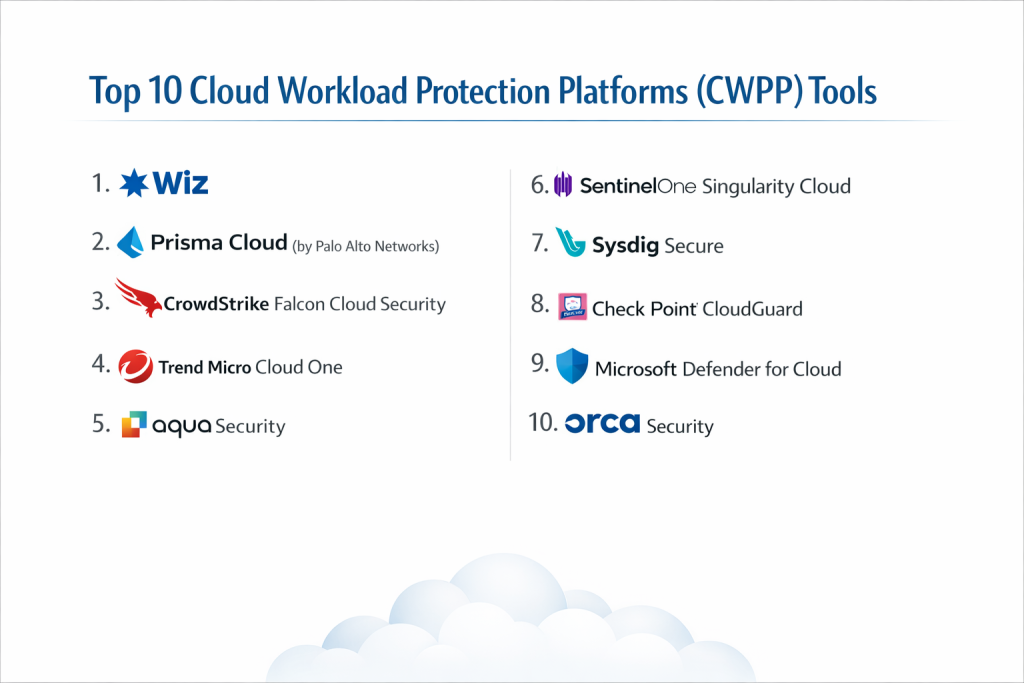
Top 10 Cloud Workload Protection Platforms (CWPP) Tools
1 — Wiz
Wiz is famous for being very easy to use. It “plugs in” to your cloud and starts looking for problems immediately without you having to install software on every single server.
- Key Features:
- Graph View: Shows how different risks connect to each other in a simple picture.
- No-Software Scanning: Scans your servers without needing to install “agents.”
- Risk Ranking: Tells you which problems are the most dangerous so you can fix them first.
- Secret Finder: Looks for hidden passwords that hackers might find.
- Compliance Reports: Creates easy-to-read reports for legal audits.
- Pros:
- You can see your whole security picture in just a few minutes.
- It doesn’t slow down your servers at all.
- Cons:
- It can be very expensive for small companies.
- It is better at finding problems than actively stopping a live hack.
- Security & Compliance: SOC 2, ISO 27001, HIPAA, and GDPR. Supports SSO.
- Support & Community: Very strong online guides and a helpful community of users.
2 — Prisma Cloud (by Palo Alto Networks)
Prisma Cloud is a giant tool that does almost everything. It is designed for big companies that have many different types of cloud accounts and need to keep them all secure in one place.
- Key Features:
- All-in-One Dashboard: Combines workload protection with other security tasks.
- Code Scanning: Checks your code for bugs before you even launch your app.
- API Security: Protects the “bridges” that let different apps talk to each other.
- Automatic Fixing: Can fix some security mistakes by itself.
- Deep Visibility: Shows exactly what every server is doing at all times.
- Pros:
- It is one of the most powerful tools on the market.
- Great for companies that want to use just one tool for all their cloud security.
- Cons:
- It is very complicated and takes a long time to learn.
- You might need a full-time expert to run it correctly.
- Security & Compliance: FedRAMP authorized, SOC 2, and HIPAA.
- Support & Community: Professional 24/7 support and global training centers.
3 — CrowdStrike Falcon Cloud Security
CrowdStrike is a leader in stopping hackers. Their cloud tool uses a very small piece of software (an “agent”) that sits on your server and acts like a 24/7 security guard.
- Key Features:
- Speedy Detection: Catches threats in seconds, not hours.
- Threat Hunting: A team of human experts helps watch over your cloud.
- Simple Setup: Uses the same software agent for laptops and cloud servers.
- Attack Mapping: Shows exactly how a hacker tried to get in.
- Container Protection: Keeps your “boxed” apps (containers) safe.
- Pros:
- Best-in-class at stopping active attacks while they are happening.
- Very easy to manage if you already use CrowdStrike for your office computers.
- Cons:
- You have to install software on every server you want to protect.
- It can get pricey if you have a lot of servers.
- Security & Compliance: SOC 2, PCI-DSS, and HIPAA compliant.
- Support & Community: Excellent 24/7 technical support.
4 — Trend Micro Cloud One
Trend Micro has been around for a long time. Their tool is great for companies that have a mix of old servers in their office and new servers in the cloud.
- Key Features:
- Virtual Patching: Protects old software even if it hasn’t been updated yet.
- Malware Scanning: Looks for viruses in your cloud files.
- Log Inspector: Reads your system notes to find suspicious activity.
- File Safety: Makes sure no one changes your important files.
- Hybrid Support: Works on almost any type of computer or cloud.
- Pros:
- Perfect for companies moving slowly from old offices to the cloud.
- Very reliable and trusted by thousands of big businesses.
- Cons:
- The screen can look a bit old-fashioned and cluttered.
- It can take more work to set up than “agentless” tools.
- Security & Compliance: ISO 27001, SOC 2, and GDPR compliant.
- Support & Community: Decades of experience and a huge library of help articles.
5 — Aqua Security
If your company uses “containers” (a modern way to run apps), Aqua is often the best choice. They focus on making sure your “cloud-native” apps are safe from the moment they are built.
- Key Features:
- Supply Chain Security: Checks your app’s ingredients (code) for “poison.”
- Kubernetes Protection: Specialized security for the most popular cloud system.
- Zero Trust: Assumes everyone is a threat until they prove otherwise.
- Runtime Blocking: Stops unapproved software from starting.
- Image Scanning: Checks your app “packages” for viruses.
- Pros:
- The top choice for modern software developers.
- Very strong at stopping attacks before they even reach your website.
- Cons:
- It is very technical and might be hard for beginners.
- Not as good for old-fashioned servers.
- Security & Compliance: SOC 2, ISO 27001, and HIPAA.
- Support & Community: Great for developers; strong presence on sites like GitHub.
6 — SentinelOne Singularity Cloud
SentinelOne uses Artificial Intelligence (AI) to watch over your cloud. It doesn’t need a person to tell it what is dangerous—the AI learns and acts on its own.
- Key Features:
- AI Defense: Uses smart software to find and stop new types of hacks.
- 1-Click Rollback: Can “undo” a hack and put your server back to normal.
- Automated Response: Fixes problems without waiting for an admin to wake up.
- Visual Stories: Shows you a “movie” of how a threat moved through your cloud.
- Lightweight: The software doesn’t slow down your website.
- Pros:
- Great for teams that don’t have enough security people to watch the screen 24/7.
- The “rollback” feature is a lifesaver if you get hit by ransomware.
- Cons:
- Setting up the rules for the AI can take some time.
- It is more focused on stopping threats than doing legal paperwork.
- Security & Compliance: SOC 2 Type II and HIPAA compliant.
- Support & Community: Good customer support and easy-to-read guides.
7 — Sysdig Secure
Sysdig is built for people who want to see every tiny detail. It watches your cloud’s “heartbeat” to find even the smallest signs of a problem.
- Key Features:
- Deep Monitoring: Sees exactly what is happening inside your app’s memory.
- Vulnerability Priority: Tells you which bugs are actually dangerous right now.
- Cost Savings: Helps you find servers that you are paying for but not using.
- Incident Records: Records everything during a hack so you can learn from it.
- Open Standards: Built on “Falco,” a system trusted by developers everywhere.
- Pros:
- Gives you more information than almost any other tool.
- Helps you save money on your cloud bill while staying safe.
- Cons:
- It can feel like too much information for a non-technical manager.
- You might spend a lot of time “tuning” it to stop false alarms.
- Security & Compliance: SOC 2 Type II and GDPR compliant.
- Support & Community: Excellent community for technical users and engineers.
8 — Check Point CloudGuard
Check Point is a very famous security brand. Their tool focuses on “prevention first,” meaning they try to stop hackers before they even get one foot in the door.
- Key Features:
- Smart Prevention: Uses 60 different security engines to find threats.
- Serverless Safety: Protects apps that don’t even use standard servers.
- Least Privilege: Makes sure your staff only has access to what they need.
- Identity Security: Watches who is logging in and from where.
- Multi-Cloud View: Shows AWS, Azure, and Google Cloud in one list.
- Pros:
- Very high success rate at stopping viruses and hackers.
- Great if your company already uses Check Point firewalls in the office.
- Cons:
- The pricing can be a bit confusing.
- It takes more time to set up than the “agentless” tools like Wiz.
- Security & Compliance: ISO 27001, SOC 2, and GDPR.
- Support & Community: Large global support team and many training videos.
9 — Microsoft Defender for Cloud
If your company uses Azure, this tool is already built-in. It is the easiest choice for teams that are already “Microsoft-only” shops.
- Key Features:
- Secure Score: Gives you a grade (0 to 100) on how safe you are.
- Native Integration: One-click setup for Azure servers.
- Database Protection: Special security for your data and spreadsheets.
- JIT Access: Locks your server doors and only opens them when you say so.
- Multi-Cloud: Can now also watch over your AWS and Google accounts.
- Pros:
- You don’t have to buy a new product; you just turn it on.
- Very affordable if you already have a big Microsoft contract.
- Cons:
- It works best on Azure; it isn’t as good at watching AWS or Google Cloud.
- The menus can be very confusing because they are part of the huge Azure portal.
- Security & Compliance: High-level government standards (FedRAMP) and SOC 2.
- Support & Community: Backed by Microsoft’s massive global help team.
10 — Orca Security
Orca is a direct rival to Wiz. It also uses “agentless” technology to give you a full view of your cloud without making you install extra software.
- Key Features:
- SideScanning: Reads your data from the “side” so it doesn’t bother your apps.
- Full Inventory: Lists every single thing you have in the cloud.
- Risk Prioritization: Focuses on “toxic combinations” (like a bug plus a weak password).
- Compliance Maps: Shows your progress toward legal safety standards.
- Fast Alerts: Tells you about new risks within minutes.
- Pros:
- Very fast to set up and very easy to read the results.
- It finds “hidden” servers that other tools might miss.
- Cons:
- It is a newer company compared to giants like Microsoft or Trend Micro.
- It is better at finding risks than actively blocking a hacker in real-time.
- Security & Compliance: SOC 2 Type II, ISO 27001, and GDPR.
- Support & Community: Friendly support and very clear help documents.
Comparison Table
| Tool Name | Best For | Platform(s) Supported | Standout Feature | Rating (Gartner) |
| Wiz | Beginners / Speed | AWS, Azure, GCP | Picture-based Risks | 4.8 / 5 |
| Prisma Cloud | Huge Enterprises | All Clouds / Hybrid | Total Security Suite | 4.7 / 5 |
| CrowdStrike | Stopping Attacks | Cloud / Laptops | 24/7 Expert Help | 4.7 / 5 |
| Trend Micro | Older Systems | Hybrid / Multi-cloud | Virtual Patching | 4.5 / 5 |
| Aqua Security | Container Apps | Kubernetes / Cloud | Developer-focused | 4.6 / 5 |
| SentinelOne | Using AI | Cloud / Multi-cloud | Undo a Hack (Rollback) | 4.7 / 5 |
| Sysdig Secure | Deep Details | Kubernetes / Cloud | Finds Hidden Risks | 4.5 / 5 |
| Check Point | Preventing Hacks | Multi-Cloud | Prevention-First | 4.4 / 5 |
| MS Defender | Azure Users | Azure, AWS, GCP | Built-in Azure Score | 4.4 / 5 |
| Orca Security | Fast Setup | Multi-Cloud | SideScanning View | 4.7 / 5 |
Evaluation & Scoring of [Cloud Workload Protection Platforms (CWPP)]
We use a simple point system to grade these tools. A higher weight means that part is more important for most buyers.
| Criteria | Weight | What we look for |
| Core Features | 25% | Can it find bugs, stop viruses, and watch containers? |
| Ease of Use | 15% | Can a non-expert set it up and understand the results? |
| Integrations | 15% | Does it work with the cloud tools you already use? |
| Security & Compliance | 10% | Is the tool itself safe and certified by experts? |
| Performance | 10% | Does it slow down your website or server? |
| Support & Community | 10% | Is there a person to call if something goes wrong? |
| Price / Value | 15% | Do you get a lot of security for the money you pay? |
Which [Cloud Workload Protection Platforms (CWPP)] Tool Is Right for You?
Solo Users vs SMB vs Mid-market vs Enterprise
- Small Teams: Go for Wiz or Orca. They are easy to understand and won’t take up your whole day.
- Growing Teams: CrowdStrike or SentinelOne are great because they can protect your office computers and your cloud at the same time.
- Big Corporations: Prisma Cloud is the best choice for managing thousands of servers across many different countries.
Budget-conscious vs Premium Solutions
- On a Budget: Stick with the native tools like Microsoft Defender. They are often cheaper because you are already paying for the cloud service.
- Willing to Pay for Quality: Wiz or CrowdStrike cost more, but they save you from the “cost” of a massive data breach, which can be millions of dollars.
Feature Depth vs Ease of Use
- If you want it to be Easy, choose an Agentless tool (Wiz or Orca). You don’t have to touch your server settings.
- If you want it to be Powerful, choose an Agent tool (CrowdStrike or Prisma). It sits inside the server and can block attacks more effectively.
Frequently Asked Questions (FAQs)
1. What is a “Workload” exactly?
It’s just a fancy word for any program or app running in the cloud. It could be a website, a database, or a piece of code that runs for only one second.
2. Is this different from a normal antivirus?
Yes. Normal antivirus is for laptops. CWPP is built for the special way cloud servers work, which is much faster and more complex.
3. What is an “Agent”?
An agent is a small piece of software you install on your server. Think of it like a security camera you put inside a room.
4. What does “Agentless” mean?
It means the security tool watches your server from the outside (via the cloud provider). It’s like having a security guard walk the hallway instead of sitting in the room.
5. Will these tools slow down my website?
Most modern tools are very “light.” They usually use less than 1% of your server’s power, so your users won’t notice a thing.
6. Can I use these for my office servers too?
Some tools (like Trend Micro and CrowdStrike) work for both. Others are only for the cloud. Always check if the tool supports “Hybrid” cloud.
7. How do I know if I’m “Compliant”?
These tools have a dashboard that checks your settings against laws like HIPAA. If a light turns green, you are doing well!
8. Do I need to be a coder to use these?
For tools like Wiz or Microsoft Defender, you don’t need to be a coder. For tools like Sysdig or Aqua, it helps to have some technical knowledge.
9. Can I just use the free tools my cloud provider gives me?
You can, but they are often basic. If you have very sensitive data (like credit card numbers), it is safer to use a dedicated tool from this list.
10. What is a “False Positive”?
It’s a “false alarm.” A good tool is smart enough to know the difference between a real hacker and a regular update from your team.
Conclusion
The cloud is a great place to build your business, but it needs a guard. Choosing a Cloud Workload Protection Platform (CWPP) is about making sure your hard work doesn’t get ruined by a hacker or a simple mistake.
If you want the easiest experience, start with Wiz or Orca. If you need the strongest protection to stop active attacks, CrowdStrike is your best bet. And if you are an Azure user on a budget, Microsoft Defender is already there waiting for you. The “best” tool is simply the one that makes your team feel safe without making their jobs harder.