Introduction
CCTV Monitoring Software, often referred to as a Video Management System (VMS), is the central nervous system of any surveillance infrastructure. It is the software platform that allows users to view live video feeds, manage recording schedules, analyze captured footage using AI, and coordinate responses to security events. Unlike a simple monitor plugged into a camera, modern monitoring software acts as an intelligent aggregator that can manage thousands of cameras across different geographical locations, integrating them with access control, alarms, and environmental sensors.
The importance of this software has skyrocketed as businesses move toward data-driven security. It is no longer just about “recording crime” but about operational intelligence. High-quality monitoring software can now count foot traffic, detect fire before a smoke alarm triggers, and use facial recognition to identify authorized personnel. It serves as a critical tool for risk mitigation, liability protection, and even marketing insights. In a world where physical security and cybersecurity are converging, the right CCTV software ensures that your cameras are not just “eyes” but proactive digital guards.
Key Real-World Use Cases
- Loss Prevention in Retail: Using AI heatmaps and POS (Point of Sale) integration to identify suspicious transactions or high-theft areas in real-time.
- Smart City Management: Monitoring traffic flow and public spaces to automatically alert emergency services in the event of a collision or crowd surge.
- Industrial Safety: Tracking whether employees are wearing proper Personal Protective Equipment (PPE) in high-risk zones and triggering alerts if safety protocols are breached.
- Forensic Investigation: Utilizing “Smart Search” to find a specific person in a blue shirt across 48 hours of footage in mere seconds.
What to Look For (Evaluation Criteria)
When selecting a platform, users must prioritize Scalability—the ability to add cameras without degrading performance. Interoperability is equally vital; the software should support the ONVIF standard to ensure it works with cameras from various manufacturers. Furthermore, evaluate the AI and Analytics suite for features like object detection and license plate recognition. Finally, consider Storage Efficiency, looking for software that supports modern compression like H.265 to save on hard drive costs.
Best for: Security directors, IT managers, and business owners across industries such as retail, manufacturing, education, and government. It is ideal for those who need a centralized, searchable, and intelligent way to manage physical security assets.
Not ideal for: Casual home users who only have one or two Wi-Fi cameras; in those cases, the camera manufacturer’s native mobile app is often sufficient and less complex.
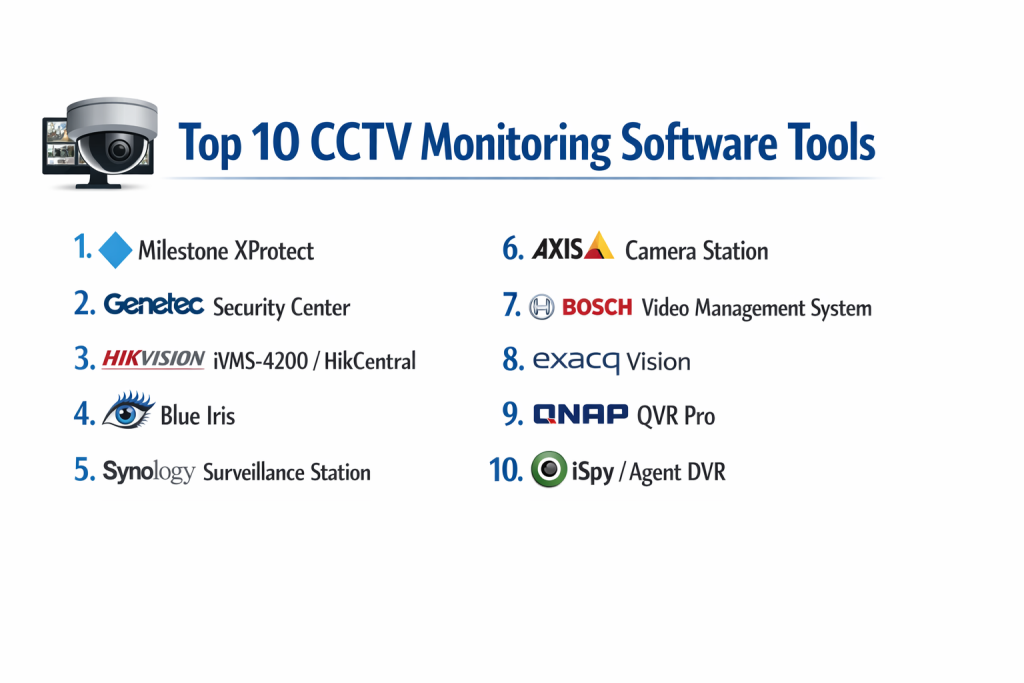
Top 10 CCTV Monitoring Software Tools
1 — Milestone XProtect
Milestone XProtect is a world-leading open-platform VMS designed for high-performance surveillance in mission-critical environments.
- Key features
- Open-platform architecture supporting over 13,000 camera models.
- Centralized management for unlimited sites and cameras.
- Advanced “Smart Map” for visual situational awareness across layers.
- Hardware acceleration for high-speed video decoding.
- Integrated “Incident Manager” for documenting and exporting evidence.
- Powerful Rule Engine for automated system responses.
- Native support for edge-based AI analytics from camera partners.
- Pros
- Exceptional reliability and uptime for enterprise-scale deployments.
- Highly flexible; you are not locked into a single camera brand.
- Cons
- The licensing structure can be complex and expensive for small setups.
- Requires a high-performance Windows server environment to run effectively.
- Security & compliance: FIPS 140-2 compliant, GDPR-ready tools, end-to-end encryption, and role-based access control (RBAC).
- Support & community: Extensive certification programs for technicians, 24/7 global support, and a massive community of third-party plugin developers.
2 — Genetec Security Center
Genetec is a unified security platform that seamlessly blends video surveillance with access control and automatic license plate recognition (ALPR).
- Key features
- “Omnicast” VMS engine for high-density video streaming.
- Unified interface for video, doors, and intercom systems.
- “Cloud Fusion” for hybrid storage and easy remote access.
- Advanced forensic search for rapid investigation.
- Dynamic mapping with real-time asset tracking.
- Federated architecture allowing separate entities to share video.
- Pros
- The industry leader in “unification,” eliminating the need for separate security apps.
- Extremely powerful for government and large-scale campus environments.
- Cons
- Steep learning curve for administrators due to the depth of features.
- Premium pricing that targets the higher end of the market.
- Security & compliance: SOC 2 Type II certified, GDPR compliant, and features advanced cybersecurity “Hardening” tools.
- Support & community: Top-tier enterprise support, detailed technical documentation, and a global network of certified integrators.
3 — Avigilon Unity (formerly ACC)
Avigilon, a Motorola Solutions company, is famous for its “AI-First” approach, making it easy to find what you are looking for in massive datasets.
- Key features
- “Appearance Search” technology to find people based on physical descriptions.
- Unusual Activity Detection (UAD) that learns normal patterns and flags anomalies.
- Focus of Attention (FOA) interface to highlight critical events.
- High-definition stream management (HDSM) for low-bandwidth 4K video.
- Direct integration with Motorola radio systems for instant voice alerts.
- Cloud-managed remote access via the Unity Cloud platform.
- Pros
- The best “Smart Search” in the business; saves hours of manual review.
- User interface is modern, dark-themed, and very easy on the eyes for 24/7 guards.
- Cons
- Works best with Avigilon’s proprietary cameras (limited third-party AI).
- Can be resource-heavy on the client workstations.
- Security & compliance: NDAA compliant hardware/software, encrypted video, and detailed audit logs.
- Support & community: Strong North American presence, excellent training videos, and reliable professional support.
4 — Blue Iris
Blue Iris is the gold standard for DIY enthusiasts and small businesses who want professional features on a consumer budget.
- Key features
- Supports up to 64 cameras (IP, USB, or analog via capture cards).
- Integrated web server for viewing from any browser or mobile device.
- Deep Stack/CodeProject.AI integration for object and face detection.
- Advanced motion sensing with customizable “Masking” and “Zones.”
- Digital PTZ (Pan-Tilt-Zoom) for high-resolution static cameras.
- Extensive alert system via SMS, Email, and Push notifications.
- Pros
- Incredibly affordable one-time license fee compared to enterprise subscriptions.
- Extremely high customization; you can tweak every aspect of the recording logic.
- Cons
- The user interface looks dated (Windows 98/XP aesthetic).
- High CPU usage; requires a dedicated, powerful PC to manage many high-res cameras.
- Security & compliance: Secure remote access via stunnel/VPN, login auditing, and password protection.
- Support & community: Massive, passionate community forums; direct support is primarily via email.
5 — Nx Witness (Network Optix)
Nx Witness is known as the “Fastest VMS” in the world, prioritizing a lightning-fast user experience and cross-platform compatibility.
- Key features
- Cross-platform server support (Windows, Linux, ARM/Raspberry Pi).
- “Instant Motion Search” allows you to highlight an area and see history immediately.
- Browser-like interface with drag-and-drop tiles and custom layouts.
- Server Hive architecture with automatic failover and synchronization.
- Open API and SDK for deep developer integrations.
- Automatic camera discovery and one-click configuration.
- Pros
- The most intuitive and responsive user interface; no “lag” when scrolling timelines.
- Very low hardware requirements compared to Milestone or Blue Iris.
- Cons
- Lacks some of the ultra-niche enterprise features like built-in ALPR (requires plugins).
- Mobile app is functional but lacks the deep features of the desktop client.
- Security & compliance: Salted MD5 passwords, TLS encryption, and secure HTTPS communications.
- Support & community: Excellent developer documentation and a very helpful online support portal.
6 — iSpy / Agent DVR
Agent DVR is the successor to iSpy, offering a modern, browser-based, and open-source-friendly monitoring solution.
- Key features
- 100% browser-based interface; no desktop software installation needed.
- Built-in AI support for object recognition (People, Cars, Fire).
- Remote access without the need for port forwarding via its cloud portal.
- Supports massive camera counts across multiple local or remote servers.
- Timeline view with “Photo” and “Video” event overlays.
- Extensive scripting and automation through MQTT and Webhooks.
- Pros
- Great for users who prefer Linux or Docker environments.
- The basic version is free for local use, making it highly accessible.
- Cons
- Professional features and remote access require a monthly subscription.
- Configuration can be complex for users unfamiliar with web-server settings.
- Security & compliance: SSL/TLS support, encrypted cloud tunnels, and permission-based user management.
- Support & community: Very active GitHub community and a detailed user wiki.
7 — HikCentral Professional
HikCentral is Hikvision’s enterprise-level VMS, designed to provide a unified platform for their vast catalog of security hardware.
- Key features
- Integrated video, access control, and video wall management.
- AI-powered business intelligence (Heatmaps, Queue Analysis).
- Multi-site management via a hierarchical “Control Client.”
- Advanced Health Monitoring for cameras and hard drives.
- E-Map support for multi-story buildings and outdoor campuses.
- License Plate Recognition (LPR) and Under-Vehicle Surveillance integration.
- Pros
- Seamless, native performance with Hikvision cameras and NVRs.
- Highly cost-effective for large-scale commercial deployments.
- Cons
- Faces ongoing regulatory restrictions in certain government sectors (NDAA).
- User interface can feel cluttered due to the sheer number of features.
- Security & compliance: AES-128/256 encryption, audit logs, and GDPR-compliant data masking.
- Support & community: Large global support network and extensive dealer-based training.
8 — Axis Camera Station Pro
Optimized for Axis hardware, this VMS provides a “single-vendor” experience where the software and cameras are perfectly synced.
- Key features
- Seamless integration with Axis network audio, intercoms, and radar.
- “Smart Search 2” for filtering objects, colors, and directions.
- Automatic “Zipstream” configuration to reduce bandwidth by up to 50%.
- Intuitive incident report generator with redacted video options.
- Mobile app for live viewing and controlling PTZ cameras.
- Scalable from small shops to large multi-site retailers.
- Pros
- Exceptionally stable; hardware and software are tested as a single unit.
- “One-stop shop” support means you never get caught in a “vendor finger-pointing” loop.
- Cons
- Strictly optimized for Axis cameras; limited support for third-party brands.
- Axis hardware carries a premium price compared to generic competitors.
- Security & compliance: Signed firmware, secure boot, and FIPS-compliant encryption.
- Support & community: Industry-leading technical support and a prestigious certification academy.
#9 — Zoneminder
Zoneminder is the premier open-source surveillance platform for Linux users, focusing on total freedom and zero licensing costs.
- Key features
- 100% Free and Open Source (GPL License).
- High-performance video capture via various protocols (RTSP, HTTP, etc.).
- Web-based management console for multi-camera viewing.
- Support for high-resolution cameras and various recording modes.
- Mobile app support (Zmninja) for remote monitoring.
- Highly scriptable for integration with Home Automation (Home Assistant).
- Pros
- No licensing fees regardless of how many cameras you add.
- Total control over your data; no cloud dependencies or “phoning home.”
- Cons
- Very difficult to set up and maintain for non-Linux experts.
- User interface is utilitarian and lacks the polish of commercial systems.
- Security & compliance: Community-audited code; security depends on the user’s server hardening.
- Support & community: Massive volunteer community on forums and Slack; no professional “SLA” support.
10 — Solink
Solink is a cloud-first VMS that specializes in business intelligence, widely used in restaurants and retail to link video to data.
- Key features
- Video-to-POS integration to see footage of every transaction.
- High-speed cloud-based searching by receipt data or movement.
- “Heatmaps” to visualize customer flow and dwell times.
- Mobile-first design for owners to manage multiple stores on the go.
- Automatic daily reports of suspicious activity or operational lapses.
- Hybrid storage (Cloud + Local) to ensure video is never lost.
- Pros
- The best tool for turning security cameras into a “Business Management” tool.
- Requires very little technical knowledge from the end-user.
- Cons
- Requires a recurring monthly subscription per camera.
- Dependent on a stable internet connection for full cloud features.
- Security & compliance: SOC 2 Type II certified, encrypted cloud storage, and automated audit trails.
- Support & community: Dedicated success managers and 24/7 proactive system monitoring.
Comparison Table
| Tool Name | Best For | Platform(s) Supported | Standout Feature | Rating |
| Milestone XProtect | Enterprise Scale | Windows | Massive Device Support | 4.8 / 5 |
| Genetec | Unified Security | Windows | Access Control Integration | 4.8 / 5 |
| Avigilon Unity | AI Analytics | Windows, Cloud | Appearance Search | 4.7 / 5 |
| Blue Iris | Budget / DIY | Windows | Ultimate Customization | 4.5 / 5 |
| Nx Witness | Speed / UX | Windows, Linux, Mac | Instant Motion Search | 4.9 / 5 |
| iSpy / Agent DVR | Browser-Based | Windows, Linux, Mac | No-Install Browser UI | 4.4 / 5 |
| HikCentral | Commercial High-Density | Windows | Business Intelligence | 4.3 / 5 |
| Axis Station | Axis Ecosystem | Windows | Single-Vendor Stability | 4.6 / 5 |
| Zoneminder | Open Source / Linux | Linux | 100% Free License | 4.1 / 5 |
| Solink | Retail & Restaurants | Cloud, Mobile, Web | POS Data Integration | 4.6 / 5 |
Evaluation & Scoring of CCTV Monitoring Software
| Category | Weight | Score (1-10) | Evaluation Rationale |
| Core Features | 25% | 9 | Enterprise tools offer deep feature sets, while DIY tools provide agility. |
| Ease of Use | 15% | 7 | Professional VMS tools are complex; cloud and NX Witness lead in UX. |
| Integrations | 15% | 9 | Open-platform systems (Milestone/Genetec) are the masters of integration. |
| Security & Compliance | 10% | 8 | Most top tools now prioritize encryption and GDPR compliance. |
| Performance | 10% | 9 | Local hardware acceleration has made 4K monitoring standard. |
| Support & Community | 10% | 8 | Large vendors provide 24/7 support; open source relies on forums. |
| Price / Value | 15% | 7 | Enterprise tools are expensive; Blue Iris/Zoneminder offer high ROI. |
Which CCTV Monitoring Software Tool Is Right for You?
Solo Users vs. SMB vs. Mid-Market vs. Enterprise
Solo users and DIY enthusiasts should look at Blue Iris or iSpy; they provide enterprise-grade power on a standard PC. SMBs with 10–50 cameras will find Nx Witness or Axis Camera Station perfect for their balance of ease and performance. Mid-Market and Enterprise organizations with hundreds of cameras and multiple locations require the heavy-duty management of Milestone XProtect or Genetec Security Center.
Budget-Conscious vs. Premium Solutions
If cost is the only factor, Zoneminder is free, but it requires significant “sweat equity” to set up. Blue Iris offers the best value for a one-time fee. Conversely, Solink and Genetec are premium solutions where you pay for the peace of mind of professional support and integrated intelligence.
Feature Depth vs. Ease of Use
If you want to scrub through 100 cameras quickly, Nx Witness is the easiest to use. If you need to track a specific person across a 1-million-square-foot facility, you need the Feature Depth provided by Avigilon Unity’s AI.
Integration and Scalability Needs
For those who need their cameras to talk to their doors, alarms, and fire systems, Genetec is the gold standard. For those who plan to start with 5 cameras but might eventually have 5,000, Milestone’s hierarchical management is designed to scale without breaking.
Security and Compliance Requirements
If you are in a regulated industry (Healthcare, Banking, Government), you must choose an NDAA-compliant VMS like Axis or Genetec. These systems are built to meet strict federal and international security standards, including SOC 2 and FIPS 140-2.
Frequently Asked Questions (FAQs)
1. What is the difference between an NVR and VMS software?
An NVR (Network Video Recorder) is a physical box that comes with software pre-installed. VMS is the standalone software that can be installed on any computer to turn it into a powerful surveillance server.
2. Can I use different camera brands with one software?
Yes, as long as the software and cameras are “ONVIF compliant.” Most professional software like Milestone and Nx Witness support thousands of different brands.
3. Do I need a monthly subscription for CCTV software?
It depends. Enterprise software (Genetec/Solink) usually requires a yearly or monthly fee per camera. DIY software (Blue Iris) is typically a one-time purchase.
4. How much storage do I need for my cameras?
This depends on resolution and frame rate. Generally, a single 4K camera recording 24/7 requires about 1TB of storage for 30 days of history using modern H.265 compression.
5. Can I view my cameras on my phone?
Yes, almost all modern VMS platforms offer iOS and Android apps. However, for DIY tools like Blue Iris, you may need to set up a VPN or Port Forwarding for remote access.
6. Does the software include AI features like facial recognition?
Premium VMS tools (Avigilon, HikCentral) have built-in AI. Open platforms like Blue Iris can integrate with free AI engines like CodeProject.AI to add these features.
7. What happens if my server crashes?
Professional VMS tools offer “Failover” features. If one server goes down, another automatically takes over to ensure no footage is lost.
8. Is it better to store video in the Cloud or Locally?
Local storage is faster and has no monthly fees. Cloud storage (Solink) is more secure against theft/fire and easier to access remotely, but it costs more per month.
9. Can I use a Mac for CCTV monitoring software?
Most professional VMS tools are Windows-only. However, Nx Witness and Agent DVR have native Mac clients or browser-based interfaces that work perfectly on macOS.
10. What is “Metadata” in CCTV software?
Metadata is data about the video—such as “Person detected” or “License plate: ABC-123.” It allows you to search for events without having to watch hours of video.
Conclusion
Selecting the right CCTV Monitoring Software is the most important decision in your security strategy. The hardware is just the “eye,” but the software is the “intelligence” that determines whether you spend hours hunting for footage or seconds finding an answer. For most professional businesses, the speed and reliability of Nx Witness or the sheer scale of Milestone XProtect represent the best paths forward.
However, the rapid rise of AI-driven analytics and Cloud-managed systems like Solink is changing the landscape. The goal is no longer just to “see” what happened, but to predict and prevent incidents before they occur. Whether you choose an open-source tool like Zoneminder or a unified giant like Genetec, ensure your choice supports the ONVIF standard to keep your system flexible and future-proof.