Introduction
Call center software is a specialized tool that helps businesses manage a high volume of incoming and outgoing telephone calls. While a regular office phone system is meant for one-on-one conversations, call center software is built for teams. It uses “intelligent routing” to make sure a caller is sent to the right person, and it provides managers with data to see how fast calls are being answered. In 2026, these tools have moved to the cloud, allowing agents to work from anywhere with just a headset and a laptop.
This software is important because it prevents customers from getting lost in a maze of busy signals or long hold times. By using features like “Automatic Call Distribution” (ACD) and “Interactive Voice Response” (IVR), a business can handle thousands of calls efficiently. It also records conversations, which is vital for training and solving disputes.
Key real-world use cases include:
- Customer Support: Managing technical help desks where dozens of people call at once.
- Telemarketing & Sales: Using “power dialers” to help sales teams reach more leads quickly.
- Emergency Dispatch: Ensuring calls are routed to the nearest available responder without delay.
- Debt Collection & Surveys: Automating outbound calls to save time for agents.
When choosing a tool, you should look for voice quality, CRM integration, and real-time reporting.
Best for: Customer service departments, outbound sales teams, and help desks in industries like retail, finance, and healthcare. It is ideal for any company with five or more people dedicated to answering phones.
Not ideal for: Small local shops where the owner answers the phone personally, or creative businesses that rely almost entirely on email or social media for communication.
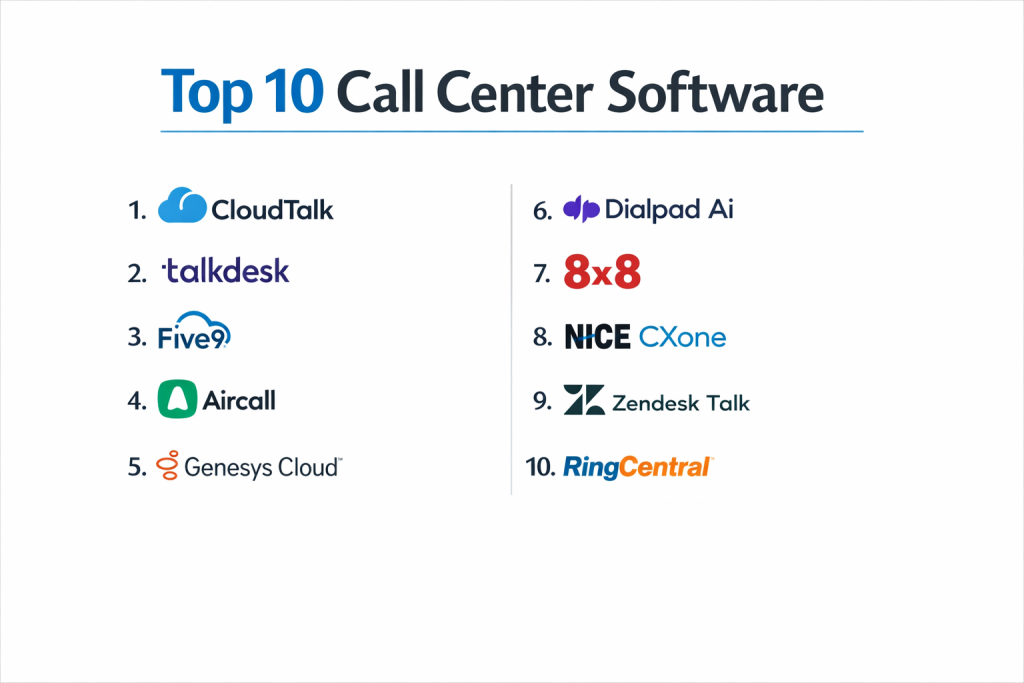
Top 10 Call Center Software Tools
1 — Five9
Five9 is a pioneer in the cloud call center space. It is designed for medium-to-large businesses that want a powerful, reliable system that connects deeply with their sales and support data.
- Key Features:
- Intelligent Virtual Assistant (IVA) to handle basic questions using AI.
- Predictive, Power, and Progressive dialers for outbound sales.
- Omnichannel support (Switch between phone, email, and chat).
- Workflow Automation to trigger actions in other apps after a call.
- Real-time supervisor dashboards to monitor agent performance.
- Pre-built integrations with Salesforce, Zendesk, and Oracle.
- Pros:
- Excellent for outbound sales teams due to its powerful dialing modes.
- Very high reliability and sound quality for international calls.
- Cons:
- The administrative interface can be difficult for non-technical users to navigate.
- Pricing is on the higher side compared to “lite” alternatives.
- Security & compliance: SOC 2, HIPAA, PCI DSS, and GDPR compliant.
- Support & community: 24/7 technical support, dedicated account managers, and an extensive online training university.
2 — Talkdesk
Talkdesk is known for being very fast to set up and very easy to use. It is designed for modern, cloud-first companies that want an enterprise-grade system without the old-fashioned complexity.
- Key Features:
- Talkdesk IQ: AI that provides real-time help to agents during a live call.
- “Click-to-consult” features to bring experts into a call quickly.
- Mobile Agent app that allows for a full call center experience on a phone.
- Virtual Agent (AI) for 24/7 automated customer service.
- One-click integrations with over 60 business apps.
- Custom reporting and live “wallboards” for the office.
- Pros:
- The interface is very clean and easy to learn, which reduces training time.
- It is very fast to implement; you can be up and running in days.
- Cons:
- It requires a very strong internet connection to maintain high voice quality.
- Some of the most advanced AI features require the most expensive plans.
- Security & compliance: ISO 27001, SOC 2 Type II, HIPAA, and GDPR.
- Support & community: 24/7 support and a very active user community for sharing best practices.
3 — Nice CXone
Nice CXone is often rated as the #1 tool for large enterprises. It is a massive platform that offers almost every feature imaginable for a global call center.
- Key Features:
- Enlighten AI: Uses data from millions of calls to improve customer satisfaction.
- Advanced workforce management to schedule agent shifts perfectly.
- Quality Management (QM) tools to record and score agent calls.
- Self-service bots that can handle complex tasks without a human.
- Omni-channel routing for over 30 different digital channels.
- Deep analytics that show why customers are calling in the first place.
- Pros:
- It can handle thousands of agents across multiple countries with ease.
- The most feature-rich tool on the market for high-level managers.
- Cons:
- Too complex for small businesses; it usually requires a full-time admin.
- The setup process can take months instead of days.
- Security & compliance: PCI DSS Level 1, HIPAA, GDPR, and FedRAMP.
- Support & community: Top-tier enterprise support and global professional services for setup.
4 — CloudTalk
CloudTalk is a modern, affordable solution designed for small and medium-sized businesses (SMBs). It is built for teams that want a professional phone system that connects with their CRM.
- Key Features:
- Smart Detection: Shows the agent the caller’s history before they pick up.
- Power Dialer to speed up outbound sales campaigns.
- International numbers for over 160 countries.
- Call Queuing with custom hold music and announcements.
- Tagging and notes to keep track of call outcomes.
- Automatic call recording for every conversation.
- Pros:
- Very affordable pricing for smaller teams.
- The desktop and mobile apps are very fast and simple to use.
- Cons:
- It lacks the advanced workforce management of Five9 or Nice.
- Reporting is good but not as customizable as enterprise tools.
- Security & compliance: GDPR compliant and ISO 27001.
- Support & community: Fast email and phone support with a very helpful knowledge base.
5 — Genesys Cloud CX
Genesys is a leader in “experience orchestration.” It is designed for businesses that want to use AI to make every customer call feel personal and easy.
- Key Features:
- Unified agent desktop for calls, chat, and social media.
- Predictive Engagement: Reaching out to a customer before they call you.
- Voicebots and Chatbots with natural language understanding.
- Real-time speech and text analytics.
- Employee engagement tools to keep agents from burning out.
- Open APIs for companies that want to build their own custom tools.
- Pros:
- The AI features are among the smartest in the industry.
- Highly flexible; it can grow from a small team to a global giant.
- Cons:
- The wide range of options can make the software feel overwhelming.
- Customer support can sometimes be slow to respond to basic queries.
- Security & compliance: ISO 27001, SOC 2, HIPAA, and GDPR.
- Support & community: Excellent global support and a very large developer forum.
6 — Aircall
Aircall is designed for sales and support teams that live inside tools like Salesforce, HubSpot, or Intercom. It focuses on productivity and “clean” integration.
- Key Features:
- “Power Dialer” for sales teams to fly through lead lists.
- Shared inbox so the whole team can see missed calls and voicemails.
- Live monitoring to help managers coach agents during calls.
- Warm transfers (talk to your teammate before passing the caller).
- After-call work settings to give agents time to type notes.
- Advanced IVR menus to route callers to the right department.
- Pros:
- The easiest tool to integrate with CRMs like HubSpot and Salesforce.
- Very simple setup that doesn’t require an IT expert.
- Cons:
- Not designed for massive call centers with hundreds of people.
- Pricing is based on a “per-user” model which can get expensive for large teams.
- Security & compliance: SOC 2 Type II and GDPR.
- Support & community: High-quality onboarding and 24/5 or 24/7 support depending on the plan.
7 — Dialpad
Dialpad is an AI-first platform. It uses “Voice Intelligence” (Vi) to transcribe every call in real-time and give agents helpful tips while they are talking to customers.
- Key Features:
- Real-time transcription: Read what the caller is saying while they say it.
- Sentiment Analysis: Tells you if the caller is getting angry or happy.
- Ai Recaps: Automatically writes a summary of the call and lists action items.
- Built-in video conferencing and team messaging.
- Real-time assist cards that pop up with answers to common questions.
- Completely browser-based; no software installation needed.
- Pros:
- The AI features are the most advanced and helpful for daily work.
- Setting up new users and phone numbers is incredibly fast.
- Cons:
- AI transcriptions are great but not always 100% accurate.
- It relies heavily on high-speed internet to run all the AI features.
- Security & compliance: SOC 2 Type II, HIPAA, and GDPR.
- Support & community: Excellent online help center and 24/7 live support for higher tiers.
8 — 8×8 Contact Center
8×8 is a global provider that excels in providing a single platform for both regular office phones and high-volume call center needs.
- Key Features:
- Unlimited calling to 48 countries on select plans.
- Integrated video, chat, and phone in one app.
- Speech Analytics to find trends in customer complaints.
- Skills-based routing to ensure experts handle complex calls.
- Co-browsing: Agents can see the customer’s screen to help them.
- Expert Connect: Quickly finding people in the office who aren’t in the call center.
- Pros:
- Having your office phone and call center on one bill is very simple.
- One of the best options for companies with international offices.
- Cons:
- The interface feels a bit older and “clunkier” than Dialpad or Aircall.
- Reporting tools can be difficult to customize.
- Security & compliance: FISMA, HIPAA, GDPR, and ISO 27001.
- Support & community: Global support teams and a dedicated “8×8 University” for training.
9 — RingCentral Contact Center
RingCentral is a massive name in business phones. Their call center product is built for companies that want a highly reliable, “all-in-one” solution.
- Key Features:
- Omni-channel support (Call, Chat, Social, SMS).
- Smart routing that sends callers to the agent they last spoke with.
- Workforce optimization to help with scheduling and training.
- Over 300 pre-built integrations with other business software.
- Advanced IVR with “visual” setup tools.
- Real-time and historical reporting dashboards.
- Pros:
- Known for extremely high reliability and 99.999% uptime.
- Works seamlessly with the RingCentral office phone system.
- Cons:
- The system is very powerful but takes a long time to learn.
- Support can be a bit slow to respond to small-business accounts.
- Security & compliance: HITRUST, SOC 2, HIPAA, and GDPR.
- Support & community: 24/7 phone support and a massive library of help articles.
10 — Freshdesk Contact Center
Freshdesk (formerly Freshcaller) is part of the Freshworks suite. It is perfect for teams that already use Freshdesk for email tickets and want to add phone support easily.
- Key Features:
- Purchase local and toll-free numbers in 90+ countries.
- “Bring Your Own Carrier” (BYOC) support.
- Automated call routing and multi-level IVR.
- Real-time dashboard to see who is on a call.
- Mobile app for agents on the go.
- Simple call masking to show a local number when calling out.
- Pros:
- Very affordable and has a “free” tier for very small teams.
- If you use Freshdesk, this is the easiest tool to set up.
- Cons:
- It lacks the high-end AI and predictive dialers of Five9.
- Not suitable for very large, high-volume call centers.
- Security & compliance: SOC 2 Type II, GDPR, and HIPAA.
- Support & community: 24/7 email and 24/5 phone support.
Comparison Table
| Tool Name | Best For | Platform(s) Supported | Standout Feature | Rating (Gartner) |
| Five9 | Outbound Sales | Win, Mac, Web | Predictive Dialing | 4.4 / 5 |
| Talkdesk | Modern Ease of Use | Win, Mac, Web, iOS | Fast Implementation | 4.6 / 5 |
| Nice CXone | Large Enterprise | Win, Mac, Web | Enlighten AI | 4.5 / 5 |
| CloudTalk | SMB Budget | Win, Mac, iOS, Android | Smart Detection | 4.3 / 5 |
| Genesys | Personalization | Win, Mac, Web | Experience Orchestration | 4.4 / 5 |
| Aircall | CRM Integration | Win, Mac, iOS, Android | HubSpot/Salesforce Sync | 4.4 / 5 |
| Dialpad | AI & Transcription | Win, Mac, Web, iOS | Real-time Assist Cards | 4.5 / 5 |
| 8×8 | Global Calling | Win, Mac, iOS, Android | Unlimited Int’l Plans | 4.2 / 5 |
| RingCentral | Reliability | Win, Mac, iOS, Android | 99.999% Uptime | 4.3 / 5 |
| Freshdesk | Startups | Web, iOS, Android | Integrated Help Desk | 4.1 / 5 |
Evaluation & Scoring of Call Center Software
We evaluated these tools based on a weighted scoring system to help you see where each tool shines.
| Criteria | Weight | What We Looked For |
| Core Features | 25% | Quality of ACD, IVR, and outbound dialing. |
| Ease of Use | 15% | How quickly an agent can learn the software. |
| Integrations | 15% | How well it talks to Salesforce, Zendesk, etc. |
| Security | 10% | HIPAA, SOC 2, and data encryption. |
| Performance | 10% | Voice quality and uptime guarantees. |
| Support | 10% | Speed and quality of the help desk. |
| Price / Value | 15% | Is the monthly cost worth the features? |
Which Call Center Software Tool Is Right for You?
1. Solo Users vs. SMB vs. Enterprise
- Solo Users: You likely don’t need a “call center” tool. A simple VoIP app like Ooma or Grasshopper is better.
- Small Business (5-20 agents): CloudTalk or Freshdesk are great because they are cheap and easy to use.
- Enterprise (50+ agents): You need Nice CXone or Five9. These can handle the complex rules that big companies require.
2. Budget vs. Premium Solutions
- Budget: Freshdesk or CloudTalk are your best options. They offer “pay-per-minute” or low monthly fees.
- Premium: Nice CXone and Talkdesk are the most expensive but offer the most advanced technology to save your agents’ time.
3. Feature Depth vs. Ease of Use
- If you want features, pick RingCentral or Five9.
- If you want simplicity, pick Aircall or Talkdesk.
Frequently Asked Questions (FAQs)
1. What is the difference between a call center and a contact center?
A call center handles only phone calls. A contact center handles calls, emails, live chat, and social media all in one place. Most software on this list can do both.
2. Can my agents work from home with this software?
Yes. Since this software is “cloud-based,” your agents just need a computer and a good internet connection. They can log in from anywhere.
3. Do I need to buy expensive desk phones?
No. Most modern call centers use “softphones,” which means the phone is just an app on the computer. Agents use a USB headset to talk.
4. How long does it take to set up?
Simple tools like Aircall can be set up in 15 minutes. Enterprise tools like Nice CXone can take several weeks to set up correctly.
5. Can I keep my existing business phone numbers?
Yes. Every provider on this list allows you to “port” your current numbers so your customers don’t have to learn a new one.
6. What is an IVR?
It stands for Interactive Voice Response. It’s the menu that says, “Press 1 for Sales, Press 2 for Support.” It helps get the caller to the right person.
7. Is the voice quality good?
As long as you have good internet, the quality is usually better than a standard cell phone. Many providers offer “HD Voice.”
8. Is it safe to talk about private info?
Yes, if you choose a “compliant” provider. Look for HIPAA (for medical info) or PCI (for credit cards) in the security section.
9. Can the software tell me if my agents are working hard?
Yes. Managers get dashboards that show how many calls each person took, how long they talked, and how much time they spent on breaks.
10. How much does it cost?
Most systems cost between $25 and $150 per agent per month. The price changes based on how many features and how many international minutes you need.
Conclusion
The right call center software can turn a chaotic office into a smooth, professional operation. Whether you choose Aircall for its simple CRM sync, Dialpad for its incredible AI notes, or Five9 for its powerful sales tools, the goal is the same: making it easier for customers to talk to you.
There is no “best” tool for everyone. The best tool for you depends on how many agents you have and whether you care more about outbound sales or inbound support. We recommend picking two or three tools from this list and doing a free trial to see which one your team likes using the most.