Introduction
Design systems management tools are specialized platforms used by companies to build, store, and organize a “single source of truth” for their brand’s digital elements. Think of a design system as a giant box of digital Lego bricks. Instead of every designer and developer creating their own buttons, fonts, or menus from scratch, they use a pre-approved set of pieces stored in these management tools. These platforms act as a bridge between the creative design world and the technical coding world. They ensure that every button looks the same and every color is consistent, whether a customer is looking at a company’s mobile app or their website. By centralizing these assets, businesses can avoid “design debt”—a messy buildup of inconsistent styles that makes a product feel unprofessional and difficult to maintain.
The importance of these tools has skyrocketed as digital products become more complex. In the real world, a major bank might use a design systems management tool to ensure that its “Submit” button is the same shade of blue across its thousands of internal and external web pages. Another use case is for a fast-growing startup that needs to launch new features every week; having a managed design system allows them to drag and drop pre-coded components rather than redesigning them every time. When evaluating these tools, users should look for strong version control (the ability to see changes over time), how well the tool connects design files to live code, and how easy it is for team members to search for and find the specific components they need.
Best for: UX/UI designers, front-end developers, product managers, and brand guardians. These tools are perfect for medium-to-large enterprises and scaling tech companies that need to maintain consistency across multiple products and large, distributed teams.
Not ideal for: Solo freelancers or very small businesses with a single, simple website. For these users, the time and cost required to set up and manage a full design system might outweigh the benefits, and simple folders or basic design files may be sufficient.
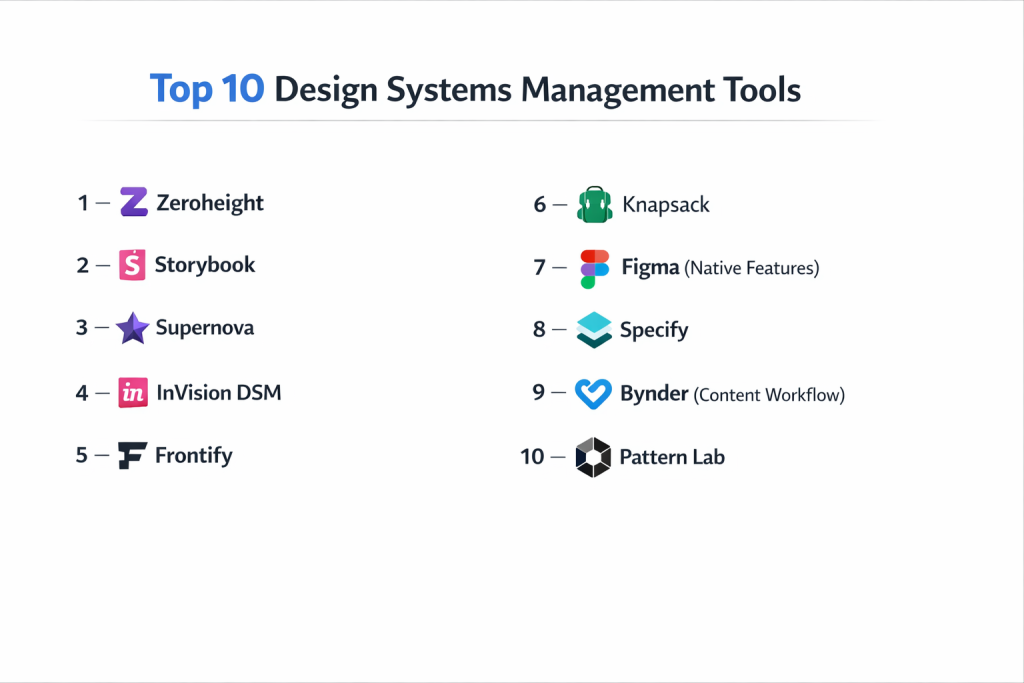
Top 10 Design Systems Management Tools
1 — Figma (with Dev Mode)
Figma is a collaborative interface design tool that has become the industry standard. With its powerful “Dev Mode” and robust libraries, it allows teams to manage design systems in real-time within the same space where the designs are actually created.
- Key features
- Multi-player collaboration allowing dozens of people to work on the same system at once.
- Variables and tokens for managing colors, spacing, and typography across platforms.
- Dev Mode provides a workspace for developers to inspect designs and copy CSS/code snippets.
- Branching and merging to test changes to the system without breaking the main version.
- Automated documentation that updates as soon as a component is changed.
- Deep plugin ecosystem that connects Figma to external coding tools and trackers.
- Pros
- Keeps design and documentation in one single place, reducing the need for extra software.
- Extremely intuitive for anyone familiar with modern web-based tools.
- Cons
- Can become very expensive as you add “Editor” seats for large teams.
- Performance can slow down significantly in files with thousands of complex components.
- Security & compliance: SOC 2 Type II, ISO 27001, GDPR compliant, and supports SAML-based SSO.
- Support & community: Massive community with a huge template marketplace and 24/7 enterprise support.
2 — Zeroheight
Zeroheight is a dedicated documentation platform that connects to design tools like Figma or Sketch and coding tools like GitHub. It is designed for teams that want a beautiful, easy-to-read “handbook” for their design system that both designers and non-designers can use.
- Key features
- Live syncing with design tools so documentation updates automatically.
- Ability to embed live code snippets (React, Vue, etc.) directly next to designs.
- Versioning features to track how the design system evolves over time.
- Customizable themes to make the documentation site look like your own brand.
- Support for “Design Tokens” which helps bridge the gap between design and code.
- Searchable categories for icons, colors, components, and brand guidelines.
- Pros
- The interface is incredibly simple for non-technical people like marketing or product managers.
- Provides a very professional-looking output that is great for showing to stakeholders.
- Cons
- It is a “documentation-only” tool, meaning you still need a separate tool to create the designs.
- The free version is quite limited in terms of how many pages you can create.
- Security & compliance: SOC 2 Type II, GDPR compliant, and offers SSO for enterprise customers.
- Support & community: Great technical documentation and a responsive support team for paid tiers.
3 — Storybook
Storybook is a tool built specifically for developers. It allows them to build and organize UI components in isolation, away from the main application. It is the “gold standard” for managing the code side of a design system.
- Key features
- Creates a visual catalog of all your coded components (buttons, sliders, etc.).
- Supports every major web framework including React, Angular, Vue, and Svelte.
- Interactive “playroom” where you can test how a component behaves with different data.
- Extensive “Add-ons” for accessibility testing, viewport resizing, and documentation.
- Ability to publish the Storybook as a static website for the whole company to see.
- Visual regression testing to see if a code change accidentally changed a component’s look.
- Pros
- Excellent for ensuring that code is high-quality and reusable across many projects.
- Completely free and open-source, giving you full control over how you use it.
- Cons
- Requires significant coding knowledge to set up and maintain properly.
- It does not have a “design” interface, so designers cannot work inside it directly.
- Security & compliance: Varies (depends on your hosting environment); open-source code is highly auditable.
- Support & community: One of the largest open-source communities in the world with endless tutorials.
4 — Supernova
Supernova is an end-to-end design system platform that focuses on automation. It aims to manage the entire lifecycle of a design system, from Figma components to code in GitHub, ensuring they stay in sync without manual work.
- Key features
- Automatic conversion of design tokens from Figma into code for multiple platforms.
- Powerful documentation engine that pulls in live design and code data.
- Multi-platform support (Web, iOS, Android) from a single design system source.
- Advanced version control that allows you to release “versions” of your system.
- Extension system that allows you to customize how code is generated.
- Built-in lifecycle management to see which components are new, stable, or deprecated.
- Pros
- Highly automated, which drastically reduces the manual work of updating code.
- Great for companies that need to manage a system across web and mobile apps simultaneously.
- Cons
- It has a steeper learning curve than simpler documentation tools.
- The setup process for automated code generation can be technical.
- Security & compliance: SOC 2 compliant, GDPR ready, and provides secure data encryption.
- Support & community: Responsive Slack community and a detailed help center for users.
5 — Frontify
Frontify is an all-in-one brand management platform that goes beyond just UI components. It is designed for large companies that need to manage their entire brand identity, including logos, marketing assets, and design systems, in one place.
- Key features
- Brand portal for storing logos, fonts, and print guidelines.
- Design system module for UI components and code snippets.
- Creative collaboration tools for approving marketing materials.
- Digital Asset Management (DAM) for storing thousands of images and videos.
- Template library where non-designers can create on-brand social media posts.
- Deep integration with Sketch, Figma, and Adobe Creative Cloud.
- Pros
- Excellent for large corporations where “Brand” is just as important as “Product.”
- Very polished and user-friendly interface that feels like a premium product.
- Cons
- Can be extremely expensive, as it is targeted at large enterprise budgets.
- Might be “too much tool” for a team that only needs to manage UI components.
- Security & compliance: ISO 27001, SOC 2 Type II, GDPR, and enterprise SSO support.
- Support & community: Dedicated success managers and a highly professional support team.
6 — Knapsack
Knapsack is a platform that emphasizes the “production” side of design systems. It is built to help teams build, manage, and use their design system in a way that directly powers their live production code.
- Key features
- Real-time preview of components using your actual production code.
- Seamless integration between Figma and your code repository.
- Versioning that allows you to sync design releases with software releases.
- Multi-tenant support, which is perfect for agencies managing systems for many clients.
- No-code documentation editor that still stays connected to the underlying data.
- Support for “Themes,” allowing one design system to look different for different brands.
- Pros
- Stronger link between “Design” and “Live Code” than almost any other platform.
- Greatly reduces “handover” friction between designers and developers.
- Cons
- Requires a good amount of technical setup to connect to your codebase.
- Best suited for larger teams with dedicated design system engineers.
- Security & compliance: SOC 2 compliant, GDPR ready, and focuses on secure enterprise workflows.
- Support & community: High-touch customer support and personalized onboarding sessions.
7 — Adobe-Spectrum (with Adobe XD)
While Adobe has shifted focus toward Figma, many legacy enterprises still use Adobe XD and the Spectrum system. It is designed for those deeply embedded in the Adobe Creative Cloud ecosystem who want a highly structured design system.
- Key features
- Adobe XD Creative Cloud Libraries for sharing assets across all Adobe apps.
- Spectrum design tokens and guidelines for high-quality, accessible UI.
- Integration with Photoshop and Illustrator for complex asset creation.
- Shareable web links for developers to inspect designs.
- Built-in states (Hover, Active, etc.) for interactive components.
- Collaboration features for commenting and feedback directly on the canvas.
- Pros
- If you already pay for Adobe Creative Cloud, it is included in your subscription.
- Best-in-class integration with creative tools like Photoshop.
- Cons
- Adobe XD is no longer the primary focus for new features in the industry.
- Collaboration is not as smooth as Figma’s “multi-player” experience.
- Security & compliance: SOC 2, ISO 27001, HIPAA, and GDPR compliant through Adobe Cloud.
- Support & community: Backed by Adobe’s massive global support infrastructure.
8 — Specify
Specify is a “Design Data Platform” that focuses on the concept of Design Tokens. It acts as a middleman that collects design data from Figma and automatically distributes it to developers in whatever format they need.
- Key features
- Connects Figma to platforms like GitHub, GitLab, and even Notion.
- Automatically transforms colors, fonts, and icons into code (CSS, JSON, Swift, etc.).
- Helps maintain a “Single Source of Truth” by automating the data pipeline.
- Version control specifically for design tokens and assets.
- Ability to create custom “parsers” to format code exactly how your team likes it.
- Real-time syncing so that a color change in Figma is pushed to code immediately.
- Pros
- Perfect for solving the “manual update” problem where developers have to copy hex codes.
- Small and lightweight; it doesn’t try to be a giant documentation site.
- Cons
- It is a specialized tool; you still need a separate place for written documentation.
- Requires some initial technical knowledge to set up the automated “destinations.”
- Security & compliance: GDPR compliant and uses secure API tokens for all data transfers.
- Support & community: Helpful developer-focused documentation and a growing user community.
9 — Bit
Bit is a unique platform that treats design system components like “independent pieces.” It allows developers to build, version, and share components across different projects easily. It is designed for teams using a “composable” software architecture.
- Key features
- Every component is treated as its own small package that can be updated individually.
- Visual workspace where you can see all your components and their dependencies.
- Automated documentation generated directly from your code files.
- Strong support for React, Vue, and other component-based frameworks.
- Built-in testing and linting to ensure every piece of the system works.
- Multi-app consistency by allowing different apps to pull in the same components.
- Pros
- Ideal for massive companies with dozens of different apps that all need to share parts.
- Makes it very easy for developers to “contribute” back to the design system.
- Cons
- Very technical and can be confusing for designers who don’t understand coding.
- The learning curve for the “Bit workflow” is quite steep.
- Security & compliance: SOC 2 compliant, GDPR ready, and offers private hosting options.
- Support & community: Strong developer community and professional enterprise support plans.
10 — InVision DSM (Design System Manager)
InVision DSM was one of the early pioneers in this space. While it has faced heavy competition, it remains a simple and effective tool for teams that want to manage their design system within the InVision prototyping ecosystem.
- Key features
- Library manager that integrates directly into Sketch and Photoshop.
- Simple web portal for developers to view style guides and download assets.
- Versioning to keep track of different iterations of the design system.
- Drag-and-drop interface for organizing components and guidelines.
- Integration with InVision prototypes to ensure mockups stay on-brand.
- Permission controls to decide who can edit or just view the system.
- Pros
- Very easy to use if your team is already using InVision for prototyping.
- Focuses on the basics, which makes it less intimidating for smaller teams.
- Cons
- Development has slowed down as users have migrated to tools like Figma.
- Lacks the advanced “Design Token” automation of newer competitors.
- Security & compliance: SOC 2 Type II, ISO 27001, and GDPR compliant.
- Support & community: Extensive help center and a history of good customer service.
Comparison Table
| Tool Name | Best For | Platform(s) Supported | Standout Feature | Rating |
| Figma | Design Collaboration | Web, Mac, Win | All-in-One Design & Dev Mode | 4.8/5 |
| Zeroheight | Documentation | Web | Beautiful, No-Code Styleguides | 4.5/5 |
| Storybook | Developer Cataloging | Web (React/Vue/etc.) | Isolated Component Testing | 4.7/5 |
| Supernova | Automation | Web, iOS, Android | End-to-End Token Syncing | 4.4/5 |
| Frontify | Enterprise Brands | Web | Full Digital Asset Management | 4.3/5 |
| Knapsack | Production Sync | Web | Direct Live Code Previews | 4.5/5 |
| Adobe-Spectrum | Adobe Users | Mac, Win | Creative Cloud Integration | 4.1/5 |
| Specify | Data Pipelines | Web (API-driven) | Automatic Code Generation | 4.3/5 |
| Bit | Composable Apps | Web (JS/TS) | Independent Component Versioning | 4.2/5 |
| InVision DSM | Simple Prototypes | Web, Mac | Prototyping Ecosystem | 3.9/5 |
Evaluation & Scoring of Design Systems Management Tools
To determine the true value of a tool, we have evaluated them against a set of standards that matter most to growing businesses.
| Evaluation Category | Weight | Why It Matters |
| Core Features | 25% | The ability to manage tokens, components, and documentation effectively. |
| Ease of Use | 15% | How quickly designers and non-tech staff can navigate the tool. |
| Integrations | 15% | How well it connects to Figma, GitHub, Slack, and other vital tools. |
| Security & Compliance | 10% | Ensuring your intellectual property and design data are safe. |
| Performance | 10% | Speed of the platform, especially when handling large systems. |
| Support & Community | 10% | Access to help, templates, and a community of other experts. |
| Price / Value | 15% | Whether the monthly cost justifies the time saved by the team. |
Which Design Systems Management Tools Tool Is Right for You?
Solo Users vs SMB vs Mid-Market vs Enterprise
If you are a solo designer, Figma on its own is likely all you need. Small-to-Mid-sized Businesses (SMBs) will benefit most from adding Zeroheight for documentation, as it provides a professional look without a high price. Mid-market companies that have a clear split between design and engineering should look at Supernova or Specify to automate the handoff. Global enterprises managing multiple brands must look at Frontify or Knapsack, which are built to handle the security and complexity of thousands of users.
Budget-Conscious vs Premium Solutions
For those on a tight budget, Storybook and Figma’s free tier are excellent starting points. They are powerful and have huge communities. If you have a larger budget and want to save dozens of hours of manual labor every month, premium automated tools like Knapsack or Supernova are worth the investment. These tools effectively pay for themselves by reducing the need for developers to manually “code” things that have already been designed.
Feature Depth vs Ease of Use
If you want something that “just works” and requires no training, Zeroheight and Frontify are the winners. They have beautiful, drag-and-drop interfaces. However, if you need deep features like “independent component versioning” or “automated multi-platform code generation,” you must go with a more technical tool like Bit or Specify. These tools are harder to learn but offer much more power for complex software engineering.
Integration and Scalability Needs
As your company grows, you will need a tool that doesn’t just store pictures but talks to your code. Storybook and Bit are highly scalable for engineering teams. For design teams, Figma is the most scalable because it is where the work actually happens. Ensure the tool you choose has a strong API (Application Programming Interface) so that you can build your own connections if the company doesn’t provide them.
Security and Compliance Requirements
Companies in finance, healthcare, or government must prioritize security. Figma, Frontify, and Adobe lead the way in this area with SOC 2 Type II and ISO 27001 certifications. If your security team requires that all data stays on your own private servers, look for tools that offer “on-premise” or “private cloud” hosting, such as Bit or specialized versions of Knapsack.
Frequently Asked Questions (FAQs)
What exactly is a Design Token?
A design token is the smallest piece of a design system, like a specific hex code for a color or a pixel value for spacing. Tools like Specify help turn these into code variables so they can be changed in one place and updated everywhere.
Do these tools replace Figma or Sketch?
Generally, no. Most of these tools connect to Figma or Sketch. They take the drawings you make in those tools and help you document them and turn them into code.
Can I build a design system without a management tool?
Yes, you can use a basic document or a PDF, but as soon as you have more than 3-4 people on a team, it becomes almost impossible to keep everyone’s files in sync without a dedicated tool.
How long does it take to set up a design system?
A basic system can be set up in a few days, but a full enterprise-grade system with documented components and code can take several months of dedicated work.
Is Storybook only for developers?
While it is built with code, many modern design teams use Storybook as the “final word” on what a component looks like. It is the bridge between the design mockup and the real product.
What is the difference between a style guide and a design system?
A style guide is usually just a document showing colors and fonts. A design system includes those things, plus coded components, usage rules, and a shared language for the whole company.
Do these tools work for mobile apps?
Yes. Tools like Supernova and Knapsack are specifically designed to help you manage one design system that powers both your website and your iOS/Android apps.
How much do these tools cost?
Prices vary wildly. Some are free (Storybook), while enterprise solutions like Frontify or Knapsack can cost thousands of dollars per year depending on the size of your team.
What is “Design-to-Code” automation?
This is a feature in tools like Supernova or Specify where a designer changes a color in Figma, and the tool automatically sends a “Pull Request” to GitHub to update the code.
Can non-designers use these tools?
Yes! One of the main goals of tools like Zeroheight is to give people in marketing, sales, and product management a place to see what the brand should look like without needing to open design software.
Conclusion
Choosing the right design systems management tool is a critical step in making your company more efficient and your brand more consistent. We have seen that there is a perfect tool for every type of team, from the developer-centric world of Storybook to the brand-heavy portals of Frontify. These tools do more than just store files; they create a shared language between designers and developers, reducing confusion and speeding up the time it takes to launch new products.
The most important insight is that the “best” tool is the one that fits into your existing way of working. If your developers are already using React, Storybook is a natural fit. If your designers live in Figma, staying within that ecosystem is likely the easiest path. No matter which you choose, focus on finding a tool that helps your team communicate better and ensures that your users have a seamless, high-quality experience every time they interact with your brand. By investing in the right management tool now, you are building a foundation for growth that will save your team countless hours of frustration in the years to come.