Introduction
Trademark monitoring tools are specialized software platforms designed to protect a brand’s identity by scanning global databases for potential infringements. When a company registers a logo, name, or slogan, they gain legal rights to that mark, but the government does not actively “police” it for them. It is the owner’s responsibility to find people who are using similar marks and stop them. These tools act as a digital “security guard,” constantly watching trademark offices, domain registries, and social media platforms to find anyone trying to ride on the co-attails of a successful brand.
The importance of these tools lies in the concept of “brand dilution.” If a competitor starts using a name that is “confusingly similar” to yours, it can steal your customers and damage your reputation. Trademark monitoring software automates the search process, which would be impossible for a human to do manually across hundreds of countries. By identifying these threats early—often while a competitor’s application is still in the “opposition period”—businesses can take legal action before the infringing mark is fully registered, saving thousands of dollars in long-term litigation costs.
Key Real-World Use Cases
Trademark monitoring tools are used in several critical business scenarios:
- Watching New Applications: The tool alerts you the moment someone files a trademark for a name that sounds or looks like yours at the USPTO or other global offices.
- Domain Name Protection: Monitoring software finds “typo-squatters” who register websites like yourbrand.co instead of yourbrand.com to trick your customers.
- E-commerce Counterfeit Detection: Brands use these tools to scan marketplaces like Amazon, eBay, and Alibaba to find and remove fake products using their logo.
- Social Media Monitoring: Tracking usernames and hashtags across platforms like Instagram and X (formerly Twitter) to prevent brand impersonation.
What to Look For (Evaluation Criteria)
When evaluating a trademark monitoring tool, consider these essential factors:
- Global Reach: Does the tool monitor only your local country, or does it cover all 190+ jurisdictions worldwide?
- Phonetic and Visual Matching: Can the AI find marks that sound the same (e.g., “Katz” vs. “Cats”) or look similar, even if the spelling is different?
- Reporting Frequency: Does the tool send alerts in real-time, weekly, or monthly? Speed is vital during opposition windows.
- Actionability: Does the platform provide a way to send “Cease and Desist” letters or file takedown notices directly?
- False Positive Filtering: Good tools use AI to filter out results that aren’t actually threats, so you don’t waste time reviewing irrelevant data.
Best for:
- Brand Protection Managers: Professionals tasked with maintaining the integrity of a company’s intellectual property.
- Intellectual Property (IP) Law Firms: Attorneys who monitor trademarks on behalf of hundreds of different clients.
- Marketing Teams: To ensure that new campaign slogans don’t accidentally infringe on existing trademarks.
- E-commerce Businesses: Companies that sell physical goods and are at high risk of counterfeiters.
Not ideal for:
- Local “Mom and Pop” Shops: A small local cafe likely only needs to check their local business registry once and won’t benefit from global AI monitoring.
- One-Time Search Needs: If you just want to see if a name is taken before starting a business, a “Clearance Search” tool is better than a continuous “Monitoring” tool.
- Pre-Launch Startups: Until you have an actual mark to protect, these tools provide limited value compared to basic search tools.
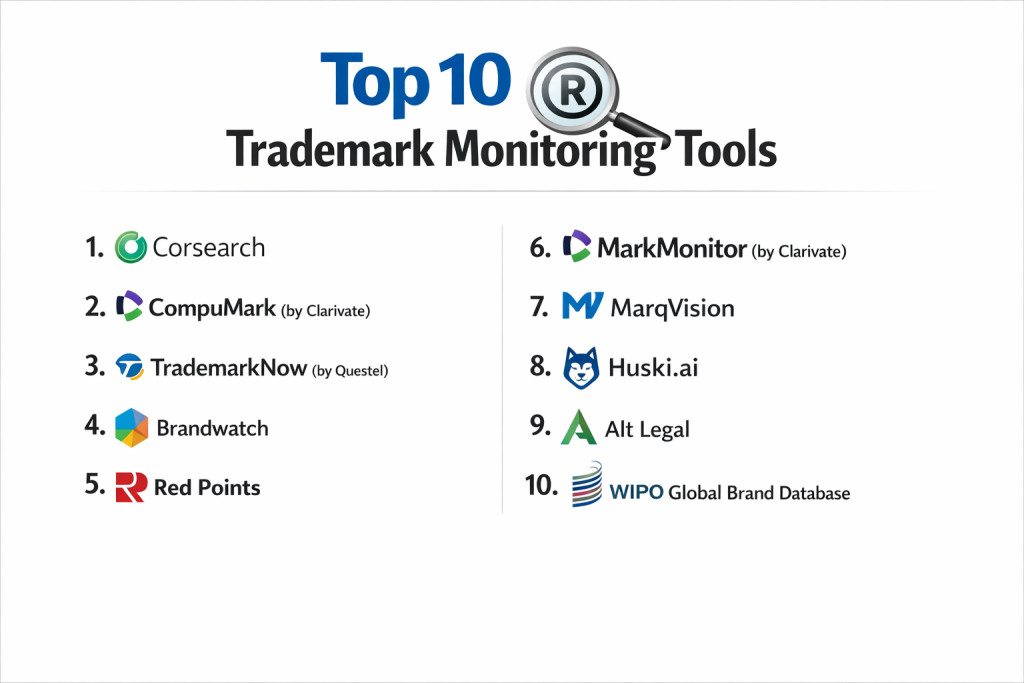
Top 10 Trademark Monitoring Tools
1 — Corsearch
Corsearch is a global leader in brand protection and trademark solutions. It is a high-end platform used by some of the world’s most recognizable brands to manage their entire IP lifecycle.
Key features:
- Global Trademark Watching: Monitors new filings in over 180 countries simultaneously.
- AI-Powered Image Recognition: Finds logos that look visually similar to yours, even without text matches.
- Marketplace Monitoring: Scans hundreds of global e-commerce sites for counterfeit goods.
- Domain Watch: Tracks new domain registrations that include your trademarked terms.
- Integrated Workflow: Allows legal teams to collaborate on infringement cases within the platform.
Pros:
- The accuracy of their AI is among the best in the industry, significantly reducing “noise.”
- They offer a very deep level of expertise and human-vetted reports for high-stakes cases.
Cons:
- It is a premium-priced tool that may be too expensive for smaller businesses.
- The interface is professional but has a steeper learning curve for non-legal users.
Security & compliance: ISO 27001 certified, SOC 2 compliant, and GDPR compliant.
Support & community: Exceptional customer support with dedicated account managers for enterprise clients.
2 — CompuMark (by Clarivate)
CompuMark is often considered the industry standard for trademark professionals. It boasts the most extensive database of trademark records in the world, dating back decades.
Key features:
- Multi-National Watch: Covers nearly every trademark registry on the planet.
- Phonetic Search: Advanced algorithms that find “confusingly similar” sounds across multiple languages.
- Industrial Design Watching: Specialized monitoring for 3D shapes and product designs.
- Company Name Watching: Tracks new business registrations, not just trademarks.
- Customized Alerts: Users can set very specific rules for what triggers a notification.
Pros:
- Their database is widely recognized as the most complete and reliable in the legal field.
- Excellent for law firms that need to provide high-quality reports to their clients.
Cons:
- The software can feel “old school” and less modern than some newer cloud-native competitors.
- Costs can add up quickly if you are monitoring many marks in many different regions.
Security & compliance: SOC 2 Type II and industry-standard data encryption.
Support & community: Large global presence with specialized support teams in different time zones.
3 — TrademarkNow (by Questel)
TrademarkNow is a modern, AI-centric platform that focuses on speed and ease of use. It is designed to make trademark monitoring accessible to both legal experts and business managers.
Key features:
- Examine: A real-time monitoring tool that provides instant “threat scores” for new filings.
- Visual Search: High-speed logo and image matching capabilities.
- NameCheck: Provides a visual “map” of how close your mark is to others in the market.
- Automated Reporting: Generates clean, easy-to-read PDF reports for stakeholders.
- Cloud-Native Platform: No software to install; everything works perfectly in a web browser.
Pros:
- The “Threat Scoring” system helps you prioritize which infringements to deal with first.
- Very intuitive design that doesn’t require a law degree to understand.
Cons:
- While fast, it may lack some of the deepest historical records found in CompuMark.
- The AI-heavy approach can sometimes miss very subtle, culturally specific nuances.
Security & compliance: GDPR compliant and SOC 2 certified.
Support & community: Strong online knowledge base and responsive email support.
4 — Brandwatch
While Brandwatch is primarily known for social media listening, its brand protection suite is a powerful tool for monitoring how your trademark is being used (or misused) across the digital web.
Key features:
- Social Media Tracking: Monitors millions of posts for unauthorized use of your brand name or logo.
- Sentiment Analysis: Tells you if people are using your trademark in a positive or negative way.
- Influencer Monitoring: Tracks if people representing your brand are following your trademark guidelines.
- Visual Logo Detection: Uses AI to find your logo in the background of social media photos.
- Real-time Trending Alerts: Notifies you if an infringement is “going viral.”
Pros:
- Unmatched coverage of the “social web,” including platforms like Reddit, X, and Instagram.
- Great for marketing teams who want to protect their brand reputation alongside their legal marks.
Cons:
- It is not a formal legal trademark registry monitor (it won’t find USPTO filings).
- It is more focused on “usage” than “legal registration” of marks.
Security & compliance: ISO 27001 and GDPR compliant.
Support & community: Large community of marketing professionals and extensive training webinars.
5 — Red Points
Red Points is a highly specialized “revenue recovery” and brand protection platform. It is built specifically to automate the process of finding and removing infringements online.
Key features:
- Automated Takedowns: Can automatically send notices to platforms like Amazon or Instagram to remove infringements.
- Seller Tracking: Identifies the actual people or companies behind multiple infringing accounts.
- Global Map: Shows you exactly where in the world your trademark is being infringed the most.
- Image Fingerprinting: Tracks your original product photos to find people stealing your content.
- Machine Learning Refinement: The more you use the tool, the better it gets at identifying your specific brand.
Pros:
- The “Auto-Takedown” feature saves massive amounts of manual legal work.
- Excellent ROI for companies that suffer from heavy online counterfeiting.
Cons:
- It is very focused on e-commerce and social media, rather than government trademark offices.
- The automated nature requires careful setup to avoid “over-flagging” legitimate resellers.
Security & compliance: SOC 2 Type II and GDPR compliant.
Support & community: Dedicated success managers and a focus on “active” brand protection.
6 — MarkMonitor (by Clarivate)
MarkMonitor is an enterprise-level platform that specializes in high-stakes domain and brand protection. It is used by some of the largest technology companies in the world.
Key features:
- Domain Management: Securely manages and monitors your entire portfolio of website addresses.
- Phishing Protection: Finds and shuts down websites trying to steal customer logins using your brand.
- Fraud Detection: Tracks unauthorized use of your trademark in digital advertisements (PPC).
- Social Media Governance: Ensures all official brand accounts are secured and monitors for fakes.
- Dark Web Monitoring: Scans the unindexed parts of the internet for trademark-related threats.
Pros:
- The gold standard for “Domain-based” trademark protection.
- Highly secure environment designed for the world’s most sensitive brands.
Cons:
- The interface can be complex and geared toward IT and security professionals.
- It is an expensive, high-end solution that isn’t built for small budgets.
Security & compliance: ISO 27001, SOC 2, and high-level internal security protocols.
Support & community: 24/7 global support and strategic advisory services.
7 — MarqVision
MarqVision uses advanced AI to simplify the process of detecting and removing counterfeits and trademark infringements across global e-marketplaces.
Key features:
- Bot-Powered Scanning: Bots scan thousands of websites 24/7 to find your trademarked terms.
- Dashboard Management: A central place to view every potential infringement and its status.
- Legal Enforcement Integration: Connects you with legal partners to take things further if a takedown doesn’t work.
- Covert Purchasing: Tools to help buy suspected fakes to prove they are infringements.
- Instant Removal: One-click removal for many major shopping platforms.
Pros:
- Very modern AI that is exceptionally good at finding “hidden” infringements on sites like Telegram or WeChat.
- The user interface is one of the most modern and easy to use in the category.
Cons:
- It is a newer player in the market, so it may have less “brand history” than companies like CompuMark.
- Its focus is heavily weighted toward physical goods rather than service-based trademarks.
Security & compliance: SOC 2 and GDPR compliant.
Support & community: Rapidly growing community and very proactive customer support.
8 — Huski.ai
Huski.ai is a newer entrant that uses “Deep Learning” to provide trademark monitoring and search. It is designed to be a “smarter” and more affordable version of traditional legal tools.
Key features:
- Deep Image Search: Can find logos based on shapes, colors, and compositions.
- USPTO Direct Sync: Real-time updates directly from the US Patent and Trademark Office.
- Collaborative Workspace: Allows attorneys and clients to comment on specific search results.
- Automatic Categorization: Groups dockets and marks by their level of risk.
- Phonetic Matching: High-quality sound-alike detection for many languages.
Pros:
- Excellent value for money, offering “big tech” features at a lower price point.
- The image search is surprisingly accurate compared to older platforms.
Cons:
- Global registry coverage is not as deep as the “Big Two” (Corsearch/CompuMark).
- Fewer “human” legal services compared to full-service IP firms.
Security & compliance: Standard data encryption and GDPR compliance.
Support & community: Digital-first support with a helpful online documentation center.
9 — Alt Legal
Alt Legal is primarily a trademark management tool, but its monitoring and “docketing” features are essential for smaller law firms and in-house teams who want to automate their workflow.
Key features:
- Automated Docketing: Automatically tracks your own trademarks and alerts you of deadlines.
- Trademark Watching: Integrated monitoring of the USPTO for new, similar filings.
- Client Portals: Allows law firms to show their clients what is being monitored in real-time.
- Document Assembly: Helps create the letters needed to stop an infringer.
- Simple Interface: Focuses on showing you only what is important, with no unnecessary “clutter.”
Pros:
- The best tool for automating the “administrative” side of trademark protection.
- Very affordable and transparent pricing for small to mid-sized firms.
Cons:
- The “Watching” feature is mostly focused on the US, making it less ideal for global brands.
- It lacks the deep “Counterfeit Detection” features of tools like Red Points.
Security & compliance: SOC 2 compliant and high-level data security.
Support & community: Known for having some of the best customer service in the legal tech industry.
10 — WIPO Global Brand Database
While not a “commercial tool,” the World Intellectual Property Organization (WIPO) provides a massive, free database that is an essential starting point for any monitoring strategy.
Key features:
- Free Access: No subscription required to search millions of records.
- International Scope: Includes records from the Madrid System and many national offices.
- Image Search: Upload a photo to find similar logos across the WIPO network.
- Filter by Class: Narrow down results by the specific industry (Nice Classification).
- Direct Links: Connects you to the official records of national trademark offices.
Pros:
- It costs nothing to use and covers a huge amount of global data.
- The image search tool is surprisingly powerful for a free resource.
Cons:
- It does not send “Alerts”—you have to go in and search manually every time.
- It lacks the AI-driven “threat analysis” and “takedown” features of paid tools.
Security & compliance: Government-level security and privacy.
Support & community: Extensive documentation and guides provided by WIPO.
Comparison Table
| Tool Name | Best For | Platform(s) Supported | Standout Feature | Rating |
| Corsearch | Large Global Brands | Web / Mobile | AI-Image Recognition | N/A |
| CompuMark | Law Firms / Experts | Web | Most Extensive Database | N/A |
| TrademarkNow | Speed & Ease of Use | Web | Threat Scoring System | N/A |
| Brandwatch | Social Reputation | Web / Mobile | Social Listening AI | N/A |
| Red Points | Counterfeit Removal | Web | Automated Takedowns | N/A |
| MarkMonitor | Domain Security | Web | Phishing & Fraud Focus | N/A |
| MarqVision | E-commerce Brands | Web | Marketplace Bot Scanning | N/A |
| Huski.ai | Tech-Savvy Teams | Web | Deep Learning Matching | N/A |
| Alt Legal | Small Law Firms | Web | Automated Docketing | N/A |
| WIPO Database | Free Research | Web | 100% Free Global Data | N/A |
Evaluation & Scoring of Trademark Monitoring Tools
| Criterion | Weight | What We Look For |
| Core Features | 25% | Global coverage, phonetic matching, and logo recognition. |
| Ease of Use | 15% | Is the dashboard intuitive or does it require a lawyer? |
| Integrations | 15% | Does it connect to e-commerce APIs or legal software? |
| Security | 10% | SOC 2, ISO 27001, and GDPR compliance. |
| Performance | 10% | How fast are the alerts and how low is the “false positive” rate? |
| Support | 10% | Availability of account managers and training resources. |
| Price / Value | 15% | Does the cost justify the amount of “risk” it removes? |
Which Trademark Monitoring Tool Is Right for You?
Solo Users vs SMB vs Mid-Market vs Enterprise
If you are a Solo User or a tiny startup, start with the WIPO Global Brand Database for free checks. As you grow into an SMB, tools like Alt Legal or Huski.ai provide great automation without a massive price tag. Mid-Market e-commerce companies that struggle with fakes should prioritize Red Points or MarqVision. For Enterprise giants like Apple or Nike, only the massive power and global scale of Corsearch, CompuMark, or MarkMonitor will suffice to protect their billions in brand equity.
Budget-Conscious vs Premium Solutions
For those on a budget, look for tools that offer “pay-per-mark” pricing. Alt Legal is very transparent here. If you have a larger budget, the “Premium” solutions like Corsearch are worth it because they provide human-vetted reports. This means you don’t have to waste your own time looking at thousands of “false hits”—the experts do it for you.
Feature Depth vs Ease of Use
If you want “Feature Depth”—meaning you want to see every tiny detail about a trademark’s history—CompuMark is the winner. However, if you want “Ease of Use” so your marketing manager can understand the data, TrademarkNow or LawVu (for general legal) are much better. They use colors and simple “risk scores” instead of dense legal jargon.
Integration and Scalability Needs
If you sell on 20 different websites (Amazon, Etsy, etc.), you need a tool like Red Points that integrates with those platforms to remove fakes instantly. If you are a law firm managing 500 clients, you need Alt Legal or TrademarkNow because they are built to handle multiple “accounts” and “dockets” at the same time without getting confused.
Security and Compliance Requirements
Legal data is sensitive. If you are a public company, you should only consider tools with SOC 2 Type II and ISO 27001 certifications. MarkMonitor and Corsearch lead the pack here. If you are based in Europe, GDPR compliance is non-negotiable, and tools like BusyLamp (for legal ops) or the European-based Red Points have very strong privacy features.
Frequently Asked Questions (FAQs)
What is trademark monitoring?
It is the process of constantly checking trademark offices and the internet for new names or logos that are similar to yours so you can stop them.
Why do I need a tool? Can’t I just use Google?
Google is great for websites, but it doesn’t show you “pending” applications at the Trademark Office. Tools show you these applications before they are approved, giving you a chance to block them.
What is the “Opposition Period”?
When someone applies for a trademark, there is usually a 30-day window where the public can object. Monitoring tools find these during that window so you can act in time.
Do these tools work for logos?
Yes, high-end tools use “Image Recognition” AI to find logos that look like yours, even if the brand name is completely different.
How much do these tools cost?
Basic tools can start at $50/month per mark, while enterprise-level protection for a global brand can cost thousands of dollars per month.
Can a tool automatically stop someone?
Some tools like Red Points can send automated takedown notices to websites. However, for a formal legal objection at a trademark office, you still need a lawyer.
What is a “confusingly similar” mark?
This is a legal term. If a customer might accidentally buy the wrong product because the names are too similar (like “Starbucks” vs. “Star-box”), it is likely an infringement.
What is “Phonetic Matching”?
This is when a tool finds names that sound the same but are spelled differently, like “Klean” and “Clean.”
How often should I monitor my trademark?
Most professional tools monitor 24/7. For manual checks, you should at least search once a month to ensure you don’t miss an opposition deadline.
What happens if I miss an infringement?
If you let too many people use similar names, your trademark becomes “diluted” and you might lose your legal right to stop others in the future.
Conclusion
In conclusion, protecting your trademark is an ongoing battle, not a one-time event. The “best” tool for you depends entirely on what you are protecting and where your risks are. If you are a software company, you might care most about Domain and Phishing protection from MarkMonitor. If you are a fashion brand, you likely need the E-commerce Takedown power of Red Points.
The key insight is that early detection is the cheapest form of legal protection. Waiting until an infringer has built a successful business with your name makes it much harder and more expensive to stop them. By using a monitoring tool, you gain the “unfair advantage” of time. Start by using a free resource like the WIPO Database, and as your brand grows, invest in an AI-powered partner like Corsearch or TrademarkNow to do the heavy lifting for you.