Introduction
Court docket management tools are digital platforms designed to track, organize, and monitor court proceedings and legal filings. In the legal world, a “docket” is the official summary of a court case, listing every document filed, every hearing scheduled, and every order issued by a judge. Managing these manually is a recipe for disaster. These tools connect directly to court databases—such as PACER in the US—to pull real-time updates. Instead of a legal assistant manually checking a court website every morning, these platforms send automatic alerts whenever something changes in a case.
The importance of these tools lies in “deadline protection.” In litigation, missing a court-ordered deadline can lead to a case being dismissed or a lawyer being sanctioned. Docket management software acts as a safety net. It centralizes all case schedules, provides calendars that sync with your email, and stores copies of every filing so the entire legal team stays informed. By automating the tracking of court records, law firms and legal departments can stop worrying about administrative mistakes and focus on winning their cases.
Key Real-World Use Cases
Court docket management tools solve high-stakes problems for legal professionals every day:
- Automated Deadline Tracking: The system scans court rules and specific judge orders to calculate exactly when a response is due, placing those dates on everyone’s calendar.
- Competitive Intelligence: Law firms use these tools to monitor what their competitors are doing or to track specific companies to see if they are being sued.
- Large-Scale Litigation: For firms handling hundreds of cases at once, these tools provide a “master dashboard” to see which cases require immediate attention.
- Document Retrieval: Instead of paying for every individual search on a government website, these tools often store and share documents among team members to save money.
What to Look For (Evaluation Criteria)
When choosing a tool, you should judge it based on these core requirements:
- Court Coverage: Does the tool cover all the specific federal, state, and local courts where you actually practice?
- Alert Speed: How fast does the system notify you after a new filing is made? Seconds matter in high-stakes litigation.
- Calendar Integration: Does it sync perfectly with Outlook or Gmail without creating duplicate entries?
- AI Search: Can you search for specific keywords across millions of court documents, not just case names?
- User Interface: Is it easy for a busy lawyer to find information quickly, or does it require hours of training?
Best for:
- Litigation Law Firms: Any firm that handles court cases needs a way to track filings and deadlines.
- Corporate Legal Departments: In-house teams that need to monitor the progress of lawsuits handled by outside law firms.
- Legal Researchers: Professionals who need to analyze court trends or find specific legal precedents.
- Paralegals and Docket Clerks: Staff members whose primary job is to ensure court documents are filed and tracked correctly.
Not ideal for:
- Transactional Attorneys: Lawyers who only do contracts or estate planning and never go to court.
- Solo Practitioners with Low Case Volumes: If you only have one case a year, the cost of a premium subscription may not be worth it.
- Pro Se Litigants: Individuals representing themselves usually find these professional tools too expensive and technical.
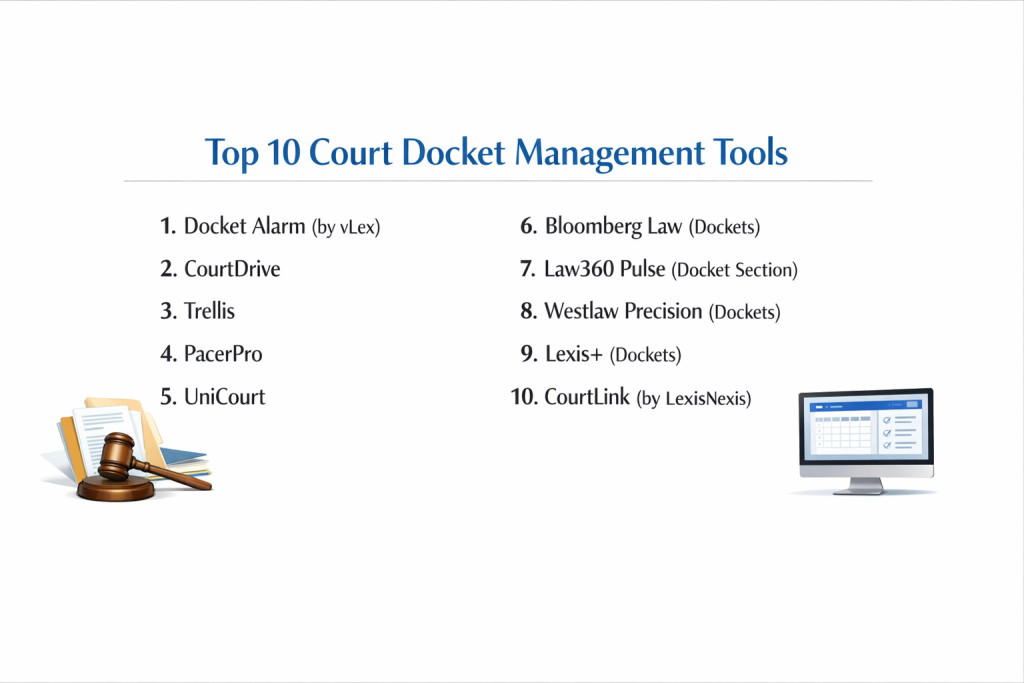
Top 10 Court Docket Management Tools
1 — Docket Alarm (by vLex)
Docket Alarm is a highly powerful search and tracking tool that covers a vast range of courts. It is famous for its “Legal Analytics” which help you predict how a judge might rule based on their past history.
Key features:
- Real-time alerts for new filings in federal, state, and specialized courts.
- Advanced “Full-Text Search” across millions of legal documents.
- Judicial analytics that show a judge’s average time to rule on a motion.
- Integration with the broader vLex global legal database.
- Automated tracking of “Patent Trial and Appeal Board” (PTAB) cases.
Pros:
- The search speed is incredibly fast, even when looking through huge amounts of data.
- Excellent for specialized areas like Intellectual Property and Bankruptcy.
Cons:
- The pricing can get complicated if you need access to many different state courts.
- The interface provides so much data that it can feel overwhelming for a casual user.
Security & compliance: SOC 2 Type II and GDPR compliant.
Support & community: High-quality documentation and a very responsive technical support team.
2 — CourtDrive
CourtDrive is designed to simplify the “PACER” experience. It is a cloud-based tool that automates the downloading, filing, and organizing of court documents for federal and state courts.
Key features:
- Automated “PDF” downloading that saves you from paying PACER fees multiple times.
- A centralized “Inbox” where all court notices are stored and organized.
- Seamless integration with document management systems like NetDocuments and iManage.
- Custom tagging for cases so you can group them by client or department.
- Real-time notification system for new entries on the docket.
Pros:
- Very simple to set up and use; it feels like a natural part of your email workflow.
- It saves firms a significant amount of money by sharing one copy of a document with the whole team.
Cons:
- It is more of an “organizer” than a “search engine” for finding new cases.
- State court coverage is good but not as deep as some competitors.
Security & compliance: Data encryption in transit and at rest, SSO available.
Support & community: Great onboarding support and a very active user help desk.
3 — Trellis
Trellis is an AI-powered state court research and tracking platform. It focuses heavily on “State Courts,” which are often much harder to track than federal courts.
Key features:
- Massive database of state court dockets that are usually hard to find.
- “Judge Analytics” that provide insights into how specific state judges handle cases.
- Searchable “Trial Court” documents, including motions and transcripts.
- Alerts for when your firm or your clients are mentioned in a new state filing.
- Comparison tools to see how different law firms perform in specific courts.
Pros:
- The best tool for anyone who practices heavily in state-level courts.
- The “Judge Dashboards” are incredibly helpful for planning a litigation strategy.
Cons:
- It does not focus as much on Federal (PACER) courts as other tools.
- The monthly subscription price is higher than basic tracking tools.
Security & compliance: Standard web security protocols and GDPR compliance.
Support & community: Strong online training and a growing community of litigation experts.
4 — PacerPro
PacerPro is the industry standard for firms that do heavy work in the US Federal court system. It acts as a professional “wrapper” for PACER, making the data much easier to manage.
Key features:
- “One-Click” document downloads that automatically name files correctly.
- Batch downloading for entire dockets at once.
- Automated distribution of court notices to your whole team instantly.
- A clean, searchable dashboard that mirrors the official PACER records.
- Integration with major law firm accounting and billing software.
Pros:
- It turns the clunky PACER system into a modern, professional experience.
- The “Automatic Distribution” ensures that no one on the team can say “I didn’t get that email.”
Cons:
- It is very focused on US Federal courts, so it may not be enough for state-heavy practices.
- It requires an active PACER account to function.
Security & compliance: SOC 2 Type II and industry-standard encryption.
Support & community: Highly professional support team with experience in large-firm environments.
5 — UniCourt
UniCourt is a data-focused platform that provides both a user-friendly website and a powerful “API” for firms that want to build their own custom legal tech tools.
Key features:
- Unified search across Federal and State court records.
- Legal data APIs for companies that want to automate their own internal tracking.
- “Legal Analytics” to track litigation trends and lawyer performance.
- Crowdsourced document library that helps reduce costs.
- Automated alerts for new cases and docket updates.
Pros:
- The API is world-class, making it the top choice for “Legal Ops” teams.
- The interface is very modern and easy to navigate for new users.
Cons:
- Deep analytics can sometimes require a more expensive “Enterprise” plan.
- Some users find the search filters to be less granular than Docket Alarm.
Security & compliance: SOC 2 and GDPR compliant.
Support & community: Excellent developer documentation and responsive customer success managers.
6 — Bloomberg Law (Dockets)
Bloomberg Law is a massive all-in-one legal platform. Their “Dockets” feature is famous for its depth and its integration with the rest of Bloomberg’s financial and legal news.
Key features:
- Unlimited search and retrieval of dockets for a flat subscription fee.
- Integration with “Points of Law” to see the legal rules mentioned in a case.
- Real-time monitoring of corporate litigation for thousands of public companies.
- Deeply integrated news alerts that tell you why a case matters.
- High-quality mobile app for checking court updates on the go.
Pros:
- The “Flat Fee” model means you never have to worry about individual document costs.
- It is the best tool for attorneys who need business context along with court records.
Cons:
- It is one of the most expensive legal tools available.
- It is a massive platform, so it might be “too much” software if you only need docket tracking.
Security & compliance: SOC 2 Type II and ISO 27001.
Support & community: 24/7 live help desk and a massive network of professional users.
7 — Law360 Pulse (Docket Section)
Law360 is a leading legal news provider. Their docket tracking tool is designed to help lawyers stay on top of the most “newsworthy” and important cases in their industry.
Key features:
- Curated alerts for the most significant lawsuits in specific practice areas.
- Integration with Law360’s daily news briefings.
- Ability to track specific companies, law firms, or judges.
- Simple search for federal and state court records.
- Daily “morning reports” sent directly to your inbox.
Pros:
- Excellent for staying informed about the “big picture” of litigation in your field.
- Very easy to use; it feels like reading the news rather than doing hard research.
Cons:
- It is less of a “workflow” tool for managing daily deadlines.
- The state court coverage is not as deep as specialized tools like Trellis.
Security & compliance: Standard corporate security and privacy policies.
Support & community: Large user base and excellent email-based support.
8 — Westlaw Precision (Dockets)
Westlaw is the giant of the legal research world. Their “Dockets” tool is part of a high-end ecosystem that connects every court filing to the world’s most comprehensive legal database.
Key features:
- Integration with “KeyCite” to see if the law mentioned in a filing is still valid.
- Advanced filters to find cases by judge, lawyer, or specific legal topic.
- Automated “Trackers” that notify you of every change in a case.
- Links from a docket entry directly to the full text of cases cited in the document.
- Professional summaries of dockets written by human legal experts.
Pros:
- The level of detail and accuracy is unmatched in the industry.
- It is part of the Westlaw ecosystem, so everything a lawyer needs is in one place.
Cons:
- Very high price point, often requiring long-term contracts.
- The sheer amount of information can make simple tasks feel more complicated.
Security & compliance: SOC 2, HIPAA, and ISO 27001 compliant.
Support & community: 24/7 access to “Reference Attorneys” for help with your search.
9 — Lexis+ (Dockets)
Lexis+ is the modern flagship platform from LexisNexis. Their docket tool focuses on “Litigation Analytics,” helping you understand the “Who, What, and Where” of any court case.
Key features:
- “Shepard’s for Dockets” to ensure the information you are looking at is accurate.
- Visual analytics that show which law firms handle the most cases in a certain court.
- Integration with “Context” to research a judge’s background and history.
- Unified search that looks through news, cases, and dockets at the same time.
- Clean, “Google-like” search bar for easy navigation.
Pros:
- The visual charts and graphs make it very easy to explain case trends to clients.
- Excellent integration with Law360 news.
Cons:
- Premium pricing that can be difficult for smaller firms to afford.
- Some users find the interface to be a bit “heavy” and slow to load.
Security & compliance: ISO 27001 and GDPR compliant.
Support & community: Massive global support team and extensive online training.
10 — CourtLink (by LexisNexis)
While Lexis+ is the “new” platform, CourtLink is the classic, specialized tool for deep docket searching and alerts. It is often preferred by professional docket clerks and librarians.
Key features:
- The largest collection of federal and state court dockets available.
- “Strategic Profiles” of litigants and law firms to see their success rates.
- Specialized alerts that can be shared with an entire practice group.
- Deep historical records going back decades for many courts.
- Ability to request “Runner Services” to get physical documents from courts.
Pros:
- It has more “depth” in state court records than almost any other platform.
- The alerting system is incredibly granular and reliable.
Cons:
- The interface can feel a bit dated and “old-school” compared to Lexis+.
- It is a specialized tool that usually requires its own separate subscription.
Security & compliance: SOC 2 and GDPR compliant.
Support & community: Excellent technical support with a deep understanding of court systems.
Comparison Table
| Tool Name | Best For | Platform(s) Supported | Standout Feature | Rating |
| Docket Alarm | Judicial Analytics | Web / API | PTAB & Patent Focus | N/A |
| CourtDrive | PACER Organization | Web | Auto PDF Downloading | N/A |
| Trellis | State Court Research | Web | State Judge Analytics | N/A |
| PacerPro | Large Federal Firms | Web | Automatic Distribution | N/A |
| UniCourt | Data & APIs | Web / API | Clean Modern Interface | N/A |
| Bloomberg Law | Corporate Context | Web / Mobile | Unlimited Flat-Fee Use | N/A |
| Law360 Pulse | News-Driven Alerts | Web | Daily Morning Reports | N/A |
| Westlaw Precision | High-Stakes Lit | Web / Mobile | KeyCite Integration | N/A |
| Lexis+ | Lit Strategy | Web / Mobile | Visual Analytics Charts | N/A |
| CourtLink | Professional Clerks | Web | Deep State Records | N/A |
Evaluation & Scoring of Court Docket Management Tools
| Criterion | Weight | Evaluation Focus |
| Core Features | 25% | Alert speed, court coverage, and document retrieval. |
| Ease of Use | 15% | Is the interface intuitive for a busy lawyer? |
| Integrations | 15% | Does it connect with Outlook, Word, and NetDocuments? |
| Security | 10% | SOC 2, SSO, and encryption standards. |
| Performance | 10% | Reliability of alerts and system uptime. |
| Support | 10% | Availability of help and quality of documentation. |
| Price / Value | 15% | Does it save more money in fees/time than it costs? |
Which Court Docket Management Tool Is Right for You?
Solo Users vs SMB vs Mid-Market vs Enterprise
If you are a Solo User or a small firm, CourtDrive or Fastcase (often integrated with docket tools) are great starting points because they are simple and focus on the basics. Mid-Market firms will find UniCourt or Trellis very helpful for expanding their state court reach. Large Enterprises and global law firms almost always require the massive power and security of Westlaw Precision, Lexis+, or Bloomberg Law because they need every feature possible in one place.
Budget-Conscious vs Premium Solutions
If you want to save money, look for tools that offer “crowdsourced” documents. UniCourt and Docket Alarm often allow you to see documents others have already paid for, which saves on court fees. If budget is no object and you want the absolute highest level of human-vetted data, Westlaw and Lexis are the premium “gold standard” choices.
Feature Depth vs Ease of Use
For those who want “Feature Depth” and deep data science, Docket Alarm and UniCourt provide the most granular control. If you just want something that “works” and sends you simple alerts without you having to learn a new system, CourtDrive and Law360 Pulse are the easiest to pick up and start using today.
Integration and Scalability Needs
If your firm uses iManage or NetDocuments, you must choose a tool like CourtDrive or PacerPro that integrates natively. This allows court documents to fly directly from the court website into your client folders without a human ever touching them. This level of automation is essential for scaling a litigation practice.
Security and Compliance Requirements
Always ensure the tool meets your clients’ security needs. Large banks and government agencies often require their law firms to use tools with SOC 2 Type II certification. If you are handling sensitive medical information, check for HIPAA compliance. Westlaw and Bloomberg Law are typically the leaders in meeting these strict corporate security standards.
Frequently Asked Questions (FAQs)
What is a court docket tool?
It is software that tracks court summaries (dockets) and alerts you whenever a new document is filed or a hearing is scheduled.
Is it different from a legal research tool?
Yes. Research tools (like Westlaw) help you find past laws. Docket tools help you track active, ongoing cases in real-time.
How does it save money?
It prevents you from paying for the same document twice. Once one person in your firm downloads it, the tool stores it for everyone else to see for free.
Does it cover state courts?
It depends on the tool. Some like Trellis and CourtLink have great state coverage, while others like PacerPro are mostly for federal courts.
Can it predict how a judge will rule?
Some tools use AI to analyze a judge’s past behavior to give you a “percentage” of how likely they are to grant a certain motion.
Will it sync with my Outlook calendar?
Most professional tools will automatically put court deadlines on your Outlook or Google calendar so you never miss a date.
Is PACER the same thing?
No. PACER is the government’s old, clunky website. These tools sit on top of PACER to make it easier and cheaper to use.
How fast are the alerts?
The best tools send an email alert within seconds or minutes of a court filing being posted online.
Can I track my competitors?
Yes. You can set up alerts for specific law firms or companies to see whenever they are involved in a new lawsuit.
Is it hard to set up?
Cloud-based tools like CourtDrive or Trellis can be set up in minutes. Enterprise systems for big firms take a bit longer to integrate with existing software.
Conclusion
In summary, choosing the right court docket management tool is about matching the technology to your specific litigation style. There is no “perfect” tool for everyone. If you spend your life in federal court, PacerPro or CourtDrive will make your life much easier. If you are fighting battles in local state courts, Trellis is likely your best partner. And for those who need to see the “big picture” of the legal and business world, Bloomberg Law is the clear winner.
What matters most is moving away from manual tracking. The law is moving too fast for human assistants to keep up with court websites by hand. By picking a tool that automates your alerts and organizes your filings, you are protecting your firm from deadlines and giving your clients the best possible service. Take advantage of free trials, see which interface feels right for your team, and start automating your docketing today.