Introduction
A data lake platform is a massive, flexible storage home that can hold all types of digital information in its rawest form. Imagine a giant container where you can drop everything: simple spreadsheets, long text documents, high-quality images, social media posts, and even logs from heavy machinery. Unlike traditional storage systems that require you to organize data perfectly before you put it in, a data lake lets you store it first and worry about the structure later. This is incredibly helpful because it ensures that no piece of information is ever lost just because you didn’t have a specific folder for it yet.
These platforms are essential for modern businesses because they act as the “raw material” center for artificial intelligence and advanced research. By keeping data in its original state, companies can look back at years of history to find hidden patterns that they might have missed if the data had been cleaned or shortened. It allows businesses to be more creative and flexible. Instead of spending months building a rigid system, a team can simply pour data into the lake and start finding answers immediately.
Key Real-World Use Cases
- Predictive Maintenance: Large airline companies store sensor data from airplane engines in a data lake. By studying the raw vibration and heat levels over time, they can predict when a part might fail and fix it before it causes a delay.
- Customer Sentiment Analysis: Retailers collect millions of comments from social media and customer emails. They store these in a lake to see how people feel about their brand using smart language-reading tools.
- Scientific Research: Genomic researchers store massive amounts of DNA data in lakes. This raw data is too big for a normal database, but a data lake handles it easily, allowing scientists to look for cures for diseases.
- Smart City Planning: Cities use data lakes to collect info from traffic cameras, weather sensors, and bus GPS trackers. This helps them understand traffic jams and improve how the city moves.
What to Look For (Evaluation Criteria)
When you are looking for a data lake platform, keep these simple points in mind:
- Storage Cost: Since you will be storing massive amounts of data, the cost per gigabyte needs to be very low.
- Compatibility: Can the tool talk to your other software? You want a lake that connects easily to your reporting and AI tools.
- Security: Because you are putting all your company’s “eggs” in one basket, the basket needs to have very strong locks.
- Metadata Management: This is like a catalog for your lake. Without a way to label what you put in, your data lake will quickly turn into a “data swamp” where nothing can be found.
Best for: Large enterprises with massive data sets, data scientists building AI models, and technology companies that handle complex files like video or audio. It is perfect for roles like Data Engineers and Research Scientists who need raw, unfiltered information.
Not ideal for: Small businesses that only handle basic sales numbers or teams that don’t have the technical skills to manage raw data. If you just need a simple report for a weekly meeting, a standard database or warehouse is much better.
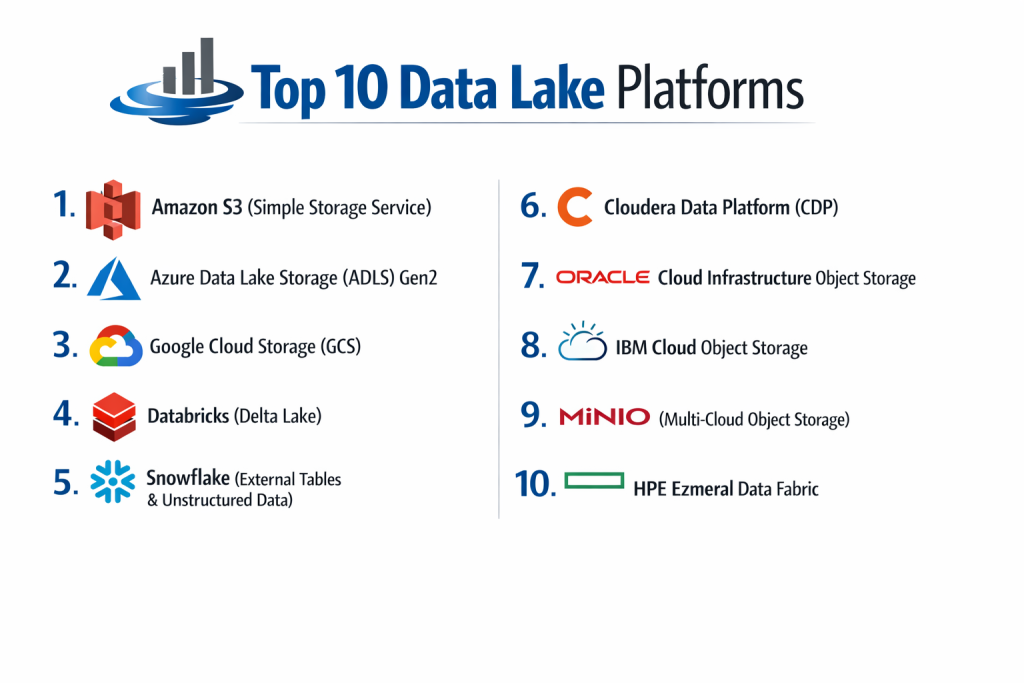
Top 10 Data Lake Platforms
1 — Amazon S3 (Simple Storage Service)
Amazon S3 is the most famous data lake in the world. It is the “gold standard” for storing raw files in the cloud because it is incredibly reliable and almost never goes down.
- Key features:
- “Eleven nines” of durability, meaning your data is almost impossible to lose.
- Different “tiers” of storage to save money on data you don’t look at often.
- Intelligent Tiering that moves data to cheaper spots automatically.
- Massive ecosystem of tools that connect to it.
- Strong versioning so you can see older versions of files.
- Pros:
- Incredibly cheap for storing huge amounts of data.
- It is the “default” choice; almost every other software tool connects to it perfectly.
- Cons:
- The pricing for moving data out of Amazon can be a surprise.
- It is just storage; you need other tools to actually “read” or analyze the data.
- Security & compliance: Supports SSO, fine-grained bucket policies, encryption at rest, and is HIPAA and SOC 2 compliant.
- Support & community: The largest community in the world and 24/7 professional support from Amazon.
2 — Azure Data Lake Storage (ADLS) Gen2
This is Microsoft’s main data lake. It is built specifically for businesses that want to run big data analytics inside the Microsoft environment.
- Key features:
- Hierarchical Namespace, which helps organize data like folders on your computer.
- Built on top of Azure Blob storage for high reliability.
- Connects directly to Azure Synapse and Power BI.
- High-speed access for big data processing.
- Tiered storage options to balance performance and cost.
- Pros:
- The best choice for companies that already use Windows and Microsoft 365.
- Managing permissions is very easy if you already use Microsoft’s security tools.
- Cons:
- The interface can be very technical and confusing for beginners.
- Performance can sometimes vary depending on which “region” your data is in.
- Security & compliance: Integrates with Azure Active Directory (SSO), supports encryption, and meets GDPR and ISO standards.
- Support & community: Extensive documentation and a massive network of Microsoft certified partners.
3 — Google Cloud Storage (GCS)
Google’s platform is known for being very fast and having a very simple pricing model. It is a top choice for tech-heavy companies and AI startups.
- Key features:
- Single API for all storage classes.
- High availability across different geographic locations.
- Object Lifecycle Management to delete or move old data automatically.
- Strong integration with Google BigQuery.
- Very fast “cold” storage (data you rarely use) that is still easy to access.
- Pros:
- Very simple to set up compared to Amazon or Microsoft.
- Google’s network is incredibly fast for moving large files.
- Cons:
- Has fewer “third-party” tools compared to Amazon S3.
- Some advanced features are only available in certain countries.
- Security & compliance: IAM permissions, encryption by default, and SOC 2/3 and HIPAA compliance.
- Support & community: Good online guides and strong support for Google Cloud customers.
4 — Databricks (Delta Lake)
Databricks created “Delta Lake” to fix the problems of old-fashioned lakes. It adds a layer of organization and reliability on top of raw storage.
- Key features:
- ACID transactions, which ensure your data never gets corrupted or half-written.
- Time Travel feature that lets you see what the data looked like last week.
- Schema enforcement to prevent “garbage” data from entering the lake.
- High-speed processing for both batch and live data.
- Unity Catalog for managing security in one place.
- Pros:
- Turns a “messy” lake into a clean, reliable system.
- Excellent for teams that do both heavy coding and simple reporting.
- Cons:
- It is a more expensive “layer” on top of your existing storage.
- Can be very complex for a company that just wants a simple file home.
- Security & compliance: SOC 2 Type II, ISO 27001, and HIPAA compliant with strong role-based access.
- Support & community: Very active developer community and top-tier enterprise support.
5 — Snowflake (External Tables & Unstructured Data)
Snowflake is famous as a warehouse, but it has expanded to handle data lakes too. It allows you to search files sitting in Amazon or Google without moving them into Snowflake.
- Key features:
- External Tables that let you “see” files in S3 or Azure as if they were in Snowflake.
- Support for Iceberg, an open standard for data lakes.
- Ability to process images, PDFs, and audio files.
- Centralized security for all data, regardless of where it is stored.
- Secure data sharing with other companies.
- Pros:
- Much easier to use than traditional data lake tools.
- You get the power of a data warehouse with the flexibility of a lake.
- Cons:
- Can be very expensive if you use it for “heavy lifting” of raw data.
- Not as “raw” as a pure storage system like S3.
- Security & compliance: High-level encryption, multi-factor authentication, and SOC 1/2 and PCI DSS compliance.
- Support & community: Excellent documentation and a very helpful user community.
6 — Cloudera Data Platform (CDP)
Cloudera is the best choice for companies that don’t want to be fully in the cloud. It works in your own office, in the cloud, or a mix of both.
- Key features:
- Shared Data Experience (SDX) for consistent security rules.
- Works on almost any type of computer hardware.
- Strong tools for data “governance” (knowing who did what).
- Built on open-source technology like Hadoop.
- Hybrid cloud capabilities.
- Pros:
- Maximum control over where your data physically lives.
- Highly trusted by governments and giant banks.
- Cons:
- Very difficult to set up; requires a team of experts.
- The software feels older and “clunkier” than modern cloud tools.
- Security & compliance: Extremely deep security controls; HIPAA, GDPR, and ISO compliant.
- Support & community: High-touch enterprise support and a large community of data engineers.
7 — Oracle Cloud Infrastructure Object Storage
Oracle’s data lake is built for speed and reliability, specifically for companies that already use Oracle for their finance or customer data.
- Key features:
- High-performance “Hot” storage for data you use every day.
- Very low-cost “Archive” storage for data you keep for legal reasons.
- Automatic data replication to prevent loss.
- Integrated with Oracle’s AI and data science tools.
- Simple management through the Oracle Cloud console.
- Pros:
- Very fast for companies that run Oracle databases.
- Pricing is very competitive and simple to understand.
- Cons:
- Not as many people know how to use it compared to Amazon or Microsoft.
- Smaller ecosystem of third-party apps.
- Security & compliance: Encryption by default, IAM integration, and SOC 2 and HIPAA support.
- Support & community: Strong professional support and training from Oracle.
8 — IBM Cloud Object Storage
IBM’s platform is designed for large companies that need to store massive amounts of “unstructured” data like videos or legal records with high security.
- Key features:
- Information Dispersal technology that spreads data across different locations for safety.
- SQL Query feature that lets you search data without moving it.
- Flexible storage classes for different budgets.
- Integrated with IBM Watson for AI projects.
- High-speed data transfer tools.
- Pros:
- Incredible reliability and safety for your most sensitive files.
- Great for companies that are already using IBM’s other AI tools.
- Cons:
- The interface can be difficult to navigate.
- Generally more expensive for small-scale projects.
- Security & compliance: FIPS 140-2 security, encryption, and GDPR/HIPAA compliance.
- Support & community: Excellent enterprise-level support and professional services.
9 — MinIO (Multi-Cloud Object Storage)
MinIO is a bit different because it is “Open Source.” You can run it on your own servers to create your own private version of Amazon S3.
- Key features:
- High-performance storage built for AI.
- Fully compatible with Amazon S3 (tools built for S3 work here too).
- Can be installed on almost any computer or server.
- Kubernetes-native, making it a favorite for modern developers.
- Extremely fast data reading speeds.
- Pros:
- You can build your own data lake without paying a cloud provider.
- Very fast and lightweight.
- Cons:
- You are responsible for the hardware and maintenance.
- Does not come with built-in AI tools like Google or Amazon.
- Security & compliance: Supports encryption, IAM-style policies, and is SOC 2 compliant in the enterprise version.
- Support & community: Large open-source community and paid support for businesses.
10 — HPE Ezmeral Data Fabric
This is an enterprise tool designed to act as a “fabric” that connects data lakes across many different locations and offices.
- Key features:
- Unifies data across different clouds and your own office.
- Supports many different file types and data formats.
- Built-in tools for data science and analytics.
- Automated data movement to save costs.
- High-level governance and security.
- Pros:
- Excellent for companies with data spread out in many different countries.
- Makes many different lakes look like one single system.
- Cons:
- Very expensive and complex for anyone but the largest companies.
- Brand is less known in the pure “cloud” space.
- Security & compliance: Strong enterprise-grade security and audit logs; HIPAA/GDPR ready.
- Support & community: Direct professional support from HP Enterprise.
Comparison Table
| Tool Name | Best For | Platform(s) Supported | Standout Feature | Rating |
| Amazon S3 | General Use | AWS | Massive Ecosystem | 4.8 / 5 |
| Azure ADLS | Microsoft Users | Microsoft Azure | Folder Hierarchy | 4.6 / 5 |
| Google GCS | Speed and Simplicity | Google Cloud | Fast Cold Storage | 4.5 / 5 |
| Databricks | Reliability & AI | Multi-Cloud | Delta Lake Tech | 4.7 / 5 |
| Snowflake | Easy Management | Multi-Cloud | Iceberg Support | 4.6 / 5 |
| Cloudera | Hybrid/On-Prem | Hybrid | SDX Security | 4.2 / 5 |
| Oracle | Oracle Users | Oracle Cloud | High-Performance Hot Tier | 4.3 / 5 |
| IBM | Security & Compliance | IBM Cloud | Data Dispersal | 4.1 / 5 |
| MinIO | Private Lakes | On-Prem/Private Cloud | S3 Compatibility | 4.5 / 5 |
| HPE Ezmeral | Global Enterprises | Multi-Cloud/Hybrid | Data Fabric | 4.0 / 5 |
Evaluation & Scoring of Data Lake Platforms
| Criteria | Weight | Evaluation Focus |
| Core Features | 25% | Can it store any file type? Is it reliable? |
| Ease of Use | 15% | Can a human understand the dashboard and tools? |
| Integrations | 15% | Does it work with Power BI, Tableau, and Spark? |
| Security & Compliance | 10% | Does it follow the law and keep hackers out? |
| Performance | 10% | Is it fast when you need to read 10,000 files? |
| Support & Community | 10% | Are there help guides and people to talk to? |
| Price / Value | 15% | Is it affordable for the amount of data stored? |
Which Data Lake Platforms Tool Is Right for You?
Small to Mid-Market vs. Enterprise
If you are a smaller company, Google Cloud Storage or Amazon S3 are the best places to start. They are “pay as you go,” so you don’t have to spend a lot of money upfront. Large enterprises that need to follow very strict rules and manage data across many different countries should look at Cloudera or HPE Ezmeral, as these tools are built for that level of complexity.
Budget-conscious vs. Premium solutions
For those on a budget, MinIO is a great choice because you can run it on your own existing hardware. Amazon S3 is also very cheap if you use their “Glacier” tiers for old data. If you have a larger budget and want a “premium” experience where the data is always clean and reliable, Databricks or Snowflake are worth the extra cost.
Feature depth vs. Ease of use
If you want something that just “works” without a lot of setup, Snowflake and Google Cloud Storage are the easiest to handle. If you need “deep” features—like the ability to travel back in time to see old data or write complex code for machine learning—Databricks and Azure Data Lake offer the most power.
Integration and Scalability needs
If your company is already using Microsoft Teams, Excel, and Power BI, Azure Data Lake is the clear winner for integration. If you need to grow your storage from 1 megabyte to 1 petabyte overnight without any manual work, Amazon S3 handles that kind of scaling better than anyone else.
Frequently Asked Questions (FAQs)
1. What is a data lake?
It is a giant storage home where you can keep any kind of digital file in its original form without having to organize it first.
2. Is a data lake better than a data warehouse?
Neither is “better.” A lake is for raw, messy data and AI research. A warehouse is for clean, organized data used for daily business reports.
3. Will my data get lost in a “data swamp”?
This happens if you don’t use “metadata” (labels). A data swamp is a lake where no one knows what is inside. Good tools help you label your data to prevent this.
4. How much does a data lake cost?
The storage itself is very cheap (often pennies per gigabyte). However, you pay more when you “read” the data or move it to another system.
5. Do I need a team of experts?
For tools like Cloudera or Databricks, yes. For simple storage like Amazon S3 or Google Cloud, a regular IT person can set it up easily.
6. Can I use a data lake for small files?
Yes, but it is most useful for very large files or massive amounts of small files that a normal database can’t handle.
7. Is the cloud safe for my data?
Yes. Modern cloud providers spend more on security than almost any individual company can. They use high-level encryption to keep data safe.
8. What is “S3 Compatible”?
It means a tool works exactly like Amazon S3. This is great because it means you can switch tools easily without having to rewrite your code.
9. Can I delete data from a lake?
Yes, you can set “lifecycle rules” that automatically delete old data after a certain number of years to save money and follow privacy laws.
10. Can I connect a data lake to my charts?
Yes, but usually you need another tool in the middle (like a query engine) to turn the raw files into numbers that a chart can understand.
Conclusion
A data lake platform is one of the most powerful tools a business can own. It ensures that your company never loses a piece of information and remains ready for the future of AI and big data. While the many options can feel overwhelming, the best approach is to start with where your company is already “living.” If you use Microsoft products, start with Azure. If you are a startup, look at Google or Amazon.
The “best” platform is simply the one that keeps your data safe, keeps your costs low, and makes it easy for your team to find the answers they need. By choosing a solid data lake today, you are building a foundation that will serve your company for many years to come. Take the time to test a few options, watch your costs, and don’t be afraid to keep your data in its raw, natural state.