Introduction
Data warehouse platforms are digital storage systems that act like a giant, organized library for a company’s information. Businesses collect a lot of data every day, such as sales records, customer names, and website clicks. A data warehouse takes all this information from different places and puts it into one central home. This allows business owners to look at the big picture and understand how their company is doing. Instead of searching through many different spreadsheets, leaders can use these tools to find patterns and make better plans for the future.
These tools are important because they help turn raw numbers into useful knowledge. Without a warehouse, data is often messy and spread out, making it hard to use. With one, a company can see exactly where they are spending too much money or which products are the most popular. It provides a “single source of truth” so that everyone in the office is looking at the same facts. In a world where every click counts, having a solid place to store and study those clicks is a huge advantage.
Key Real-World Use Cases
- Improving Customer Service: By looking at past support chats and purchase history, a company can fix common problems before more customers complain.
- Inventory Planning: Stores use these tools to see what sold best in previous years so they know exactly how much stock to buy for the next big holiday.
- Financial Reporting: Large banks use warehouses to combine millions of daily transactions into simple reports for government inspectors.
- Marketing Success: Teams can see which ads actually led to a sale and which ones were a waste of money by connecting their ad data to their sales data.
What to Look For (Evaluation Criteria)
When you are choosing a data warehouse, you should look at a few main things:
- Speed: How fast can the tool give you an answer when you ask a complicated question?
- Ease of Use: Can a regular office worker understand the screen, or do you need to be a computer scientist?
- Cost Flexibility: Can you pay only for what you use, or do you have to pay a big flat fee every month?
- Growth: If your business gets ten times bigger next month, can the tool handle all that extra data without breaking?
Best for: Mid-sized to large companies, data analysts, and tech-heavy startups. It is ideal for businesses that have data coming from many different sources like apps, websites, and physical stores.
Not ideal for: Very small local businesses that only use one or two simple tools, or teams that only need to look at today’s numbers without caring about the past.
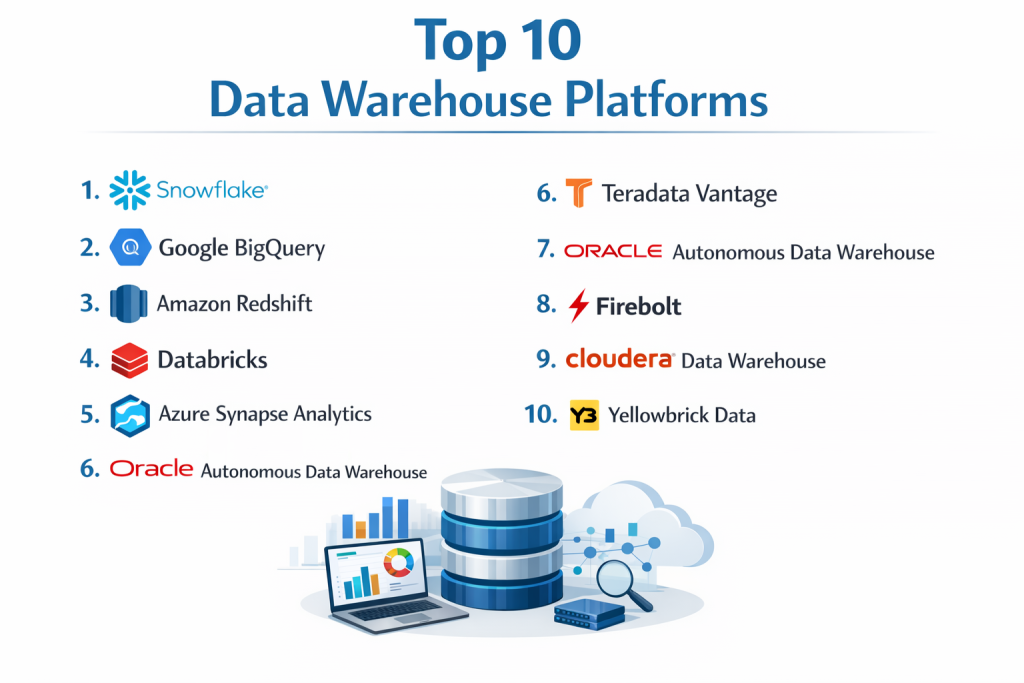
Top 10 Data Warehouse Platforms
1 — Snowflake
Snowflake is a modern cloud system that is built to be very flexible. It is designed for companies that want to store and study data without having to manage physical computer hardware.
- Key features:
- Separates storage and compute so you only pay for the work you do.
- Works on all major cloud providers like Amazon and Google.
- Allows you to share data with partners instantly.
- Auto-scaling to handle huge amounts of work.
- Supports many types of data, including messy files like JSON.
- Pros:
- Very simple to set up and start using immediately.
- You don’t have to worry about the system slowing down when many people use it.
- Cons:
- The costs can be hard to predict because of the per-second billing.
- Moving huge amounts of data out of the system can be expensive.
- Security & compliance: SOC 2 Type II, PCI DSS, HIPAA, and GDPR compliant with full encryption.
- Support & community: Very large community and excellent online help documents.
2 — Google BigQuery
BigQuery is Google’s answer to data storage. It is “serverless,” meaning Google handles all the technical parts so you can just focus on looking at your data.
- Key features:
- No servers to set up or manage at all.
- Built-in machine learning to help predict future trends.
- Fast searching through massive amounts of data.
- Connects perfectly with Google Sheets and Google Ads.
- Real-time data updates as things happen.
- Pros:
- Incredible speed when searching through billions of rows.
- Very low maintenance work for your tech team.
- Cons:
- Costs can spike if you run many large searches.
- Mainly stays within the Google ecosystem.
- Security & compliance: Data is encrypted at rest and in transit; meets HIPAA and FedRAMP rules.
- Support & community: Strong support from Google Cloud and a large user base.
3 — Amazon Redshift
Redshift is a very powerful tool from Amazon. It is the best choice for businesses that already use Amazon Web Services (AWS) for their websites or apps.
- Key features:
- Massively Parallel Processing for fast results.
- Can search data sitting in simple Amazon storage folders.
- Offers a “Serverless” option for easier use.
- Integrates with thousands of other business tools.
- Advanced tools to make searches run more efficiently.
- Pros:
- Great value for money if you have a steady, predictable workload.
- Deeply connected to the most popular cloud system in the world.
- Cons:
- The standard version requires more technical setup than Snowflake.
- Can be confusing for people who are not used to Amazon’s interface.
- Security & compliance: SOC 1/2/3, PCI DSS Level 1, ISO, and HIPAA compliant.
- Support & community: Huge community and many professional consultants available.
4 — Databricks
Databricks is a “Lakehouse” platform. This means it tries to be both a simple data warehouse and a powerful system for advanced data science and AI.
- Key features:
- Uses “Delta Lake” technology for reliable data.
- Perfect for building and training AI models.
- Works with Python, SQL, and other coding languages.
- Collaborative workspaces so teams can work together.
- Strong focus on high-speed data processing.
- Pros:
- The best choice for teams that do both reporting and advanced science.
- Built on open-source technology so you aren’t “locked in.”
- Cons:
- Has a steeper learning curve for non-technical users.
- Can be overkill for a company that only needs simple reports.
- Security & compliance: SOC 2, ISO 27001, HIPAA, and GDPR support.
- Support & community: Very active developer community and enterprise support.
5 — Azure Synapse Analytics
This is Microsoft’s main tool for big data. It is the natural choice for companies that use Windows, Excel, and Power BI every day.
- Key features:
- Combines data cleaning and data storage in one place.
- Deep integration with Microsoft Power BI for charts.
- Allows you to choose between “pay as you go” and “dedicated” power.
- High-level security built by Microsoft experts.
- Single workspace for all data tasks.
- Pros:
- Everything works together perfectly if you are already a Microsoft shop.
- Great for handling both old-school data and modern streaming data.
- Cons:
- The interface is very “busy” and can be overwhelming.
- Setup can be complex for small teams.
- Security & compliance: Uses Azure Active Directory and high-grade encryption; HIPAA and GDPR ready.
- Support & community: Extensive documentation and global partner support.
6 — Teradata Vantage
Teradata is a legendary name in data. Vantage is their modern version that is excellent at handling the most complicated questions from the world’s biggest companies.
- Key features:
- Can run on the cloud or on your own office computers.
- Handles thousands of people using the system at once.
- Advanced workload management to keep things moving fast.
- Very stable and reliable for giant data sets.
- Flexible deployment options.
- Pros:
- Extremely powerful for the most complex enterprise needs.
- Highly trusted by banks and large retailers for many years.
- Cons:
- Generally more expensive than newer cloud-only tools.
- Needs a specialized person to manage and tune it.
- Security & compliance: Meets all major global banking and health security standards.
- Support & community: Dedicated enterprise-level support and professional services.
7 — Oracle Autonomous Data Warehouse
Oracle’s tool is “Autonomous,” which means it uses AI to fix, tune, and back up itself. It is like a “self-driving” car for your data.
- Key features:
- Automatic patching and tuning without human help.
- Fast performance for many different types of data.
- Easy to grow or shrink without turning the system off.
- Integrated tools for loading and cleaning data.
- Pros:
- Saves a lot of time because the computer does the boring admin work.
- Very familiar for businesses that already use Oracle databases.
- Cons:
- Best performance is only on Oracle’s own cloud.
- Can be pricey for businesses not already in the Oracle world.
- Security & compliance: Highly secure with automatic encryption and self-patching.
- Support & community: High-quality professional support and a massive global network.
8 — Firebolt
Firebolt is a newer tool that is built for speed. It is made for companies that need their dashboards to update in a fraction of a second.
- Key features:
- Extremely fast query speeds.
- Uses less computer power to save money.
- Easy to use with standard SQL.
- Optimized for high-performance data apps.
- Pros:
- Much faster than many older systems for specific tasks.
- Pricing can be lower because it is more efficient.
- Cons:
- Smaller community since it is a newer company.
- Fewer built-in features for things like AI compared to BigQuery.
- Security & compliance: SOC 2 Type II compliant.
- Support & community: Growing community and direct support for customers.
9 — Cloudera Data Warehouse
Cloudera is built for “Hybrid” work. This means it is great if you want to keep some data in your own office and some in the cloud.
- Key features:
- Consistent security across different cloud systems.
- Built on open-source technology.
- Handles “messy” data from the internet very well.
- Auto-scaling to save money during slow times.
- Pros:
- Great for companies that aren’t ready to go 100% to the cloud.
- Very high level of control over where your data sits.
- Cons:
- Can be very complex to set up and manage.
- The interface feels a bit older than Snowflake.
- Security & compliance: Strong governance tools and standard enterprise compliance.
- Support & community: Good technical support and a large engineering community.
10 — Yellowbrick Data
Yellowbrick is a modern tool that focuses on high speed and privacy. It is often used by companies that want to run a warehouse inside their own private network.
- Key features:
- Runs in your own network for maximum privacy.
- Works with almost any other data tool.
- Predictable pricing with no “surprise” bills.
- Very fast at searching through data.
- Pros:
- Excellent for businesses with strict privacy rules.
- You get the speed of the cloud without the data leaving your sight.
- Cons:
- Does not have as many extra AI features as the big names.
- Fewer people know how to use it compared to Amazon or Google.
- Security & compliance: Designed for extreme data residency and security needs.
- Support & community: Personal support and clear documentation.
Comparison Table
| Tool Name | Best For | Platform(s) Supported | Standout Feature | Rating |
| Snowflake | General Ease of Use | AWS, Azure, GCP | Storage/Compute Split | 4.6 / 5 |
| Google BigQuery | Serverless Speed | Google Cloud | Built-in AI/ML Tools | 4.5 / 5 |
| Amazon Redshift | AWS Users | AWS | AWS Integration | 4.4 / 5 |
| Databricks | AI and Data Science | Multi-Cloud | Lakehouse Design | 4.5 / 5 |
| Azure Synapse | Microsoft Users | Azure | Microsoft Stack Links | 4.4 / 5 |
| Teradata Vantage | Giant Enterprises | Hybrid & Cloud | Complex Workloads | 4.3 / 5 |
| Oracle ADW | Low Maintenance | Oracle Cloud | Self-Driving AI | 4.5 / 5 |
| Firebolt | Ultra-Fast Apps | AWS | High Speed Efficiency | 4.7 / 5 |
| Cloudera | Hybrid Setups | Hybrid | SDX Security | 4.1 / 5 |
| Yellowbrick | Private Networks | Private Cloud | Data Privacy | 4.6 / 5 |
Evaluation & Scoring of Data Warehouse Platforms
| Criteria | Weight | Purpose |
| Core Features | 25% | Does it do the basic jobs of storing and searching well? |
| Ease of Use | 15% | Can a regular employee learn to use it quickly? |
| Integrations | 15% | Does it connect to the apps you already use? |
| Security & Compliance | 10% | Is the data safe and following the law? |
| Performance | 10% | Is it fast enough to keep the business moving? |
| Support & Community | 10% | Can you find help when things go wrong? |
| Price / Value | 15% | Is the cost fair for the features you get? |
Which Data Warehouse Platform Is Right for You?
Small to Mid-Market vs. Enterprise
If you are a growing business, you likely want Snowflake or Google BigQuery. They allow you to start small and only pay for what you need. Giant corporations with massive, complicated data needs are often better off with Teradata or Oracle, as these tools are built to handle thousands of users at once without slowing down.
Budget and Value
If you are watching every penny, Amazon Redshift can be very cost-effective if you know exactly how much data you will use. BigQuery is also great for small budgets because you don’t pay anything if you aren’t running searches. For a premium experience where money is less of an issue than speed and ease, Snowflake is the top choice.
Technical Depth vs. Simplicity
Do you have a team of expert engineers? If so, Databricks or Cloudera offer a lot of power for them to build custom things. If you don’t have a big tech team and just want a tool that “works,” Snowflake or Oracle’s Autonomous warehouse will save you a lot of stress because they do the hard work for you.
Security and Compliance Requirements
If you are in a field like healthcare or finance, you need a tool that is very strict about rules. Azure Synapse and Yellowbrick are excellent for this. If your data must stay in your own building or a private cloud, Yellowbrick is usually the safest bet.
Frequently Asked Questions (FAQs)
1. What is a data warehouse platform?
It is a big digital storage center that collects data from all parts of a business so that leaders can study it and make smart choices.
2. Is it different from a regular database?
Yes. A regular database is for daily tasks like scanning a sale. A warehouse is for looking back at months or years of data to find trends.
3. Do I need to move all my data to the cloud?
Most people do because it is easier, but some tools like Cloudera or Yellowbrick let you keep data in your own office if you prefer.
4. How much do these platforms cost?
It varies. Some charge by the hour, some by the month, and some by how much data you search through. It is important to check the pricing carefully.
5. Is my data safe in these systems?
Yes. These companies use very strong encryption and locks to keep hackers out. They are often safer than keeping data on your own office computer.
6. Can a small business use a data warehouse?
Yes. Many modern tools are affordable for small teams because you only pay for the small amount of data you actually use.
7. Do I need to be a programmer to use one?
Most use a simple language called SQL. If you can use a basic spreadsheet, you can learn the basics of a data warehouse fairly quickly.
8. What is “Scaling”?
Scaling is the ability of the tool to grow instantly. If you suddenly have a million new customers, a good warehouse will grow to handle them automatically.
9. Can I see my data in charts?
Yes. These tools connect to “Business Intelligence” apps like Power BI or Tableau to turn rows of numbers into beautiful charts and graphs.
10. What is the most common mistake when buying?
The biggest mistake is choosing a tool that is too complicated for your team or not realizing how much the monthly bill will be until it arrives.
Conclusion
Choosing the right data warehouse platform is a big decision, but it doesn’t have to be scary. The most important thing is to pick a tool that matches your team’s skills and your company’s budget. If you want something that is very easy and works on any cloud, Snowflake is a great place to start. If you are already using Google or Microsoft for your other business needs, sticking with their tools like BigQuery or Synapse will make your life much simpler.
There is no single “best” tool for everyone. The right one for you is the one that helps you understand your customers better and grow your business with confidence. By putting your data in the right home, you can stop guessing about the future and start making decisions based on real facts.