Introduction
Identity Governance and Administration (IGA) is a critical cybersecurity discipline that combines identity governance (the “why” and “who should”) with identity administration (the “how” and “when”). At its core, IGA manages the digital identity lifecycle and user access rights across an entire organization. It goes beyond simple login management (IAM) by providing the oversight needed to ensure that the right people have the right access to the right resources for the right reasons—and, crucially, that this access is revoked when it is no longer needed.
IGA is vital in today’s landscape of “identity sprawl,” where users interact with hundreds of SaaS apps, on-premises systems, and cloud infrastructure. Without it, organizations face “privilege creep,” where employees accumulate excessive permissions over time, creating massive security holes. Real-world use cases include automating the “Joiner-Mover-Leaver” (JML) process, performing quarterly access certifications for auditors, and enforcing Separation of Duties (SoD) to prevent financial fraud. When choosing a tool, you should evaluate its connector ecosystem, its ability to automate complex workflows, and how well it integrates with your existing Human Resources Information System (HRIS).
Best for: IGA tools are essential for mid-market and large enterprises, especially those in highly regulated industries like finance, healthcare, and government. It is a “must-have” for IT auditors, Security Operations (SecOps) teams, and compliance officers who need to prove “least privilege” to regulators.
Not ideal for: Very small businesses (under 50 employees) with a limited number of applications may find the cost and complexity of a full IGA suite unnecessary. For these users, a basic Identity Provider (IdP) like Okta or Google Workspace with simple provisioning may be sufficient.
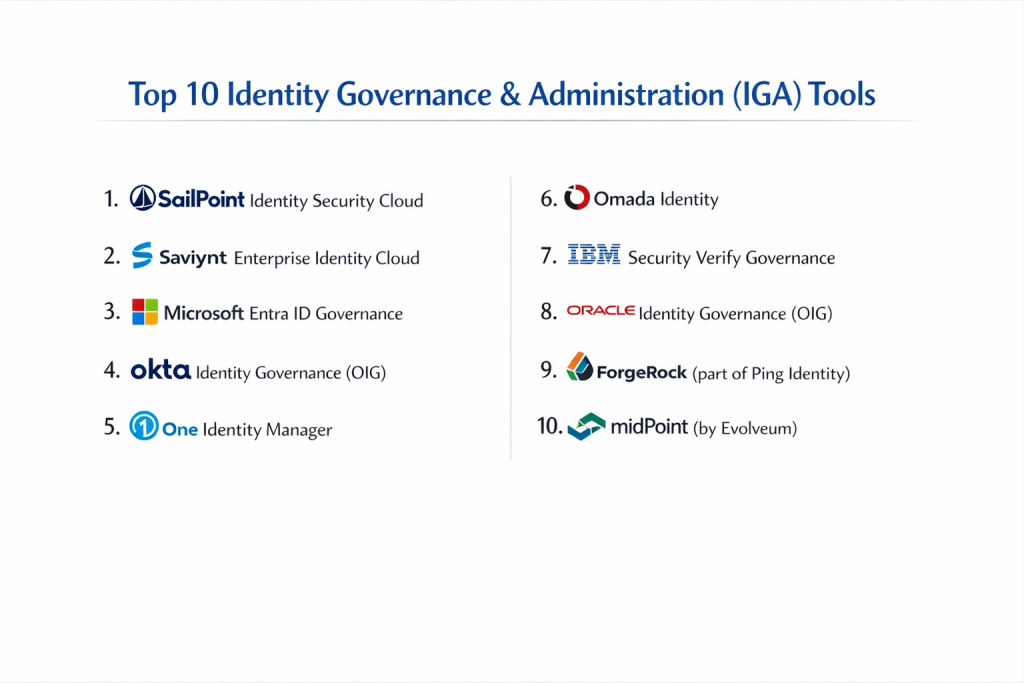
Top 10 Identity Governance & Administration (IGA) Tools
1 — SailPoint Identity Security Cloud
SailPoint is the perennial leader in the IGA space, known for its deep governance capabilities and advanced AI/ML integration. It is designed for large-scale enterprises that require high-level automation and risk-based insights.
- Key Features:
- SailPoint Atlas: A unified platform for managing identities, data, and infrastructure.
- AI-Driven Certifications: Uses machine learning to recommend which access should be kept or removed.
- Role Modeling: Automatically discovers and builds roles based on actual user behavior.
- Sensitive Data Governance: Extends visibility into unstructured data (files and folders).
- Extensive Connector Library: Thousands of pre-built integrations for legacy and modern apps.
- Pros:
- Most comprehensive feature set on the market for pure governance.
- Highly scalable for organizations with millions of identities.
- Cons:
- High cost and complex implementation process.
- Can be “overkill” for organizations without a high maturity level in security.
- Security & Compliance: SOC 2 Type II, ISO 27001, GDPR, HIPAA, and FedRAMP authorized.
- Support & Community: Industry-leading documentation, a massive “Compass” community portal, and 24/7 global enterprise support.
2 — Saviynt Enterprise Identity Cloud
Saviynt is a cloud-native pioneer that offers a “converged” approach, bringing together IGA, Privileged Access Management (PAM), and Cloud Infrastructure Entitlement Management (CIEM) into one platform.
- Key Features:
- Converged Platform: Manage standard users and privileged admins in one place.
- Risk-Based Governance: Assigns risk scores to users and entitlements to prioritize reviews.
- Fine-Grained Entitlement Management: Goes deep into application-specific permissions (e.g., SAP, Salesforce).
- Cloud-First Architecture: Built specifically for AWS, Azure, and GCP environments.
- No-Code Workflows: Visual drag-and-drop editor for access request approvals.
- Pros:
- Excellent visibility into complex cloud and hybrid environments.
- Faster “time-to-value” compared to traditional on-premises IGA solutions.
- Cons:
- The user interface can feel cluttered due to the massive amount of data.
- Support response times can be inconsistent for smaller customers.
- Security & Compliance: SOC 1 & 2, HIPAA, GDPR, and PCI DSS compliant.
- Support & Community: Strong technical documentation and a growing partner ecosystem.
3 — Microsoft Entra ID Governance
Formerly part of Azure AD, Entra ID Governance is the logical choice for organizations heavily invested in the Microsoft 365 and Azure ecosystem. It focuses on simplicity and native integration.
- Key Features:
- Entitlement Management: Create “Access Packages” that bundle apps and groups together.
- Access Reviews: Automated workflows for managers to verify user permissions.
- Lifecycle Workflows: Automates joiner-mover-leaver tasks using visual templates.
- Privileged Identity Management (PIM): Just-in-time access for administrative roles.
- Machine Learning Insights: Identifies “outlier” access that doesn’t fit a user’s peer group.
- Pros:
- Seamless integration with existing Microsoft licenses and directories.
- Very easy to deploy for basic governance needs.
- Cons:
- Managing non-Microsoft (legacy or niche SaaS) apps can be more difficult.
- Less “depth” in advanced role mining compared to SailPoint.
- Security & Compliance: Heavily certified (FedRAMP, ISO, GDPR, etc.) within the Azure platform.
- Support & Community: Massive global support network and extensive Microsoft Learn documentation.
4 — Okta Identity Governance (OIG)
Okta has expanded its popular Access Management platform into the governance space. OIG is built for speed, focusing on “Governance for the Modern Workforce.”
- Key Features:
- Okta Workflows: A powerful automation engine for complex identity logic.
- Access Requests: A Slack/Teams integrated interface for users to ask for access.
- Access Certifications: Streamlined campaigns to review resource permissions.
- Unified Directory: A single source of truth for employees, contractors, and partners.
- Self-Service Portal: High-quality user experience for requesting apps.
- Pros:
- Exceptional user experience (UX) that employees actually like using.
- Fast deployment—often set up in weeks rather than months.
- Cons:
- Still growing its advanced governance features (e.g., complex SoD rules).
- Can become expensive as you add more modules.
- Security & Compliance: SOC 2, ISO 27001, HIPAA, and GDPR compliant.
- Support & Community: Very active user community and excellent online training resources.
5 — One Identity Manager
One Identity focuses on “Identity-Centered Security.” It is known for its ability to handle extremely complex on-premises requirements while supporting modern cloud needs.
- Key Features:
- IT Shop: A shopping-cart-like experience for access requests.
- Business Role Management: Translates technical permissions into business language.
- Attestation Framework: Highly customizable audit and certification workflows.
- SAP Integration: Deep, specialized connectors for ERP systems.
- Data Governance: Integrated tools to manage access to sensitive file shares.
- Pros:
- Highly flexible and customizable for unique business rules.
- Strong performance in hybrid environments with legacy mainframes.
- Cons:
- The UI feels dated compared to cloud-native competitors.
- Requires significant professional services for initial setup.
- Security & Compliance: ISO 27001, GDPR, and HIPAA reporting templates included.
- Support & Community: Long-standing enterprise support and a robust knowledge base.
6 — Omada Identity
Omada is a European leader in IGA, famous for its “Omada Identity Process Framework,” which provides a standardized blueprint for IGA success.
- Key Features:
- Best-Practice Framework: Out-of-the-box processes for identity governance.
- Connectivity Framework: No-code approach to connecting new applications.
- Advanced Role Management: Supports complex hierarchical role models.
- Compliance Dashboards: Real-time visibility into audit readiness.
- Automated Reconciliation: Constantly checks for “out-of-band” access changes.
- Pros:
- Fixed-cost deployment models available through partners.
- Very strong adherence to European privacy and data protection laws.
- Cons:
- Smaller presence in the North American market.
- Documentation is detailed but can be dense for new users.
- Security & Compliance: GDPR-first design, ISO 27001, and SOC 2.
- Support & Community: High-touch enterprise support and regional user groups.
7 — IBM Security Verify Governance
IBM provides an IGA solution that leverages powerful analytics to help organizations manage risk and compliance across complex, global infrastructures.
- Key Features:
- Business Activities Mapping: Aligns IT access with actual business processes.
- Risk Analytics: Uses statistical models to find toxic combinations of access.
- User Lifecycle Management: Full automation for onboarding and offboarding.
- Integration with IBM Security QRadar: Correlates identity data with security events.
- Flexible Deployment: Available as a virtual appliance or SaaS.
- Pros:
- Excellent for finding and fixing “Segregation of Duties” violations.
- Backed by IBM’s massive research and security divisions.
- Cons:
- Can be technically heavy to administer.
- Licensing and pricing are often complex.
- Security & Compliance: Meets global standards including GDPR, SOX, and HIPAA.
- Support & Community: Enterprise-grade 24/7 support and a vast library of technical redbooks.
8 — Oracle Identity Governance (OIG)
Oracle’s solution is part of the broader Oracle Identity Management suite. It is built for high-scale environments, especially those running Oracle applications and databases.
- Key Features:
- Unified Console: Manage identities across all Oracle Cloud and on-prem apps.
- Extensible Workflow Engine: Highly programmable approval flows.
- Identity Audit: Continuous monitoring of policy violations.
- Bulk Provisioning: Efficiently handles thousands of access changes simultaneously.
- Reporting Engine: Pre-built reports for SOX and other regulations.
- Pros:
- Unmatched integration depth for Oracle ERP, HCM, and Database users.
- Very high performance and reliability for large data sets.
- Cons:
- Steep learning curve for non-Oracle administrators.
- Implementation can be slow and resource-intensive.
- Security & Compliance: ISO 27001, SOC, and GDPR compliant.
- Support & Community: Extensive Oracle Support (MOS) portal and global training certifications.
9 — ForgeRock (part of Ping Identity)
ForgeRock (now merged with Ping Identity) offers a modern, API-first IGA platform that is particularly strong for organizations managing both workforce and customer identities.
- Key Features:
- Identity Trees: Visual, flow-chart-style designer for login and access journeys.
- AI-Driven Governance: Automates the tedious parts of access reviews.
- Extensible Metadata: Allows for highly custom user profiles and attributes.
- Hybrid Deployment: Run it anywhere (cloud, Docker, Kubernetes).
- API-First Design: Easy to integrate into custom-built applications.
- Pros:
- Extremely flexible for “non-standard” identity use cases.
- Modern architecture that developers love.
- Cons:
- The merger with Ping Identity has led to some roadmap uncertainty.
- High flexibility means more room for configuration errors.
- Security & Compliance: SOC 2, ISO 27001, and GDPR compliant.
- Support & Community: Active developer community and comprehensive “ForgeRock University.”
10 — midPoint (by Evolveum)
midPoint is the leading open-source IGA solution. It is highly respected for its technical depth and is used by universities and large government entities that need total control over their source code.
- Key Features:
- Advanced Data Modeling: Can handle the most complex identity relationships.
- Open Source Framework: No vendor lock-in; code is fully auditable.
- Synchronization Engine: Powerful logic for keeping disparate systems in sync.
- Org-Based Roles: Automatically assigns roles based on organizational structure.
- Granular RBAC: Very fine-grained control over the IGA tool itself.
- Pros:
- No licensing fees (though support and implementation cost money).
- Unbeatable flexibility for technical teams who can code their own logic.
- Cons:
- No “out-of-the-box” SaaS version; you must host it yourself.
- Requires high-level internal expertise to maintain.
- Security & Compliance: Compliance depends on deployment; supports all standard audit logging.
- Support & Community: Extremely active open-source community and professional support from Evolveum.
Comparison Table
| Tool Name | Best For | Platform(s) Supported | Standout Feature | Rating (Gartner) |
| SailPoint | Large Enterprises | SaaS, Hybrid | AI-Driven Role Mining | 4.4 / 5 |
| Saviynt | Cloud-First Firms | SaaS | Converged IGA & PAM | 4.3 / 5 |
| Microsoft Entra | M365 Ecosystem | SaaS | Native Azure Integration | 4.5 / 5 |
| Okta | Modern Workforce | SaaS | Slack/Teams Integration | 4.6 / 5 |
| One Identity | Complex Hybrid IT | On-Prem, SaaS | “IT Shop” Request Model | 4.2 / 5 |
| Omada | European Markets | SaaS, On-Prem | Identity Process Framework | 4.3 / 5 |
| IBM Security | Risk Analytics | Appliance, SaaS | Business Activity Mapping | 4.1 / 5 |
| Oracle | Oracle Ecosystem | Cloud, On-Prem | Database Depth | 4.0 / 5 |
| ForgeRock | Hybrid & APIs | Cloud, DevOps | Visual “Identity Trees” | 4.4 / 5 |
| midPoint | Open Source Fans | Self-Hosted | No Vendor Lock-In | 4.7 / 5 |
Evaluation & Scoring of [Identity Governance & Administration (IGA)]
When we evaluate IGA tools, we use a weighted rubric to ensure that “flashy” features don’t overshadow the core functionality that actually keeps a business secure and compliant.
| Criteria | Weight | What We Look For |
| Core Features | 25% | Automated provisioning, access certifications, and SoD enforcement. |
| Ease of Use | 15% | Intuitiveness for business managers (who perform the reviews). |
| Integrations | 15% | Number of pre-built connectors and ease of API integration. |
| Security & Compliance | 10% | Encryption, audit logging, and out-of-the-box compliance reports. |
| Performance | 10% | System uptime, sync speed, and handling of bulk data. |
| Support & Community | 10% | Quality of documentation and speed of technical support. |
| Price / Value | 15% | Transparency of pricing and total cost of ownership (TCO). |
Which [Identity Governance & Administration (IGA)] Tool Is Right for You?
Choosing an IGA tool is a long-term marriage. Here is a guide to finding your perfect match:
Solo Users vs SMB vs Mid-Market vs Enterprise
- SMBs: Look at Okta or Microsoft Entra. They are easier to manage without a dedicated identity team.
- Mid-Market: Saviynt or Omada offer a great balance of power without the massive overhead of a legacy system.
- Enterprises: SailPoint is the gold standard for high-complexity, high-risk environments.
Budget-Conscious vs Premium Solutions
- Budget-Conscious: If you have high technical skill, midPoint (Open Source) eliminates licensing costs. If you are a Microsoft shop, Entra ID Governance often has the lowest total cost.
- Premium: SailPoint and Saviynt are premium for a reason; they offer the most automation, which can save you millions in labor and audit fees over time.
Feature Depth vs Ease of Use
- If your priority is User Adoption, go with Okta. Its interface is intuitive for non-technical managers.
- If your priority is Technical Depth (e.g., managing complex SAP environments), One Identity or Oracle are stronger.
Integration and Scalability Needs
Assess your “Connector Debt.” Do you have many custom-built legacy apps? You will need a tool with a strong SDK or “Universal Connector” framework. If you are 100% cloud, a SaaS-native tool like Saviynt is a better fit than an appliance-based one.
Frequently Asked Questions (FAQs)
1. Is IGA the same as Identity and Access Management (IAM)?
Not exactly. IAM focuses on the operational part of identity (logging in, SSO, MFA). IGA is the governance layer that asks: “Should this person have this access?” and “Who approved it?”
2. Why do I need IGA if I already have Okta or Azure AD?
Basic IdPs are great at letting people in. However, they often lack the “compliance brain” needed for multi-stage approvals, toxic access detection (SoD), and formal audit reporting.
3. How long does it take to implement an IGA tool?
A “quick start” for a cloud-based tool can take 3–4 months. A full enterprise-wide rollout for a large bank can take 12–24 months.
4. What is “Privilege Creep”?
This happens when an employee moves from Department A to Department B but keeps their Department A access. Over time, they become “over-privileged,” creating a security risk.
5. Does IGA replace Privileged Access Management (PAM)?
No. They work together. IGA manages the lifecycle of all users, while PAM provides extra security (like session recording) for high-power admin accounts.
6. Can IGA help with GDPR compliance?
Yes. IGA allows you to see exactly who can access “Personally Identifiable Information” (PII) and proves that you are reviewing that access regularly.
7. Is open-source IGA safe for enterprise use?
Yes, but with a caveat. Tools like midPoint are very secure, but they require a highly skilled internal team to manage the security of the host environment.
8. What are “Access Packages”?
Used by tools like Microsoft Entra, these are bundles of access (e.g., “Marketing Team Package”) that let a user get everything they need for their job with one request.
9. What is “Separation of Duties” (SoD)?
This is a policy that prevents a user from having two conflicting powers—for example, the power to create a vendor and the power to pay that vendor.
10. Do I need an IGA tool for a 50-person company?
Probably not. At that size, manual reviews and a simple Single Sign-On (SSO) tool are usually enough to stay secure.
Conclusion
Identity Governance & Administration is no longer an “optional” security layer for modern businesses—it is the foundation of a Zero Trust strategy. Choosing the right tool depends entirely on your current technical landscape. If you are a Microsoft-centric shop, Entra ID Governance is a natural starting point. If you are a massive global entity with complex requirements, SailPoint or Saviynt are the industry benchmarks for a reason.
The most important factor is not the feature list, but usability. If your managers find the tool too hard to use, they will “rubber stamp” approvals, making the entire governance process useless. Start by defining your business processes, then find the tool that fits them best.