Introduction
An API Gateway is a server or service that acts as an intermediary, receiving requests from external users (like mobile apps or web browsers) and directing them to the appropriate internal microservices. It is much more than a simple traffic director; it handles “cross-cutting” concerns such as authentication, rate limiting, request transformation, and load balancing. By centralizing these tasks, developers can focus on writing business logic rather than repeating security and networking code across every single service.
The importance of an API Gateway cannot be overstated in an era of high-frequency data exchange. Real-world use cases include protecting financial APIs from DDoS attacks, aggregating multiple service responses into a single mobile-friendly payload, and managing version control so that legacy clients don’t break when a backend is updated. When choosing a gateway, users should prioritize low latency, extensibility (plugins), observability, and ease of integration with their existing cloud or container orchestration platforms.
Best for: Backend engineers, DevOps professionals, and system architects working in mid-to-large scale organizations. It is essential for teams adopting microservices, serverless architectures, or those needing to expose internal data to third-party developers securely.
Not ideal for: Simple, monolithic applications where only one or two endpoints exist. In such cases, adding a gateway introduces unnecessary complexity and latency. It may also be overkill for very small startups that can manage basic security at the application level.
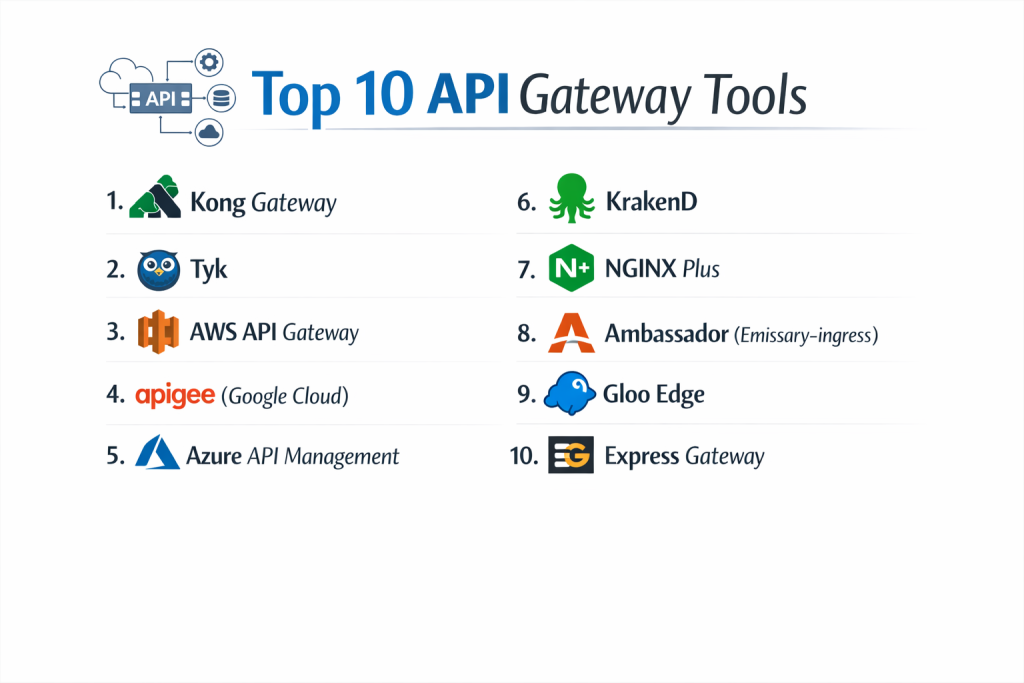
Top 10 API Gateways Tools
1 — Kong Gateway
Kong is arguably the most famous open-source API gateway in the world. Built on top of NGINX, it is designed for high performance and modularity, offering a massive library of plugins to extend its functionality.
- Key features:
- Dynamic Routing: Route traffic based on headers, paths, or methods.
- Plugin Architecture: Over 100 plugins for OAuth2, rate limiting, and logging.
- Cloud-Native Integration: Native support for Kubernetes via an Ingress Controller.
- Declarative Configuration: Manage settings via YAML (decK) for GitOps workflows.
- gRPC Support: High-performance proxying for modern service-to-service communication.
- Developer Portal: A self-service hub for developer onboarding and documentation.
- Pros:
- Incredible performance with extremely low latency overhead.
- Highly flexible; the community version is powerful enough for many production use cases.
- Cons:
- Managing the database (PostgreSQL/Cassandra) adds operational complexity.
- Some of the most critical enterprise features (like advanced OIDC) are behind a paywall.
- Security & compliance: Supports SSO (SAML/OIDC), mTLS, encryption at rest, and is SOC 2 and GDPR compliant in its enterprise/cloud versions.
- Support & community: Massive GitHub community, extensive documentation, and tiered professional support for enterprise customers.
2 — Tyk
Tyk is a modern, open-source API gateway written in Go. It is known for its “batteries-included” approach, providing a powerful management dashboard and developer portal out of the box.
- Key features:
- Universal Data Graph: A unique feature to combine multiple APIs into a single GraphQL endpoint.
- Zero Dependencies: Can run as a single binary without a heavy database requirement for the gateway.
- Version Management: Easily deprecate old versions and transition users to new ones.
- Visual API Designer: Create and test APIs through a clean graphical interface.
- Quotas and Throttling: Granular control over how much data each user can consume.
- Import Tools: Native support for importing Swagger and OpenAPI specifications.
- Pros:
- Very developer-friendly; the dashboard makes complex configurations visual.
- Written in Go, making it highly efficient for concurrent request handling.
- Cons:
- The open-source version lacks some of the visual management tools found in the paid version.
- Smaller plugin ecosystem compared to the NGINX-based giants like Kong.
- Security & compliance: SOC 2 Type II compliant; supports HIPAA-compliant architectures and GDPR data sovereignty.
- Support & community: Very active community forum, high-quality documentation, and direct engineering support for enterprise clients.
3 — AWS API Gateway
As a fully managed service, AWS API Gateway is the go-to choice for developers heavily invested in the Amazon Web Services ecosystem, particularly those using Lambda.
- Key features:
- Serverless Native: Perfect integration with AWS Lambda functions.
- Websocket Support: Handles stateful connections for real-time chat and apps.
- Canary Deployments: Slowly roll out new versions to a percentage of traffic.
- VPC Integration: Securely connect to private resources within your Amazon network.
- Caching: Built-in response caching to reduce backend load and cost.
- CloudWatch Integration: Automatic logging and alerting for every request.
- Pros:
- No servers to manage; it scales automatically from zero to millions of requests.
- Cost-effective “pay-per-request” model for low-to-medium traffic apps.
- Cons:
- Can become very expensive at extreme scales compared to self-hosted options.
- Significant vendor lock-in; moving logic to another cloud is difficult.
- Security & compliance: PCI DSS, HIPAA, GDPR, SOC 1/2/3, and FedRAMP compliant.
- Support & community: Supported by AWS’s global support team and an endless supply of community tutorials.
4 — Apigee (Google Cloud)
Apigee is the “Rolls Royce” of API management. Acquired by Google, it is a comprehensive platform designed for large-scale enterprise digital transformation.
- Key features:
- AI-Powered Insights: Uses Google’s ML to detect anomalies and predict traffic spikes.
- Monetization: Sophisticated tools to charge developers for API usage.
- Multi-Cloud/Hybrid: Manage APIs across on-prem, AWS, Azure, and Google Cloud.
- Advanced Security: Built-in protection against SQL injection and bot attacks.
- Trace Tool: Powerful debugging interface to see exactly where a request failed.
- Developer Portal: Best-in-class portal for externalizing APIs.
- Pros:
- Unrivaled feature depth for monetization and enterprise governance.
- Excellent visibility into the business value and performance of APIs.
- Cons:
- Steep learning curve and a very complex setup process.
- One of the most expensive products in the market.
- Security & compliance: ISO 27001, SOC 2, HIPAA, and GDPR compliant; industry-leading encryption standards.
- Support & community: Global enterprise support and deep integration with Google Cloud’s professional services.
5 — Azure API Management
Microsoft’s flagship gateway is built for the enterprise, offering deep integration with Azure Active Directory and the broader Microsoft developer stack.
- Key features:
- Self-Hosted Gateway: Deploy the gateway component on-premises while managing it from the cloud.
- Developer Portal: A customizable, CMS-based hub for developer documentation.
- Active Directory Integration: Use Microsoft Entra ID (formerly AD) for effortless SSO.
- Policy Expressions: Write logic-based rules in C# fragments for request transformation.
- Git Integration: Manage your API configurations using standard Git workflows.
- Virtual Network Support: Isolation for high-security environments.
- Pros:
- Seamless experience for .NET shops and existing Azure customers.
- The “Consumption” tier offers a great entry point for serverless projects.
- Cons:
- Performance can be slightly lower than Kong/Tyk for very high-throughput needs.
- Some features are only available in the “Premium” tier which is quite costly.
- Security & compliance: FedRAMP, HIPAA, SOC 1/2, and GDPR compliant.
- Support & community: Backed by Microsoft’s extensive support network and documentation library.
6 — KrakenD
KrakenD is an ultra-high-performance, stateless API gateway. It is designed for developers who care about speed above all else and don’t want to manage a database.
- Key features:
- Stateless Design: No database required; configurations are handled in a single JSON/YAML file.
- Data Aggregation: Merge multiple backend calls into a single response for the client.
- Backend for Frontend (BFF): Specialized support for creating mobile-specific endpoints.
- Linear Scalability: Since it’s stateless, you can add nodes without any synchronization overhead.
- Security Policies: Native support for JWT validation and OAuth2.
- Filtering: Remove unnecessary fields from backend responses before sending them to the user.
- Pros:
- One of the fastest gateways on the market with the lowest memory footprint.
- Extremely easy to deploy in CI/CD pipelines due to its file-based config.
- Cons:
- No “Dynamic” dashboard; changes require a config reload (though this can be automated).
- Not a full “Management Platform”—focuses strictly on the gateway layer.
- Security & compliance: Supports standard encryption and JWT; compliance depends on hosting environment.
- Support & community: Professional support available via KrakenD Enterprise; active open-source community.
7 — NGINX Plus
The commercial version of the ubiquitous NGINX server, NGINX Plus, adds enterprise-grade API gateway features to a codebase that already powers half the internet.
- Key features:
- High-Performance Proxying: Inherits the world-class speed of the NGINX engine.
- Active Health Checks: Automatically routes traffic away from failing servers.
- Session Persistence: Ensures users stay connected to the same backend node.
- Native JWT Validation: Offload authentication logic to the gateway layer.
- Live Activity Monitoring: Real-time stats and dashboards for traffic flow.
- App Protect: Optional WAF (Web Application Firewall) integration.
- Pros:
- Extremely reliable; if you know NGINX, you already know how to manage this.
- Combines a load balancer, web server, and API gateway into one tool.
- Cons:
- Configuration is done through text files, which may feel “old school” to some.
- Lacks a built-in “Developer Portal” found in competitors like Tyk.
- Security & compliance: FIPS 140-2, HIPAA, and GDPR compliant through enterprise modules.
- Support & community: 24/7 commercial support from F5; massive community knowledge base.
8 — Ambassador (Emissary-ingress)
Ambassador is a Kubernetes-native API gateway built on the Envoy Proxy. It is designed specifically for teams running complex containerized environments.
- Key features:
- Envoy-Powered: Benefits from the high performance of the Envoy service mesh engine.
- Self-Service for Devs: Developers can manage their own routing via Kubernetes CRDs.
- Progressive Delivery: Integration with Argo for blue-green and canary releases.
- Automatic HTTPS: Integrated with Let’s Encrypt for automated certificate management.
- Observability: Deep integration with Prometheus and Grafana.
- Service Mesh Compatible: Works seamlessly with Istio and Linkerd.
- Pros:
- The most “natural” choice for Kubernetes power users.
- Encourages a decentralized model where teams manage their own APIs.
- Cons:
- Can be very complex for those who aren’t already Kubernetes experts.
- Configuration via YAML can become verbose and difficult to manage at scale.
- Security & compliance: SOC 2 compliant; supports sophisticated Auth/Z filters and mTLS.
- Support & community: Strong CNCF community support and professional enterprise plans.
9 — Gloo Edge
Gloo Edge is another Envoy-based gateway that focuses on “Function-Level” routing. It excels at connecting legacy apps with modern microservices and serverless functions.
- Key features:
- Function Discovery: Automatically detects Lambda, Google Cloud Functions, and more.
- Hybrid Connectivity: Routes traffic between monoliths and microservices simultaneously.
- Transformation Engine: Advanced logic to rewrite requests and responses on the fly.
- Security Filters: Web Application Firewall (WAF) and SQL injection protection.
- GraphQL Gateway: Native ability to turn REST endpoints into a GraphQL schema.
- Multi-Cluster Management: Unified control plane for multiple Kubernetes clusters.
- Pros:
- Incredible flexibility for companies in the middle of a migration to the cloud.
- Very powerful request/response transformation capabilities.
- Cons:
- The learning curve is quite steep due to the complexity of Envoy.
- The open-source version is missing several key security features.
- Security & compliance: FIPS compliant; supports OIDC, SAML, and advanced RBAC.
- Support & community: Backed by Solo.io with excellent enterprise support and an active Slack community.
10 — Express Gateway
Express Gateway is a unique tool built entirely on Express.js. It is designed for JavaScript developers who want a gateway that speaks their language.
- Key features:
- JS-Centric: Entirely written in Node.js; easily extensible with JavaScript.
- Microservices Ready: Built-in support for service discovery and load balancing.
- Policy-Driven: Configure everything via simple YAML files.
- Plugin System: Use existing Express middleware as gateway policies.
- CLI Tools: Powerful command-line interface for management.
- Identity Management: Built-in OAuth2 and key authentication providers.
- Pros:
- The easiest gateway for JavaScript/Node.js teams to adopt and extend.
- Very lightweight and easy to run in a container.
- Cons:
- Performance is lower than Go or NGINX-based gateways for high-traffic loads.
- Not suitable for massive enterprise-scale “API-first” monetization strategies.
- Security & compliance: Varies; supports standard encryption and JWT.
- Support & community: Active community on GitHub; documentation is straightforward but limited.
Comparison Table
| Tool Name | Best For | Platform(s) Supported | Standout Feature | Rating (Approx.) |
| Kong | High Performance | Multi-Cloud, K8s | Massive Plugin Ecosystem | 4.5 / 5 |
| Tyk | Full Management | Any (Go Binary) | Universal Data Graph | 4.6 / 5 |
| AWS Gateway | Serverless / AWS | AWS Only | Lambda Native Sync | 4.4 / 5 |
| Apigee | Large Enterprise | Multi-Cloud | AI & Monetization | 4.8 / 5 |
| Azure API M | Microsoft Ecosystem | Azure, On-Prem | C# Policy Expressions | 4.3 / 5 |
| KrakenD | Speed / Stateless | Any (Go Binary) | LUA Scripting & BFF | 4.7 / 5 |
| NGINX Plus | Stability / WAF | Any | Load Balancer + Gateway | 4.6 / 5 |
| Ambassador | Kubernetes Native | K8s Only | CRD-based Management | 4.4 / 5 |
| Gloo Edge | Hybrid Cloud | K8s, Serverless | Function Discovery | 4.5 / 5 |
| Express GW | JS/Node Developers | Node.js Runtime | Express Middleware Support | 4.0 / 5 |
Evaluation & Scoring of API Gateways
Selecting an API Gateway is a strategic move. We evaluate these tools based on a weighted rubric to reflect real-world operational priorities.
| Category | Weight | Evaluation Criteria |
| Core Features | 25% | Traffic routing, rate limiting, and request transformation. |
| Ease of Use | 15% | Quality of the CLI, GUI, and the “First Hour” experience. |
| Integrations | 15% | How well it fits with Kubernetes, CI/CD, and Cloud providers. |
| Security & Compliance | 10% | Authentication, WAF support, and enterprise certifications. |
| Performance | 10% | Latency (ms), CPU/Memory footprint, and scalability. |
| Support & Community | 10% | Quality of documentation and forum responsiveness. |
| Price / Value | 15% | Licensing cost versus the breadth of features provided. |
Which API Gateways Tool Is Right for You?
The “best” gateway is the one that fits your current team’s skills and your long-term infrastructure goals.
Solo Users vs SMB vs Mid-market vs Enterprise
Solo users and small teams should look at AWS API Gateway or Express Gateway; they are easy to set up and have low overhead. SMBs will find a great balance of power and dashboard control in Tyk or Kong. Mid-market companies often benefit from Azure API Management or NGINX Plus for their stability. Enterprises with complex monetization or compliance needs should prioritize Apigee or Kong Enterprise.
Budget-conscious vs Premium Solutions
If you are budget-conscious, KrakenD and Kong (OSS) are incredible because they are free and out-perform many paid tools. If you are looking for a premium solution that includes 24/7 hand-holding and advanced business analytics, Apigee is the market leader.
Feature Depth vs Ease of Use
If you need Ease of Use, Tyk and Glide (for simple wrappers) are great. If you need Feature Depth—specifically the ability to transform data, manage thousands of keys, and run across multiple clouds—Kong and Gloo Edge are your best options.
Integration and Scalability Needs
If you are all-in on Kubernetes, Ambassador and Gloo Edge are built specifically for you. For High Scalability with minimal hardware, KrakenD and NGINX are the most efficient choices.
Frequently Asked Questions (FAQs)
1. What is the difference between an API Gateway and a Load Balancer?
A load balancer simply distributes traffic across servers. An API gateway understands the “content” of the request, allowing it to perform authentication, rewrite URLs, and aggregate multiple service responses.
2. Is an API Gateway the same as a Service Mesh?
No. An API Gateway manages “North-South” traffic (external to internal). A Service Mesh (like Istio) manages “East-West” traffic (service-to-service communication inside the network).
3. Does an API Gateway add latency?
Yes, technically every hop adds time. However, modern gateways like Kong or KrakenD add less than 1-2ms, which is negligible compared to the benefits of security and management they provide.
4. Can I use multiple gateways?
Yes. Large enterprises often use a “Global Gateway” (like Apigee) for external traffic and “Internal Gateways” (like Kong or Ambassador) for specific microservice clusters.
5. How does an API Gateway help with security?
It acts as a buffer. By handling authentication and rate limiting at the edge, your backend services are never exposed to malicious or overwhelming traffic directly.
6. Do I need a database to run an API Gateway?
Not always. “Stateless” gateways like KrakenD or Kong (in dbless mode) run without a database, using config files instead. This simplifies deployment but can limit some dynamic features.
7. Can I build my own gateway?
You can, using Node.js or Go, but you will likely spend months rebuilding features that already exist in these tools for free. It is usually better to use a proven gateway and extend it with custom plugins.
8. What is “Request Transformation”?
It’s the ability of the gateway to change the data. For example, it could take a client’s JSON request and convert it to XML for an old legacy backend, then convert the response back to JSON.
9. How do I choose between open-source and enterprise?
Open-source is great for engineering-heavy teams who can manage the infrastructure. Enterprise is better for organizations that need a GUI, monetization features, and a “throat to choke” if things go wrong.
10. What is a “Developer Portal”?
It’s a website provided by the gateway where external developers can sign up, read your API docs, get their own API keys, and track their usage without needing to contact your team.
Conclusion
The API Gateway has evolved from a simple proxy into a sophisticated control plane for the modern enterprise. Whether you prioritize the blistering speed of KrakenD, the ecosystem of Kong, or the cloud-native focus of Ambassador, the right choice will fundamentally improve your developers’ productivity and your system’s security.
Remember that an API Gateway is more than a technical tool; it is a business enabler. By providing a clean, managed interface to your internal systems, you make it easier for partners to integrate with you and for your own teams to build faster. Start by evaluating your existing cloud footprint—if you’re in Azure, start with Azure APIM. If you’re in Kubernetes, look at Ambassador. The “best” tool is the one that disappears into your workflow.