Live streaming has evolved from a niche hobby into a cornerstone of modern communication, marketing, and entertainment. Live Streaming Studio Software is the digital backbone of this revolution, acting as a virtual control room that allows users to capture, mix, and broadcast video and audio in real-time. Unlike a simple video call, studio software enables “production value”—the ability to switch between multiple cameras, overlay professional graphics, share screens, play pre-recorded videos, and manage live guests. This software takes raw input from your hardware and encodes it into a format that platforms like YouTube, Twitch, LinkedIn, or private corporate servers can ingest.
The importance of these tools lies in their ability to democratize professional-grade broadcasting. You no longer need a million-dollar satellite truck to reach a global audience; you simply need a reliable software interface and an internet connection. Key real-world use cases include corporate town halls, product launches, gaming broadcasts, virtual summits, and religious services. When choosing a tool, users must evaluate latency (delay), CPU efficiency, ease of use, and the depth of “scene” customization. A great studio software should feel like an extension of your creative intent, not a technical hurdle.
Best for: Content creators, marketing teams, enterprise communications officers, educators, and event organizers. It is ideal for those who need to maintain a professional brand image and engage an audience across multiple platforms simultaneously.
Not ideal for: Individuals making simple one-on-one video calls or small internal team huddles where a basic tool like Zoom or Microsoft Teams suffices. It may also be overkill for “IRL” (In Real Life) mobile streamers who prefer the simplicity of a direct-to-app mobile interface.
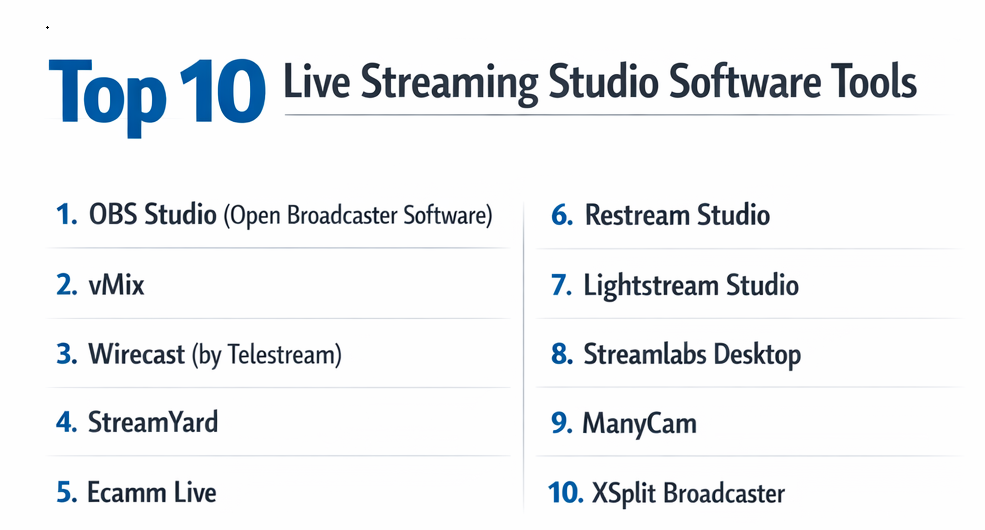
Top 10 Live Streaming Studio Software Tools
1 — OBS Studio (Open Broadcaster Software)
OBS Studio is the gold standard of free, open-source broadcasting. It provides a powerful, highly customizable environment that allows for nearly infinite layers of video and audio sources, making it the bedrock of the streaming industry.
- Key features:
- High-Performance Capturing: Real-time video/audio capturing and mixing with per-source filters.
- Unlimited Scenes: Create an infinite number of layouts and switch between them seamlessly.
- Intuitive Audio Mixer: Per-source filters such as noise gate, suppression, and gain.
- Modular “Dock” UI: Rearrange the layout to focus on the tools you use most.
- Vast Plugin Ecosystem: Thousands of community-made plugins for everything from 3D effects to automated transitions.
- Studio Mode: Preview your scenes and sources before pushing them live to the audience.
- Pros:
- Completely free with no hidden costs or watermarks.
- Extremely lightweight on system resources when configured correctly.
- Cons:
- Steep learning curve for beginners who aren’t tech-savvy.
- No native technical support (relies on community forums).
- Security & compliance: Varies; being open-source, security depends on the user’s local environment and chosen plugins.
- Support & community: Massive global community, extensive Wiki documentation, and active Discord servers.
2 — vMix
vMix is a high-end, Windows-based live production software that bridges the gap between software and hardware switchers. It is a favorite for professional sporting events and high-stakes corporate broadcasts.
- Key features:
- 4K/8K Support: Designed for high-resolution productions with full hardware acceleration.
- vMix Call: Built-in solution for bringing in up to 8 remote guests via a simple web link.
- Instant Replay: Professional-grade slow-motion replay functionality for sports.
- GT Graphics Engine: High-performance, data-driven 2D and 3D titles.
- NDI Integration: Full support for Network Device Interface for low-latency video over IP.
- Multi-View Output: Send different views to multiple monitors or projectors.
- Pros:
- Unrivaled stability and professional feature set for high-budget events.
- One-time purchase options avoid the “subscription fatigue.”
- Cons:
- Windows only; no support for macOS or Linux.
- The interface can look intimidating and dated to new users.
- Security & compliance: Supports local network security; GDPR compliant data handling for vMix Call.
- Support & community: Professional email support, deep technical documentation, and a dedicated user forum.
3 — Wirecast (by Telestream)
Wirecast is a robust, professional-grade streaming application known for its “layered” approach to production. It feels more like traditional television production software than many of its competitors.
- Key features:
- Unlimited Sources: Inputs for cameras, microphones, IP cams, and web pages.
- Social Media Integration: Built-in tools for displaying live comments and polls.
- Stock Media Library: Integrated access to over 500,000 media assets (Pro version).
- Virtual Sets: Chromakey (Green screen) support with high-quality virtual backgrounds.
- Multi-Streaming: Native support for broadcasting to multiple destinations at once.
- ISO Recording: Record individual inputs for later editing (post-production).
- Pros:
- Very polished user interface that logic-driven producers will appreciate.
- Excellent balance between professional features and ease of use.
- Cons:
- Expensive initial cost and high renewal fees for support/updates.
- Can be very demanding on computer hardware (CPU/GPU).
- Security & compliance: SOC 2 compliant infrastructure; secure authentication and data encryption.
- Support & community: Tiered support plans, including premium phone support and extensive video tutorials.
4 — StreamYard
StreamYard is the leader in browser-based streaming. It removes the need for powerful hardware or complex installations, allowing users to produce professional shows directly from Google Chrome.
- Key features:
- Browser-Based Production: No software download required for host or guests.
- Multi-Streaming: Easy broadcasting to Facebook, LinkedIn, YouTube, and X simultaneously.
- Engagement Tools: Display viewer comments on-screen with a single click.
- Custom Branding: Easily upload logos, overlays, and background videos.
- Local Recordings: High-quality separate audio/video tracks for each guest.
- Giveaway Tool: Built-in tool to run contests and select random winners from comments.
- Pros:
- The easiest tool for non-technical users to get up and running.
- Exceptional guest experience; they just click a link to join the “studio.”
- Cons:
- Limited control over complex technical settings compared to desktop software.
- Visual customization is somewhat rigid and “templated.”
- Security & compliance: GDPR compliant; data encryption in transit; SSO available for enterprise plans.
- Support & community: 24/7 live chat support for paid tiers and a very active Facebook community.
5 — Ecamm Live
Ecamm Live is the premier streaming studio for macOS users. It is renowned for its sleek design and deep integration with the Mac ecosystem, including iPhone camera support and M-series chip optimization.
- Key features:
- Mac-Native Performance: Fully optimized for Apple Silicon (M1/M2/M3 chips).
- Interview Mode: Built-in guest hosting with high-quality video/audio.
- Stream Deck Integration: Native support for Elgato hardware for one-touch control.
- Camera Control: Adjust focus, exposure, and zoom for supported cameras within the software.
- Virtual Cam & Mic: Use Ecamm as a source for Zoom or Google Meet.
- Profile Management: Save different configurations for different shows.
- Pros:
- Unbelievably high video quality with minimal configuration.
- Best-in-class user interface design that feels like a native Mac app.
- Cons:
- Strictly Mac only; no Windows version available.
- Subscription-only pricing model.
- Security & compliance: Standard macOS sandboxing; GDPR compliant.
- Support & community: High-quality documentation, email support, and a vibrant “Ecamm Family” community.
6 — Restream Studio
Restream Studio is a cloud-based tool that pairs a powerful broadcast interface with the world’s most popular multi-streaming service. It is designed for creators who want to be everywhere at once.
- Key features:
- Multi-streaming: Broadcast to 30+ platforms simultaneously from the cloud.
- In-Browser Studio: Manage graphics, guests, and chat without desktop software.
- Combined Chat: View and respond to comments from all platforms in one window.
- Analytics: Comprehensive post-stream data across all platforms.
- Video Storage: Upload pre-recorded videos to stream live (Restream Events).
- Background Music: Built-in library of royalty-free tracks for your stream.
- Pros:
- Eliminates the need for high upload speeds since the cloud handles the heavy lifting.
- Simple, clean interface that minimizes distraction.
- Cons:
- High-quality features (like Full HD) are locked behind higher-priced tiers.
- Internet dependency; if your connection dips, you lose control of the cloud studio.
- Security & compliance: GDPR compliant; SSL encryption; two-factor authentication (2FA).
- Support & community: 24/7 live chat support and a robust help center.
7 — Lightstream Studio
Lightstream is a unique cloud-based studio that specializes in “low-impact” streaming. It is particularly popular for console gamers (Xbox/PlayStation) who want overlays without needing a capture card.
- Key features:
- Cloud Composition: Scenes and layers are processed on Lightstream’s servers.
- Console Integration: Directly integrates with Xbox and PlayStation broadcast menus.
- Remote Control: Use your phone as a remote to switch scenes while you play.
- Third-Party Integrations: Easy setup for Streamlabs and StreamElements alerts.
- Auto-Resolution: Automatically adjusts settings for the best possible stream quality.
- Pros:
- Perfect for gamers who don’t have a high-end PC for encoding.
- Easy “drag-and-drop” scene building.
- Cons:
- Limited features for professional corporate use.
- Monthly subscription cost can feel high for the limited feature set.
- Security & compliance: GDPR compliant; secure cloud infrastructure.
- Support & community: Live chat support and a helpful Discord community.
8 — Streamlabs Desktop
Streamlabs is a modified version of OBS (a “fork”) that focuses on monetization and ease of use for entertainers. It integrates all the essential tools for a “pro streamer” into one package.
- Key features:
- Integrated Alerts: Native support for follows, subs, and donations.
- App Store: Access to hundreds of plugins and overlays.
- Cloudbot: Built-in moderation and mini-games for your chat.
- Ultra-Multistream: Simplified streaming to multiple platforms (Prime only).
- Dual Output: Simultaneously stream in horizontal and vertical formats (for TikTok/Reels).
- Overlays: Thousands of free professional themes.
- Pros:
- Much easier to set up than standard OBS.
- All-in-one dashboard for chat, alerts, and settings.
- Cons:
- Can be much heavier on CPU usage than vanilla OBS.
- Many “premium” features are locked behind the Ultra subscription.
- Security & compliance: Varies; inherits OBS architecture; GDPR compliant.
- Support & community: Extensive knowledge base, ticket-based support, and a massive creator community.
9 — ManyCam
ManyCam is a versatile virtual camera and live streaming software that excels in educational and presentation-heavy environments. It is widely used by online teachers and webinar hosts.
- Key features:
- Virtual Backgrounds: high-quality background replacement without a green screen.
- Whiteboard Tools: Draw and write on the screen during the broadcast.
- Picture-in-Picture: Multiple layers for showing your face and your slides.
- Media Source Switcher: Easily switch between images, videos, and desktop.
- Mobile App: Use your mobile device as a wireless camera source.
- Pros:
- Excellent for instructional content and online classrooms.
- Very affordable compared to high-end broadcast tools.
- Cons:
- Not designed for complex gaming or high-end professional events.
- Stability can be inconsistent on older hardware.
- Security & compliance: Standard software encryption; GDPR compliant.
- Support & community: Email support and a growing library of “How-To” guides.
10 — XSplit Broadcaster
XSplit is a veteran in the streaming space, known for its stability and “plugin-heavy” architecture. It has long been a favorite of professional esports organizers.
- Key features:
- Scene Preview Editor: Edit scenes on the fly before they go live.
- Macros: Script complex actions to happen with a single keypress.
- Local Recording: High-bitrate recording for YouTube uploads.
- Source Management: Professional-level cropping and resizing of windows.
- Plugin Store: Massive library of official and third-party extensions.
- Pros:
- Highly stable and less prone to “crashing” during long broadcasts.
- Excellent professional-grade support.
- Cons:
- The UI feels more like professional enterprise software than a creative tool.
- Most useful features require a paid license.
- Security & compliance: Varies / N/A (Focused on local security).
- Support & community: 24/7 technical support and a long-standing user forum.
Comparison Table
| Tool Name | Best For | Platform(s) Supported | Standout Feature | Rating (Gartner/TrueReview) |
| OBS Studio | Tech-savvy Creators | Win, Mac, Linux | Open-Source Extensibility | 4.7 / 5 |
| vMix | Professional Events | Windows | Instant Replay & 4K | 4.8 / 5 |
| Wirecast | Corporate Broadcasters | Win, Mac | ISO Recording | 4.3 / 5 |
| StreamYard | Remote Interviews | Web-Browser | Zero-Install Guest Studio | 4.9 / 5 |
| Ecamm Live | Apple Enthusiasts | macOS | Native Mac Optimization | 4.9 / 5 |
| Restream Studio | Multi-platform Users | Web-Browser | Global Multi-streaming | 4.6 / 5 |
| Lightstream | Console Gamers | Web-Browser | Cloud-based Rendering | 4.2 / 5 |
| Streamlabs | New Streamers | Win, Mac | All-in-one Alerts/Bot | 4.5 / 5 |
| ManyCam | Online Educators | Win, Mac | Whiteboard & Teaching | 4.1 / 5 |
| XSplit | Esports/Pro Gamers | Windows | Macro/Scripting Engine | 4.4 / 5 |
Evaluation & Scoring of Live Streaming Studio Software
To provide a transparent and objective look at how these tools stack up, we have evaluated each platform against a weighted scoring rubric. This model prioritizes the features most critical for professional reliability and high-quality production in 2026.
| Tool Name | Core Features (25%) | Ease of Use (15%) | Integrations (15%) | Security (10%) | Performance (10%) | Support (10%) | Value (15%) | Total Score |
| OBS Studio | 25 | 8 | 24 | 7 | 25 | 5 | 25 | 89% |
| vMix | 25 | 10 | 22 | 9 | 24 | 18 | 18 | 86% |
| Wirecast | 24 | 18 | 20 | 9 | 18 | 18 | 12 | 79% |
| StreamYard | 18 | 25 | 18 | 9 | 20 | 20 | 22 | 92% |
| Ecamm Live | 22 | 22 | 20 | 9 | 25 | 20 | 20 | 93% |
| Restream Studio | 19 | 23 | 24 | 9 | 19 | 18 | 20 | 87% |
| Lightstream | 15 | 24 | 18 | 8 | 18 | 15 | 18 | 74% |
| Streamlabs | 23 | 21 | 22 | 8 | 20 | 18 | 21 | 88% |
| ManyCam | 17 | 21 | 15 | 8 | 19 | 15 | 20 | 75% |
| XSplit | 22 | 16 | 20 | 8 | 22 | 17 | 18 | 80% |
Which Live Streaming Studio Software Tool Is Right for You?
Selecting the perfect software depends on your specific hardware, technical comfort level, and the type of content you produce.
Solo Users vs. SMB vs. Mid-Market vs. Enterprise
- Solo Users: If you have time but no money, OBS Studio is the only answer. If you have a budget but want simplicity, Ecamm Live (for Mac) or Streamlabs (for Windows) are excellent choices.
- SMBs: Small businesses running webinars or product demos should look at StreamYard. Its ease of use for remote guests makes it indispensable for professional-looking interviews without a dedicated technician.
- Mid-Market/Enterprise: Organizations requiring high security and deep compliance (like HIPAA or SOC 2) should lean toward Wirecast or vMix. These tools allow for local network control and advanced encoding settings that keep data secure.
Budget-Conscious vs. Premium Solutions
Free doesn’t always mean cheap. OBS Studio is free but requires a powerful PC and time to learn. Conversely, StreamYard costs a monthly fee but saves you hours of setup time. If you want a one-time payment to own your software forever, vMix and ManyCam offer lifetime or perpetual licenses.
Feature Depth vs. Ease of Use
If you need “Instant Replay” for a football game, you need the depth of vMix. If you simply want to put your logo in the corner and show a viewer’s comment on screen, the simplicity of Restream Studio or StreamYard is a better fit.
Integration and Scalability Needs
For those heavily invested in the Elgato ecosystem (Stream Decks, Key Lights), Ecamm Live and OBS offer the best native integrations. If you plan to scale from a single stream to broadcasting on 30 platforms, Restream is the most scalable infrastructure.
Frequently Asked Questions (FAQs)
1. Does live streaming software require a powerful computer?
Yes, for desktop applications like OBS, vMix, or Wirecast. Encoding video in real-time is CPU and GPU intensive. However, cloud-based tools like StreamYard or Lightstream shift most of that work to their servers, allowing you to stream from a basic laptop.
2. Can I stream to multiple platforms (YouTube, Twitch, etc.) at once?
Yes, this is called “multi-streaming.” Cloud-based tools like Restream and StreamYard have this built-in. Desktop apps like OBS require a plugin or a third-party service to do this effectively.
3. What is the difference between an “encoder” and “studio software”?
The terms are often used interchangeably. The “encoder” is the technology that converts video into a streamable format (like H.264), while “studio software” is the interface that allows you to manage scenes and inputs.
4. Do I need a capture card?
If you want to stream high-end console gameplay (PS5/Xbox) or use a DSLR/Mirrorless camera as a webcam, you usually need a capture card (like Elgato or Magewell). Some cameras can now connect via USB using “Webcam Utility” software.
5. How much upload speed do I need for a stable stream?
For a 1080p stream at 60fps, you should have a dedicated upload speed of at least 10 Mbps. For 4K, you’ll need 25+ Mbps. Always use a wired Ethernet connection rather than Wi-Fi for stability.
6. Is OBS Studio safe to download?
Yes, as long as you download it from the official “obsproject” website. Since it is open-source, be careful when installing third-party plugins from unknown sources.
7. Can I bring remote guests into my live stream?
Yes. Tools like StreamYard, vMix (via vMix Call), and Ecamm Live have native guest features. For OBS, you might use a tool like “OBS.ninja” or “VDO.ninja” to bring in remote video feeds.
8. What is NDI?
NDI (Network Device Interface) allows you to send and receive high-quality video and audio over your local Wi-Fi or Ethernet network. It’s great for using a second computer to handle encoding or for bringing in IP cameras.
9. Can I use these tools for Zoom or Google Meet?
Most of these tools offer a “Virtual Camera” feature. This allows you to set up your professional scene in the studio software and then select that software as your camera in Zoom.
10. What is the most common mistake new streamers make?
Ignoring audio quality. Viewers will tolerate mediocre video, but they will leave immediately if the audio is distorted, quiet, or has a loud hum. Invest in a decent microphone before a 4K camera.
Conclusion
Navigating the world of live streaming studio software is about balancing your creative vision with your technical reality. There is no single “best” tool; rather, there is a “best for you.”
If you are a power user who craves absolute control and custom scripts, OBS Studio or vMix will be your best friend. If you are a busy marketer who needs to produce a high-quality interview show in under ten minutes, StreamYard or Ecamm Live are far superior choices. The key is to start with your end goal in mind: who is your audience, where are they watching, and how much complexity can your hardware handle?
By choosing the right software from this list, you are not just buying a tool—you are building a stage. Whether that stage is for a global product launch or a local gaming session, the right studio software ensures that your message is seen and heard with the professional quality it deserves.