Introduction
Every week, skilled employees spend hours moving numbers from emails into spreadsheets, sorting customer support tickets, and chasing invoice approvals. These routine steps keep a company running, yet they consume time that teams could spend serving customers or building better products. When businesses grow, this manual workload multiplies, leading to slow response times, staff burnout, and avoidable data entry mistakes.
Many business owners and professionals look at AI-powered workflows as a way to fix these bottlenecks. However, it is easy to get confused by technical buzzwords or assume that automation requires replacing an entire workforce. Poorly planned automation can actually break existing processes, leak sensitive data, or waste money on tools nobody uses.
This guide explains how AI-powered workflows work in plain language. You will learn the core concepts behind smart automation, see where it adds real value, understand its hidden risks, and get a clear framework to decide which tasks in your organization are ready for AI.
What Are AI-Powered Workflows?
To understand this concept, it helps to separate the two parts: the workflow and the AI.
- Workflow → A sequence of repeatable steps required to complete a specific business task → It matters because clear steps keep teams organized and ensure consistent results → Example: Receiving a customer invoice, checking the total against a purchase order, and sending it to a manager for payment approval.
- AI-Powered Workflow → A business process that uses artificial intelligence to read unstructured information, recognize patterns, and decide what happens next without human intervention → It matters because traditional software can only follow rigid rules, whereas AI can handle messy, real-world inputs → Example: Software that reads a scanned PDF invoice, extracts the vendor name and total, flags an unusual price spike, and routes it to the right department automatically.
Traditional automation relies on strict “if-this-then-that” rules. If an email has the exact word “Refund” in the subject line, the system moves it to the billing folder. If the customer writes “I want my money back” instead, the traditional rule fails.
AI-powered workflows solve this gap. They use Natural Language Processing (NLP)—technology that allows computers to understand human text and speech—to grasp the intent behind the message, regardless of the exact words used.
How AI-Powered Workflows Work
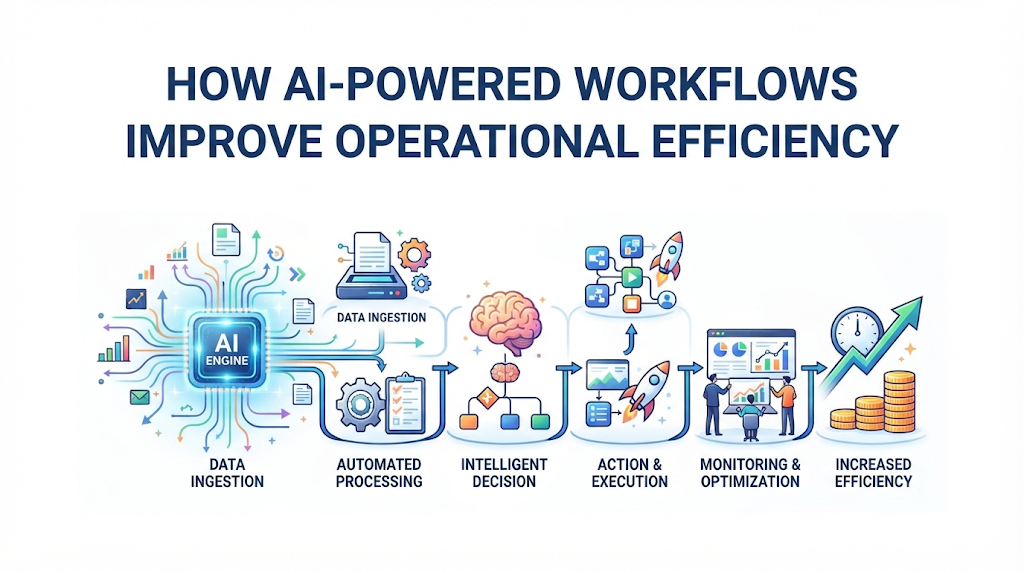
An AI-powered workflow acts like a digital assembly line with a smart quality inspector built into the middle. Most smart workflows follow four basic stages:
1. The Trigger
Every workflow starts with an event. A trigger could be a new email arriving in a shared inbox, a customer submitting a web form, a payment failing in your billing system, or a scheduled time each morning.
2. Data Extraction and Understanding
Once triggered, the system gathers the raw information. If the data is unstructured data (information without a neat row-and-column format, like emails, PDFs, voice notes, or images), the AI reads it and pulls out the useful facts. For instance, it can read a five-page contract and pull out only the renewal date and payment terms.
3. Decision-Making and Routing
Next, the AI evaluates the extracted facts against your business rules or historical patterns. It might assign a priority score to a sales lead, detect whether a transaction looks fraudulent, or draft a suggested reply to a customer question.
4. Action and Execution
Finally, the workflow updates your other software tools through APIs (Application Programming Interfaces)—digital bridges that allow different software programs to talk to each other safely. The system might update a customer profile in your CRM, send a message to a team channel, or generate a shipping label.
Human-in-the-Loop (HITL)
In serious business operations, the workflow rarely runs 100% alone on high-stakes tasks. Professionals use a setup called Human-in-the-Loop (HITL)—a design where the AI prepares the work and pauses for a person to click “approve” before a final action happens. For example, AI can draft a refund email and calculate the amount, while a support agent reviews it in five seconds and hits send.
Why Operational Efficiency Improves With AI
Operational efficiency measures how well a company turns time, money, and effort into useful output. Improving efficiency does not just mean cutting costs; it means getting higher-quality work done with less friction.
Speed and Cycle Time Reduction
Manual handoffs between departments create delays. When an employee finishes a task, it often sits in another person’s inbox for hours or days. AI workflows pass information instantly from one step to the next, shrinking multi-day processes into minutes.
Fewer Manual Errors
Humans naturally make typing mistakes when copying data across multiple screens, especially when tired. Automated extraction and data entry eliminate these copy-paste errors, keeping financial records and customer databases clean.
Consistent Execution
Human performance varies from day to day. An AI workflow applies the exact same compliance checks and quality standards to the thousandth task of the day as it did to the first.
Better Capacity Scaling
In a manual setup, doubling your customer orders usually requires doubling your administrative staff. With smart workflows handling the routine processing, an existing team can handle a much higher volume of work without working overtime.
Practical Examples Across Business Functions
To see how this works in daily operations, consider three realistic scenarios across different departments.
Customer Support Triage
- The Old Way: Support agents open a shared inbox, read every message, guess how urgent it is, look up the customer’s order history in a separate database, and manually assign the ticket to billing, tech support, or shipping.
- The AI Workflow: When an email arrives, an AI model reads the text, detects the customer’s mood (such as frustration or urgency), pulls their recent order status via an API, tags the ticket with the right category, and drafts a personalized response using the company’s help center articles. The agent simply verifies the draft and sends it.
Accounts Payable and Invoice Processing
- The Old Way: Suppliers email PDF invoices in dozens of different layouts. An accounting clerk opens each PDF, types the vendor name, date, tax amount, and line items into accounting software, and emails a department head for approval.
- The AI Workflow: Optical Character Recognition (OCR)—software that converts images of text into machine-readable data—combines with AI to scan incoming PDFs regardless of layout. The system matches the invoice numbers against existing purchase orders. If everything matches, it schedules the payment. If the price is higher than expected, it flags the file and alerts a human manager.
Employee Onboarding
- The Old Way: HR sends multiple emails to IT, payroll, and department managers whenever a new hire signs an offer letter. Accounts get created late, and new employees spend their first day waiting for software access.
- The AI Workflow: Signing the digital offer letter triggers a workflow. The system creates the employee’s email and software accounts based on their job role, generates a customized first-week training schedule, and sends automated reminders to their manager to prepare equipment.
Traditional Automation vs. AI-Powered Workflows
Many businesses already use basic automation tools. Understanding when to use simple rules versus AI prevents you from overpaying for complex technology you do not need.
| Feature | Traditional Rule-Based Automation | AI-Powered Workflows |
| Input Type | Structured data (clean forms, spreadsheets, exact database fields) | Unstructured and messy data (emails, PDFs, call transcripts, images) |
| Decision Logic | Rigid “If X, then Y” rules programmed by humans | Pattern recognition, context understanding, and probability |
| Handling Exceptions | Breaks or stops when data looks slightly different | Adapts to variations in wording, layout, or phrasing |
| Setup Cost & Effort | Low to moderate; fast to build for simple tasks | Moderate to high; requires testing, prompt tuning, and monitoring |
| Predictability | 100% predictable; always produces the exact same output | Probabilistic; may occasionally misinterpret ambiguous inputs |
| Best Use Case | Moving clean form submissions into a CRM | Summarizing customer calls, sorting varied invoices, drafting replies |
When to Use AI Workflows (And When Not To)
Smart operations teams do not put AI everywhere. They apply it where the return on effort is clear.
When to Use AI Workflows
- High-volume, repetitive tasks: Processes that happen dozens or hundreds of times every week.
- Messy text or documents: Tasks that require reading emails, contracts, resumes, or support tickets before taking action.
- Clear digital steps: Workflows where the inputs and outputs already live inside cloud software tools.
When NOT to Use AI Workflows
- Broken or undefined processes: Automating a chaotic workflow only creates chaos faster. Fix the human process first before adding software.
- Low-volume tasks: If a task takes ten minutes once a month, spending twenty hours building an AI workflow wastes time and money.
- Zero-tolerance legal or medical decisions: Tasks where a single misinterpretation causes severe physical harm or legal liability without human review.
- Simple math or exact rules: If a standard spreadsheet formula or basic “if-this-then-that” rule solves the problem, do not use AI. AI is slower and more expensive than basic logic for simple calculations.
Common Mistakes That Ruin Efficiency
Even well-funded companies fail with AI workflows when they overlook basic operational habits.
1. Automating Without Mapping the Process First
- What people do: Buy an AI tool and immediately try to connect it to their daily work.
- Why they do it: They want fast results and skip planning.
- Why it causes problems: Hidden exceptions—like special rules for VIP clients—get missed, causing the workflow to make embarrassing mistakes.
- What to do instead: Draw every step of the current process on paper or a digital whiteboard first, including all the “what if” exceptions.
2. Removing Humans Too Early
- What people do: Set AI workflows to send emails or update customer records completely automatically on day one.
- Why they do it: They assume modern AI is 100% accurate out of the box.
- Why it causes problems: Early configuration errors reach real customers, damaging trust and creating cleanup work.
- What to do instead: Run the workflow in “shadow mode” or Human-in-the-Loop mode for the first few weeks. Let the team review outputs until accuracy stays consistently high.
3. Ignoring Data Quality
- What people do: Connect AI workflows to outdated, duplicate, or messy company databases.
- Why they do it: Cleaning old records feels boring compared to building new tools.
- Why it causes problems: Garbage In, Garbage Out—if the AI pulls incorrect prices or outdated policies from your database, it will confidently give wrong answers to customers.
- What to do instead: Clean and archive outdated documents before connecting them to an AI system.
Security, Privacy, and Operational Risks
Connecting AI models to internal business systems introduces specific risks that require practical safeguards.
Data Leakage and Privacy
- Risk: Employees or automated workflows send confidential customer records, financial data, or trade secrets to public AI tools that store or train on that data.
- Why it matters: Exposing private customer data can violate privacy laws (such as GDPR) and destroy company reputation.
- How to reduce it: Use enterprise-grade AI APIs that guarantee zero data retention for model training. Mask or remove Personally Identifiable Information (PII)—details like Social Security numbers, bank accounts, or home addresses—before sending text to external AI services.
AI Hallucinations
- Risk: Hallucination—a situation where an AI model generates false, fabricated, or nonsensical information while sounding completely confident.
- Why it matters: If a workflow invents a fake return policy or quotes an imaginary discount to a buyer, the business faces disputes and financial loss.
- How to reduce it: Restrict the AI using Retrieval-Augmented Generation (RAG)—a method that forces the AI to answer using only approved company documents you provide, rather than guessing from its general training memory.
Silent Failures and API Breakages
- Risk: A third-party software tool updates its system, causing an API connection in your workflow to break quietly in the background without alerting anyone.
- Why it matters: Customer leads or urgent support tickets may pile up unprocessed for days before anyone notices.
- How to reduce it: Build automated error alerts (via email or team chat) that notify an administrator immediately if a workflow fails or stops running.
Understanding Real Costs
Calculating the true cost of an AI-powered workflow requires looking beyond the monthly software subscription.
- Software and Licensing Fees: Monthly fees for workflow automation platforms (such as Make, Zapier, or n8n) plus usage-based fees for AI models, which are usually billed by tokens (small chunks of text processed by the AI).
- Setup and Integration Time: Hours spent by internal staff or external consultants designing, testing, and connecting the tools.
- Maintenance and Monitoring: Ongoing time needed to review accuracy logs, update prompts when business rules change, and fix broken connections when software vendors update their apps.
- Staff Training: Time required to teach employees how to review AI suggestions, handle flagged exceptions, and report errors.
For high-volume tasks, token costs are usually fractions of a cent per task—far cheaper than manual labor. However, sending huge, unedited documents through expensive AI models thousands of times a day can create surprise bills if usage limits are not set.
Step-by-Step Decision Framework
Before building an AI workflow, walk through these six steps to make sure the project will actually save time and money.
- Identify the Bottleneck: Look for tasks where employees complain about repetitive typing, slow approvals, or frequent delays.
- Measure the Baseline: Record how long the task currently takes, how often it happens per week, and how often mistakes occur. You cannot prove efficiency improved without knowing your starting numbers.
- Check Input Consistency: Look at the data entering the process. If it is clean and structured, use basic rule-based automation. If it involves messy emails, PDFs, or human language, use AI.
- Define the Risk Level: Decide what happens if the AI makes a mistake. Low-risk tasks (like tagging internal notes) can run automatically. High-risk tasks (like sending money or replying to angry clients) require Human-in-the-Loop approval.
- Start With One Small Pilot: Build the workflow for a single, narrow use case rather than trying to automate an entire department at once.
- Verify and Measure Results: After 30 days, compare the new completion time and error rate against your baseline. Keep the workflow only if it genuinely reduces workload.
Pre-Launch Checklist for AI Workflows
Use this checklist before turning on any new AI workflow in a live business environment:
- The manual process has been mapped out step-by-step, including common exceptions.
- Source documents and databases connected to the AI are accurate and up to date.
- Sensitive customer data (PII) is stripped out or protected by strict enterprise privacy agreements.
- Human approval (HITL) is built into any step involving money, legal terms, or external customer communication.
- Spending limits and usage alerts are configured on AI API accounts to prevent unexpected bills.
- Automated failure notifications are set up to alert a real person if a step breaks.
- A clear fallback procedure exists so staff can still complete the work manually if the software goes offline.
Key Terms to Know
- API (Application Programming Interface): A set of rules that allows two different software applications to share data and trigger actions automatically.
- Hallucination: An error where an AI model produces false or made-up facts while presenting them as true.
- Human-in-the-Loop (HITL): A workflow setup where AI prepares an action or decision, but a human must review and approve it before execution.
- Natural Language Processing (NLP): A branch of AI that helps computers read, understand, and generate human language.
- Optical Character Recognition (OCR): Technology that reads text inside scanned documents, PDFs, or photos and turns it into editable digital text.
- Retrieval-Augmented Generation (RAG): A technique that connects an AI model to a specific set of trusted company documents so its answers stay grounded in verified facts.
- Structured Data: Information organized in a predictable format, such as rows and columns in a spreadsheet or database.
- Tokens: The small pieces of words or characters that AI models process to read input and generate output, often used to calculate usage costs.
- Unstructured Data: Information that does not follow a neat database format, such as emails, PDF contracts, audio recordings, and chat messages.
Frequently Asked Questions (FAQs)
1. Do I need coding skills to build AI-powered workflows?
No. Many modern automation platforms—such as Zapier, Make, and Microsoft Power Automate—offer visual drag-and-drop builders that connect AI models to everyday business apps without writing code. However, complex custom integrations or strict security setups may still benefit from a software developer.
2. Will AI-powered workflows replace my employees?
In most businesses, AI workflows replace tasks, not entire jobs. They take over repetitive data entry, sorting, and first-draft writing, allowing existing employees to spend more time on customer relationships, creative strategy, and handling complex exceptions that software cannot solve.
3. How long does it take to see efficiency gains?
Simple workflows—such as summarizing incoming support tickets or extracting data from standard invoices—can often be built, tested, and deployed within one to two weeks. Larger workflows that connect multiple legacy databases may take several weeks of testing and staff training.
4. How can I check if my AI workflow is actually working well?
Track four practical metrics before and after launch: cycle time (how fast a task finishes from start to end), error rate (how often humans have to fix AI mistakes), exception rate (how often the AI gets confused and asks for human help), and hours saved per week by your team.
5. What happens if the AI makes a mistake in a workflow?
If you design the workflow with guardrails—such as confidence thresholds and Human-in-the-Loop approvals—uncertain outputs pause in a review queue instead of reaching customers. Logging these mistakes also helps you refine your instructions so the system improves over time.
6. Are free AI tools safe to connect to business workflows?
Generally, no. Free consumer AI tools often log user inputs to train future models and lack strict business privacy protections. Companies should use paid business accounts or official API access that include clear data privacy terms and zero-retention policies.
7. What is the difference between an AI chatbot and an AI workflow?
An AI chatbot waits for a human to type a prompt and answers one question at a time in a chat window. An AI workflow runs automatically in the background, triggered by business events, and connects multiple software tools to complete multi-step operational tasks without someone typing prompts all day.
8. Can small businesses benefit from AI workflows, or are they only for large enterprises?
Small businesses often see the fastest benefits because small teams wear many hats and have less bureaucracy. Automating repetitive admin work like lead follow-ups, appointment scheduling, and invoice sorting gives a five-person team the operational speed of a much larger company.
Conclusion
AI-powered workflows improve operational efficiency by taking messy, repetitive administrative tasks off your team’s plate and handling them quickly and consistently. When paired with clear business rules and human oversight, smart automation shrinks turnaround times, lowers error rates, and lets organizations grow without drowning in manual paperwork.
The key to success is restraint and structure. Do not try to automate everything at once, and never let AI run unchecked on high-risk decisions before proving its accuracy. Start by mapping one repetitive bottleneck in your daily operations, clean up the data behind it, build a small pilot with human approval built in, and measure the time saved before expanding further.