Introduction
Data lineage tools are specialized software solutions that provide a visual and technical map of how data moves through an organization. Think of it as a “GPS for your data.” These tools track the entire journey of a piece of information, starting from its origin (like a sales app), through various transformations (like a spreadsheet or database calculation), to its final destination (like a boardroom report). By documenting this path, lineage tools show exactly what happened to the data at every step and who touched it.
This visibility is critically important because it provides trust and accountability. When a CEO looks at a chart that seems wrong, data lineage allows the technical team to “trace back” the numbers to find the exact point where an error occurred. Without these tools, finding a mistake in a complex data system is like looking for a needle in a haystack. Furthermore, in a world of strict privacy laws, lineage helps companies prove to regulators that they know exactly where sensitive customer information is stored and how it is being used.
Key Real-World Use Cases
- Impact Analysis: Before an engineer deletes a column in a database, they use a lineage tool to see which 100 executive dashboards will break if that column disappears.
- Root Cause Analysis: When a monthly financial report shows an unexpected dip, the team uses lineage to find the specific “broken” data pipeline that caused the error.
- Regulatory Compliance: For laws like GDPR or BCBS 239, banks and healthcare providers use lineage to prove to auditors the “provenance” or origin of their reporting data.
- Data Migration: When moving from an old office server to the cloud, lineage tools help map out which data is still being used and which can be safely left behind.
What to Look For (Evaluation Criteria)
When choosing a data lineage tool, keep these four factors in mind:
- Level of Detail: Does the tool show lineage at the high “table” level or the deep “column” level? The best tools show exactly which cell moved where.
- Automation: Can the tool read SQL code and automatically draw the map, or do you have to draw it manually?
- Historical Views: Can the tool show you what the data path looked like six months ago? This is vital for audits.
- Integration: Does it “talk” to the specific databases (Snowflake, Databricks) and BI tools (Tableau, Power BI) your company uses?
Best for: Data engineers, data architects, and compliance officers at mid-to-large enterprises. It is essential for industries like finance, insurance, and healthcare where data accuracy is a legal requirement.
Not ideal for: Small businesses with very simple data setups, such as a single Shopify store and an Excel sheet. If your data only moves between two points, a visual mapping tool is an unnecessary expense.
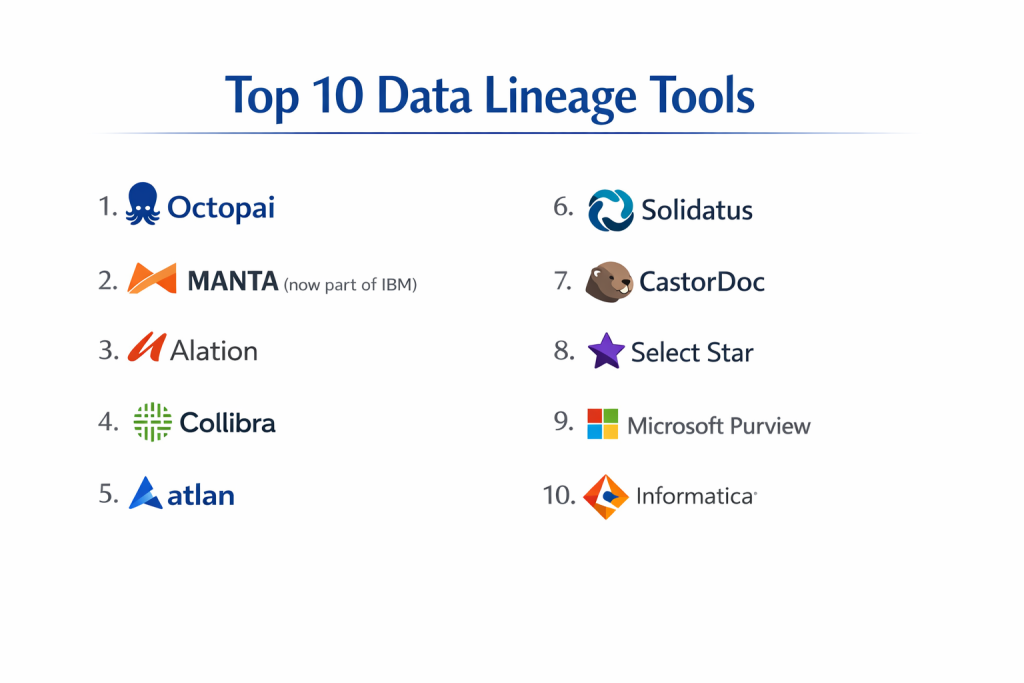
Top 10 Data Lineage Tools
1 — Manta
Manta is a “world-class” automated data lineage platform that specializes in understanding complex code. It is designed for large organizations with massive, messy data environments that need absolute technical accuracy.
- Key features:
- Automated scanning of SQL scripts, ETL tools, and BI reports.
- Column-level lineage that shows the exact path of individual data points.
- “Time Travel” feature to compare lineage at different points in time.
- Indirect lineage tracking (showing how one value influences another).
- Massive library of scanners for both modern and legacy systems.
- Pros:
- It is incredibly thorough; it finds connections that humans often miss.
- Excellent for highly regulated industries that need to pass strict audits.
- Cons:
- It is a very technical tool that requires a steep learning curve.
- The pricing is at the premium end of the market.
- Security & compliance: SOC 2 Type II compliant, supports SSO, and offers deep audit logs for all user activity.
- Support & community: High-touch enterprise support and a professional services team for complex setups.
2 — Octopai
Octopai focuses on “Data Discovery” and is known for being very user-friendly. It is a cloud-based tool that helps BI and analytics teams find their data and understand its movement in seconds.
- Key features:
- Three layers of lineage: Cross-system, Inner-system, and Column-level.
- Automated metadata search engine.
- Rapid setup that can often be completed in 24 to 48 hours.
- Visual map of the entire BI landscape.
- Automated impact analysis alerts.
- Pros:
- Much easier to navigate than most technical lineage tools.
- Great for business analysts who aren’t necessarily “coding experts.”
- Cons:
- It doesn’t support as many “legacy” or “on-prem” systems as Manta.
- Some of the visualization filters can feel limited for very large maps.
- Security & compliance: SOC 2 compliant and GDPR ready; does not store actual business data.
- Support & community: Strong onboarding program and a dedicated customer success manager.
3 — MANTA (now part of IBM)
IBM recently acquired Manta to bolster its “IBM Knowledge Catalog.” This version is specifically designed for IBM customers who want a fully integrated data management experience.
- Key features:
- Deep integration with IBM Cloud Pak for Data.
- Automated discovery of “hidden” data relationships.
- Unified governance and lineage in one dashboard.
- AI-driven tagging of sensitive data.
- Support for hybrid cloud environments.
- Pros:
- A perfect choice for companies already using the IBM ecosystem.
- High stability and support from one of the world’s largest tech companies.
- Cons:
- Can feel “too big” and complex for a company only looking for lineage.
- The interface can be dry and corporate compared to modern startups.
- Security & compliance: Meets the highest global standards, including ISO 27001, HIPAA, and FedRAMP.
- Support & community: Global 24/7 support and a massive network of certified consultants.
4 — Alation
Alation is primarily a “Data Catalog,” but its lineage features are top-tier. It is designed to foster a “data culture” where everyone in the company knows where data comes from.
- Key features:
- Automated lineage generated from query logs.
- Collaborative flags (like a “verified” badge) on lineage paths.
- Integration with a wide variety of “Modern Data Stack” tools.
- Searchable lineage diagrams.
- Linkage between business terms and technical data paths.
- Pros:
- It makes lineage understandable for “business” people, not just engineers.
- The social features help teams keep the lineage information updated.
- Cons:
- Lineage is a “module” within the catalog, which might be expensive if you only want the map.
- Automation can sometimes struggle with very complex, manual SQL scripts.
- Security & compliance: SOC 2 Type II and HIPAA compliant with fine-grained access controls.
- Support & community: Excellent “Alation University” for training and an active user community.
5 — Collibra
Collibra is the “Gold Standard” for enterprise data governance. Its lineage tool is part of a larger system that ensures data is legal, safe, and accurate across giant global companies.
- Key features:
- End-to-end lineage from source systems to BI dashboards.
- Automated metadata harvesting.
- Relationship mapping between data, processes, and people.
- High-level “Business Lineage” for executives.
- Strong integration with the Collibra Data Quality module.
- Pros:
- The best tool for giant corporations with thousands of data users.
- Highly customizable to fit unique business rules.
- Cons:
- Implementation is a major project that can take many months.
- It is one of the most expensive solutions available.
- Security & compliance: FedRAMP, SOC 2, and ISO 27001 compliant.
- Support & community: Extensive professional services and a massive global partner network.
6 — Atlan
Atlan is a “modern” tool built for fast-moving teams. It focuses on “Active Metadata” and is designed to feel as easy to use as Slack or Notion.
- Key features:
- Automated, column-level lineage that works in the background.
- “Open Lineage” support (an industry standard).
- Chrome extension that shows lineage directly inside your BI tool.
- Visual impact analysis for data engineers.
- Integration with dbt, Snowflake, and Fivetran.
- Pros:
- It has the most modern and beautiful interface in the category.
- Very fast time-to-value; you can see your maps in a matter of days.
- Cons:
- Not as strong for old-fashioned “Mainframe” or legacy systems.
- The pricing can grow quickly as you add more “seats.”
- Security & compliance: SOC 2 Type II compliant; supports SSO and private cloud deployment.
- Support & community: Very active Slack community and excellent documentation.
7 — Solidatus
Solidatus is a unique tool that focuses on “Data Blueprinting.” It is particularly popular in the world of investment banking and finance because it handles complex relationships so well.
- Key features:
- Highly scalable visualization that can show millions of connections.
- Capability to map not just data, but business processes and regulations.
- Version control to see how the data map changed over years.
- Efficient handling of “Unstructured” data relationships.
- Direct mapping of regulatory requirements to data sets.
- Pros:
- It is exceptionally fast even when the data map is incredibly huge.
- Very powerful for compliance teams who need to “prove” their reports to regulators.
- Cons:
- The visual interface is very different from other tools and takes time to learn.
- It requires a more manual “modeling” approach than some fully automated tools.
- Security & compliance: Highly secure; used by some of the largest banks in the world.
- Support & community: Strong focus on high-touch enterprise support.
8 — CastorDoc
CastorDoc is a collaborative tool that aims to be the “Google” for your company’s data. It is very popular with startups and mid-market companies that want to move fast.
- Key features:
- Automatic lineage that maps Snowflake, BigQuery, and Redshift.
- Simple “Table-to-Dashboard” lineage view.
- Slack integration to notify people when a data path changes.
- Focus on “Data Democratization” (making data clear for everyone).
- Clean, simple interface without unnecessary jargon.
- Pros:
- Very easy to set up and requires almost zero maintenance.
- Great value for money for companies that don’t need a “heavy” enterprise tool.
- Cons:
- Lacks some of the “deep” column-level transformations found in Manta.
- Lacks advanced “Governance” features like policy management.
- Security & compliance: GDPR specialist and SOC 2 Type II compliant.
- Support & community: Responsive customer success team and helpful onboarding guides.
9 — Select Star
Select Star focuses on “Automated Documentation.” It is built for data engineers who are tired of manually writing down where data comes from and want the tool to do it for them.
- Key features:
- Automated column-level lineage and popularity scores.
- “Upstream” and “Downstream” dependency mapping.
- Simple search bar to find any table or dashboard.
- Automated discovery of “un-used” data (to help save costs).
- Direct integration with the modern data stack.
- Pros:
- It is excellent at cleaning up “messy” data environments.
- Very straightforward pricing and simple installation.
- Cons:
- It is primarily cloud-native and doesn’t handle on-prem systems well.
- Visualization can get cluttered if you have too many connections.
- Security & compliance: SOC 2 Type II compliant and data encryption at rest.
- Support & community: Great direct support from the engineering team.
10 — Microsoft Purview
For companies that are “all-in” on the Microsoft Azure cloud, Purview is the logical choice. It provides lineage across all Azure services and even some other clouds.
- Key features:
- Automatic scanning of Power BI, Azure SQL, and Synapse.
- Sensitivity labels that follow data through the lineage path.
- Unified view of data across the whole company.
- Integration with Microsoft 365 security.
- Data classification (finding social security numbers automatically).
- Pros:
- If you already pay for Azure, this is very cost-effective.
- Unbeatable for managing the security of Excel and Power BI files.
- Cons:
- Lineage can be difficult to pull from non-Microsoft systems.
- The interface is quite technical and can be confusing for business users.
- Security & compliance: Top-tier security; meets almost every global standard including FedRAMP.
- Support & community: Massive global support and extensive Microsoft Learn resources.
Comparison Table
| Tool Name | Best For | Platform(s) Supported | Standout Feature | Rating |
| Manta | Technical Depth | Cloud & On-Prem | Column-level Accuracy | 4.8 / 5 |
| Octopai | BI Discovery | Cloud-Native | Rapid 24-hour Setup | 4.6 / 5 |
| IBM (Manta) | IBM Ecosystem | Hybrid Cloud | Integrated Governance | 4.4 / 5 |
| Alation | Data Culture | Multi-Cloud | Collaborative Flags | 4.7 / 5 |
| Collibra | Giant Enterprises | Multi-Cloud | Regulatory Compliance | 4.5 / 5 |
| Atlan | Modern Fast Teams | Cloud-Native | Chrome BI Extension | 4.8 / 5 |
| Solidatus | Financial Mapping | Multi-Cloud | Regulation-to-Data Map | 4.4 / 5 |
| CastorDoc | Non-Tech Users | Cloud-Native | Simple “Search” UI | 4.5 / 5 |
| Select Star | Clean-up Projects | Cloud-Native | Popularity Scoring | 4.6 / 5 |
| MS Purview | Microsoft Shops | Azure | Sensitivity Labels | 4.1 / 5 |
Evaluation & Scoring of Data Lineage Tools
| Criteria | Weight | What we look for |
| Core features | 25% | Automated column-level lineage and impact analysis. |
| Ease of use | 15% | Can a non-engineer understand the visual map? |
| Integrations | 15% | Does it connect to Snowflake, Tableau, and SQL? |
| Security & compliance | 10% | SOC 2, SSO, and encryption for sensitive maps. |
| Performance | 10% | Does the map load fast when showing 1,000+ links? |
| Support & community | 10% | Slack community, help docs, and 24/7 support. |
| Price / value | 15% | Is the cost fair for the time saved in debugging? |
Which Data Lineage Tool Is Right for You?
Small to Mid-Market vs. Enterprise
If you are a Small to Mid-Market company using modern tools like Snowflake or BigQuery, Atlan or CastorDoc are your best options. They are easy to turn on and don’t require a whole department to manage. For Large Enterprises with old systems (like mainframe) and new ones, you need the “heavy lifting” power of Manta or Informatica.
Budget and Value
If you are on a Budget, Microsoft Purview (if you use Azure) or Select Star offer great value. They provide the “essential” maps without the massive enterprise price tag. If you are a Premium buyer who cannot afford a single data error, Manta and Collibra are the gold standards worth the investment.
Technical Depth vs. Simplicity
Does your team mostly consist of developers who write complex code? They will want the “technical depth” of Manta or Solidatus. Do you want the lineage to be used by regular business analysts? They will prefer the “simplicity” and visual clarity of Octopai or Atlan.
Security and Compliance Requirements
If you are a Bank or a Healthcare provider, you must choose a tool with high security. Collibra and Solidatus are built for these industries. They help you not just see the data, but prove to a government auditor that you are following every rule.
Frequently Asked Questions (FAQs)
1. What is data lineage?
It is a visual map that shows where data starts, how it changes, and where it ends up (like a family tree for your data).
2. Is data lineage the same as a data catalog?
No. A catalog is like a library index (showing what you have). Lineage is like a map (showing how it moves). Many tools do both.
3. Do I have to draw the maps myself?
No, modern tools like Manta and Atlan “read” your code and automatically draw the maps for you.
4. Why is data lineage expensive?
Because the tool has to “understand” many different programming languages (like SQL, Python, Java) to correctly trace the data.
5. How long does it take to implement?
Cloud tools can be ready in days. Giant enterprise tools can take months to “scan” thousands of old database tables.
6. Can data lineage help me save money?
Yes. By showing you which tables are never used, you can delete them and save thousands in storage and processing costs.
7. Does it show “PII” (Private Information)?
Yes, good tools will highlight exactly which data paths contain sensitive info like social security numbers or credit cards.
8. What is “Column-Level” lineage?
It is the most detailed type. It shows exactly which specific column (like “Last Name”) moved from one table to another.
9. Can I see what happened to data in the past?
Some tools (like Manta) have “Time Travel” which lets you see what the data path looked like on a specific day last year.
10. Do I need an engineer to run these tools?
For setup, yes. But once it is running, many tools are designed for regular business analysts to use for their daily research.
Conclusion
A data lineage tool is an insurance policy for your company’s intelligence. In an era where data is constantly moving and changing, you cannot afford to have “blind spots” in your system. Whether you are trying to find a broken calculation in a financial report or trying to stay on the right side of privacy laws, having a visual map of your information is a competitive advantage.
The “best” tool is the one that fits your specific tech stack and your team’s skills. If you are cloud-native and want speed, Atlan is a winner. If you are a global enterprise with complex legacy code, Manta is the leader. Start by identifying your biggest “data mystery” and pick the tool that can shine a light on it today.