Introduction
Secure Messaging Apps have evolved from niche tools used by activists and security researchers into essential daily infrastructure for the general public. At its core, a secure messaging app is a platform that prioritizes the confidentiality and integrity of communication through End-to-End Encryption (E2EE). This means that only the sender and the intended recipient have the cryptographic keys necessary to unlock and read the messages. Not even the service provider, the government, or a malicious interceptor can see the content of your texts, photos, or calls.
The importance of these apps transcends simple secrecy; it is about sovereignty over personal data. In an era where metadata—the information about who you talk to, when, and from where—is often as valuable as the message itself, the best secure messaging tools now focus on “metadata minimization.” Real-world use cases are vast: a healthcare team discussing patient vitals in compliance with privacy laws, a legal firm sharing sensitive discovery documents, or a family simply wanting to ensure their private photos aren’t indexed by a corporate AI. When choosing a tool, you must evaluate the encryption protocol, whether the source code is open-source, the jurisdiction of the company, and how it handles your contact list.
Best for: Secure messaging apps are indispensable for journalists, legal professionals, whistleblowers, and corporate executives handling trade secrets. They are also ideal for small to enterprise-level companies in the fintech, healthcare, and defense sectors that require a “zero-trust” communication environment.
Not ideal for: Users who prioritize social features like public “discovery” feeds, massive 100,000-person public broadcasts, or integration with standard social media marketing tools may find these apps too restrictive. In such cases, standard enterprise collaboration suites or public social platforms may be more convenient, provided the user accepts the trade-off in privacy.
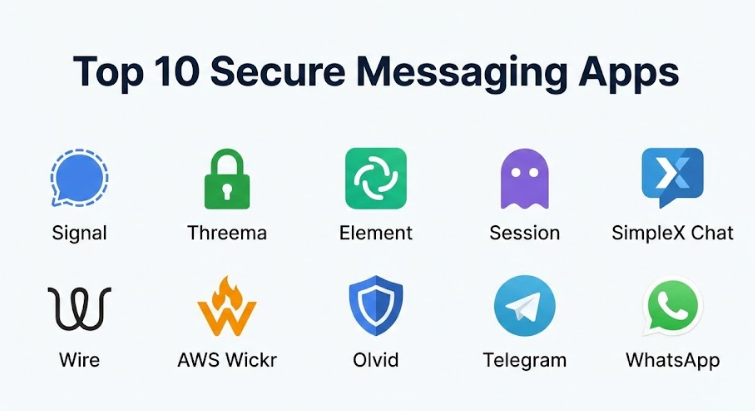
Top 10 Secure Messaging Apps Tools
1 — Signal
Signal is widely considered the “gold standard” of secure communication. Owned by a non-profit foundation, it pioneered the Signal Protocol, which is now used by almost every other major encrypted app. It is designed for users who want the highest possible security without sacrificing the “feel” of a modern, fast messaging app.
- Key features:
- Signal Protocol: Peer-reviewed, state-of-the-art E2EE for all communication.
- Sealed Sender: Hides the sender’s identity from the Signal server itself.
- Disappearing Messages: Customizable timers for messages to self-destruct.
- Incognito Keyboard: Prevents the phone’s OS from “learning” what you type.
- Screen Security: Blocks screenshots of the app on the recipient’s end.
- Contact Discovery: Uses hashed phone numbers to keep the server from seeing your contacts.
- Pros:
- Completely open-source and regularly audited by independent security firms.
- Zero-profit motive ensures that user data is never a product.
- Cons:
- Requires a phone number to sign up (though you can now hide it with usernames).
- No native “cloud backup,” making it easy to lose history if a phone is lost.
- Security & compliance: E2EE by default, GDPR compliant, HIPAA-ready, and uses the Proteus/Double Ratchet algorithm.
- Support & community: Extensive online documentation, active community forums, and a highly responsive developer base.
2 — Threema
Threema is a Swiss-based messaging powerhouse that takes a “privacy-first, identity-last” approach. Unlike most competitors, it does not require a phone number or email to start. It is designed for both individuals and businesses that want total anonymity and the security of Swiss data laws.
- Key features:
- Anonymous ID: Users are identified by an 8-digit Threema ID, not a personal identifier.
- Threema Work: A dedicated version for corporate teams with central management.
- On-Premises Option: Large companies can host their own Threema server.
- Polls & Distribution Lists: Advanced organizational tools for group management.
- Local Storage: All data is stored on the device, not the company’s servers.
- Verify Contacts: Use QR code scanning to confirm the physical identity of a contact.
- Pros:
- Zero metadata generation; the server knows nothing about who is talking to whom.
- Swiss jurisdiction offers some of the strongest privacy protections in the world.
- Cons:
- It is a paid app (one-time fee), which can be a barrier for casual users.
- The user base is significantly smaller outside of Europe.
- Security & compliance: GDPR compliant, ISO 27001 certified, and regularly audited open-source library.
- Support & community: Professional enterprise support tickets, comprehensive business onboarding, and a dedicated Swiss helpdesk.
3 — Element (Matrix)
Element is a decentralized messaging app built on the Matrix protocol. It is designed for organizations and individuals who want to “own their own conversation” by hosting their own servers while still being able to talk to users on other servers.
- Key features:
- Decentralization: No single company owns the network; it is a federated system.
- Bridges: Ability to talk to users on Slack, WhatsApp, and Telegram from within the app.
- End-to-End Encryption: Uses the Olm and Megolm cryptographic ratchets.
- Cross-Signing: Verify new devices through existing ones to prevent “man-in-the-middle” attacks.
- Space Management: Organize multiple chat rooms into distinct “Spaces” for projects.
- Custom Widgets: Integrate calendars, documents, and tools directly into the chat.
- Pros:
- Total sovereignty—you can run the app on your own hardware.
- Highly resilient against censorship because there is no central server to shut down.
- Cons:
- The setup and “feel” can be slightly more technical and intimidating for average users.
- Syncing history across multiple devices can occasionally be sluggish.
- Security & compliance: Open-source, Matrix-standard E2EE, and GDPR compliant through server-side controls.
- Support & community: Massively active developer community, GitHub-based support, and enterprise hosting options through Element Matrix Services.
4 — Session
Session is a high-privacy fork of Signal that removes the two biggest privacy hurdles: phone numbers and central servers. It is designed for extreme anonymity, utilizing a decentralized “onion routing” network similar to Tor.
- Key features:
- No Identifiers: Sign up requires zero phone numbers or emails.
- Onion Routing: Messages are bounced through three different nodes to hide your IP address.
- Decentralized Network: Operates on a network of thousands of community-run nodes.
- Session ID: A long cryptographic string is your only identity.
- File Encryption: Securely share files without leaving a trace on a central server.
- No Metadata: The network does not record which IDs are communicating.
- Pros:
- Virtually impossible for a government or ISP to block or track.
- No central point of failure or data subpoena target.
- Cons:
- Message delivery can be slightly slower than Signal due to the onion routing.
- Lacks some “quality of life” features like voice calls in certain versions.
- Security & compliance: Fully open-source, E2EE via the Session Protocol, and audit-logged by Quarkslab.
- Support & community: Very active GitHub presence and a community-driven help center.
5 — SimpleX Chat
SimpleX Chat is perhaps the most innovative app on this list for 2026. It is the first messaging platform that has no user identifiers at all—not even a random ID. It is designed for users who want to be completely invisible to the network they use.
- Key features:
- No User IDs: Uses “simplex” (one-way) communication queues for every contact.
- Double E2EE: Encrypts both the message content and the transport layer.
- Self-Hosting: Users can easily run their own SMP servers to route their traffic.
- Database Encryption: All local chat history is encrypted with a master password.
- Incognito Mode: Changes your profile for every new connection you make.
- Quantum Resistance: Testing and implementing algorithms to stay safe against future computers.
- Pros:
- The ultimate in metadata protection; the network doesn’t even know a “user” exists.
- Extremely lightweight and fast despite the complex routing.
- Cons:
- Managing contacts can be tricky because there is no central “directory.”
- Still in a relatively early stage of adoption compared to giants like Signal.
- Security & compliance: Open-source, zero-knowledge architecture, and independent security audits.
- Support & community: Direct developer interaction on Reddit and GitHub, with a rapidly growing privacy-enthusiast community.
6 — Wire
Wire is a versatile, secure collaboration tool that positions itself as the “secure alternative to Slack or Teams.” It is designed for businesses and government agencies that need high-level security for calls, video, and file sharing.
- Key features:
- Swiss Jurisdiction: Like Threema, it benefits from strong Swiss privacy laws.
- Encrypted Conferencing: E2EE for group voice and video calls.
- Guest Rooms: Securely invite external partners to a chat without them needing a full account.
- Team Management: Centralized console for onboarding and offboarding employees.
- File Versioning: Securely track changes to documents shared in the chat.
- Ephemeral Messages: Automatic deletion of messages for high-stakes business discussions.
- Pros:
- Excellent balance of professional features and high-grade security.
- High-quality audio and video compared to other encrypted apps.
- Cons:
- The free version is very limited, pushing users toward the paid “Pro” tier.
- Some metadata is collected to facilitate team management features.
- Security & compliance: SOC 2 Type II, GDPR, ISO 27001, and FIPS 140-2 compliant.
- Support & community: Dedicated enterprise account managers, 24/7 technical support for business, and a clear documentation portal.
7 — AWS Wickr
Following its acquisition by Amazon, Wickr (now AWS Wickr) has become the go-to secure messaging choice for the US military and large government contractors. It is designed for high-compliance environments where auditability must coexist with E2EE.
- Key features:
- Administrative Controls: Allows admins to set retention policies and manage keys.
- Wickr Recall: Ability to delete messages from all devices at once.
- Compliance Integration: Can log encrypted data to a secure vault for legal discovery.
- Secure Screen Sharing: Collaboration tools built with military-grade encryption.
- Blast Lists: Securely send one-way messages to large groups.
- Device Fingerprinting: Ensures only authorized hardware can access the network.
- Pros:
- Unmatched for organizations that need “E2EE with an audit trail.”
- Backed by the immense infrastructure and reliability of Amazon Web Services.
- Cons:
- The consumer version (“Wickr Me”) was retired, making it strictly a professional tool now.
- Privacy purists may be wary of its ties to a massive data-driven company like Amazon.
- Security & compliance: FIPS 140-2, HIPAA, SOC 2, and DoD Impact Level 4/5 compliant.
- Support & community: Enterprise-grade AWS support, white-glove implementation, and professional consulting.
8 — Olvid
Olvid is a French-made messaging app that claims to be the most secure in the world because it does not use a central directory of any kind. It is designed for government agencies and corporate boards that want to eliminate the “service provider” as a potential point of failure.
- Key features:
- Serverless Architecture: The servers only pass encrypted blobs; they don’t manage identities.
- Cryptographic Identity: Identities are created locally on the device using public-key crypto.
- Secure Pairing: Users must scan a QR code or exchange a 4-digit code to connect.
- Encrypted Metadata: Even the “envelope” of the message is hidden from the network.
- Multi-Device Sync: Securely syncs your “identity” across multiple personal devices.
- Pro Version: Includes advanced features for team management and VOIP.
- Pros:
- Removes the “trust” requirement from the service provider entirely.
- Awarded the highest security certification (CSPN) by the French government.
- Cons:
- Connecting with new people is slower because it requires a manual “pairing” step.
- It is a relatively new player with a smaller global user base.
- Security & compliance: GDPR, ANSSI CSPN certified, and independent cryptographic audits.
- Support & community: Strong focus on the French defense community and European corporate board support.
9 — Telegram
Telegram is the “giant” of the list, offering a mix of massive social features and security. It is designed for users who want a rich, feature-heavy app that feels like a social network but offers “Secret Chats” for high-security moments.
- Key features:
- Secret Chats: E2EE chats that are not stored in the cloud and allow self-destruct.
- Massive Groups: Can host up to 200,000 members in a single group.
- Cloud Sync: Standard chats are stored in the cloud for easy access across all devices.
- Custom Bots: Extensive API for building tools and automated services.
- Video Messaging: High-speed “Video Notes” for quick visual updates.
- Channel System: One-to-many broadcasting for news and community updates.
- Pros:
- Incredibly fast and packed with more features than any other app.
- High resistance to censorship in countries like Iran and Russia.
- Cons:
- E2EE is NOT the default. You must manually start a “Secret Chat.”
- Standard group chats are technically readable by Telegram’s servers if they choose.
- Security & compliance: MTProto protocol, GDPR compliant (mostly), and uses a distributed server structure.
- Support & community: Massive volunteer support team, huge developer ecosystem, and millions of community groups.
10 — WhatsApp
Despite its ownership by Meta, WhatsApp remains the most widely used E2EE app on Earth. It is designed for the “average user” who wants security but needs everyone they know to be on the same platform.
- Key features:
- Signal Protocol: Uses the same world-class encryption as Signal by default.
- Cloud Backup E2EE: You can now encrypt your Google Drive or iCloud backups.
- Status Updates: Social-media style stories for your contacts.
- Communities: Organize multiple related groups under one umbrella.
- WhatsApp Business: Extensive tools for small shops to talk to customers.
- Video Calls: Secure, high-quality group video calls for up to 32 people.
- Pros:
- “Everyone has it,” which makes it the easiest way to talk to family and friends.
- The E2EE is truly “always-on” for every single chat and call.
- Cons:
- It collects significant metadata (who you talk to and when), which is shared with Meta.
- It is a closed-source platform, so we have to trust Meta’s implementation.
- Security & compliance: Signal Protocol, SOC 2, and GDPR compliant (with recent policy updates).
- Support & community: Massive online help center, but human support is notoriously difficult to reach.
Comparison Table
| Tool Name | Best For | Platform(s) Supported | Standout Feature | Rating |
| Signal | Personal Privacy | iOS, Android, Desktop | Sealed Sender Metadata | 4.9 / 5 |
| Threema | Anonymous Business | iOS, Android, Web | No Phone Number Required | 4.8 / 5 |
| Element | Decentralization | Web, iOS, Android | Matrix Federation | 4.5 / 5 |
| Session | Extreme Anonymity | iOS, Android, Desktop | Onion Routing (Tor-like) | 4.7 / 5 |
| SimpleX Chat | Metadata Protection | iOS, Android, Desktop | No User Identifiers | 4.8 / 5 |
| Wire | Team Collaboration | iOS, Android, Web | Secure Guest Rooms | 4.3 / 5 |
| AWS Wickr | Gov / Military | Desktop, iOS, Android | Administrative Recall | 4.4 / 5 |
| Olvid | Boardroom / Execs | iOS, Android, Desktop | No Central Directory | 4.6 / 5 |
| Telegram | Mass Communities | iOS, Android, Desktop | 200k Member Groups | 4.2 / 5 |
| Ubiquity / Ease | iOS, Android, Desktop | Universal Adoption | 4.1 / 5 |
Evaluation & Scoring of Secure Messaging Apps
| Category | Weight | Top Score | Evaluation Criteria |
| Core Features | 25% | 10 / 10 | E2EE quality, disappearing messages, and voice/video stability. |
| Ease of Use | 15% | 9 / 10 | Onboarding speed and intuitive UI for non-technical users. |
| Integrations | 15% | 7 / 10 | Compatibility with other business tools or desktop sync. |
| Security & Compliance | 10% | 10 / 10 | Audits, encryption protocol, and jurisdictional safety. |
| Performance | 10% | 9 / 10 | Message delivery speed and battery impact. |
| Support & Community | 10% | 8 / 10 | Help documentation and active developer response. |
| Price / Value | 15% | 9 / 10 | Cost per user vs. the level of privacy provided. |
Which Secure Messaging Apps Tool Is Right for You?
Solo Users and Families
If you are looking for a “WhatsApp replacement” for your family, Signal is the clear winner. It feels identical to standard messaging but offers significantly better metadata protection. If you are a solo user looking for true anonymity, Session or SimpleX Chat are the best options because they don’t link your physical identity (phone number) to your digital presence.
Small to Mid-Market Businesses (SMB)
For businesses with 10 to 500 employees, Wire or Threema Work provide the best value. They offer a “Slack-like” experience but with a “zero-knowledge” backend. This ensures that your internal strategy and financial discussions stay inside the company, even if the service provider is hacked.
Enterprise and Government
Large organizations with strict compliance needs should look at AWS Wickr or Element. These platforms allow for the administrative control required for legal discovery while still providing E2EE. Olvid is particularly well-suited for high-level executive boards who want to ensure their communication is entirely independent of any IT administrator’s reach.
Feature Depth vs. Ease of Use
If you need feature depth (bots, massive groups, cloud sync), Telegram is unmatched, though you must remember to use “Secret Chats” for security. If you need simplicity, Signal and WhatsApp lead the pack.
Frequently Asked Questions (FAQs)
1. Is WhatsApp truly secure if Meta owns it?
The content of your messages is secure because it uses the Signal Protocol. However, the metadata (who you talk to, when, and how often) is not encrypted and is used by Meta for business intelligence and social graphing.
2. Why do some apps ask for a phone number?
Phone numbers are used for easy “contact discovery,” allowing the app to show you which of your friends are already using it. Apps like Threema and Session avoid this to provide higher anonymity, but they are harder to find friends on.
3. What is the difference between “Encrypted” and “End-to-End Encrypted”?
Standard encryption (like Gmail) means the data is safe while moving, but the company can unlock it. E2EE means only you and the recipient have the keys; the company cannot unlock it even if they want to.
4. Can a secure app be hacked?
While the encryption itself is almost impossible to “crack,” a hacker can still compromise your device with malware (like Pegasus) to read messages before they are encrypted. Secure apps protect the transmission, but you must still keep your device safe.
5. Are open-source apps better?
Generally, yes. Open-source means the code is public, so security researchers can verify that the company isn’t hiding “backdoors” or making mistakes in the encryption.
6. Do disappearing messages really work?
They delete the data from the phones, but they cannot stop the other person from taking a physical photo of the screen with another camera. They are for “data hygiene,” not absolute prevention of leaks.
7. Can I use these apps on my computer?
Most offer “Desktop” apps. However, apps like Signal and WhatsApp usually require your phone to be linked, while Element and Wire can function independently.
8. What is “Metadata” and why should I care?
Metadata is the “envelope” of your message. It shows the sender, receiver, time, and location. If a government sees you talking to a whistleblower every day at 2 AM, they don’t need to read the messages to know what is happening.
9. Is Telegram’s encryption “home-grown”?
Yes, Telegram uses its own protocol called MTProto. Many cryptographers prefer the Signal Protocol because it has been more heavily scrutinized by the global community.
10. Which app is the best for avoiding government censorship?
Element and Session are the most resilient because they are decentralized. There is no central office for a government to send a “shutdown” order to.
Conclusion
Choosing the right secure messaging app in 2026 is no longer about finding a “cool” app; it is about choosing a security posture. If your primary concern is preventing your personal life from being turned into advertising data, Signal is your best friend. If your goal is to protect a multi-billion dollar corporate merger from industrial espionage, AWS Wickr or Threema Work are the professional choices.
What matters most is recognizing that security is a spectrum. No app is 100% perfect, but moving away from unencrypted SMS and “privacy-lite” platforms is the single best thing you can do for your digital health. The “best” tool is ultimately the one that your intended contacts will actually use—because a perfectly secure app is useless if you have no one to talk to. Pick the highest level of security that your community is willing to adopt, and you will have already won half the battle.