Introduction
Observability Platforms are comprehensive software solutions that allow IT teams to understand the internal state of a complex system by examining the external data it produces. Unlike traditional monitoring, which focuses on “known unknowns” (predefined metrics), observability is built for “unknown unknowns.” It relies on the three pillars of data: logs, metrics, and traces, often combined with real-user monitoring and profiling to provide a holistic view of system health.
In a digital-first economy, these platforms are vital for maintaining uptime and optimizing user experience. Real-world use cases include identifying a single malfunctioning API call in a swarm of microservices, pinpointing latent database queries during a traffic spike, and correlating infrastructure failures with recent code deployments. When evaluating a platform, users should look for data cardinality support, AI-driven anomaly detection, OpenTelemetry integration, and cost predictability.
Best for: Site Reliability Engineers (SREs), DevOps teams, and platform engineers in mid-sized to enterprise organizations. They are essential for companies running high-traffic web applications, fintech services, or complex e-commerce platforms where even minutes of downtime translate to massive revenue loss.
Not ideal for: Small businesses with simple, single-server setups or static websites. For these users, basic uptime monitors or built-in cloud provider tools (like AWS CloudWatch) are usually sufficient and far more cost-effective than a full-scale observability suite.
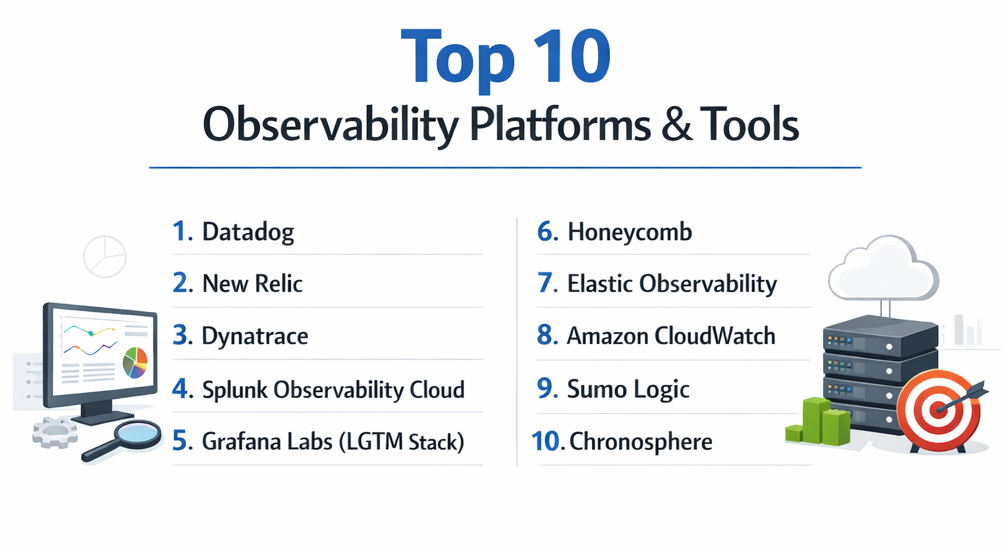
Top 10 Observability Platforms
1 — Datadog
Datadog is a leader in the cloud-scale monitoring and security space, offering a unified platform that breaks down silos between metrics, traces, and logs. It is designed for high-velocity teams operating in dynamic cloud environments.
- Key Features:
- Unified Service Map: Automatically visualizes how services interact in real-time.
- Watchdog AI: Automated anomaly detection that identifies root causes without manual setup.
- Real User Monitoring (RUM): Correlates frontend user journeys directly with backend traces.
- Serverless Monitoring: Comprehensive support for AWS Lambda, Azure Functions, and GCP.
- Log Management: Decouples log ingestion from indexing to control costs.
- Cloud Security: Integrated posture management and workload protection.
- Pros:
- Massive library of 600+ integrations makes setup nearly instant for most stacks.
- The user interface is widely considered the gold standard for usability and visualization.
- Cons:
- Pricing can become unpredictable and expensive as data volume increases.
- The “per-host” and “per-feature” billing model can lead to “sticker shock” for growing teams.
- Security & compliance: SOC 2 Type II, HIPAA, GDPR, ISO 27001 compliant. Features granular RBAC and SAML SSO.
- Support & community: Extensive documentation, proactive customer success, and a very active community of DevOps professionals.
2 — New Relic
New Relic is a pioneer in Application Performance Monitoring (APM) and has evolved into an “all-in-one” observability data platform that emphasizes a simplified consumption-based pricing model.
- Key Features:
- New Relic One: A unified entity-centric view of the entire stack.
- Errors Inbox: Centralized place for teams to track and triaging all errors.
- Vulnerability Management: Automatically scans for vulnerabilities in your application dependencies.
- Distributed Tracing: Deep visibility into requests as they travel through complex architectures.
- Infrastructure Monitoring: Real-time visibility into hosts, containers, and orchestration layers.
- Pixie Integration: Auto-telemetry for Kubernetes using eBPF technology.
- Pros:
- The “one platform, one price” model (paying by user and data volume) is simpler than many competitors.
- Exceptional drill-down capabilities from high-level dashboards to the actual line of code causing an error.
- Cons:
- The platform’s UI has undergone several iterations, which some long-time users find confusing.
- Data ingestion costs can still climb quickly if not strictly managed.
- Security & compliance: FedRAMP authorized, SOC 2, HIPAA, GDPR, and ISO 27001 compliant.
- Support & community: Strong community forum, New Relic University for training, and 24/7 global support.
3 — Dynatrace
Dynatrace distinguishes itself through high-level automation and a powerful AI engine called Davis. It is purpose-built for large-scale enterprise “Cloud-Ops” and automated digital transformations.
- Key Features:
- Davis AI: A deterministic AI engine that provides precise root-cause analysis rather than just alerts.
- OneAgent: A single binary that automatically discovers and instruments the entire stack.
- PurePath: Advanced distributed tracing that captures every transaction, end-to-end.
- Smartscape Mapping: Real-time topology mapping of all entities and dependencies.
- Automated SLOs: Built-in tracking of Service Level Objectives and error budgets.
- AppEngine: Allows developers to build custom apps on top of observability data.
- Pros:
- The highest degree of automation in the market, significantly reducing manual configuration.
- AI-driven insights are incredibly accurate for large, complex enterprise environments.
- Cons:
- The price point is among the highest in the industry, making it inaccessible for most SMBs.
- Can feel “heavy” or over-engineered for teams with simpler requirements.
- Security & compliance: FedRAMP, SOC 2 Type II, GDPR, and HIPAA compliant. Key focused on secure data masking.
- Support & community: Elite enterprise support, a robust “Dynatrace Community” portal, and extensive on-site training options.
4 — Splunk Observability Cloud
Splunk is legendary in the log management space, and their Observability Cloud (built on the acquisition of SignalFx and Omnition) offers a real-time, streaming-first approach to observability.
- Key Features:
- Real-Time Streaming: Metrics are processed in seconds, not minutes, for near-instant alerting.
- Splunk Log Observer: Intuitive log exploration for DevOps teams without needing complex query languages.
- No-Sample Tracing: Captures 100% of traces to ensure that rare, intermittent bugs are never missed.
- Tag Spotter: Automatically identifies patterns and trends within metadata tags.
- Business Flow: Correlates system performance with business KPIs in real-time.
- OpenTelemetry Native: Heavily invested in the OTel standard for data collection.
- Pros:
- Unrivaled for teams that require sub-second latency in their monitoring data.
- Total visibility through the “No-Sample” approach ensures high fidelity.
- Cons:
- Integrating the observability side with the traditional Splunk Enterprise (Core) can still be complex.
- Steep learning curve for advanced query functionality.
- Security & compliance: SOC 2 Type II, ISO 27001, HIPAA, and PCI DSS compliant.
- Support & community: Massive global user group (Splunk .conf), extensive partner ecosystem, and premium support.
5 — Grafana Labs (LGTM Stack)
Grafana is the world’s most popular visualization tool. Grafana Labs offers a powerful observability stack (Loki, Grafana, Tempo, Mimir) that is highly favored by teams who prefer an “open source first” philosophy.
- Key Features:
- Mimir: Highly scalable long-term storage for Prometheus metrics.
- Loki: Log aggregation system inspired by Prometheus that is highly cost-effective.
- Tempo: High-volume distributed tracing backend.
- Multi-DataSource Support: Visualize data from SQL, NoSQL, and other cloud providers in one dashboard.
- Grafana OnCall: Integrated incident response and on-call management.
- k6 Integration: Native support for performance and load testing.
- Pros:
- Incredible flexibility—you aren’t locked into a single vendor’s data storage.
- Extremely cost-effective for high-volume logs due to Loki’s unique indexing approach.
- Cons:
- Managing the self-hosted versions of these tools requires significant engineering overhead.
- The “Grafana Cloud” experience is excellent but can get expensive if using many premium plugins.
- Security & compliance: SOC 2 Type II, ISO 27001, and GDPR compliant. Supports OIDC and SAML.
- Support & community: One of the largest open-source communities in the world; excellent community-built dashboards.
6 — Honeycomb
Honeycomb is the platform that popularized the term “observability” in the modern sense. It focuses on high-cardinality data and allows engineers to “slice and dice” data to find the needle in the haystack.
- Key Features:
- High Cardinality: Handles millions of unique values (like User IDs or Order IDs) effortlessly.
- BubbleUp: Automatically compares outliers to the baseline to show exactly what is different.
- Service Map: Fast, interactive visualization of service dependencies.
- Query Engine: Optimized for fast, exploratory debugging rather than static dashboards.
- SLO Support: Native integration for tracking Service Level Objectives.
- OpenTelemetry Focused: Built from the ground up to support OTel.
- Pros:
- The best tool for debugging “the long tail” of performance issues and rare edge cases.
- Pricing is based on event volume, which can be much more predictable for distributed systems.
- Cons:
- Requires a shift in mindset; it doesn’t rely on traditional “dashboards” as much as others.
- Instrumentation requires more intentional effort to get the most out of the platform.
- Security & compliance: SOC 2 Type II compliant. Features Secure Tenancy for sensitive data.
- Support & community: Very strong engineering-to-engineering support; highly respected technical blog and documentation.
7 — Elastic Observability
Building on the ubiquitous ELK Stack (Elasticsearch, Logstash, Kibana), Elastic Observability provides a unified platform for logs, metrics, traces, and profiling.
- Key Features:
- Universal Profiling: Whole-system visibility with zero instrumentation using eBPF.
- Machine Learning: Automated anomaly detection integrated directly into the Elasticsearch engine.
- Elasticsearch Backend: The world’s most powerful search and analytics engine powers the data.
- Synthetics: Integrated global monitoring of user journeys.
- Real-Time Log Tailing: High-performance log streaming and analysis.
- APM: Native support for diverse programming languages and frameworks.
- Pros:
- If you are already using Elasticsearch for search or security, adding observability is seamless.
- Unrivaled search capabilities for finding specific events in billions of logs.
- Cons:
- Can be resource-intensive to manage if self-hosting the cluster.
- The transition from “Logging tool” to “Full Observability” can feel fragmented in some areas.
- Security & compliance: SOC 2 Type II, HIPAA, GDPR, FedRAMP (on Elastic Cloud).
- Support & community: Massive community support; extensive official training and certification programs.
8 — Amazon CloudWatch
For teams residing entirely within the Amazon Web Services ecosystem, CloudWatch provides a native, highly integrated observability service that requires zero third-party setup.
- Key Features:
- Container Insights: Deep metrics and logs for EKS, ECS, and Fargate.
- Lambda Insights: Specialized monitoring for serverless cold starts and execution times.
- CloudWatch Logs Insights: A powerful query language to analyze logs at scale.
- ServiceLens: Visualizes the health of your distributed applications.
- Evidently: Built-in A/B testing and feature flagging.
- Contributor Insights: Identifies “Top-N” contributors to system behavior (e.g., top talkers).
- Pros:
- Zero-effort instrumentation for AWS services.
- Simplified billing (consolidated with your AWS bill).
- Cons:
- The UI is often criticized for being slower and less intuitive than dedicated third-party platforms.
- Does not support multi-cloud or on-premise environments effectively.
- Security & compliance: Fully compliant with all major AWS certifications (FedRAMP, HIPAA, SOC 2, etc.).
- Support & community: Backed by the world’s largest cloud support organization.
9 — Sumo Logic
Sumo Logic is a cloud-native platform that specializes in “Continuous Intelligence,” blending observability with security analytics (SIEM) in a single platform.
- Key Features:
- LogReduce & LogCompare: AI-driven patterns that reduce millions of logs into a few actionable items.
- Root Cause Explorer: Correlates metrics and logs to accelerate incident response.
- Global Intelligence: Benchmarks your system performance against other Sumo Logic users.
- Cloud SIEM Integration: Seamless transition between operational monitoring and security investigation.
- Reliability Management: Built-in tracking for SLOs and error budgets.
- Multi-Cloud Support: Native collectors for AWS, Azure, and GCP.
- Pros:
- Excellent for teams that want to consolidate their Security and DevOps tooling.
- The log reduction features save hours of manual searching during incidents.
- Cons:
- The query language can be complex for new users to master.
- Pricing can be high for high-ingest log workloads.
- Security & compliance: PCI DSS, HIPAA, SOC 2 Type II, FedRAMP Moderate, and GDPR compliant.
- Support & community: Good documentation, “Sumo Dojo” community, and professional training.
10 — Chronosphere
Chronosphere is a rising star in the observability space, built specifically to handle the “data scale” challenges faced by companies with massive Kubernetes and microservices footprints.
- Key Features:
- Control Plane: Allows users to decide which data to keep and which to discard before it is stored, controlling costs.
- M3 Backend: Based on M3DB (created at Uber), designed for extreme scale.
- Prometheus & Graphite Native: Total compatibility with open-source standards.
- Change Event Tracking: Correlates system changes (like deployments) with performance shifts.
- Query Mapping: Translates complex open-source queries into optimized versions.
- High Availability: Designed for 99.99% availability for the monitoring data itself.
- Pros:
- The only tool that truly puts “cost control” at the center of the product experience.
- Handles massive metric cardinality without performance degradation.
- Cons:
- A relatively new entrant compared to giants like Datadog or Splunk.
- Focused heavily on the “cloud-native” segment; less ideal for legacy monolithic apps.
- Security & compliance: SOC 2 Type II, GDPR, and HIPAA compliant.
- Support & community: High-touch customer success and deep technical support for large-scale migrations.
Comparison Table
| Tool Name | Best For | Platform(s) Supported | Standout Feature | Rating (Gartner) |
| Datadog | Full-Stack DevOps | Multi-Cloud, Hybrid | Ease of Use / UI | 4.6 / 5 |
| New Relic | Value-Focused Teams | Multi-Cloud | APM Depth | 4.5 / 5 |
| Dynatrace | Large Enterprise | Multi-Cloud, SAP | Davis AI Engine | 4.6 / 5 |
| Splunk Obs. | Real-Time Latency | Cloud-Native | Streaming Data | 4.5 / 5 |
| Grafana Labs | OSS Enthusiasts | Any | Dashboarding | 4.6 / 5 |
| Honeycomb | Debugging Outliers | Cloud-Native | High Cardinality | 4.8 / 5 |
| Elastic Obs. | Search/Log Heavy | Multi-Cloud, On-Prem | Elastic Search Engine | 4.5 / 5 |
| CloudWatch | AWS-Only Shops | AWS | Native Integration | 4.3 / 5 |
| Sumo Logic | DevSecOps | Multi-Cloud | Log Analysis AI | 4.5 / 5 |
| Chronosphere | High-Scale K8s | Cloud-Native | Cost Control Plane | 4.9 / 5 |
Evaluation & Scoring of Observability Platforms
| Category | Weight | Evaluation Criteria |
| Core Features | 25% | Logs, Metrics, Tracing, RUM, and AI-driven alerting. |
| Ease of Use | 15% | Time to value, UI/UX quality, and documentation. |
| Integrations | 15% | Breadth of third-party ecosystem and OTel support. |
| Security & Compliance | 10% | RBAC, encryption, and industry certifications. |
| Performance | 10% | Data ingestion speed, query latency, and HA. |
| Support & Community | 10% | Responsiveness of support and size of user base. |
| Price / Value | 15% | Predictability of billing and overall ROI. |
Which Observability Platform Is Right for You?
Solo Users vs. SMB vs. Mid-Market vs. Enterprise
- Solo Users/Small Teams: Start with Grafana Cloud (Free Tier) or New Relic. These platforms offer generous free tiers that provide enough visibility without a financial commitment.
- Mid-Market: Datadog or Honeycomb are excellent. They provide high-level insights that help smaller teams act like larger ones by automating much of the “toil.”
- Enterprise: Dynatrace or Splunk are the heavy hitters. They handle the massive complexity, legacy baggage, and strict security requirements of global corporations.
Budget-Conscious vs. Premium Solutions
If cost is the primary driver, Grafana (Self-Hosted) or Elastic (Self-Hosted) can save licensing fees, but you must factor in the cost of the engineers managing the clusters. For a SaaS solution that helps manage costs proactively, Chronosphere or New Relic are leading choices.
Feature Depth vs. Ease of Use
If you want a tool that “just works” out of the box with the prettiest dashboards, Datadog is the winner. If you want a tool that allows you to ask the deepest, most complex questions about your code—even if the UI is more utilitarian—Honeycomb is your best bet.
Frequently Asked Questions (FAQs)
1. What is the difference between Monitoring and Observability?
Monitoring tells you when something is wrong (e.g., CPU is at 99%). Observability helps you understand why it is wrong by providing the context and the ability to explore the data in ways you didn’t pre-plan.
2. What are the “Three Pillars” of Observability?
They are Metrics (aggregates over time), Logs (discrete events), and Traces (the journey of a request through the system). Modern platforms also add Profiling and User Monitoring.
3. What is OpenTelemetry (OTel)?
OTel is an open-source standard for collecting telemetry data. It allows you to instrument your code once and send the data to any of the platforms listed above, preventing vendor lock-in.
4. Why is high cardinality important?
High cardinality allows you to group data by unique values like user_id. Without it, you can’t tell if an error is affecting everyone or just one specific customer.
5. How do these tools affect application performance?
Most modern agents use “sampling” or efficient technologies like eBPF to ensure that monitoring data takes up less than 1–3% of system resources.
6. Can I use these tools for on-premise servers?
Yes. Elastic, Dynatrace, and Grafana have strong on-premise or hybrid support. Others like CloudWatch are cloud-only.
7. Is AI in observability just marketing hype?
Partially, but tools like Dynatrace’s Davis and Datadog’s Watchdog are legitimately excellent at filtering out “alert noise” and pinpointing root causes faster than humans.
8. How do I prevent my observability costs from spiraling?
Use “Sampling” for traces, index only the logs you need for troubleshooting, and use platforms like Chronosphere that offer a control plane for data management.
9. Do I need a full-time engineer to manage these platforms?
For platforms like Datadog or New Relic, no. For large-scale self-hosted Grafana or Elastic clusters, you will likely need a dedicated DevOps or SRE team.
10. What is a “Service Map”?
It is a visual diagram generated by the platform that shows how your different microservices connect to each other and where the “bottlenecks” or “red flags” are currently located.
Conclusion
The “best” observability platform isn’t the one with the most features; it’s the one that your engineers will actually use during a 2:00 AM incident. If the tool is too complex to query, it won’t save you. If it’s too expensive, your finance team will force you to turn off the very data you need to debug.
For most modern teams, Datadog provides the best balance of power and usability. However, if you are tackling the extreme scale of Kubernetes, Chronosphere is a game-changer. If you value open-source flexibility above all, the Grafana LGTM stack is the way to go.